@ickby: wasn’t it decided that FreeCAD wasn’t going to use any OCAF?
What version of opencascade are you using? I’m using the latest, 7.0.0 . Maybe that’s why? But I think you’re right, this is not the correct use of MapIteratorOfMapOfShape I think it expects a MapOfShape not an IndexedMapOfShape.
Edit: updated github repo with your fix.
From the research I’ve done regarding early FreeCAD development, it seems that it was decided not to use OCAF as the bases for the application/document framework. Instead, this was done from scratch. I don’t think there were any issues/concerns with using portions of the OCAF stuff as-needed, and in fact I believe that yorik has mentioned in the original Robust References thread using the TNaming stuff.
From the research I’ve done regarding early FreeCAD development, it seems that it was decided not to use OCAF as the bases for the application/document framework. Instead, this was done from scratch. I don’t think there were any issues/concerns with using portions of the OCAF stuff as-needed, and in fact I believe that yorik has mentioned in the original Robust References thread using the TNaming stuff.
I think that it was mainly meant that we don’t want to use the application & document logic of OCAF. Here is a link to where this was explained:
http://forum.freecadweb.org/viewtopic.php?f=8&t=69&p=535#p535
However, according to this http://forum.freecadweb.org/viewtopic.php?f=17&t=4608&p=37368#p36660 we have to see how useful TNaming can really be for us without OCAF document.
Here are some links to further naming related threads:
http://forum.freecadweb.org/viewtopic.php?f=10&t=2980&p=23183
http://forum.freecadweb.org/viewtopic.php?f=10&t=2656
http://forum.freecadweb.org/viewtopic.php?f=10&t=2267
http://forum.freecadweb.org/viewtopic.php?f=20&t=7555&p=61444
Yea, I agree. If you looked at the ‘Next Steps’ I posted in the second post of this thread, I’m working on doing some proof-of-concept Fillet stuff right now (mostly for fun, because the Face stuff is pretty boring, lol) but then the next thing I want to do is do a write up for what is required to use the TNaming library properly. From the reading (of documentation and code) I’ve done so far, it seems like it should be as “simple” as making sure we update the Data Framework properly whenever we modify our TopoDS_Shape.
In fact, here’s a snippet from the opencascade documentation
Note As Topological naming is based on the reference-key and attributes such as Naming (selection information) and Shape (topology evolution information), OCAF is not coupled to the underlying modeling libraries. The only modeling services required by OCAF are the following:
- Each algorithm must provide information about the evolution of the topology (the list of faces modified, updated and deleted by the algorithm)
- Exploration of the geometric model must be available (a 3D model is made of faces bounded by close wires, themselves composed by a sequence of edges connected by their vertices)
Currently, OCAF uses the Open CASCADE Technology modeling libraries.
The Data Framework stores Labels which contain data in Attributes. The TNaming_NamedShape construct is an Attribute that the occ folks have already created for us. The TNaming_Builder class is a helper class to create and modify TNaming_NamedShape attributes. None of this is tied in to any of the other OCAF stuff - essentially, occ offers a suite of tools for managing topological structures/naming, if we should so choose to use it.
Attached is a shape dump of the test program, for those who want a visual.
I find it interesting that the tnaming object takes over the shape transformation.
// ====================================
    // 3.Applying a transformation to Box2
    // ====================================
    gp_Vec vec1(gp_Pnt(0.,0.,0.),gp_Pnt(50.,50.,20.));
    gp_Trsf TRSF;
    TRSF.SetTranslation(vec1);
    TopLoc_Location loc(TRSF);
    TDF_LabelMap scope;
    TDF_ChildIterator itchild;
    for (itchild.Initialize(Box2Label,Standard_True); itchild.More();itchild.Next()) {
        if (itchild.Value().IsAttribute(TNaming_NamedShape::GetID()))
            scope.Add(itchild.Value());
    }
    if (Box2Label.IsAttribute(TNaming_NamedShape::GetID())) scope.Add(Box2Label);
        TDF_MapIteratorOfLabelMap it(scope);
    for (;it.More();it.Next())
        TNaming::Displace(it.Key(), loc, Standard_True);//with oldshapes
nameingTest1.fcstd (10.5 KB)
Hey thanks, that’s super helpful, and a lot better than the hand sketches I’ve been making, lol. What is a “shape dump”?
I’m working on a writeup now that explains TNaming, what it is/isn’t, and how it works. Just pushed the initial draft to the github repo if you want to check it out. To address your comment, though, the ‘TNaming object’ doesn’t take over shape transformation. gp_Trsf was used as appropriate, as were BRepAlgo_Cut and BRepFilletAlgo_MakeFillet. Rather, the ‘TNaming_NamedShape’ TDF_Attribute stores information regarding each of these transformations, such as old_shape, new_shape, as well as modified/deleted/generated Faces, Edges, etc. It is up to us to make sure we store in the TNaming_NamedShape the appropriate data.
What’s more, it seems that the real workhores is TNaming_UsedShapes, which, when examining the source code, appears to be created at the root node of the TDF_Data tree whenever the first TNaming_NamedShape Attribute is added to the tree. I find the the following image from the documentation helps sort of pull it all together, though it took me a while to actually understand what it means:
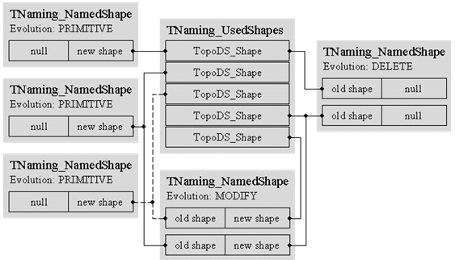
The purpose of the TNaming_Writeup.txt’ text that I’m working on is to hopefully clarify all of this so that we can then have a discussion about how to incorporate it into FreeCAD.
http://dev.opencascade.org/doc/refman/html/class_b_rep_tools.html#a17bd53a44b6a0e2b3de7726d8a575005
If you were not using tnaming, you would just pass your newly constructed toploc_location to TopoDS_Shape::Location(const TopLoc_Location &Loc). In your example, the shape is moved indirectly through TNaming::Displace(const TDF_Label &label, const TopLoc_Location &aLocation, const Standard_Boolean WithOld=Standard_True). That is what I meant by “taking it over”.
Neat, I wasn’t aware that FreeCAD could import these Dumps.
I see what you mean. I don’t know too much about this TNaming::Displace thing, but browsing the source code real quick suggests that perhaps moving the TopoDS_Shape is a trivial enough Topological Transformation that the occ folks built in a method for creating all the necessary additions to the TNaming_NamedShape Attribute. I think it would be relatively straightforward to avoid using the TNaming::Displace method and instead, move the TopoDS_Shape ourselves and then store the appropriate data in the TNaming_NamedShape.
… but then again, maybe it wouldn’t be so easy, lol.
Here is the writeup that I have made of how TNaming works and what needs to happen in order to make it work. Here’s the TL;DR.
- We’ll need to create an instance of TDF_Data, probably one for each Body
- Any time we perform a modeling operation, i.e. Cut, Fuse, Prism, etc… very particular pieces of information need to be stored in the TDF_Data - i.e., which Faces were generated from which Edges in the Prism operation
- As we add data to this TDF_Data tree-structure, we’ll want to keep track of the Tags at each node somehow
- As we generate topology that requires a “Robust Reference”, we’ll need to add a ‘Selection’ to the TDF_Data (I think, I’m still a bit unclear on this Selection thing)
- Finally, whenever we need to refer to a particular Topological Entity, rather than traverse the TopoDS_Shape as we do today, we will refer to the appropriate node on the TDF_Data tree and grab the TopoDS_Shape (i.e. Edge, Face, or w/e) that we need from there. Don’t forget to run TNaming_Selector::Solve() first :-
So that’s it!
So what happens to the TDF_Data structures when we fuse 2 solids? Do/Can we combine them?
What information needs to be serialized?
The occ documentation actually does a good job (for once) describing this scenario. Check out the Link. Here is an image from the documentation:
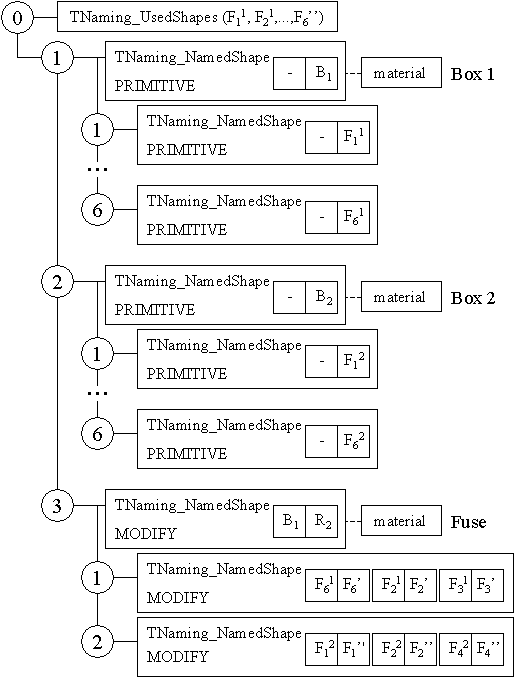
In you’re scenario, the two Boxes are not primitives, but rather are other complex structures that have their own history. That’s ok. Let’s assume, in this case, that we have a TDF_Data structure that has been tracking the evolution of Box1. That would correspond to the ‘0:1’ node in the above image, and would likely include subsequent nodes under root, i.e. 0:2, 0:3, etc. for fillet, cut, and other operations.
In this example, Box2 would also have it’s own history, let’s say it is similar to that of Box1.
Now you want to do your fuse operation. Let’s say that Box1 is Shape1 in the fuse operation and Box2 is Shape2.
What we’d do is, after the fuse operation, we’d go to the TDF_Data structure for Box1 and add a Node to the bottom. That node would be the entire TDF_Data tree of Box2. It would be the equivalent of ‘0:2’ in the above image, except it has all the history of the Box2 that has been built up.
After that, you would proceed to generate your equivalent of ‘0:3’ in the above image. You’d be much further down the tree in Box1’s TDF_Data structure, but that’s ok.
To be fair, I haven’t seen an example of adding an entire TDF_Data tree to another existing one. In theory it would work, but I worry that the TNaming_Builder thing may fubar, b/c it look at the root of the tree for TNaming_UsedShapes and now we’d have one that is not at Root. There may be a mechanism in TNaming_Tool to do merge the two TNaming_UsedShapes, but I have not as of yet explored it.
you guys having an impressive pace, keep up the good work. And awesome write up about tnaimg! tanderson had an interesting question: can this naming data be stored to file easily without the ocaf framework? That is defnitely a requirement for robust references.
Yea, I was just thinking about this last night. The short answer is I’m not sure.
The slightly longer answer is: TDF_Tool has an ExtendedDeepDump function that dumps out all the contents of a TDF_Data tree, including the attributes. It relies on the Dump method of all the TDF_Labels and TDF_Attributes. Unfortunately, TNaming_NamedShape does not implement this Dump method :-\ On the other hand, TNaming_UsedShapes DOES implement Dump, so all may not be lost.
One thought I had, though, was → how does FreeCAD currently store data structures for persistance? What happens when a user opens a new file? Is the solid re-constructed? Is it feasible to walk back through the history and re-apply every operation and re-build the TDF_Data tree then?
You know, actually I’ve talked myself out of that, it would be way too expensive.
Reconstructing is considered too expensive. Persistance is implemented by the properties: they.all have a save and load Methode. Normally data is stored in a XML file, but TopoShape uses additiomally a file and only stores the filename in XML. The file is than saved next to the XML file in the document (which is a ZIP container)
I guess we’d have to do this. The hard part will be figuring out how to write the file and what to put in it.
Isn’t here an equivalent to the python pickle package in c++? Isn’t that what json does? i.e. I do json.dump(anArbitraryThing) and then later I can json.load(theFileThatIDumpedTo)?
Edit: I’ve update my github repo with an example of the TNaming_Tools::ExtendedDeepDump method.
So, thread bump for another update. If you checkout the latest code from my github repo, you’ll see that I cleaned up the code quite a bit. I created some helper functions for managing the Cut, Fillet, Select, and Transform operations, i.e. these functions will take care of all the Data Framework stuff.
As of now, these helper functions merely replicate what the occ code did. I’m not 100% convinced that it will work in all cases, i.e. was their original algorithm for finding Modified, Generated, etc. Faces after a Cut operation exclusive to a cube? I’ll be looking into this.
For now, though, if you look at runCase5, you’ll notice it’s a lot easier to to keep up with what’s going on. Here’s the code for runCase5, which does the same as runCase4 but using the helper functions:
void runCase5(){
    std::cout << "Running case 5" << std::endl;

    // Create the Data Framework and Root node
    Handle(TDF_Data) DF          = new TDF_Data();
    const TDF_Label MyRoot       = DF->Root();
    TDF_Label Box1Label          = TDF_TagSource::NewChild(MyRoot); // 1
    TDF_Label Box2Label          = TDF_TagSource::NewChild(MyRoot); // 2
    TDF_Label SelEdgesLabel      = TDF_TagSource::NewChild(MyRoot); // 3
    TDF_Label FilletedBox1Label  = TDF_TagSource::NewChild(MyRoot); // 4
    TDF_Label Box1CutLabel       = TDF_TagSource::NewChild(MyRoot); // 5

    // Create both boxes
    // TODO: Explore why Box2 here is not translated - is this safe at all, or should we
    // always pull it from the tree?
    TopoDS_Shape Box1 = MakeTrackedBox(100., 100., 100., Box1Label);
    TopoDS_Shape Box2 = MakeTrackedBox(150., 150., 150., Box2Label);

    // Move the second box
    gp_Vec vec1(gp_Pnt(0.,0.,0.),gp_Pnt(50.,50.,20.));
    gp_Trsf Transformation;
    Transformation.SetTranslation(vec1);
    MakeTrackedTransform(Box2, Transformation, Box2Label);

    // Select the edges we're going to fillet

    // Is there a better way to keep track of which child is which Face?
    Handle(TNaming_NamedShape) Box1TopFaceNS;
    Box1Label.FindChild(1).FindAttribute(TNaming_NamedShape::GetID(), Box1TopFaceNS);
    const TopoDS_Shape& top1face  = TNaming_Tool::GetShape(Box1TopFaceNS);
    TopTools_IndexedMapOfShape mapOfEdges;
    TopExp::MapShapes(top1face, TopAbs_EDGE, mapOfEdges);
    MakeTrackedSelection(Box1, mapOfEdges, SelEdgesLabel);

    // Make the fillet operation
    MakeTrackedFillets(Box1, mapOfEdges, FilletedBox1Label);

    // make the cut operation. Note, if you use Box2 from above it won't be translated, so
    // pull it from the tree instead
    Handle(TNaming_NamedShape) Box2NS;
    Box2Label.FindAttribute(TNaming_NamedShape::GetID(), Box2NS);
    TopoDS_Shape CutTool = Box2NS->Get();
    MakeTrackedCut(Box1, CutTool, Box1CutLabel);

    TDF_Tool::DeepDump(std::cout, DF);
}
I think these helper functions may be a good entry point for incorporating some of this into FreeCAD, maybe for some early testing. I’m not familiar enough with FreeCAD yet to take a stab at it myself, but I do know that TopoShape has it’s own “Cut”, “Fillet”, “Translate”, etc.. metods, so that may be a good place to incorporate the helper function code I’ve written. What I don’t know is where my code in main would go. I.e. where in FreeCAD will the Data Framework be created and maintained.
Next steps: now that it’s easier to make cuts and boxes and fillets, try to recreate this bug, and show how the Data Framework and TNaming can resolve it.
So, the further along down this TNaming journey I get, and the more reading I do on some of the previous discussions that wmayer linked, the more hesitant I get about using the TNaming stuff from OCC.
I think for the most part we can get this working in FreeCAD, with the one glaring issue being the one that tanderson69 brought up regarding fusing two TopoDS_Shapes with their own TDF_Data structures. This will be hard b/c the way it works right now, TNaming_Builder creates a TNaming_UsedShapes at the Root of the TDF_Data structure, and this is were all the shape evolutions are stored. While we may be able to merge the two TNaming_UsedShapes, I worry about what will happen to the references (i.e. the TNaming_NamedShapes at each node in the tree). Will they work ok after the merge, or will that require more work? Will we have to re-build that whole subtree?
So, this has me thinking that maybe, just maybe, it would make more sense toe re-write our own implementation of the occ TNaming thing, stealing their algorithms but creating our own framework. I’ll be honest, right now I understand their framework a lot better than I did a month ago, but I haven’t even touched the insides of how the algos work. So this may be more difficult than I think. But in the long run it may be worth it (and I have a feeling that’s what jriegal will want anyway).
So, I’m left sort of conflicted: do I keep trucking forward with this TNaming thing, and get it to a point where we can integrate it with FreeCAD and at least resolve the naming issue for the short term? If we do, we should understand that that we may not be able to resolve this tanderson69 issue from above, and that resolving the Serialization/DeSerialization issue may be difficult. If we don’t, it will take much longer to get to a solution but ultimately that solution will be more complete.
I’d like to open this up for a town-hall type discussion. I’m ever considering starting a new thread for this conversation (should I?). My vote is that we do both, actually: take the work I’ve done so far with the occ TNaming stuff, and get it to a point where we can incorporate it into FreeCAD. This will help with the TopoNaming thing, but without Serialization will be severely limiting, and even with Serialization if we can’t merge Data Framework trees it will still be limited (though not as severely). Limitations aside, at least it will take a step forward.
After the FreeCAD integration, I would suggest starting all over and re-writing our own solution based on the occ code. This would mean re-doing the Data Framework stuff, which actually may already be done (again, I’m not that familiar with FreeCAD code base). Then, the real hard part, will be implementing the TNaming_Naming code, which is where occ keeps track of Selected Shapes.
Thoughts?
Edit: This response on this thread in the occ forums really solidifies for me the idea that we don’t really want to rely too heavily on the deep aspects of occ.
Submitted by Forum supervisor on 4 April, 2012 - 11:01
Dear Valeriu,
Certainly the amount of knowledge and the speed it is acquired with depend on the way you study.
If you prefer studying on your own, the learning speed might be not the same compared to one provided by our professional training and support programs.
Please also do not expect us to provide on this Forum the level of technical consulting comparable to our professional support - clearly we do not want to harm our own business >
Nevertheless I gave you some hints (including saved OCAF Document with correct data structure of your case) which, together with the following available guides:
1.Application Framework White paper
2.Application Framework User’s Guide
3.Application Framework Function Mechanism User’s Guide
should, in my humble opinion, allow you to find the solution yourself.If you will decide that you can benefit from our services just contact us via the Contact Form > http://www.opencascade.org/about/contacts/> .
We will try to propose you the service best suited for your needs.
Regards

Update: I’ve created an example that resolved the Fillet Bug that I linked earlier. I defined a ‘runFilletBug’ method that I pushed to the github repo. Here is an image that shows both the original Fused and Filleted shape, as well as the rebuilt shape. I changed the Fillet size for fun. Notice I’m missing some faces on my re-fused solid → I believe that is due to my inadequacies with opencascade, not due to shortcomings in the TNaming stuff. If you can suggest a better way for me to re-size the cylinder let me know.
In the image, Box1Fuse and newCylFuse are overlapped, just to show that prior to the fuse operation they were both full solids. shrug dunno why the Fuse operation messed up, could be b/c the newCylFuse has Geom_BSplinSurface as the underlying faces instead of Geom_Surface.

So, I think this suggests that the TNaming stuff can really help with some of our referencing issues. One of the big drawbacks I see is that the occ documentation doesn’t do a great job of describing what needs to be stored in the Data Framework after the initial things are loaded.
For example, great, I re-created the Fused solid with the bigger cylinder, but what info does the Data Framework need in order to keep resolving naming appropriately? I dunno!
Hi ezzieyguywuf,
I’m not a programmer so I can’t help you.
But i like your “open” approach.
Congratulations for your results and for your effort! I think your work will give us a great improvement!
–
Marco_T
Hey Marco_T. Thanks for your kind words! They actually help a lot, it helps to motivate me to keep working on this. Sometimes I feel like no one is watching/listening, lol.
My intent with the “open” approach was to leave behind enough information and commentary such that if I don’t finish, someone else has a good enough starting point to take it across the finish line. Also, I was hoping to make contributing to FreeCAD more accessible by making it look not-too-hard. To be honest, I’m not really much of a “programmer” either - I took a FORTRAN class in college 10 years ago and that’s it. I know a lot of python from reading articles and tinkering over the years. The c++ stuff confounds me a bit, but again there’s great resources online and people are usually very happy to answer questions.