"Robust References" Redux

Edit: See second post for progress, current state, and next steps, as well as some links to milestone posts within this long thread.

Back in 2012, jrheinlaender started a thread whereby he suggested an approach to solving the topological naming issue that FreeCAD currently has. I revived this post a few weeks again, and have since then spent a considerable amount of time researching this topic and reading my way through both the existing FreeCAD code base (roughly version 0.17 as of the time of tis post) as well as ickby’s tnaming branch in which he had begun to incorporate some of jrheinlaender’s original code into the FreeCAD code base.

I am starting this new thread for a few reasons:

  1. I want a place to gather some of the information I’ve found, to make it easier for anyone else that may join me on this journey
  2. I want a place to discuss current progress (or lack thereof) on this issue
  3. I want to bring my current work - limited though it is right now - to the attention of the main devs.

I find it very unfortunate that jrheinlaender made so much progress and produced so much code only to be met at the end with a bit of resistance to to his approach. In all fairness, a do agree with jriegal that this topological naming approach should not reside in the Part Design module but rather in the Part module, but I want to avoid this type of issue by discussing upfront my plans, and what I want to do.

First, a word about ‘Geometry’ and ‘Topology’ for those that, like me, are completely new to all this. As far as I can tell, ‘Geometry’ of a shape are points (represented by coordinates), lines (defined by two points), planes (defined by three points), and volumes (defines by…not sure) that define the shape. In other words, the typical things we’re used to from Geometry class, i.e. y=mx+b to define a line and whatnot.

The ‘Topology’ of a shape, on the other, is distinct from the geometry in that it is more general. It refers to vertices, edges, surfaces, and solids rather than points, lines, planes, and volumes. The difference is that an edge is essentially a portion of an underlying line, a surface a portion of an underlying plane, etc…

To be fair, I don’t 100% understand the difference, but I am led to believe that there is a preference to deal with ‘Topology’ rather than ‘Geometry’ when it comes to modeling, because of, like, memory usage and stuff.

That being said, here’s what I know so far:

Per ickby, here is a recommended roadmap for moving forward:

As far as I can tell, ickby’s branch that I list above has completed 1.1, begun 1.2, very minimally started 1.3, and hasn’t done anything else.

I am going to try to write up a protoype in pure python, maybe python-occ, since I’m most comfortable coding in python. I won’t spend too much time on this, but I figure if I can whip something together that it will help wrap my mind around what needs to happen, and I can post it here and it may spark some discussion.

Other stuff - as far as I can tell, the following is the current state of topological naming/reference in FreeCAD. Please feel free to correct me here if I’m wrong as my experience with the codebase is minimal and I may be misunderstanding things:

  1. TopoShape is the base class which is used (mostly) for interfacing with the opencascade topological libary (i.e. BRepBuilder and friends)
  2. TopoShape depends on ComplexGeoData
  3. There are currently other Modules (i.e. Part Design) that do not do all of their opencascade interface through TopoShape, hence ickby’s item 2 above
  4. TopoShape includes methods such as ‘makePipe’, ‘cut’ (booleon substract), ‘fuse’ (boolean add), ‘transformGeometry’, and notably ‘getSubShape’
  5. As far as I can tell, Modules such as ‘Part Design’ are intended to use TopoShape as follows:
  6. User creates a geometry (i.e. a closed loop of lines)
  7. Module uses geometry to create a Topological Shape using TopoShape
  8. User modifies geometry (i.e. extrudes sketch or creates pocket in solid)
  9. Module uses relevant TopoShape method. In the case of extrude, this would be ‘makePrism’ I think. In the case of pocket, it would be ‘cut’ I think. Of note is that the ‘cut’ method accepts a geometry which is used to operate on the existing TopoShape. In other words, a shape (let’s say a cylinder) is passed into the ‘cut’ metod of an existing TopoShape, let’s say it’s a cube. TopoShape then subtracts the cylinder from the cube and creates an entirely new Topological Shape.
  10. Module saves the resulting Topological Shape as the new shape that the user interacts with
  11. As far as ‘Topological Naming’, the way this is currently done is that the opencascade class ‘TopExp_Explorer’ ‘TopExp::MapShapes’ is used to ‘explore’ the Topological Structer stored in TopoShape. As the TopoShape is explored, each edge and vertex is assigned an increasing number, i.e. ‘Edge1’, ‘Edge2’, etc…
  12. When the Module requires to perform an action on a particular Topological Entity (i.e., ‘Face1’ on a cube), it specifies the name, literally ‘Face1’, and then TopoShape iterates over the Topological Face until it finds a ‘Face’ that has index 1. I’m a bit confused as to how the Module currently keeps track of which face is which, but suffice to say this is the root of the Topological Naming problem

As far a a future state, here’s what I believe the intended goal is, and what ickby/jreinheilander have started coding:

  1. TopoShape depends on ComplexGeoData as above
  2. ALL topological shapes are managed through TopoShape - no other modules make calls to ‘BRepBuilderApi’ from opencascade
  3. As methods are called on TopoShape, i.e. ‘cut’, ‘makePrism’, ‘fuse’ and friends, TopoShape keeps track of the changes
  4. By keeping track of these changes, a ‘Robust Reference’ to topological entities will be created. Rather the module referring to ‘Face1’ it will refer to ‘The Face resulting from the Edge that is between the two Vertexes that are furthest from the origin in the Shape that was passed to the consrtuctor’. Of course, the syntax would be more concise,
  5. Anytime something ‘catastrophic’ happens, i.e. an edge wit a Fillet is deleted, the TopoShape alerts the Module - or rather, provides a method that allows the Module to check before making changes - so that the Module can alert the user

I’m still trying to understand ickby/jrheinlaender’s code, but it seems that so far it’s keeping track of some sort of ‘_History’ in the TopoShape class. I don’t think the actual ‘Robust Reference’ portion of it has been implemented yet. Based on my research, I think than this and this reference, both from the Catia documentation, do a pretty good job of explaining an approach that could work.

This is all I have so far! Please, help me to fill in the gaps. Like I said, I’m still working on reading code and understanding things. But this is a big project, and in all my years of working on projects (both academically and professionally), the bigger the project, the more time that must be spent planning in order to avoid failure. Thus, I’m trying to spend an appropriate amount of time on recon and planning before diving into contributing more code.

Progress so far.

NOTE: Between update 13 and 14 I changed the naming of my github repo branches. I may or may not have updated some of the links in this thread. The original ‘tnaming_ezziey’ branch is now ‘tnaming_eziey_00’

  1. May 2016, reviewed current state and previous attempts. see first post in this thread
  2. May 2016, Compiled opencascade qt sample and pythonocc. see this post for more info
  3. May 2016, duplicated topo naming issue in opencascade. see this post for more info
  4. June 2016, Compiled simple opencascade program from scratch. see this thread.
  5. June 04, 2016, Finished extending opencascade program to duplicate work done in python-occ. see this post for more info and for full source code
  6. June 06, 2016, Posted github repo with working example of TNaming showing how to recover a TopoDS_Shape after it has been modified without referring to its Index
  7. June 07, 2016, Posted writeup of how TNaming works and what we need to do to make it work. See this post for a TL;DR and a link to the full writeup.
  8. June 09, 2016, Posted an update to github with ‘helper functions’ for Data Framework transactions. See this post for more details.
  9. June 09, 2016, Posted a ‘shape dump’ that show the Fillet Bug (linked below) resolved with TNaming. See this post
  10. June 21, 2016, Posted an update with the begginings of FreeCAD integration. See this post.
  11. July 08, 2016, Posted an update with some refactored FreeCAD integration. See this post. A cube fillet and rebuild now works without storing the edge as an int but rather by using TNaming.
  12. July 25, 2016, Posted an update with more refactored FreeCAD integration. See this post. I’ve implemented some of ickby’s recommendation from the conversation in this thread.
  13. July 27, 2016, Posted a minor update here. I’ve updated the ‘TNaming Writeup’ document to include info about ‘TNaming_Selector’
  14. August 19, 2016, Posted an updated with refactored TopoNamingHelper as well as re-organized git repo. See this post.
  15. August 26th, 2016, Posted an update that shows a partial fix for the fillet bug. See this post for more info. This is a huge milestone!

Next step:

  • [Done!] duplicate topo naming issue using just occ.
  • [Done!]Try to use occ TNaming to obtain a constant reference to an Face, regardless of other operations performed on the TopoDS_Face
  • [Done!] Incorporate the Fillet stuff from the opencascade TNaming tutorial into our little sample
  • [Done! mostly…may need to update with Selector stuff]Write up a brief (or not so brief) explanation of how this TNaming stuff works, and what is required in order to make it work (i.e. tracking Modified, Deleted, and so forth TopoDS_Shapes). Make sure we understand fully how to use TNaming (i.e. what a Selector is and when to use it)
  • [Done!] Clean up code a bit
  • [Done!]Create some more test-cases other than Fillet and Cut to test the TNaming solution again - perhaps that Gear thing that someone posted on here? Update: Will try to duplicate this bug and resolve it with TNaming
  • Write up a high-level overview for incorporating TNaming into FreeCAD, i.e. how we will keep track of the occ Data Framework, how we will add data to the Data Framework, how we’ll keep track of Labels, etc
  • [half done, have not resolved bug yet] Start FreeCAD branch with very basic TNaming incorporated, enough to replicate this issue and resolve it
  • [paused work] Figure out how to Serialize and DeSerialize the Data Framework, so that we can persist it across sessions
  • Figure how, or if, we can join two Data Frameworks together
  • Fix hard-coded TopoNamingHelper::TrackModifiedShape code, which right now was hacked as a proof-of-concept. Needs to work for any generalized case, i.e. needs to somehow determine Modified/Generated/Deleted Faces between Base Shape and Modified Shape.
  1. Move all occ algorithms that are in PartDesign or anywhere else in FreeCAD into TopoShape and make them work with the robust reference system

This one will have to be reworded. We use occ algorithms (mostly HLR, but also distances and intersections, etc) a fair bit in TechDraw (and Drawing). Maybe “occ algorithms that modify the 3D model”?

We also use weak references. but we have a Gui function to change them.

wf

The occt topo naming is built around the virtual functions of BRepBuilderApi_MakeShape: Generated, Modified and IsDeleted. Once you start examining the output of these objects, you will see they are incomplete. Most output involves faces and ignores the edges and vertices. I believe that is by design. If you read the link provided below, it mentions opencascade and talks about ‘tracking’ faces and using the faces to then map to edges and vertices. My observations from the output of BRepBuilderApi_MakeShape and reading the paper lead me to believe that this paper is the foundation for the toponaming currently implemented in occt. http://www.lias-lab.fr/publications/7076/2003-ICSMA-AGBODAN.pdf


Just in case you missed it.
http://www.freecadweb.org/wiki/index.php?title=Naming_project

Done, made the changes in red.

Nope, didn’t miss it. Thanks for the link though. Should I move the bulk of my OP to the wiki? Is that a more fitting place? Or is the forum ok? It seems that the forum gets more foot traffic than the wiki does…

Regarding the article you posted, that’s a great resource! I’ve read through most of it so far and it makes a lot of sense. I’m going to spend some time tinkering with ‘BRepBuilderApi_MakeShape’ as you noted, to get the lay of the land. When you mention ‘examining the output of these objects’ are you doing this in FreeCAD? Or are you building minimal occ programs and doing that way? I’m thinking about using pythonocc to do the tinkering, as it seems like a pretty straightforward wrapper around opencascade itself.

Finally, on a related note, I was reading through the changelog of OpenCascade 7 and saw some mention about Topological Naming. It seems they’ve added a section to the documentation that explains the TNaming stuff a little bit. It can be found here in the OCAF section of the user guides. I’m reading through this now, I’m hoping that this may be the silver bullet to the whole topological naming thing. crosses fingers

Very nice wrap up!

Yes, this is IMHO very important for a Topic that deep in FreeCADs code heart. If you take us with you forward step by step the result will be easy incorporated.

I am going to try to write up a protoype in pure python, maybe python-occ, since I’m most comfortable coding in python. I won’t spend too much time on this, but I figure if I can whip something together that it will help wrap my mind around what needs to happen, and I can post it here and it may spark some discussion.

Taht is a very good idea, using python for rapid prototyping data structures and algorithms will make it way faster to come up with and share ideas. This makes it easy for us to check out things you created by simply running scripts.

Your list is correct in nearly all points. One small addition:

I’m a bit confused > as to how the Module currently keeps track of which face is which, but suffice to say this is the root of the Topological Naming problem

The links to faces/edge etc. are stored in PropertyLink properties as strings, the subobject of those links is “Face1” or “Edge2”. Than you will find methods in TopoShape to extract subshapes from those strings. The method simply extracts shapetype and number and gets the subshape, e.g. “Face1” builds a TopExplorer for Faces and gets the first face out of it.

I think you will find that pythonocc only supports rather old versions of OCE, at least not the latest OCC. The last time I looked they still only had OCE 0.17.1 support in a review branch.

Sorry to ‘nit pick’, but TopoShape uses TopExp::MapShapes not TopExplorer. TopExplorer will revist the same sub shape multiple times.
https://github.com/FreeCAD/FreeCAD/blob/739509aadc5f155bcc3c44bc9b324929c6163e35/src/Mod/Part/App/TopoShape.cpp#L377

Ok great! I’ll spend some time trying to hobble something together for prototyping then.

I did not know this. I’ll take a look at PropertyLink. I was aware of the TopoShape methods that breaks up a std::string into, say, [‘Face’, 1], or [‘Face’, 2], etc… and then used that to find the relevant face in the Shape. My real question was: how does, for example, Part design know which Face to ask for? Without diving into the code too much further, I assume it has something to do with Selection (which is, itself, it’s own class somewhere, right?). My guess is that the Selection thing allows the user to select a feature by taking the current coordinate system orientation and highlighting the Shape that is closest “to the screen” underneath the mouse. In other words, if the user has a “Top Down” view, then the Shape with the highest Z-coordinate is what would be highlighted, and at this point TopoShape would provide Part Design with the face number of that Shape. That’s just my guess…

Yup, I was aware of this. I figured it may still be helpful for prototyping purposes though. To be honest, after some headaches I finally got pythonocc installed and working, but so far it’s not been terribly useful. Maybe I just need to spend some time with it, but maybe that time would be better spent elsewhere…

No need to apologize, these are just the types of clarifications I was hoping for. Thanks!

Current status: So I’ve successfully compiled the opencascade Qt Tutorial, as well as python-occ. The Qt tutorial is for version 7 of opencascade, and the python-occ is for an older version (not quite sure which).

Why’d I do this? Well, I want to get a better understanding of the underlying mechanics of how opencascade names things, and it was getting a bit cumbersome doing so within FreeCAD (add Base::Console().Log() things, recompile, wait, see crash, repeat) so I wanted to find a lighter-weight way of doing this. I started with python-occ but got frustrated when I couldn’t loop over a TopTools_IndexedMapOfShape, so that’s why I decided to try the opencascade Qt Tutorial.

When I got the Tutorial running, though, I realized that my C-foo is rather limited, and it seemed daunting to add enough to the base Tutorial to do what I want, so I went back to python-occ.

I have figured out how to do things in python-occ: it’s basically doing things in C, but with some handy python-like ways of doing things (like using print).

I am left with a question though: how does the current-state FreeCAD determine which of a feature has been selected? In other words, to keep the example simple, if I have a cube and select a face in the GUI, how does FreeCAD turn this into ‘myIndexedMapOfShapes.FindKey(KEY)’. i.e., how does the GUI determine which KEY to send to the FindKey method?

My next step is to duplicate the issue that we have with Topological Naming in python-occ. But right now, I have a cube, I have an IndexedMapOfShape, but I don’t know which face is which. i.e. I don’t know which is my Bottom face, which is my Top, etc. so I have no point of reference for whether or not the index changes when I, say, create a pocket.

The ‘KEY’ is stored in a custom scenegraph node. see:
https://github.com/FreeCAD/FreeCAD/blob/3d95239bae1a9cf4b961ba45bf14553be91002f9/src/Mod/Part/Gui/SoBrepFaceSet.h


In case of a pocket, a boolean subtract, you have to investigate the generated, modified, deleted virtual functions that I was talking about in the previous post. Shapes that don’t change through the operation will have the same hash.

Alright, so I can see that SoBrepFaceSet contains arrays called partIndex, selectionIndex, and highlightIndex. I imagine that either selectionIndex or highlightIndex is the one that holds the index equivalint to the IndexedMapOfShapes in occ? But which? I don’t see any of them set with any value that comes from TopExp_Explorer or TopTools_MapShapes. I must be missing something here…

So if I subtract a pocket out of the ‘top’ face on a cube, then only that face will get a new ‘hash’? When you say ‘hash’ are you referring to the index provided by the TopExp_MapShape (and others) method?

Hah! I’ve done it! I’ve duplicated this issue using python-occ. You can find my python-occ script here.

Here’s a sample of the output:

----------------------------------------
Orig Box, no mods
----------------------------------------
for i = 1, x = 0.0
for i = 1, y = 0.0
for i = 1, z = 0.0
for i = 1, dir = (1.0, 0.0, -0.0)
----------------------------------------
for i = 2, x = 10.0
for i = 2, y = 0.0
for i = 2, z = 0.0
for i = 2, dir = (1.0, 0.0, -0.0)
----------------------------------------
for i = 3, x = 0.0
for i = 3, y = 0.0
for i = 3, z = 0.0
for i = 3, dir = (-0.0, 1.0, 0.0)
----------------------------------------
for i = 4, x = 0.0
for i = 4, y = 20.0
for i = 4, z = 0.0
for i = 4, dir = (-0.0, 1.0, 0.0)
----------------------------------------
for i = 5, x = 0.0
for i = 5, y = 0.0
for i = 5, z = 0.0
for i = 5, dir = (0.0, 0.0, 1.0)
----------------------------------------
for i = 6, x = 0.0
for i = 6, y = 0.0
for i = 6, z = 30.0
for i = 6, dir = (0.0, 0.0, 1.0)
----------------------------------------
----------------------------------------
Orig cut_box, no mods
----------------------------------------
for i = 1, x = 7.0
for i = 1, y = 5.0
for i = 1, z = 30.0
for i = 1, dir = (-1.0, 0.0, -0.0)
----------------------------------------
for i = 2, x = 2.0
for i = 2, y = 5.0
for i = 2, z = 30.0
for i = 2, dir = (-1.0, 0.0, -0.0)
----------------------------------------
for i = 3, x = 7.0
for i = 3, y = 5.0
for i = 3, z = 30.0
for i = 3, dir = (0.0, 1.0, 0.0)
----------------------------------------
for i = 4, x = 7.0
for i = 4, y = 10.0
for i = 4, z = 30.0
for i = 4, dir = (0.0, 1.0, 0.0)
----------------------------------------
for i = 5, x = 7.0
for i = 5, y = 5.0
for i = 5, z = 30.0
for i = 5, dir = (0.0, 0.0, -1.0)
----------------------------------------
for i = 6, x = 7.0
for i = 6, y = 5.0
for i = 6, z = 25.0
for i = 6, dir = (0.0, 0.0, -1.0)
----------------------------------------
----------------------------------------
Cut box
----------------------------------------
for i = 1, x = 0.0
for i = 1, y = 0.0
for i = 1, z = 0.0
for i = 1, dir = (1.0, 0.0, -0.0)
----------------------------------------
for i = 2, x = 0.0
for i = 2, y = 0.0
for i = 2, z = 0.0
for i = 2, dir = (-0.0, 1.0, 0.0)
----------------------------------------
for i = 3, x = 0.0
for i = 3, y = 0.0
for i = 3, z = 30.0
for i = 3, dir = (0.0, 0.0, 1.0)
----------------------------------------
for i = 4, x = 0.0
for i = 4, y = 20.0
for i = 4, z = 0.0
for i = 4, dir = (-0.0, 1.0, 0.0)
----------------------------------------
for i = 5, x = 0.0
for i = 5, y = 0.0
for i = 5, z = 0.0
for i = 5, dir = (0.0, 0.0, 1.0)
----------------------------------------
for i = 6, x = 10.0
for i = 6, y = 0.0
for i = 6, z = 0.0
for i = 6, dir = (1.0, 0.0, -0.0)
----------------------------------------
for i = 7, x = 7.0
for i = 7, y = 5.0
for i = 7, z = 30.0
for i = 7, dir = (0.0, 1.0, 0.0)
----------------------------------------
for i = 8, x = 7.0
for i = 8, y = 5.0
for i = 8, z = 30.0
for i = 8, dir = (-1.0, 0.0, -0.0)
----------------------------------------
for i = 9, x = 7.0
for i = 9, y = 10.0
for i = 9, z = 30.0
for i = 9, dir = (0.0, 1.0, 0.0)
----------------------------------------
for i = 10, x = 2.0
for i = 10, y = 5.0
for i = 10, z = 30.0
for i = 10, dir = (-1.0, 0.0, -0.0)
----------------------------------------
for i = 11, x = 7.0
for i = 11, y = 5.0
for i = 11, z = 25.0
for i = 11, dir = (0.0, 0.0, -1.0)
----------------------------------------

So, this show that in the original box, indexes 1 and 2 were the two y-z faces, indexes 3 and 4 were the two x-z faces, and index 5 and 6 were the two x-y faces.

You can see that in the final cut box, index 1 appears to be the same face as in the original box (i.e. Location = (0,0,) and Direction=(1,0,0)) but index 2 is now what used to be index 3 in the original box.

Now, while I will allow that there does appear to be some sort of pattern to how OCC is indexing these faces, I do not expect that whatever pattern exists is reliable and would not suggest that we base our reference system on that.

So, next step, I can finally start prototyping some solutions in python. Whoot!

http://dev.opencascade.org/doc/refman/html/class_topo_d_s___shape.html#af42413b9b33dd2bae7c88f2f462c8eff

So you mentioned that these are virtual functions. what does that mean? I see that they are defined in BRepBuilderAPI_MakeShape, how does that relate to BRepAlgo_Cut?

edit: figured it out. BRepAlgoAPI_Cut inherits from BRepBuilderAPI_MakeShape and implements the Generated and other methods. Tinkering with that now.

so, I’ve decided to stop using pythonocc. The reason is that it is incredibly frustrating and not even fully implemented. I found myself searching through the source a lot due to lack of documentation, and my python code ended up looking like mostly c code anyway.

I’ve spent the past few days learning how to compile a simple (non gui) opencascade program. I’ll now redo the work I did in pythonocc in vanilla occ and go from there. I’m hoping to explore the virtual functions tanderson69 mentioned, as well as try an implementation of occ’s Tnaming thing.

I’ve updated the second post of this thread with the work I’ve done to date and my next step. this post is meant to add some flavor to that as well as to bump the thread.

if I am doing too much thread bumping on this topic, i.e. talking too much, just let me know and I can go back and edit posts instead of adding new posts.

thanks!

edit: I was playing around with this a bit this morning. One of the reasons I went back to occ rather than pythonocc was that I couldn’t get BRepTools::Dump to work in pythonocc b/c I couldn’t pass it a proper stream that it liked. So, this morning, I got BRepTools::Dump to work. Here’s the output below. I was very confused about it at first, but read RobRanch’s post (the last one) here where he does a great job explaining what the output is. off to my day job now! I’m running late, lol.

Hello, FreeCAD Dev
Shape : 34, FORWARD

Dump of 34 TShapes

-----------------

Flags : Free, Modified, Checked, Orientable, Closed, Infinite, Convex

TShape # 1 : SOLID     1100000 0x7b24e0
    +2 

TShape # 2 : SHELL     0101100 0x7b2530
    -25 +15 -11 +7 -5 +3 

TShape # 3 : FACE      0111000 0x7b5a60
    +4 
    Tolerance : 1e-07
    - Surface : 3

TShape # 4 : WIRE      0101100 0x7b5ad0
    -30 -9 +20 +13 

TShape # 5 : FACE      0111000 0x7b5330
    +6 
    Tolerance : 1e-07
    - Surface : 5

TShape # 6 : WIRE      0101100 0x7b53a0
    -27 -10 +17 +14 

TShape # 7 : FACE      0111000 0x7b4ab0
    +8 
    Tolerance : 1e-07
    - Surface : 4

TShape # 8 : WIRE      0101100 0x7b4b20
    -10 -18 +9 +28 

TShape # 9 : EDGE      0101000 0x7b4cd0
    -21 +31 
    Tolerance : 1e-07
     same parametrisation of curves
     same range on curves
    - Curve 3D : 12, range : 0 10
    - PCurve : 23 on surface 4, range : 0 10
  UV Points : 30, 0 30, 10
    - PCurve : 24 on surface 3, range : 0 10
  UV Points : 0, 20 10, 20

TShape # 10 : EDGE      0101000 0x7b4bc0
    -19 +29 
    Tolerance : 1e-07
     same parametrisation of curves
     same range on curves
    - Curve 3D : 11, range : 0 10
    - PCurve : 21 on surface 4, range : 0 10
  UV Points : 0, 0 0, 10
    - PCurve : 22 on surface 5, range : 0 10
  UV Points : 0, 20 10, 20

TShape # 11 : FACE      0111000 0x7b4230
    +12 
    Tolerance : 1e-07
    - Surface : 2

TShape # 12 : WIRE      0101100 0x7b42a0
    -14 -22 +13 +32 

TShape # 13 : EDGE      0101000 0x7b4450
    -24 +34 
    Tolerance : 1e-07
     same parametrisation of curves
     same range on curves
    - Curve 3D : 10, range : 0 10
    - PCurve : 19 on surface 2, range : 0 10
  UV Points : 30, 0 30, 10
    - PCurve : 20 on surface 3, range : 0 10
  UV Points : 0, 0 10, 0

TShape # 14 : EDGE      0101000 0x7b4340
    -23 +33 
    Tolerance : 1e-07
     same parametrisation of curves
     same range on curves
    - Curve 3D : 9, range : 0 10
    - PCurve : 17 on surface 2, range : 0 10
  UV Points : 0, 0 0, 10
    - PCurve : 18 on surface 5, range : 0 10
  UV Points : 0, 0 10, 0

TShape # 15 : FACE      0111000 0x7b3440
    +16 
    Tolerance : 1e-07
    - Surface : 6

TShape # 16 : WIRE      0101100 0x7b34b0
    -22 -20 +18 +17 

TShape # 17 : EDGE      0101000 0x7b3f20
    -19 +23 
    Tolerance : 1e-07
     same parametrisation of curves
     same range on curves
    - Curve 3D : 8, range : 0 20
    - PCurve : 15 on surface 6, range : 0 20
  UV Points : 0, 0 0, -20
    - PCurve : 16 on surface 5, range : 0 20
  UV Points : 10, 0 10, 20

TShape # 18 : EDGE      0101000 0x7b3d20
    -21 +19 
    Tolerance : 1e-07
     same parametrisation of curves
     same range on curves
    - Curve 3D : 7, range : 0 30
    - PCurve : 13 on surface 6, range : 0 30
  UV Points : 0, -20 30, -20
    - PCurve : 14 on surface 4, range : 0 30
  UV Points : 0, 10 30, 10

TShape # 19 : VERTEX    0101101 0x7b3de0
    
    Tolerance : 1e-07
    - Point 3D : 10, 20, 0

TShape # 20 : EDGE      0101000 0x7b3b80
    -21 +24 
    Tolerance : 1e-07
     same parametrisation of curves
     same range on curves
    - Curve 3D : 6, range : 0 20
    - PCurve : 11 on surface 6, range : 0 20
  UV Points : 30, 0 30, -20
    - PCurve : 12 on surface 3, range : 0 20
  UV Points : 10, 0 10, 20

TShape # 21 : VERTEX    0101101 0x7b3c40
    
    Tolerance : 1e-07
    - Point 3D : 10, 20, 30

TShape # 22 : EDGE      0101000 0x7b3550
    -24 +23 
    Tolerance : 1e-07
     same parametrisation of curves
     same range on curves
    - Curve 3D : 5, range : 0 30
    - PCurve : 9 on surface 6, range : 0 30
  UV Points : 0, 0 30, 0
    - PCurve : 10 on surface 2, range : 0 30
  UV Points : 0, 10 30, 10

TShape # 23 : VERTEX    0101101 0x7b3af0
    
    Tolerance : 1e-07
    - Point 3D : 10, 0, 0

TShape # 24 : VERTEX    0101101 0x7b3610
    
    Tolerance : 1e-07
    - Point 3D : 10, 0, 30

TShape # 25 : FACE      0111000 0x7b2600
    +26 
    Tolerance : 1e-07
    - Surface : 1

TShape # 26 : WIRE      0101100 0x7b2670
    -32 -30 +28 +27 

TShape # 27 : EDGE      0101000 0x7b2e90
    -29 +33 
    Tolerance : 1e-07
     same parametrisation of curves
     same range on curves
    - Curve 3D : 4, range : 0 20
    - PCurve : 7 on surface 1, range : 0 20
  UV Points : 0, 0 0, -20
    - PCurve : 8 on surface 5, range : 0 20
  UV Points : 0, 0 0, 20

TShape # 28 : EDGE      0101000 0x7b2c40
    -31 +29 
    Tolerance : 1e-07
     same parametrisation of curves
     same range on curves
    - Curve 3D : 3, range : 0 30
    - PCurve : 5 on surface 1, range : 0 30
  UV Points : 0, -20 30, -20
    - PCurve : 6 on surface 4, range : 0 30
  UV Points : 0, 0 30, 0

TShape # 29 : VERTEX    0101101 0x7b2d50
    
    Tolerance : 1e-07
    - Point 3D : 0, 20, 0

TShape # 30 : EDGE      0101000 0x7b29f0
    -31 +34 
    Tolerance : 1e-07
     same parametrisation of curves
     same range on curves
    - Curve 3D : 2, range : 0 20
    - PCurve : 3 on surface 1, range : 0 20
  UV Points : 30, 0 30, -20
    - PCurve : 4 on surface 3, range : 0 20
  UV Points : 0, 0 0, 20

TShape # 31 : VERTEX    0101101 0x7b2ad0
    
    Tolerance : 1e-07
    - Point 3D : 0, 20, 30

TShape # 32 : EDGE      0101000 0x7b2710
    -34 +33 
    Tolerance : 1e-07
     same parametrisation of curves
     same range on curves
    - Curve 3D : 1, range : 0 30
    - PCurve : 1 on surface 1, range : 0 30
  UV Points : 0, 0 30, 0
    - PCurve : 2 on surface 2, range : 0 30
  UV Points : 0, 0 30, 0

TShape # 33 : VERTEX    0101101 0x7b28b0
    
    Tolerance : 1e-07
    - Point 3D : 0, 0, 0

TShape # 34 : VERTEX    0101101 0x7b27f0
    
    Tolerance : 1e-07
    - Point 3D : 0, 0, 30


 -------
Dump of 24 Curve2ds 
 -------

   1 : Line
  Origin :0, 0 
  Axis   :1, 0 

   2 : Line
  Origin :0, 0 
  Axis   :1, 0 

   3 : Line
  Origin :30, 0 
  Axis   :0, -1 

   4 : Line
  Origin :0, 0 
  Axis   :0, 1 

   5 : Line
  Origin :0, -20 
  Axis   :1, 0 

   6 : Line
  Origin :0, 0 
  Axis   :1, 0 

   7 : Line
  Origin :0, 0 
  Axis   :0, -1 

   8 : Line
  Origin :0, 0 
  Axis   :0, 1 

   9 : Line
  Origin :0, 0 
  Axis   :1, 0 

  10 : Line
  Origin :0, 10 
  Axis   :1, 0 

  11 : Line
  Origin :30, 0 
  Axis   :0, -1 

  12 : Line
  Origin :10, 0 
  Axis   :0, 1 

  13 : Line
  Origin :0, -20 
  Axis   :1, 0 

  14 : Line
  Origin :0, 10 
  Axis   :1, 0 

  15 : Line
  Origin :0, 0 
  Axis   :0, -1 

  16 : Line
  Origin :10, 0 
  Axis   :0, 1 

  17 : Line
  Origin :0, 0 
  Axis   :0, 1 

  18 : Line
  Origin :0, 0 
  Axis   :1, 0 

  19 : Line
  Origin :30, 0 
  Axis   :0, 1 

  20 : Line
  Origin :0, 0 
  Axis   :1, 0 

  21 : Line
  Origin :0, 0 
  Axis   :0, 1 

  22 : Line
  Origin :0, 20 
  Axis   :1, 0 

  23 : Line
  Origin :30, 0 
  Axis   :0, 1 

  24 : Line
  Origin :0, 20 
  Axis   :1, 0 


 -------
Dump of 12 Curves 
 -------

   1 : Line
  Origin :0, 0, 0 
  Axis   :0, 0, 1 

   2 : Line
  Origin :0, 0, 30 
  Axis   :-0, 1, 0 

   3 : Line
  Origin :0, 20, 0 
  Axis   :0, 0, 1 

   4 : Line
  Origin :0, 0, 0 
  Axis   :-0, 1, 0 

   5 : Line
  Origin :10, 0, 0 
  Axis   :0, 0, 1 

   6 : Line
  Origin :10, 0, 30 
  Axis   :0, 1, 0 

   7 : Line
  Origin :10, 20, 0 
  Axis   :0, 0, 1 

   8 : Line
  Origin :10, 0, 0 
  Axis   :-0, 1, 0 

   9 : Line
  Origin :0, 0, 0 
  Axis   :1, 0, -0 

  10 : Line
  Origin :0, 0, 30 
  Axis   :1, 0, -0 

  11 : Line
  Origin :0, 20, 0 
  Axis   :1, 0, -0 

  12 : Line
  Origin :0, 20, 30 
  Axis   :1, 0, -0 

 -------
Dump of 0 Polygon3Ds
 -------
 -------
Dump of 0 PolygonOnTriangulations
 -------

 -------
Dump of 6 surfaces 
 -------

   1 : Plane
  Origin :0, 0, 0 
  Axis   :1, 0, -0 
  XAxis  :0, 0, 1 
  YAxis  :0, -1, 0 

   2 : Plane
  Origin :0, 0, 0 
  Axis   :-0, 1, 0 
  XAxis  :0, 0, 1 
  YAxis  :1, 0, -0 

   3 : Plane
  Origin :0, 0, 30 
  Axis   :0, 0, 1 
  XAxis  :1, 0, -0 
  YAxis  :-0, 1, 0 

   4 : Plane
  Origin :0, 20, 0 
  Axis   :-0, 1, 0 
  XAxis  :0, 0, 1 
  YAxis  :1, 0, -0 

   5 : Plane
  Origin :0, 0, 0 
  Axis   :0, 0, 1 
  XAxis  :1, 0, -0 
  YAxis  :-0, 1, 0 

   6 : Plane
  Origin :10, 0, 0 
  Axis   :1, 0, -0 
  XAxis  :0, 0, 1 
  YAxis  :0, -1, 0 

 -------
Dump of 0 Triangulations
 -------


 -------
 Dump of 0 Locations
 -------

I like the way you are doing this, very interesting and informative to follow your progress. :smiley:

Thanks for sharing, and for taking this on :smiley:

No problem! I just wanted to make sure I wasn’t being annoying on the forum, lol. I’ll keep posting updates and progress then, I know I have at least one fan :slight_smile:

By way of a small update, I have extended the opencascade program to Dump out the data for an ‘orig_box’, a ‘cut_box’ and a ‘new_box’. The orig_box is a 10 x 20 x 30 cube, the cut_box is a 5 x 5 x 5 with the top face somewhat centered on the top face of the orig_box, and the ‘new_box’ is the boolean subtraction of the cut_box from the ‘orig_box’. (this is all similar to what I was doing in the pyocc stuff if you were following along there).

I’ve also writing a small python script that parses out some of the data from the opencascade Dump. I plan to post the full contents of the opencascade program and the python script, as well as the CMakeList.txt file I’m using, I just don’t have time tonight. For now, here is the output of the python script which puts the three TopoDS_Shape’s side-by-side. Something I noticed is that, so far, I don’t see the issue replicated here. It could be b/c I’m using opencascade-7.0.0, since I was using oce (opencascade community edition) v0.16.1 (I think) with the python-occ stuff. I plan to do some digging though - I’m not trusting the Dump data I’m getting from BRepTools. I’m going to close the loop vis-a-vis copying what I was doing with python-occ in opencascade: i.e. I will manually traverse the TopoDS_Shape s myself using TopExp_MapShapes, pull out the origin and axis for each face, and see how that compares to this Dump data.

Edit: A note on how to read this data, for those that haven’t done geometry in a while. The origin, as far as I can tell, designates a point which lies on the Plane that is being described. the ‘Axis’ is the positive Z-axis which is, by definition, perpendicular to the plane. These two pieces of information are sufficient to fully define the plane, if you think about it: my example is easy to visualize, b/c the cube is ‘squared’ on the x-y-z planes. In other words, I have two faces (with underlying Planes) that have a Z-axis (i.e. Axis in the output below) in the x-direction, with no components of the z-axis vector in the y- or z- directions.

Hm..I could see how that would be confusing for some. When I say ‘Z-axis’ I am referring to the local z-axis of the plane being described. When I say ‘y- or z- directions’ I mean y- or z- directions relative to the global coordinate-system. So, the former can vary based on the specifics of the shape being described, but the former is static.

But yea, going back to the visualization, if you take a z-axis vector (local z-axis that is) of (1, 0, 0) (that is, a vector pointing in the positive x direction) and then place it at (0, 0, 0), then you know that the plane being defined is the y-z plane. How do you know? Because a plane with a positive-z axis that points in the positive-x (global) direction will always have a positive-z axis pointing in that direction, no matter where you check. So, we know that at (0, 0, 0) this is true, but if we check at (0, 1, 0) this is also true, as well as if we check at (0, 0, 1). Uhm, here’s an image that maybe will make this more clear:

So, see, if we tried to say that (1, 0, 0) was on the same plane as (0, 0, 0) that wouldn’t work b/c then the vector (1, 0 ,0) wouldn’t be perpendicular to that plane.

TLDR; compare the ‘Origin’ and ‘Axis’ for each Plane described below. You can ignore ‘Xaxis’ and ‘Yaxis’ for now. Also, if two Planes have the same ‘Axis’ then they are parallel to each other, and the ‘Origin’ will tell you where they are located relative to each other.

    orig_box.txt        new_box.txt         cut_box.txt     
     Thu Jun 2           Thu Jun 2           Thu Jun 2      
   22:49:31 2016       22:49:31 2016       22:49:31 2016    
                                                            
   1 : Plane           1 : Plane           1 : Plane        
  Origin :0, 0, 0     Origin :0, 0, 0     Origin :7, 5, 30  
  Axis   :1, 0, -0    Axis   :1, 0, -0    Axis   :-1, 0, -0 
  XAxis  :0, 0, 1     XAxis  :0, 0, 1     XAxis  :0, 0, -1  
  YAxis  :0, -1, 0    YAxis  :0, -1, 0    YAxis  :0, -1, -0 
                                                            
   2 : Plane           2 : Plane           2 : Plane        
  Origin :0, 0, 0     Origin :0, 0, 0     Origin :7, 5, 30  
  Axis   :-0, 1, 0    Axis   :-0, 1, 0    Axis   :0, 1, 0   
  XAxis  :0, 0, 1     XAxis  :0, 0, 1     XAxis  :0, -0, 1  
  YAxis  :1, 0, -0    YAxis  :1, 0, -0    YAxis  :1, 0, -0  
                                                            
   3 : Plane           3 : Plane           3 : Plane        
  Origin :0, 0, 30    Origin :0, 0, 30    Origin :7, 5, 25  
  Axis   :0, 0, 1     Axis   :0, 0, 1     Axis   :0, 0, -1  
  XAxis  :1, 0, -0    XAxis  :1, 0, -0    XAxis  :-1, 0, -0 
  YAxis  :-0, 1, 0    YAxis  :-0, 1, 0    YAxis  :0, 1, 0   
                                                            
   4 : Plane           4 : Plane           4 : Plane        
  Origin :0, 20, 0    Origin :0, 20, 0    Origin :7, 10, 30 
  Axis   :-0, 1, 0    Axis   :-0, 1, 0    Axis   :0, 1, 0   
  XAxis  :0, 0, 1     XAxis  :0, 0, 1     XAxis  :0, -0, 1  
  YAxis  :1, 0, -0    YAxis  :1, 0, -0    YAxis  :1, 0, -0  
                                                            
   5 : Plane           5 : Plane           5 : Plane        
  Origin :0, 0, 0     Origin :0, 0, 0     Origin :7, 5, 30  
  Axis   :0, 0, 1     Axis   :0, 0, 1     Axis   :0, 0, -1  
  XAxis  :1, 0, -0    XAxis  :1, 0, -0    XAxis  :-1, 0, -0 
  YAxis  :-0, 1, 0    YAxis  :-0, 1, 0    YAxis  :0, 1, 0   
                                                            
   6 : Plane           6 : Plane           6 : Plane        
  Origin :10, 0, 0    Origin :10, 0, 0    Origin :0, 0, 30  
  Axis   :1, 0, -0    Axis   :1, 0, -0    Axis   :0, 0, 1   
  XAxis  :0, 0, 1     XAxis  :0, 0, 1     XAxis  :1, 0, -0  
  YAxis  :0, -1, 0    YAxis  :0, -1, 0    YAxis  :-0, 1, 0  
                                                            
                       7 : Plane           7 : Plane        
                      Origin :2, 5, 30    Origin :2, 5, 30  
                      Axis   :-1, 0, -0   Axis   :-1, 0, -0 
                      XAxis  :0, 0, -1    XAxis  :0, 0, -1  
                      YAxis  :0, -1, -0   YAxis  :0, -1, -0 
                                                            
                       8 : Plane                            
                      Origin :7, 5, 30                      
                      Axis   :0, 0, -1                      
                      XAxis  :-1, 0, -0                     
                      YAxis  :0, 1, 0                       
                                                            
                       9 : Plane                            
                      Origin :7, 5, 30                      
                      Axis   :0, 1, 0                       
                      XAxis  :0, -0, 1                      
                      YAxis  :1, 0, -0                      
                                                            
                      10 : Plane                            
                      Origin :7, 5, 30                      
                      Axis   :-1, 0, -0                     
                      XAxis  :0, 0, -1                      
                      YAxis  :0, -1, -0                     
                                                            
                      11 : Plane                            
                      Origin :7, 10, 30                     
                      Axis   :0, 1, 0                       
                      XAxis  :0, -0, 1                      
                      YAxis  :1, 0, -0                      
                                                            
                      12 : Plane                            
                      Origin :7, 5, 25                      
                      Axis   :0, 0, -1                      
                      XAxis  :-1, 0, -0                     
                      YAxis  :0, 1, 0

To highlight something you might not be aware of:

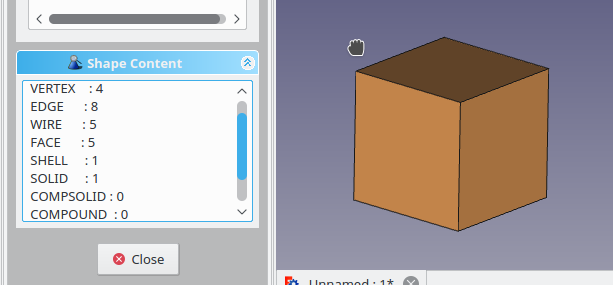
I took a single face from a cube and extruded it(part/extrude). Ran the result through part/check geometry and expanded the shape content tab and here is the result.
cubeExtrusion.png
Notice that the face count is 5 not 6. I then exported this solid out to a brep file and loaded into the occt supplied DRAWEXE program. Inside DRAWEXE there is a command ‘dump’ and I used that on the freecad exported file. Here is a section of that output:

...
 -------
Dump of 5 surfaces 
 -------

   1 : Plane
  Origin :0, 0, 0 
  Axis   :-1, 0, 0 
  XAxis  :0, 1, 0 
  YAxis  :0, 0, -1 

   2 : Plane
  Origin :0, 0, 0 
  Axis   :0, 0, 1 
  XAxis  :1, 0, -0 
  YAxis  :-0, 1, 0 

   3 : Plane
  Origin :0, 10, 0 
  Axis   :0, 1, 0 
  XAxis  :1, 0, 0 
  YAxis  :0, 0, -1 

   4 : Plane
  Origin :10, 0, 0 
  Axis   :-1, 0, 0 
  XAxis  :0, 1, 0 
  YAxis  :0, 0, -1 

   5 : Plane
  Origin :0, 0, 0 
  Axis   :0, 1, 0 
  XAxis  :1, 0, 0 
  YAxis  :0, 0, -1 
  ...

Again you see 5 planes where you would expect 6. Two of the topological faces are referencing the same plane geometry. The two faces have different TopLoc_Location values that separate them in 3d space. Finally my point: Comparing geometry definitions for shape mapping is going to be flawed.


have you read romans opencascade notes blog?
http://opencascade.blogspot.com/2009/02/topology-and-geometry-in-open-cascade.html


have you tried occts DRAWEXE program?
http://dev.opencascade.org/doc/overview/html/occt_user_guides__test_harness.html