Another approach to assembly solver (A2plus)


Hi Smiling_User:
The questions above are the questions I was trying to answer and the answer is still write your own.

This workbench is simply four different programs the I wrote, no flow. It started with the Full Auto program because I have Parkinson’s and sometimes it takes both of my hands to control the mouse let alone holding down the control key. Then the update program because I became tired of having to redo Constraints every time I made a change to a part. The other programs are just time wasters that I thought might be handy.

I’m not a programmer as you can tell from the code so I looked up dependency graph. Looks like a good tool if I ever learn to make one.

I modified the dirinfo.py file so you can hard code you a2plus path if needed The directions are in the help file 003. I hope it works.
I added the code so you can change the Fix property from the form. The directions are in the pdf.
I’m not quite sure where you’re going with the files you sent they kind of look like the beginning of a SolidWorks assembly file. I have a feeling that the information you’re trying to put into the assembly is getting lost when the file is made into as a2plus file. If you want to kick it around send a bit more info.
Thanks for sending the results of your testing the workbench.
Dan
Full auto directions003.pdf (92 KB)
A2plusmore ver003.zip (235 KB)

You’re right, I made some repetitive text.
Now will try to get clear:

  1. the efficiency of tool is defined by it’s usability inside a workflow. So the beginning of implementation is to plan a general work-flow.
  2. The most simple way to get parts positioned: make guidelines → constrain to guidelines.

In complex cases constraining to details is easier and more obvious, then constraining to guidelines.
But practice showed, that constraining to guidelines can replace constraining to parts, not the opposite.
Why? Because in the FC the most sophisticated solver and parametrisation is inside the Sketcher, so it is easier to make a sketch with constraints, than to calculate positions / interposition in Draft.

The efficient tool complex in this case would look like:

DynamicData (<-Set values)
Sketcher → Constraints (<-DynamicData)
->>guidelines → constrain to guidelines with A2P / A2Pmore

But here arises the problem: A2P(a2PMore) does not consider guidelines “Placement == Fixed” on calculation - it makes changes to position of Sketch and even altered some sketches.

So the key-solution for this case would be - to set a Sketch as the base of solving, aka Sketch{fixedPosition == true}
Then sketches would become one of possible the assembling bases. This resembles SW? Well - that’s not so bad.


Other step-to-usability would be, if the A2P/A2PMore could constrain parts/bodies, containers inside the master-file.
Then it would be very easy to “copy-paste-position” similar parts. The last version of A2P showed ability to constrain parts inside the file itself (without import). But also the first part must have the fixedPosition=true, and so must be imported.

Also the real work-flow sometimes goes different:
– sometimes it is easier to work in A2PMore manner, sometimes I turned off [auto-solve] and first applied constraints, then pressed [solve].

So at this moment as a workbench - the best seems to be the combination of A2P/A2PMore tools in a single workbench.
So I did: Tools → Customize → Toolbars → A2P → new toolbar → import all new tools from A2PMore

But still the very case-to-solve is to set fixed position to sketches.
Maybe drafts are not movable by A2P, and it is possible to convert sketches to Drafts, but this would remove parametrization.

// Besides: to the head-developers: how difficult would it be to make the “parts-library” macro - the internal part of FC?
I would use such a work-flow:

  1. Select detail (Part, body, simple link-group, sketch, draft)
  2. click - [save to LocalPartsLibrary] - [Ask user input: SaveAs “FileName”.FCStd]
    → the detail is saved to the DirPojectFolder\parts\“FileName”.FCStd
  3. When needed - RClick ->ImportPartFromLocalLibrary

It is similar to importing in an assembly, but is able to utilize all tools of FC( sketches, drafts, parts…)
Especially, that direct copy-paste replication of details is not complete in the GUI if FC.

///////
Just tried to see the A2P Code - maybe the clue is located around a2p_importpart.py Lines 430..450 ?

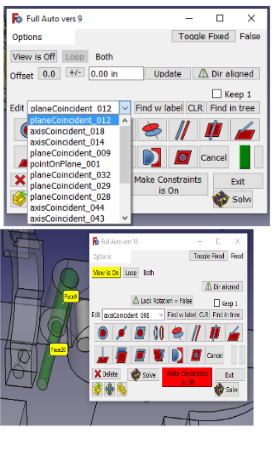
I meant to put SolidWorks Weldment file, not assembly file.

Here is the latest a2plusmore files. The instruction pdf is in the zip file. It seems to be stable and I don’t think I Can do much more without any input.

That is the way I use this workbench. I don’t have the skills to modify the A2plus workbench and if I did I don’t have a clue about the math that is being used so I wrote these work arounds. This lets me add constraints by selecting 2 features and I don’t need to mess with all the yes/no dialogs which is handy when tremors are bothersome.

I can follow some of what what you wrote but I was not able to add a sketch to the A2plus assembly file like you did so I wasn’t able to explorer very much. How did you do that?

Where Is kbwbe, he hasn’t responded to anything for months? It would be interesting to hear his input.

Sorry I can’t offer more input until I play some more with your idea.
Dan Miel
A2plusmore rev004.zip (331 KB)

Putting a sketch inside - easy: just draw it with Sketcher.

Another option, mentioned by kbwbe in this thread, is to make a master file with all sketches, and synchronized, and import them to the assembly file on-by-one.
I tried, it works. A2P contains [partial import tool] - it allows to import Bodies, sketches, Parts.
Draft, Arch, BIM - are under question for now.

A Body may contain a system of sketches, all imported at once.

Update for A2plus.
I came home and found an error when I tried to fix a floating part. So I fixed it.

And I forgot to mention that I added my a2p_solversystem.py file to the the a2plusmore folder. When you solve an assembly there are no popups for the unmoved files, instead it prints a list of the parts to the Report view at the end of the run. I believe other errors are reported as usual.

The direction pdf is in the zip file
Dan
A2plusmore vers 005.zip (331 KB)

Dan-miel,
I have recently used A2PlusMore under windows.
Video is nice, it just will take some time to learn all features.
But: today tried to install under ubuntu - it does not work: FC does not see any “new” plugin.

To KWBWE ( or to whom it may concern) :
is there an option to exclude from solving the constraints between two details with fixedPosition==true?
Worked with sketches imported into an assembly.

  1. solving the whole assembly repetitively - takes a lot of time is not acceptable and not needed for details with position fixed.
  2. after changes to the master sketch - all constraints broke, and needed resolving. But for the reason of some conflict somewhere in the previous constraints - solving is not possible, so I got to manually apply about 30 constraints again.

At the writing moment, I see that I should have made all the guidelines inside the master-SketchFile.

But such an option to select constraints for current (partial)solving - is greatly needed. (Maybe it exists, but did not notice).

My apologies to kbwbe for chopping up his work. I still don’t understand his work, his mind works on a higher level than mine.

Smiling:
This is probably too late to help you but the latest version of the a2plusmore allows you to run just the last few constraints of a file. It is amazing how fast it is. I did this by modifying kbwbe’s solver so on the first run it solves the constraints and collects the parts with zero DOF, it then lets you attach parts to the Zero DOF parts. I added a option dialog so I can chose to run the original solver or my hacked up versions and how many constraints to run. Kbwbe’s solver is always available.
My hack also eliminates most of the popups except for the critical errors that stop the program.

It seems to work on Windows 10 but might choke on linux. The FreeCAD undo button doesn’t record what the program does so the undo’s don’t work. . If anyone wants to see the speed difference the files and direction are in the Zip and here are a few videos. Most are a minute long, the subassembly one is 1min 45 sec.
Dan

Edited: I sometimes worry about me. I had one whopper of a mistake in version 7. I changed too many things after I tested. I haven’t tested everything in this version but I believe you can make the constraints with it. I need to do better testing and put up a better version in a few days. I also need to put this on Github.
Dan


Create constraints:https://youtu.be/fRmYsYxumhM
Find the last created constraint:https://youtu.be/LmiKEwOSbzY
How to view constraints using full auto:https://youtu.be/qG7JwF8dzTM
How to check for fixed parts in the assembly:https://youtu.be/pHvLkGp4Y1c
How to constraint multiple part to a common feature:https://youtu.be/SmrMTddMLEs
Making a small sub outside of main assm:https://youtu.be/_1Q_2MDx3FM
a2plus wb and FullAuto vers 008.zip (395 KB)

Well.
Have put the folder to Kubuntu → /home/worker/.FreeCAD/Mod/
Then started the FC:
On the next restart of FC - found A2P_More at the end of list.
It works Fine !
Objectives:
– What already found: in A2P possible to press “Make Duplicate” several times and then Click-click-click- distribute about 6-8 duplicates in the 3D view.
Clicking the same button on the on the A2P_More panel - allows only 1 duplicate to make.
– After using the A2Plus_More… the model stopped importing new parts… After removal of A2Plus_More - importing an duplicating returned…

The yellow color is illegible on default FreeCAD forum style:
Bildschirmfoto 2020-09-07 um 18.42.48.png

smiling. Try using the Make Duplicate button on the lower left of the Auto dialog. The import, Move and Make Duplicate buttons turns the auto select off while you’re working on those functions and turns it back on when you are done . If you don’t use those buttons you need to press the "Make constraints’ button so the auto select is off and when you’re done you need to press it again to turn the auto select back on.
Dan

Here is the better version. In addition to listing the last constraint made it has a dropdown listing the last 15 so you can select and edit them. I also attached a picture showing the Find w label function.
To install it extract the a2plusmore folder from the zip, drop it into your mod folder and restart FC, select the work bench and select the full auto program. More info is in the pdf.
Dan
add.jpg
A2plusmore with Full auto Vers 0010.zip (524 KB)

by jmmartin » Fri Sep 18, 2020 6:58 pm
Hi I’m new to A2Plus, I don’t know if this is correct place to ask for help (sorry if not). Im not being able to find correct constraints to put the selected part centered to the holes.

coliso.png
jmmartin, the place is right.

In your case: holes on the hook side are not round. So the AxisCenter-constraint is not applicable.
But this depends on the position: maybe is possible to constrain as arc-to arc using one side of hole?
Maybe, the positioning will require
– either to prepare some additional lines inside the base sketch of the hook and apply the constraint to it.
– or to position with “planeCoincident” → move under constraints → set FixedPosition:= true.

If your file is less than 1 mb - try to attach it. if larger -try using external file-sharing service.

// If interested, as a new user of FC, - try seeing the topic https://forum.freecadweb.org/viewtopic.php?f=3&t=49220
And please leave a comment whether it is helpful or not.

Hi jmmartin
I put my answer to your question in a different post so that people who are searching for it might have a better chance on finding it since I’m guessing the search engines only look at the title of the post.
My guess is to draw a sketch and constraint to the sketch. The video shows how I did it.
Dan

https://forum.freecadweb.org/viewtopic.php?f=20&t=50409

Many thanks for a great workbench! :slight_smile:

I want to suggest one little addition to make it more convenient: backlinks to parent assembly.

When we add part to assembly, let’s add some link to this assembly into the part/subassembly file. If this file is used through several assemblies, let there be list of [annotated] links.

Then, in the part file we can use this link for the next extremely useful purposes:

  • Tracking where also this part is used (full list of its super-assemblies)
  • Navigation upwards through assemblies - opening files by e.g. Ctrl+ clicking corresponding links
  • Visualisation of contexts: when one press spacebar on link, corresponding superassembly is imported as simple body and visualised. This is an easy way to see all contexts where this part is used, reference them and even use them as the base for ShapeBinder objects.
  • We can use MasterSketch or MasterVolume workflows easily and simultaneously this way: simple including of them to assembly makes them accessible to all its parts.

I don’t think you want all of the links in the part or assembly files. If the part was replaced with a newer version the links would disappear. You’re describing a PDM (product data management). it’s a database that tracks where the files are used, revisions and all other information related to the files.
Dan,

Yes, but I have no idea how to integrate database to FreeCAD. It could be possible if we could store FreeCAD data in such database with IDs instead of file paths. Can somebody point to any direction where I could experiment with code about it?

If we delete old part and replace it with new, and then save assembly, all looks logical: backlink is deleted from replaced part and added to new part. If backlink was not deleted from part, next time when we open it, backlinks are checked and marked as inactive or auto-deleted.

I think about Assembly as a basic case of PDM. Thus it is probably a general direction of all Assembly workbenches evolution.

:
A pdm doesn’t track a file by its name or address. Instead it renames it to its own naming convention. Let’s say you have a file named bolt and you add it to the database. It is the first file in the database so the database renames it as PDM1. The name is unique and will never change. It might have something like the following attributes applied to it. “Name”, Description, Revision, Location, etc. All of these can be changed but only one “Name” is allowed in the database. So if you wanted to put another “bolt” into the PDM database you would have to rename it, maybe “BOLT 10mmx30mm”. You could then change the name of your first bolt to “BOLT 8mmx30mm” PDM is still tracking it as PDM1. If you wanted to replace the file, you would tell PDM to replace “BOLT 8mmx30mm” but to PDM it is replacing the file PDM1 because the “Name” is only an attribute. Often at this point the revision is increased by 1 but that is for the engineer to decide.
For an assembly file one of the attributes would be a list of the files used in the assembly. I suppose for a part file you could make a list of where used but it might be just as good to search the assembly file’s list of parts to find the ‘where used’ of a part file. Of course the list of where used in the PDM’s mind would be PDM09, PDM67, PDM209, but we would receive a list of the file’s “Name” attribute.
This is simplified but I hope this explains how a PDM database works.
Dan

Like Dan, i do not like a lot of backlinks within a FCStd file. This is a job to be done by a database. Connecting python modules to a DB is not so difficult. For Python, there exists a DB2-API definition and many databases provide compliant python modules. I for myself have gathered some experience with connecting python code to Firebird databases. But using the API, many other databases should work. License, i think, does not really matter, as the the database management could be placed to an external module or workbech.

The work, which has to be done, is to call the database interface at all relevant commands of a workbench, in this case A2p. At first look, this is a doable job.

As most databases are able to store BLOB objects, it also should be possible to put some FreeCAD stuff inside. E.G. a shape can be represented as a string.


You are right, database is more straightforward solution than networks of mutual links. I think, database keeping FreeCAD objects instead of BLOB files
is very good idea, because if we have access to Parts and Bodies, etc across all designs, we can build different useful data models around it, e.g. trace system requirements, manage PBS, functional and structural decomposition through hierarchies. Now I use Archimate to deal with all this stuff, but if we could one day manage it from FreeCAD workbench (or startpage)- with direct link between FreeCAD objects and networks of custom cross-file abstract objects - this would be very good. And keeping “All my FreeCAD data” in one file is of course more compact and nice.

May be, for a first time we do not need to call database at all relevant commands, but only on filesystem-related (open and save). I.e just redirect reading and writing files from filesystem to database API.

While this looks like not very hard load on database, I think we could experiment with database engine with FreeCAD compatible license, with hope to make it in future part of official releases.

For spatial and geographic data there is PostGIS, a PostgreSQL extension: https://postgis.net/

A while back I thought it would be interesting to wrap OpenCASCADE functionality in a PostgreSQL extension as well; then PG servers running that extension could serve as model backends for FreeCAD, and you’d get all the functionality of PG and its ecosystem, for example permissions & access model, locking, transactions, replication, sharding, etc. – PostCAD.

As I looked more and more into this, though, it’d be really hard! Not really something I could do in my free time just yet.