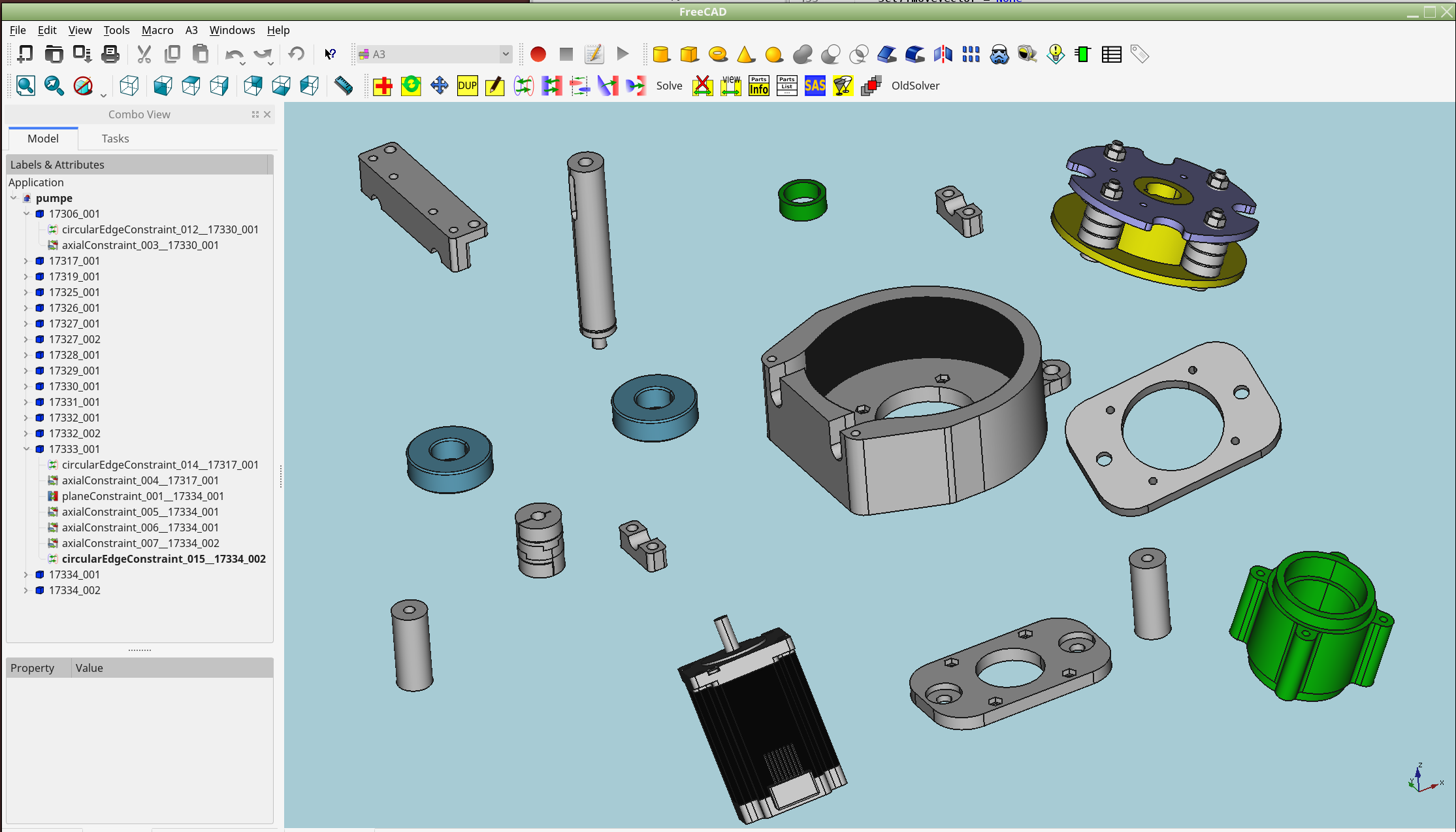
there is a lot of talking about solving an assembly here within the forum.
I developed a small prototype of yet another solver. It is in a very early state now and is only capable to handle plane/circularedge/axis-constraints.
But it can easily be extended. It consist only of one file, which is attached.
The base concept is inspired by physics. Forces(Distances from point to targetpoints) will cause moves and rotations around a spin-center. Also axis-alignments will cause “torque” and cause spinning around. The solver is working iteratively.
It is just a prototype and many things are still missing. But the idea seems to work.
Have a look a the following to tests which i did.
Test1: assembling some link-beams with circular edges
Test2: assembling a hose-pump (with plane/circularEdges/axis-constraints)
Anyone interested? Suggestions ? Important improvements ? Someone who wants to help ?
Thanks,
kbwbe
UPDATE: Look for newest complete testworkbech at newer posts within this tread. (For Win and Linux now) solversystem.py (20.8 KB)
I see your work is somehow inspired by Assembly 2 workbench? Do you plan to create a new workbench? What you attached is i guess only a prototype of a potential solver? I would say create a workbench or extend the Assembly 2 workbench and see how that goes. If it will be able to assemble FreeCAD geometry in some straightforward way i am sure end users will use it.
thanks for your answer. Your are right. I am working with a refurbished assembly2-workbench. I like the base concepts of it very much and did some bigger projects with it. My adapted workbench is somehow ready for LINUX. I use it everyday. Unfortunately I have some problems with fc0.17 and therefore i am still staying with fc0.16
There are two mainproblems of assembly2:
the solver often fails and does not find a solution. Therefore i started this work with new solver and integrated it into my workbench.
(it should work with assembly2 too)
topological naming: If a part is been updated, very often the ordering of vertexes, edges and faces is changed.
Hamishs algorithm to recover the indexes is slow and fails very often.
I did a reduced form of toponaming (which is not perfect) only for use with the assembly workbench. But my scripts where blown up
by the fc0.17 body- and partcontainers.
Working within fc0.16, my simple toponaming improved importing parts to assembly very much. It is much more stable with it.
Have no problem to share the code if anyone is interested. Perhaps someone finds a solution to adapt the scripts to fc0.17.
How to share complete workbench ? Do not have a github-account or anything else… (and don’t really want it)
UPDATE: Look for newest complete testworkbech at newer posts within this tread. (For Win and Linux now)
Installation-instructions:
only for Linux (because of filehandling) and fc0.16 (will not work with fc0.17)
before copying the extracted zip to your mod-folder, setup your CAD-folder (create a new one for testing!!!) according to this:
(you have to create a new entry “projectFolder” within the parameter-Editor.
within CAD-folder each file ony has to exist one time or you get strange results.
do NOT use this test-workbench with important work. It will mismatch existing assemblies. Use newly created files for testing.
extract zip.archive, copy the a3-folder to your mod-folder.
Start FreeCAD, work is very similar to assembly2. a3-Workbech should appear in available workbenches:
Be aware: new solver-prototype is active. You can have unexact solutions without warning. The solver has to be improved.
This is the first test in the free wild. I hope that it will work anyway.
Feel free to ask and do what you want with this code.
I did a few quick tests (FreeCAD 0.17 and without messing with the folder instructions). I used some Draft Clone geometry in a single document. As for the short version your solver will solve:
P.S. Did noticed a combination of circular and plane relations can sometimes result in:
I am analyzing the problem. I have detected wrong spin-orientations of the parts during solving.
This work will need a little bit time. I have to an intensive check of the code.
Wondering that i did not recognize this in my tests before..
found some bugs in fixed them. Find attached latest version a3-0.0.1. In my test, new version could solve the problematic file. Perhaps you have to flip plane-constraint with align/opposed options.
I also deactivated the projectFolder stuff.
Hi to all others,
find here attached a new version of my “assembly2relaunched”
System requirements now:
for fc0.16
Win and Linux should work (Win not tested, do not have a machine, but all Linux-specific stuff is removed)
How to work with:
Just copy extracted folder to your mod-folder
start fc0.16
find a3-Symbol within available workbenches
activate a3
do work analog to assembly2 (best test it with all your fcstd-files newly created)
use the symbol with the two champagner-glasses to make your assembly transparent and check it always
Enjoy (I hope…)
Limitations:
before setting of an constraint, orient the new part nearly correct for placing ( helps solver to find correct solutions)
if constraints are not solvable, atm you will get a wrong solution without warning and undo-function. (save your file often)
solver atm only does 3000 steps to find a solution, ignoring the reached accuracy. Hitting solve-button more than once will increase accuracy
If i understand you correctly you likely are interested in this area and the interest could lead to more long term development? Will you port your solver/workbench to work with Py3/Qt5? I am asking as we are trying to figure out the situation regarding Assembly 2 workbench (has no active maintainer ATM). And maybe somehow you and your solver/workbench can play a role and lead to a viable solution.
that’s correct. I intend to do some more work on this workbench. My efforts should result to a simple, easy to use assembly-workbech, based on hamish’s work. I need such a workbench and want to control its stability and features for long term usage.
I also prefer a pure python standalone workbench, so that i do not to have to dive into the C++ Code of FreeCAD.
Shure i have to switch from fc0.16 to the newer ones and will try. Within some time, fc0.16 will be obsolete.
Porting the solver to Py3 should not be a very big problem. The code is not very big and simple. Most work is to get solver running at all.
Qt5 is more difficult to me. Until now i did no project with PyQt anyway.
Perhaps i need some help. Up to this point i only analysed Hamish’s code to reach this state of my workbench now.
P.S. I do not intend to maintain the old assembly 2 workbench, as my version is to far away now. I only invest time into the new variant.
You shouldn’t have much (likely none) issues with Py3/Qt5 port (as long as you are interested in supporting it). Likely you should have a repository somewhere as “ZIP” approach will quickly start to show its limitations. As for FreeCAD end users using Assembly 2 workbench and for it to potentially stop working (Py3/Qt5). I guess now there will be another option to try out and migrate. Some sensible workbench name i guess wouldn’t hurt. That depends if you want to position yourself as Assembly 2 successor (to maybe add an addition letter to it for it not to be too long) or maybe something like Assembly 4 or something totally unrelated but unique. As Assembly 3 workbench domain name is already taken.
I strongly would suggest you to enable ‘Report View’ to see errors when loading/using the WB
I changed your code:
from PyQt4 import QtGui,QtCore
to
from PySide import QtGui, QtCore
in
a3_versionmanagement.py and a3_toponamer.py
then the WB should work fine
a lot of stuff… but with often small modifications you can manage the changes…
PS I would suggest you to change the WB name from A3 to i.e. A2plus o similar, because, as you already noticed, A3 is already adopted by the new Assembly FC branch…
Hello Maurice, tx for quick answer.
Will rename wb with next version. If i see a point where the wb is ready for real public testing, i will migrate to github.