just tested with 0.17. works fine 
good to see it…
I noticed that your WB is forcing to use its icons also for Assembly2 WB
I’m attaching here a small modified version which is using the new A2 icons…
here the WB zipped with some of modification for a better integration in Qt5 and A2 coexistence …
a2plus.zip (520 KB)
Still the A2plus WB needs to fix the resource loader to avoid an override of other WB icons… you probably have to put a prefix like ap2_ before Icon resources with the shared name between the two WBs…
many thank, exact right timed…
this evening i planned to start with renaming. Good to have your changes before that point.
Hello Maurice,
just want to start renaming and looked at your zip. Found many icon-folders with pretty icons. (icons, icons-old, wiki, gui/. )
What is the central folder to adapt icon-names if i want to change some? Did you compile icons to code ? Should i better leave hands off renaming them?
icon-old was just a backup of the previous icons…
A2 uses also some compiled resources, so the icons need to be renamed before compiling them with rcc, or just move to using the icons as svg directly.
thanks Maurice,
at first i will use icons with your suggested names. I will first start with reworking the code files.
If some icon-names are conflicting with anything, we can change later.
P.S. I should have done a deeper look to your zip. You have already changed the codefile-names. Many Thanks.
I will go over for testing
Incredible,
you have done all my work i intend to do this evening. Works fine. I will reset my internal repository and use your one as new starting point.

Your proposal for workbench name is not bad.
A2 => respect to hamish’s work (and your contributions to it)
plus => it is not really new and is following hamish’s concepts, except solver and some other things.
I can live with this name: “Assembly 2 plus” , short A2p.
New steps starting now:
3 new constraints as there are:
- point Identity
- point on line
- point on plane ()
This will have instantly effect to my rudimental topological naming, which only covers planes and edges and not vertexes. And this only with fc0.16.
Using vertexes within the muxInfo-entry of my importPart-Object will increase filesize to much. I shurely will have to change datastructure.
Nevertheless i will implement the constraints mentioned above now and will deactivate toponame checks for it.
(if topological naming is deactived, updating Parts to the assembly will possible break constraints, when parts have been modified)
So the question to the forum:
Is there anything like following pseudocode available for python:
constantFaceNames = {}
for i, face in enumerate(Part.Shape.Faces):
	constantFaceNames[i] =       Part.getFaceTopoName(i) # <=== this is the important point
Same i would need for Vertexes, Edges.
The resulting names should be robust to most common modifications of a part.
I think topological naming for purpose of assembly does need to be so perfect as for PartDesign. Almost at beginning.
Machinery designers ( i am one ) mostly fix parts together by fitting planes, axes, drilling holes, some important vertexes and so on.
Fixing parts together by constraining small fillets, chamfers and other complicated things can be necessary, but not so often.
So what i want to say:
Does anyone here have such thing or is working on it ? Is something in the pipe ? Really ready or not even. Accessible for python!
Or do i have to rework my own toponamer (it is a hell)
Each help is appreciated.
kbwbe
As for the name of the workbench. Take your time and don’t rush into something that won’t make all that much sense in the future. Topology in general can change when user goes back in the (part) design history and adds/removes stuff. Therefore end users do need to redefine Assembly relations after. In the future there likely will be some solutions available in FreeCAD mitigating the issue to some extent:
https://forum.freecadweb.org/viewtopic.php?t=27278
https://forum.freecadweb.org/viewtopic.php?t=27582
For now i would say focus only on the solver part and keep an eye on Assembly3. To see how your solutions can challenge the SolveSpace solver.
I understand. Will work on solver as you proposed. (As contribution to FreeCAD)
Getting same performance as SolveSpace will be hard. Pure Python working together with FreeCAD’s basic api will be fast, but not as fast as SolveSpace.
The topological naming issue is still frustrating. I know the links you have posted. Nothing seems to be really ready.
I have a different opinion how endusers should work with assembly.
If constraints refer to geometric Elements which still exist unchanged within a modeltree, but the user changed some small other things, these should not have to break. Commercial products can do this.
Example: A standard part, build into many of customized assemblies, you do only a small modification of the Part, perhaps a new complete uncritical hole.
If using Assembly2: All customized assemblies will be blown up. Definitely. Who should use it ?
If this topic will not be solved, IMHO endusers will not accept an assembly, regardless which variant. I hope, RealThunder’s assembly crack’s the nut.
Enough. I concentrate on the solver..
SolveSpace has been kept as python add-on also in A3 because of its license, GPL and not LGPL as FC would require to be directly included.
So probably you could get similar performances.
Thx
Hello Maurice,
next version ready. PointIdentity-Constraint newly added. ZIP attached.
For me, in first tests, it works with fc0.17

a2plus-2018-06-15-01.zip (485 KB)
+1 nice addition
New Version attached.
solver improvements:
- new constraint point on plane
also done:
- some bugfixes in workbench
totally working constraints as there are now:
- point identity
- point on plane
- circlar edge constraint
- plane constraint
- axial constraint
following soon:
- point on line
after that:
- warning if solver cannot find solution
- undo of last solving
New constraint point on plane is working for me in a2plus-workbench..
Testers welcome !
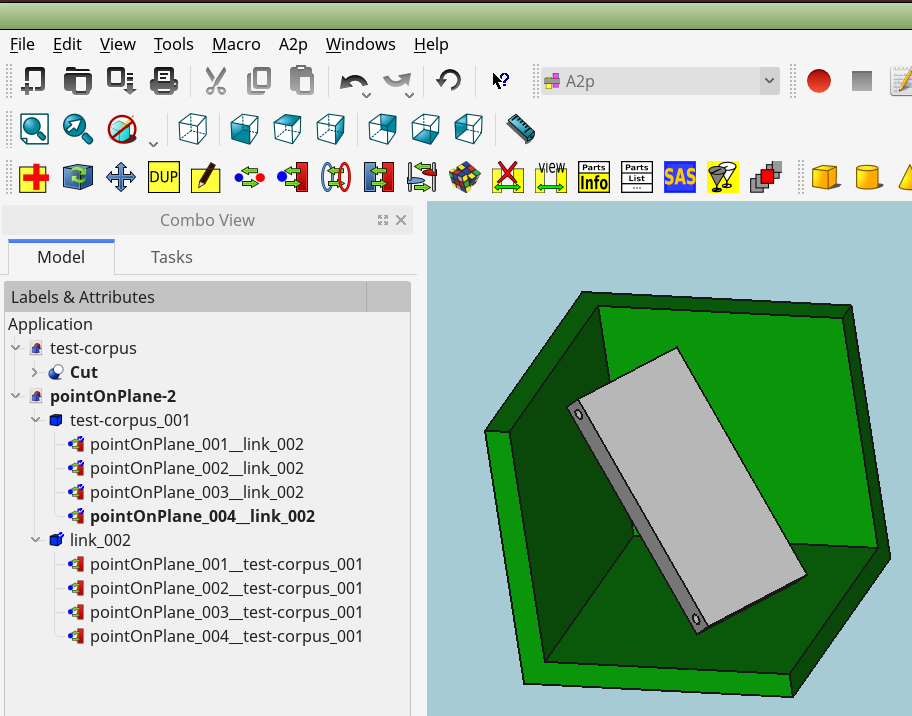
kbwbe
a2plus-2018-06-16-01.zip (486 KB)
Nice to see some work done in this!
1 Can we use “sub assemby” ?
2 Do you think than we can do simulation with your new assembly ?
3 Could you add a new tool : when all your assembly is done, export the file for a 3D printer ( make an OR logic between all the part…)
Congratulation for your work.
No problem if your are still using fc0.16. The workbench was designed for that. For fc0.17 i still have not tested. Will do that after rough finishing the WB.
Make good backup of your files. Test it and please give feedback. There will be perhaps some errors shown in the log.
When ready, it should be possible. Perhaps a little bit slow, since everything is programmed by pure python
You can try the “SAS” Button (SimpleAssemblyShape), which creates a single compound of the whole assenbly. You will find it then in the object tree. But do not really know wether a compound does work for 3D printing. It is not realy a solid i think. Simply do a test.
kbwbe
Where install a2plus, on Ubuntu 16.04 ?
Thanks
As promised, here is a new version, ZIP attached…
New Constraint:
- pointOnLine
In some quicktests, it’s working
.
.

.
.
kbwbe
a2plus-2018-06-17-01.zip (488 KB)
Unzip ZIP-archive. rename, if necessary the unzipped folder to “a2plus”
copy complete folder to:
/home/YOURUSERNAME/.FreeCAD/Mod/
(replace YOURUSERNAME with your account )
After restarting FreeCAD, “a2p” should appear within available workbenches
Which FreeCAD Version do you use ?
PS: THIS IS AN VERY EARLY TESTVERSION, DON’T DO IMPORTANT WORK WITH IT !
kbwbe