Basically at the moment the length of the landing is calculated by taking the total length of the stairs baseline and subtracting the total length of steps. But the stairs tool was never carried very far, it needs a lot of work yet…
I attempt to understand the code, though farrrrrrrr from understanding the whole, it is noted obj.Width.Value is used for the ‘landing depth’.
I try introduced ‘Landing Depth’ property and add in essence the following… prima facia it works… now if ‘Landing Depth’ is not ‘0’, the landing depth follow this input.
The whole modified file attached (ArchStairs.py), see if it helps and any problem (I do not understand most of other code/calculation) … I would try an alternative to calculate the stair length / height based on input of individual tread and riser…
@chrisb started a great thread about learning how to use git and GitHub (can’t find it ATM). There is also a short tutorial on the wiki github
Feel free to ask queations, folks are happy to help as you know
There are lots to read in fact, it’s fun though… I started to read python, workbench creation, may need to learn gimp/inkscape to draw icon, since I found FC trying to learn something that maybe like Revit or ArchiCAD (both I never use) … and like Yorik once comment ‘end up coding’ - though I am never and far far far from being a programmer of any kind (I had a book on 6502 assembly / machine code you won’t believe it, if anyone know what is 6502)
Spent/Spending lots of time figuring out how python basic works and ‘experimenting’ how to use Sketch (SketchPython) + ArchWall to build floor layout in a better workflow that is easier for design revision… haven’t really started a real model for any project / assignment yet… hoping something is useful in the end for this 'experiment.
Hi, just drop into earlier discussion (again) noting Arch Structure already has a Precast Stair which calculate based on input tread and riser! No need to attempt any code myself
(Thank Joancabeza who bring this up again)
The Precast Stair code is more straightforward for me to understand, though it apparently lacks some features like stringer, nosing (which I do not need at the moment).
Now if I manage to, and with some time, I would attempt a vertical stairwell with intermediate landing (rather than a straight flight with a landing that can be done now in Arch Stair).
Any thought how you would like / have planned to do / develop further with these 2 approach of Stairs (Arch Structure Precast Stair / Arch Stair)?
Hi, further ‘experiment’ below which turn ArhcStair._Stairs.makeStraightStairsWithLanding(self,obj,edge) into kind of frankenstein…
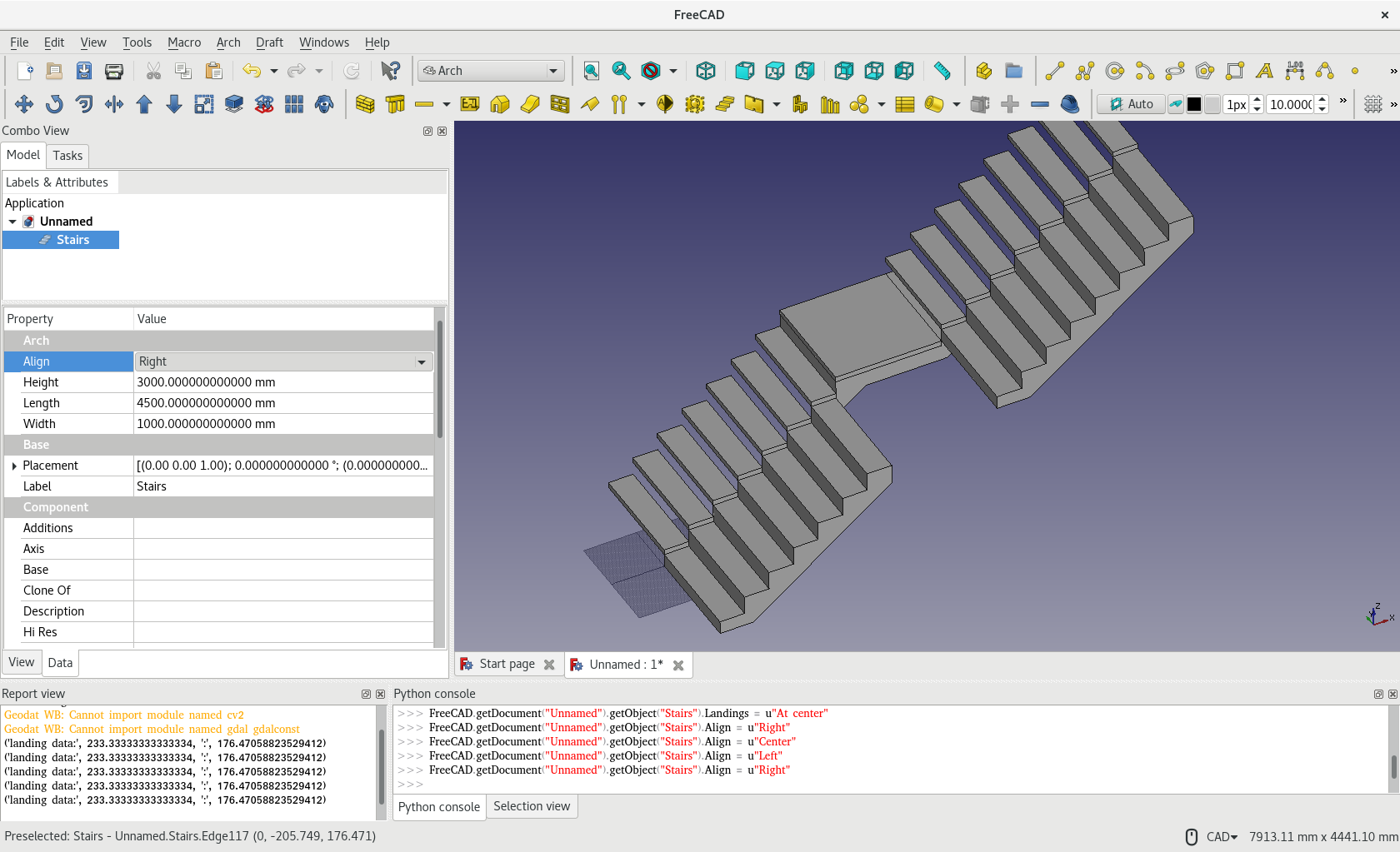
I am testing introducing another property (Flight = “Straight” or “Return”). Now a straight staircase with a landing would ‘return’ in opposite direction after landing if “Return” is selected, some progress… with some queries and maybe comments needed to further develop if find useful.
1st simple English Q: What is correct terminology for this typology of staircase? I am afraid ‘Return’ is not the correct term.
The makeStraightStairsWithLanding(self,obj,edge) is ‘manipulated’ to make this happen - I do not have full picture of the Arch / ArchStair / ArchPrecast (another query in last post) and have no better idea what to do if I want to introduce this ‘feature’.
I have a glance at YouTube how Revit is working with stairs and found the stairs ‘components’ could be edited individually after creation… I am thinking if another experiment I am having a SketchPython to create a nos. of ArchWall may work similarly… or if there is already a plan and idea to work in this direction or another?
You can see the landing is not totally ‘correct’ as there is bit sticking out… other parameters like Structure Offset would not works together nicely etc etc… Just an experiment.
Hi, some further idea that control / generate staircase below, see any people has comments on experimenting this direction… (currently ArchStair seem ignore a wire of say L-shaped…)
Idea and Experiment Attached
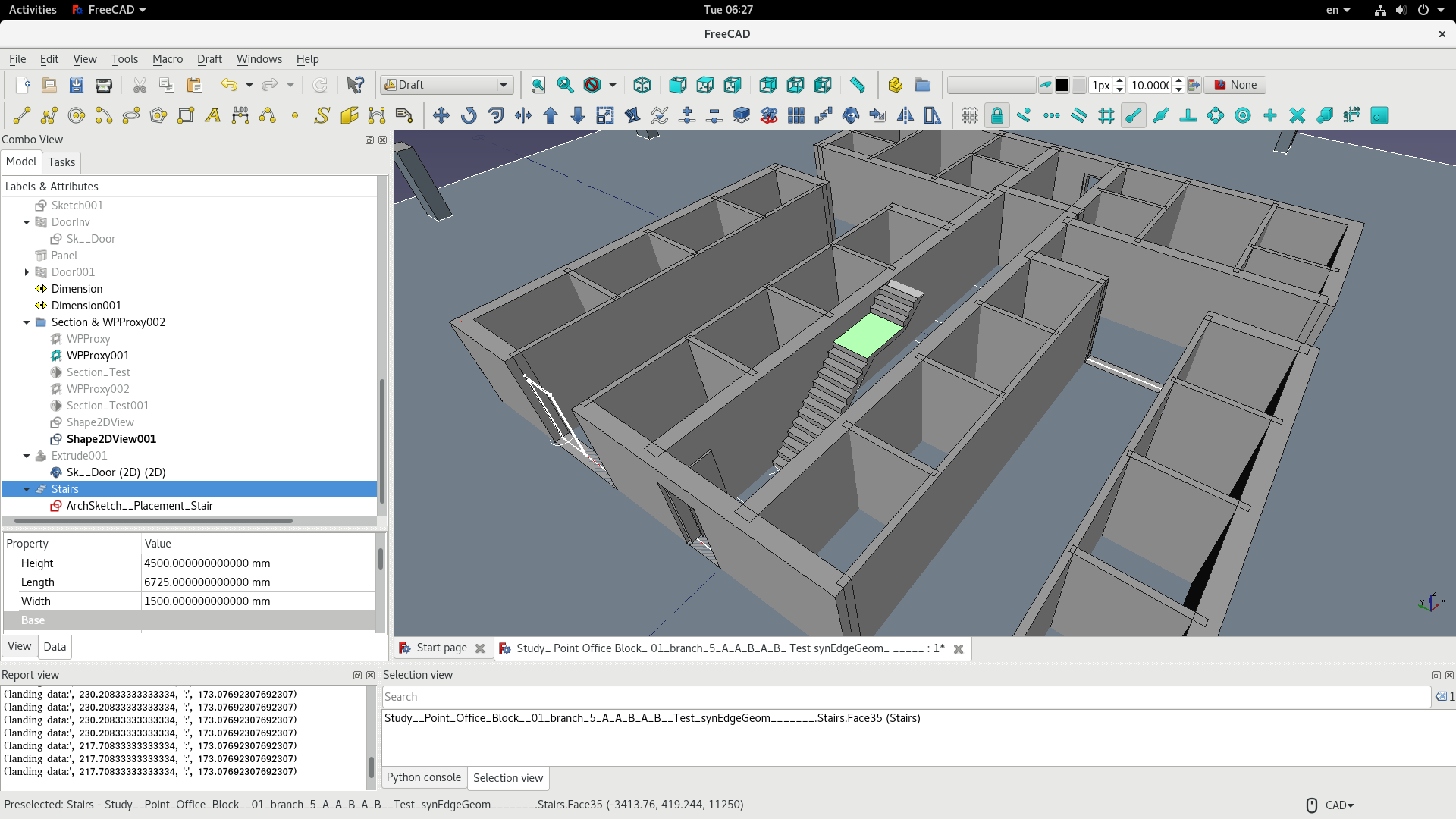
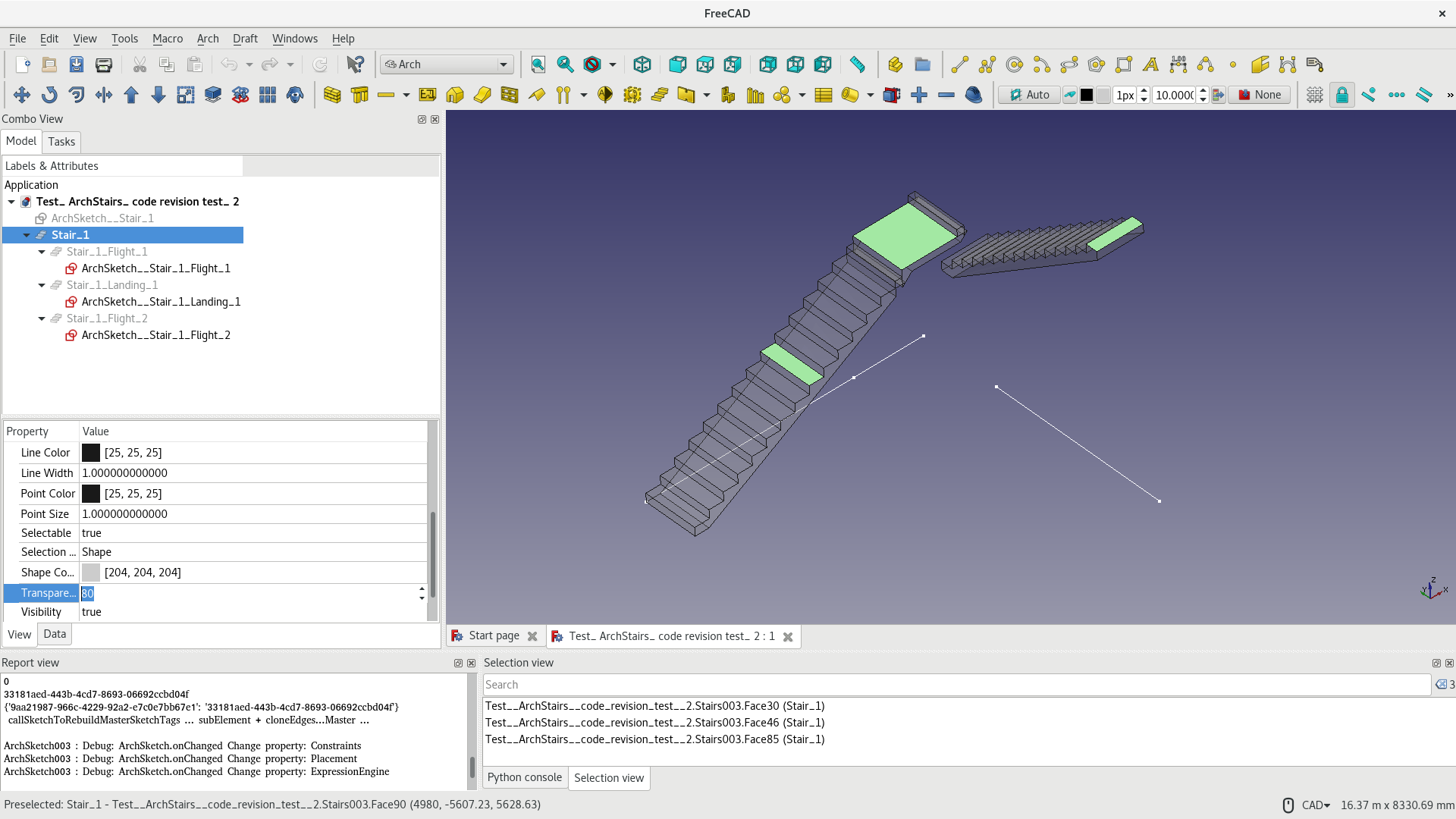
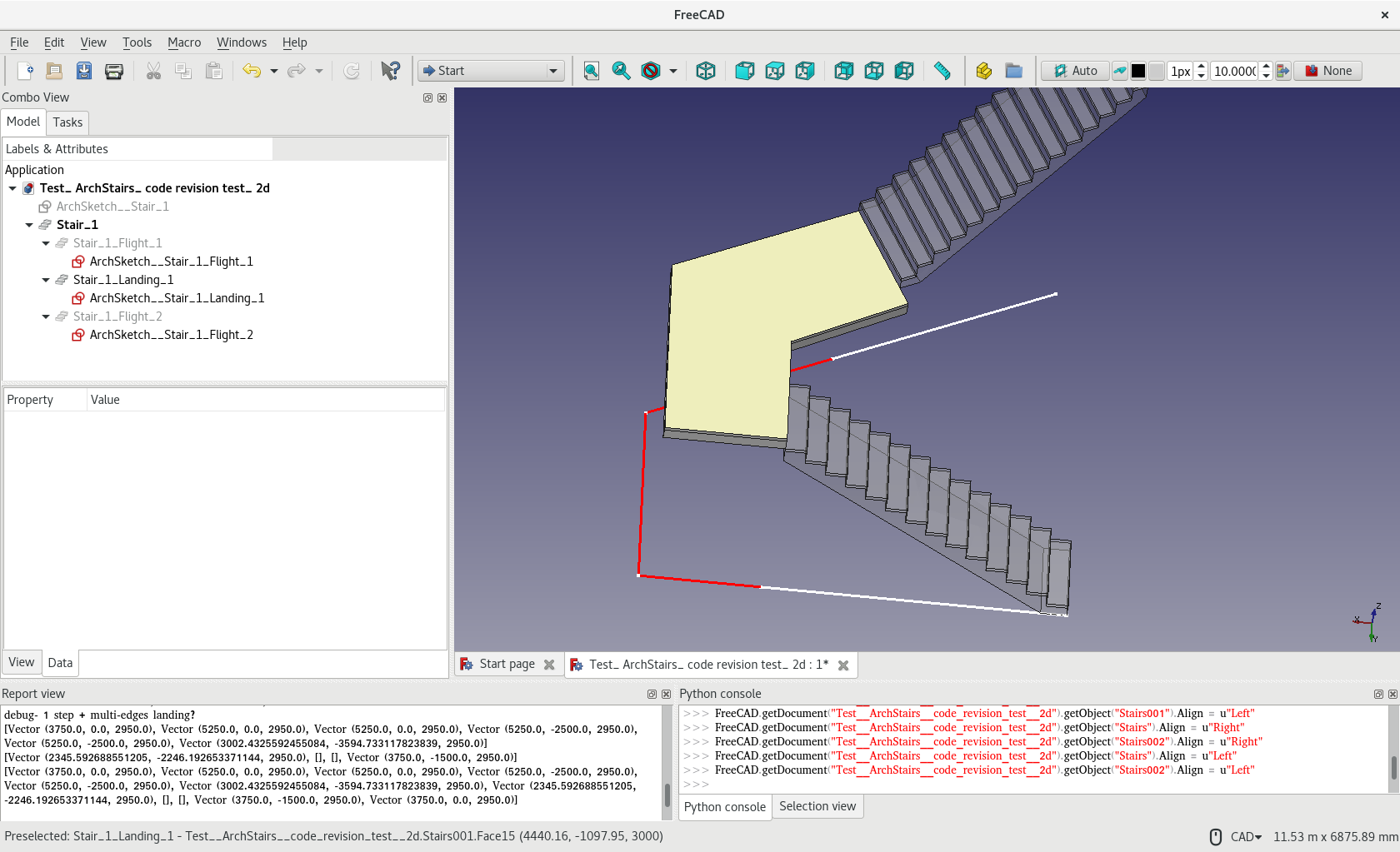
To compose a stair of more complicated form (still considering a combination of straight flights and turns only) instead of let an ArchStair do it in one go, it can be a series of Additions (inherent feature of Arch Components / objects)… see screencapture
Now, each ArchStair generate a flight, a landing, another flight… based on a series of individual edge ( in a ‘mastersketch’ e.g. - see below for more issues)
Then, each of these flights could have finer control e.g. different tread, riser, width etc.
Also, potentially, as noted in a Revit Youtube tutorial, the landing form/outline could be generated by a sketch, trapezoid etc…
A ‘Master’ Arch Stair object now ‘host’ these segments of Stair Components
Maybe a ‘Stair Kerb’, ‘Stair Railing’ etc. objects could be created and added to / hosted by this ‘Master Arch Stair’ Object
(Similar idea for other Arch Objects in general? ‘Window Mullion/Transom’, ‘Window Glass Panels’ objects in Arch Window …? ‘Rebar Object’, ‘Metal Lathing’, ‘Mortar’ in ‘Wall Object’… ‘Stud’, ‘Cladding’ in ‘Wall Panel’… etc.)
The disposition / placement of Landing_1 depends on the height / resultant height of Flight_1, Flight_2 depends on Landing_1, so on… currently by expression
Now, edit the underlying ‘MasterSketch’, the whole staircase geometry follows. Edit individual ‘Stair Component’, the ‘Master Arch Stair’ composed the updated geometry.
Better WorkFlow and Pre-requisites
Currently, seem Arch Stair only accept 1 straight wire / edge, that’s fine at the moment.
To have a series of connecting individual edge for each ‘Stair Components’, it can be drawn and updated ‘manually’, or,
Make life easier a ‘master sketch’ that includes the whole skeleton of the stair and ‘output’ individual wires for each individual stair flights/lands could be adopted - issues below
‘Master Sketch’ Issues / Potential Solutions
Currently 2 issues at least to my knowledge
1st not really a problematic one -Arch Stair need to accept something like sketch.edges[9], or wires[3] for individual components…or…
2nd a ‘Master Sketch’ export individual edge. But current associated problem being ‘kind of topological naming issue of sketch’ - delete an edge in it, the index of a wire change - so sketch.edges[12] (pseudo) is prone to break
I am using my experimental ‘ArchSketch’ which use ‘tag’ for each edges therefore (semi)-consistent, and which could somehow ‘output’ selected edges to other Sketch… currently used in experiment file attached.
Same discussion, different post https://forum.freecadweb.org/viewtopic.php?f=22&t=28575#p234518
‘Unluckily’, I am not aware of Reathunder’s works been merged?
(Don’t bother the strange form of Landing_1, just an experiment / proof of concept)
You are right that the stairs tool is already pretty complicated even when it is still very basic. I believe the complexity can easily grow to some absurd levels (all BIM apps out there present serious problems with stairs…)
Indeed a modular approach is certainly a good path. But even so there are so many situations like the landing shape must be slightly different if there is a stair flight next or not, and depend on the type of that stairs flight, etc… That quickly you’ll get back to the same level of complexity I think. Honestly I haven’t found a good answer yet, and have been pretty procrastinating to get my hands back on the stairs tool
In any case, like all Arch objects, the stair tool supports additions/subtractions. So you can start with a simple case and add more shapes to it. Ultimately that’s always what saves the day in FreeCAD, if an automatic tool fails, you can always revert to some manual modeling.
Hi, far from any modular approach… find difficult (as a newbie on Python) to implement the idea merging in the existing code… making it looks Frankenstein again… anyway proof of concept first.
Regardless the changes in code being experimenting are quite ‘ugly’, there is some slight progress:-
Now, a new Property “Last Segment” is added to Stairs Object
When a Stairs Object has Last Segment pointing to the preceding flight/landing, it succeeds the ‘Height’ of the preceding Stairs Objects
When a Stairs Object has Step = 1 (previously not accepted), and Last Segment pointing to a StairObject, it create landing to ‘complete’ the last ‘step’
So now, say, simply have 3 lines on plan, and make 3 Stairs Objects, ‘link’ them by 'Last Segment…
The individual flight/landing’s length, height, width, steps, presence of steps… can be fine-tuned separately
Further ‘experiment’ later?
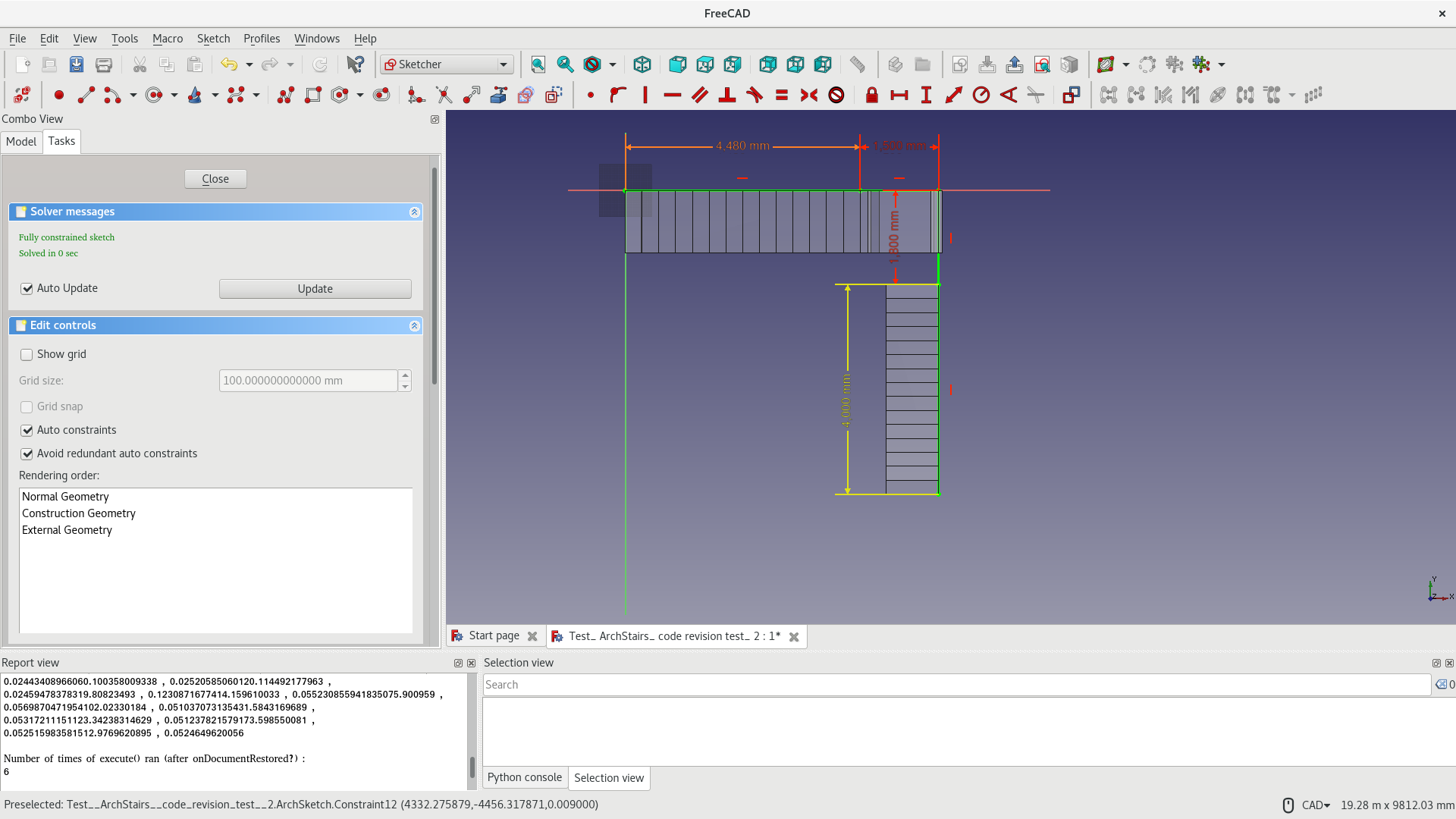
Currently, ‘landing’ only works with 1 edge - the ‘new’ landing works exactly as ArchStairs generate ‘Step’ profile
It seem not too difficult to make it accept more edges so the landing can ‘turn’ in direction
Like what Revit seem to be doing, the ‘outline’ of landing generated by wireframe currently can generating a sketch then further control on the outline… hopefully
The landing in this ‘mode’ is only a simply rectangular extrusion, no ‘connecting’ part to the lower or upper flight…so there is some gaps !
2 ‘versions’ of ArchStairs.py attached
version 3 - only have added stair landing depth, ‘return’ option etc.
version 4 - added ‘Last Segment’ property, ‘1-step’ stair generate landing based on line edge paved way for multi-segment landing… ArchStairs(Paul_ Ver 4).py (32.8 KB) ArchStairs (Paul_ Ver 3).py (28.6 KB)
Looking good @paullee ! Great progresses. I’m happy someone is taking the dust off the stairs object. Also, if you feel better discarding the current code and reimplementing stuff from scratch, no problem! We’ll see what we do with it later on.
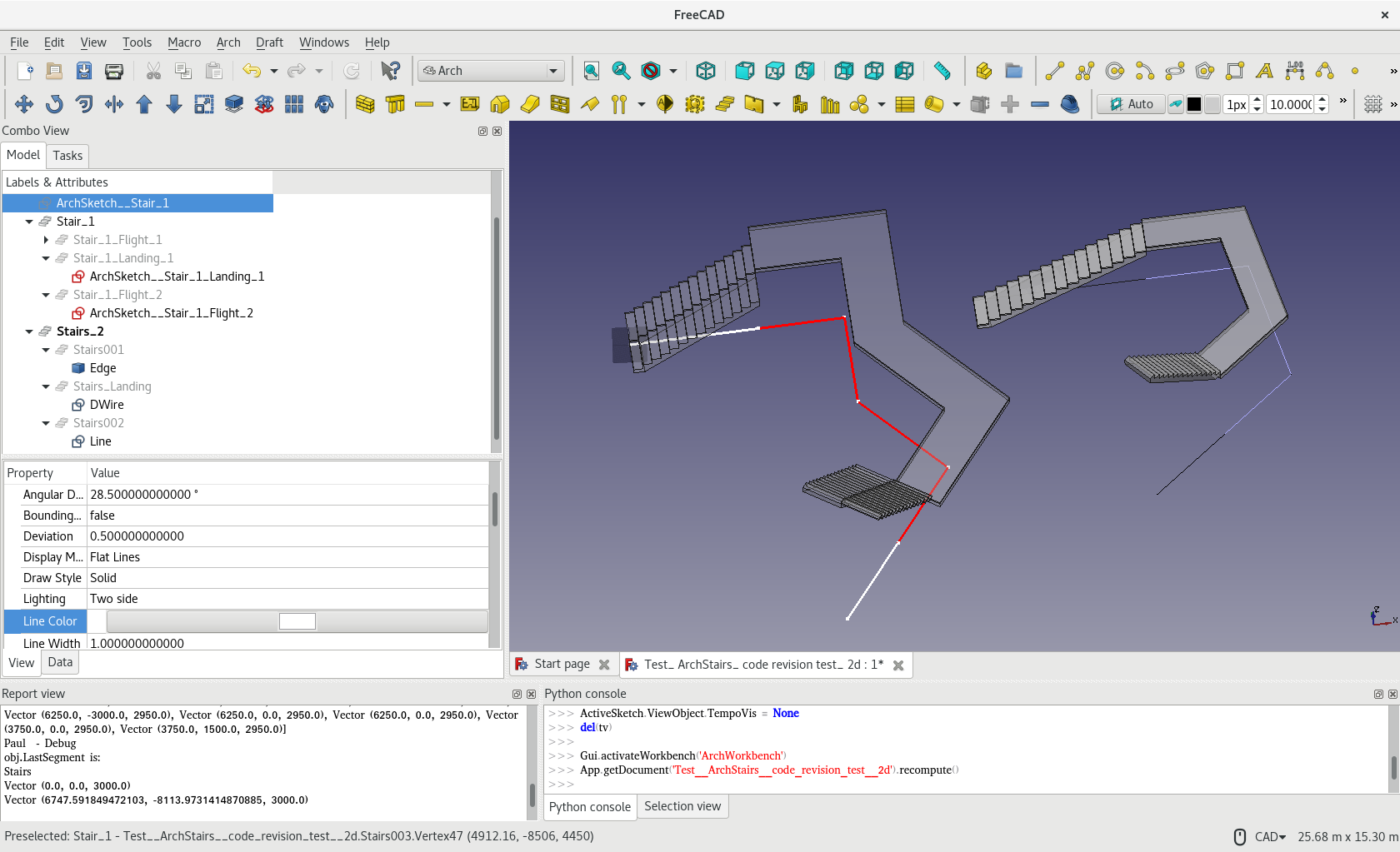
Don’t be mistaken by 1st screencapture below - it looks the landing is successfully constructed by the 3 red edges below? Just in this particular setting it looks as it works
Some geometries / codes issues being figured out…WIP… if someone like to look at / fix the mess created, please download
(I think the approach to add different ‘portion’ of a staircase in a Stairs Object Addition has other ‘side effects’ / ‘problem’, anyway, let it later…)
BTW, looks the original ArchStair has bug that the ‘massive’ structure does not honour the ‘right’ / ‘centre’ alignment setting? Or I have mess up the codes? Will further check …
Hi, I originally try some macros to ‘automate’ some repeating keystroke / mouse actions I think around same time last year… not been trained as a programmer so never think of really doing some serious codes.
Python seems to be quite close to natural language (like BASIC?) (a programmer have better / accurate comments on this), macros… macros …then.. start longer ‘codes’ maybe end last year reading online ‘tutorials’ (messy though) …
Having said that, I think if have a gap, better get a lesson to start some ‘orthodox’ programming training - would save much time ‘trial and error’, better readability, comprehensiveness etc. I read my first ‘macros’ now… I do not understand it now… I would re-write it if have time.
BTW, it seem somebody like Yorik etc. should be kind of mastermind paving some development approach, objects to add / improve… and maybe then more peoples to work on one or a few particular ‘tasks’ (like Re-Bar etc.)… better synergy… and much easier for people like me do not have a full picture of Arch Module, not to mention FC, Python etc.
Far from able to write something from scratch… if you don’t mind the original codes become a mess now
Would complete the landing first and see how to clean up the changes in codes better if it works afterall, and how ‘track-changes’ (MS Word term) works (sorry Gedit does not have this ‘feature’)… Just manage to open an account on GitHub, Kunda/Chrisb’s link should helps, when there is a gap.
BTW, I think the approach currently taken need a GUI like ‘drawing’ ArchWall ‘interactively’ - I simply have 0 idea / knowledge how it works… anyway, this is something much later.


 ).
).








 )
)