If it is not OpenSource I will not do any dev in my spare time in this regard. I would recommend to use the TCL interface than. Made a issue to bring light in the darkness … https://github.com/OpenSeesPy-pip/openseespy-pip/issues/11
according to a post on the issue OpenSeesPy is opensource and included in main opensees.
Would be good if one you you both opensees guys would test this OpenSeesPy and could give some feedback. Python is the languarge we speak, thus it would be cool to use this one.
cheers bernd
yes, it is in main source of opensees:

i will try to prepare an example for openseespy, these are available:
https://openseespydoc.readthedocs.io/en/latest/src/examples.html
OpenSees’ license
The Regents grants permission, without fee and without a written license agreement, for (a) use,
reproduction, modification, and distribution of this software and its documentation by educational,
research, and non-profit entities for noncommercial purposes only;
is not open source because of its non-commercial restriction, failing #6 of The Open Source Definition, “6. No Discrimination Against Fields of Endeavor”. It’s source-available. With its current license it will never, for example, be able to be distributed in Debian.
according to this issue on openseespy-pip i changed the name of element, but new question:
node numbering for C3D20 element is different than 20NodeBrick element in opensees, i map those node number, but it gives me this error:
Twenty_Node_Brick::Jacobian3d - Non-positive Jacobian: -1.73472e-11
    0   -8.260282e-01   -8.260282e-01   -8.260282e-01    2.261895e-01
    1   -3.936492e-01   -2.745967e-02   -2.745967e-02   -1.087298e-01
    2   -1.274597e-01   -1.274597e-01    6.350833e-03   -3.127017e-02
    3   -2.745967e-02   -3.936492e-01   -2.745967e-02   -1.087298e-01
    4   -2.745967e-02   -2.745967e-02   -3.936492e-01   -1.087298e-01
    5   -1.274597e-01    6.350833e-03   -1.274597e-01   -3.127017e-02
    6   -2.602817e-02   -2.602817e-02   -2.602817e-02   -6.189500e-03
    7    6.350833e-03   -1.274597e-01   -1.274597e-01   -3.127017e-02
    8    1.219677e+00   -1.774597e-01   -1.774597e-01    3.149193e-01
    9    1.774597e-01    1.549193e-01   -2.254033e-02    4.000000e-02
   10    1.549193e-01    1.774597e-01   -2.254033e-02    4.000000e-02
   11   -1.774597e-01    1.219677e+00   -1.774597e-01    3.149193e-01
   12    1.549193e-01   -2.254033e-02    1.774597e-01    4.000000e-02
   13    2.254033e-02    1.967734e-02    2.254033e-02    5.080666e-03
   14    1.967734e-02    2.254033e-02    2.254033e-02    5.080666e-03
   15   -2.254033e-02    1.549193e-01    1.774597e-01    4.000000e-02
   16   -1.774597e-01   -1.774597e-01    1.219677e+00    3.149193e-01
   17    1.774597e-01   -2.254033e-02    1.549193e-01    4.000000e-02
   18    2.254033e-02    2.254033e-02    1.967734e-02    5.080666e-03
   19   -2.254033e-02    1.774597e-01    1.549193e-01    4.000000e-02
now, my question is: what is principle axis in C3D20 element?

i examin it in three state, first no change between them, one for as is in picture and another for axis that i assume, but in those state gives me that error. this is my python script that convert node numbering:
inpfile = open('/home/ebi/Box_Mesh001.inp', 'r')
line = inpfile.readline()
while not line.startswith("** Volume elements"):
    line = inpfile.readline()
    continue
inpfile.readline()
line = inpfile.readline()

with open('/home/ebi/opensees/openseespy/element.tcl', 'w') as pyfile:
    while not line.startswith('*'):
        try:
            num, *nodes = line.split(',')[:-1]
            line = inpfile.readline()
            nodes2 = line.split(',')[:-1]
            n = nodes + nodes2
            maps = [7, 8, 5, 6, 3, 4, 1, 2, 15, 16, 13, 14, 11, 12, 9, 10, 19, 20, 17, 18]
            node = ''.join(f'{n[i - 1]} ' for i in maps)
#             node = ''.join(f'{i} ' for i in n)
            pyfile.write(f"element 20NodeBrick {num} {node}  1\n")
            line = inpfile.readline()
        except:
            break
have you read FEM_Mesh and FEM_Mesh_CalculiX they may help
Thanks reminding about this!
oops, i mistake this section in convert .inp file to opensees format:
xyz[-1] = xyz[-1].rstrip("\n")
last coordinate z, have “\n” character, this is now work, i will prepare .tcl and .py file soon.
thanks @bernd
this is my first attempt to visualize 3D cantilever beam with openseespy, it’s cool:

this example for 3D cantilever beam with 20NodeBrick (C3D20) element in opensees with .tcl and .py format.
python format:
load.py (825 Bytes)
nodes.py (8.49 KB)
element.py (4.56 KB)
Example8.1.py (1.54 KB)
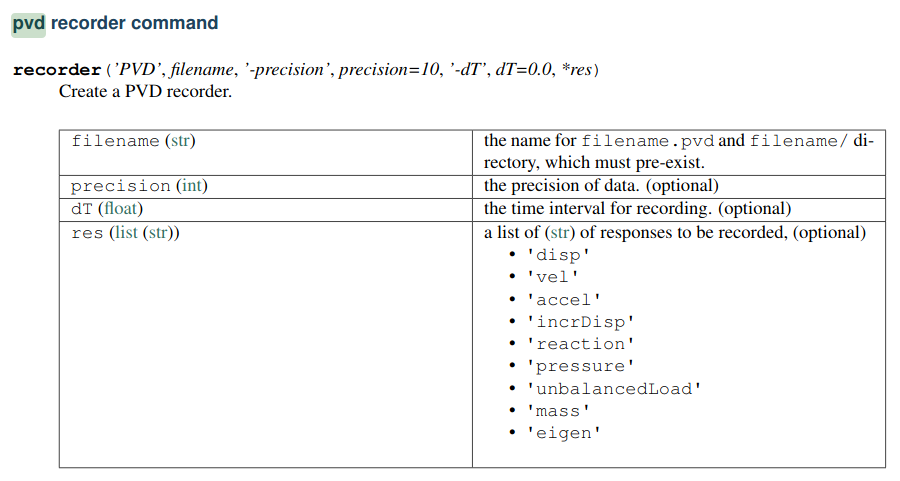
opensees can export to .pvd format that paraview can read, adding this line:
recorder pvd Paraview_Output disp reaction
other option for recording are in this picture:
this is displacement output from opensees in paraview:

thanks @bernd, I searched for the “** Nodes” in FEM workbench to find function that write Nodes in .inp file. i found it in FemMesh.cpp in App folder.
my question. how can i obtain nodes , elements and so on? with femmesh_obj.FemMesh? that femmesh_obj is ‘Fem::FemMeshObject’ object. it gives me nodes, edges , volumes and so on. is this way is true? or I must implement it in .cpp file? I don’t know more about C++ , but with python i can. thanks
You can code all in Python, but you could use C++ too. It is up to you. I would use Python since my C++ is poor.
as said before oofem branch is your friend  https://github.com/berndhahnebach/FreeCAD_bhb/commits/femoofem
Have a look at this commit how to implement a writer for a new mesh file type https://github.com/berndhahnebach/FreeCAD_bhb/commit/b5706560b1 and https://github.com/berndhahnebach/FreeCAD_bhb/commit/500b77bfc1
Furthermore have a look here too https://github.com/FreeCAD/FreeCAD/blob/953ae1e6e9/src/Mod/Fem/feminout/importZ88Mesh.py esspecially this method https://github.com/FreeCAD/FreeCAD/blob/953ae1e6e/src/Mod/Fem/feminout/importZ88Mesh.py#L421
To answer your question, start FreeCAD run this code:
from femexamples import ccx_cantilever_std as canti
doc = canti.setup_cantileverfaceload()
mesh = doc.Mesh.FemMesh
print(mesh)
print(mesh.NodeCount)
for n in mesh.Nodes:
    print("node no: {} has coordinate {}".format(n, mesh.getNodeById(n)))

print("done")
thanks @bernd. i implemented some part, heading and nodes. as i don’t familiar with git professional command, i think i made a mistake, but i created a PR for you, please forgive about it  , only please let me know my problems, although i must cleaner the code and remove some additional parameters:
https://github.com/berndhahnebach/FreeCAD_bhb/pull/66
i will continue developing with this regards:
I implemented element writer. now, when i want to implement load writer it gives me that error:
for ref_shape in femobj["NodeLoadTable"]:
KeyError: 'NodeLoadTable'
while i copy format from other solver:
for femobj in self.force_objects:
            # femobj --> dict, FreeCAD document object is femobj["Object"]
            direction_vec = femobj["Object"].DirectionVector
            print(direction_vec)
            print(femobj)
            for ref_shape in femobj["NodeLoadTable"]:
the output is:
[{'Object': <App::MaterialObjectPython object>, 'RefShapeType': ''}]
[{'Object': <Fem::ConstraintForce object>, 'RefShapeType': 'Face'}]
Vector (-0.0, -0.0, -1.0)
{'Object': <Fem::ConstraintForce object>, 'RefShapeType': 'Face'}
Have you instanciated the base writer clas FemInputWriter? The “NodeLoadTable” should be added there.
Would you point me to a branch where all you code is?
yes, this is my branch:
you need to get the NodeLoadTabel by
self.get_constraints_force_nodeloads()
in calculix this is done here: https://github.com/FreeCAD/FreeCAD/blob/92d005b26f/src/Mod/Fem/femsolver/calculix/writer.py#L1122 or in oofem here: https://github.com/berndhahnebach/FreeCAD_bhb/blob/699f3296aa0/src/Mod/Fem/femsolver/oofem/writer.py#L685
You did some stuff different than standard FreeCAD FEM. Like Elmer. In Elmer a lot is different too. I did not spend the time to understand everything. I just changed it in a way it runs like standard FEM to test if it works. https://github.com/berndhahnebach/FreeCAD_bhb/commit/b283f11ed8
You might change it back to your code .
set up the analysis
from femexamples import ccx_cantilever_std as canti
canti.setup_cantileverfaceload(solvertype="opensees")
- activate the analysis, select the OpenSees solver and click on run …
- ATM it prints the NodeLoadTable and writes some comment to tcl file …
References: empty in FemMaterial, FemMaterial
References: Face in ConstraintFixed, ConstraintFixed
References: Face in ConstraintForce, ConstraintForce
ConstraintForce:
    Type: Fem::ConstraintForce, Name: ConstraintForce
    ReferenceShape ... Type: Face, Object name: Box, Object label: Box, Element name: Face2
  No face data in finite volume element mesh. FreeCAD uses getccxVolumesByFace() to retrieve the volume elements of the ref_face.
{'Object': <Fem::ConstraintForce object>, 'RefShapeType': 'Face', 'NodeLoadTable': [('node loads on shape: Box:Face2', {4: 0.0, 2: 0.0, 49: 0.0, 64: 750000.0000000001, 189: 1500000.0000000002, 190: 1500000.0000000002, 1: 0.0, 100: 750000.0000000001, 191: 1500000.0000000002, 3: 0.0, 188: 1500000.0000000002, 88: 750000.0000000001, 102: 750000.0000000001})]}
[('node loads on shape: Box:Face2', {4: 0.0, 2: 0.0, 49: 0.0, 64: 750000.0000000001, 189: 1500000.0000000002, 190: 1500000.0000000002, 1: 0.0, 100: 750000.0000000001, 191: 1500000.0000000002, 3: 0.0, 188: 1500000.0000000002, 88: 750000.0000000001, 102: 750000.0000000001})]
***** OpenSees input file generated: /tmp/FEMWB/Unnamed/SolverOpenSees/Mesh.tcl *****

OpenSees solver input file: Mesh.tcl
Solver binary path: /home/hugo/bin/OpenSees
OpenSees solver binary: /home/hugo/bin/OpenSees
OpenSees solver run dir: /tmp/FEMWB/Unnamed/SolverOpenSees
OpenSees-info: reading output not yet implemented.
hope it helps bernd
https://github.com/berndhahnebach/FreeCAD_bhb/commits/femopensees