I’m pretty sure I have done this before as there are 2 other NC files in Start. I was using 18 as there was a video on how it’s done. I tried 19 too and get the same thing.
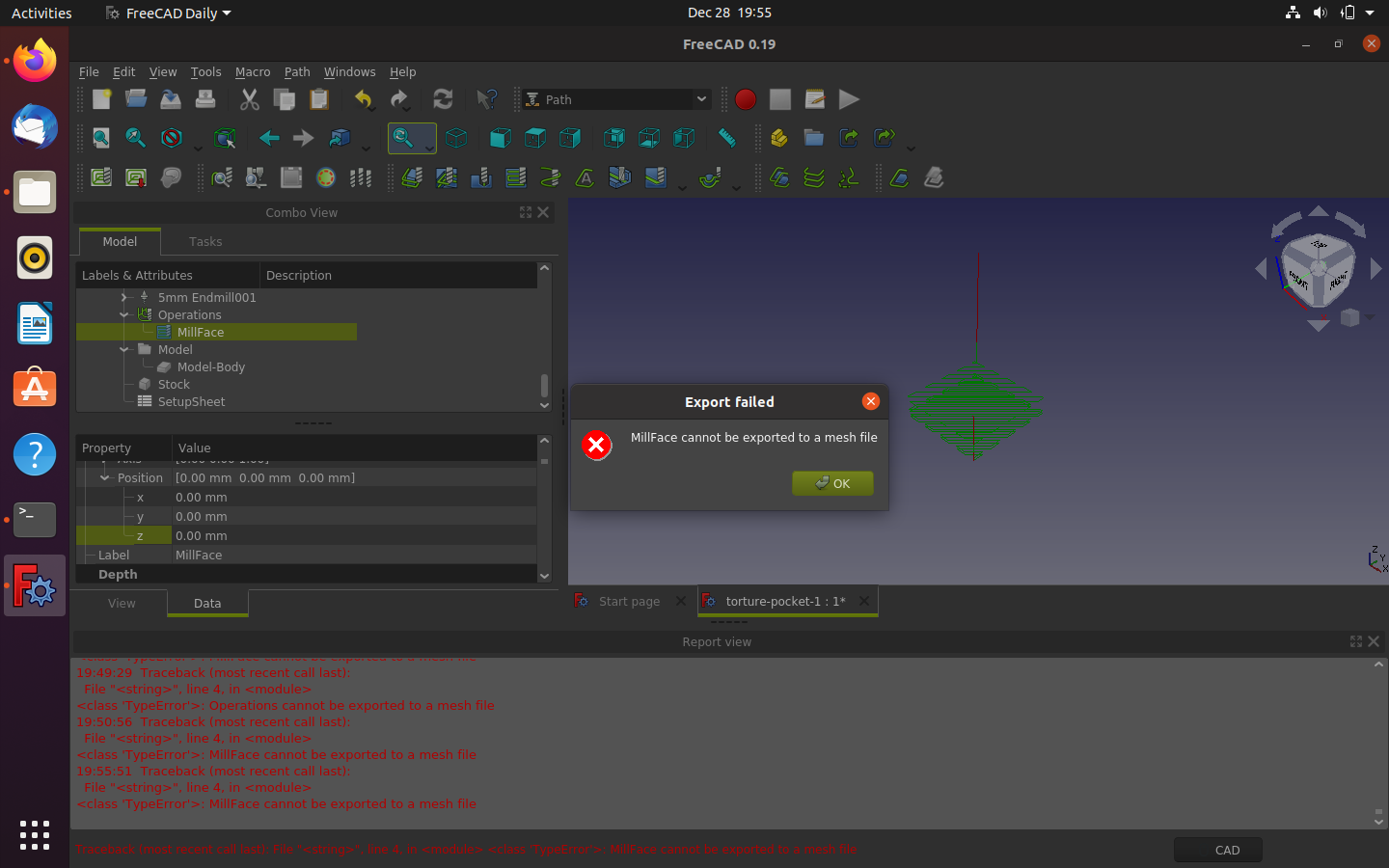
After Sim I tried to export gcode and I’m lost now. Only one option to export as a .AMF. Nothing else in the pull down. I put a name and save but nothing happens. I even tried replacing another file with no luck.

When I select the “Post Process the selected job” button there are no PP’S in there anymore. Only a file to save to.

I have Centroid as my PP

What the hell did I do to F this up?
Maybe it has something to do with my path?
Are 18 and 19 related? I see recent files in 19 that I didn’t do with it and now the path to centroi_post.py has changed to what I put in for 19 to 18. I’m “PRETTY” sure I didn’t put that centroid path in 18 but it is there now.
19 has no installed? So I may have screwed something selecting Centroid as the controller with a path to a Zipped file.

I try to change PP but only get a folder to select and no files anymore. What did I do? The PP path is where it is located but why no files to choose from anymore?
cog centertest (2).FCStd (439 KB)
I notice in the screen shots that the Operation "Drilling " is not selected, highlighted.
It is the operation path that you want to post process not the job.
Another thing to watch for is that the path is visible, when it is the icon beside the operation i.e, drillilng in this case, is present and coloured as in your screen shot; if not visible it is a greyed out circle like icon (ver 0.19 at least)
Well I got the same error “cannot export to the mesh file”, job and operations are active (and played with activating, deactivating, hiding etc.)

There is no problem with inspecting G-code.
There is no .nc extension to choose when exporting - maybe there is a problem?
Thx for the reply.
I had tried that first but here it is again. No export NC options, and no files to see in PP button only a folder to select.

Try selecting the actual “MillFace”
Do not try to EXPORT, to create gcode from your job & operations, only use post process.
When you create the job, you should select the Post Processor, else you will have the default. You can change this later in Job if you like.
Then when you post process, the selected Post Processor is used and the default behaviour is the file save dialog opens. This is to save your newly created gcode from the Post Processor. So it is not to choose a Post Processor, as your post seems to say, but allow you to set file name and location to save the gcode. Again, do not try to EXPORT, to create gcode from your job & operations, only use post process.
In the job setup, you can also create job templates for re-use in later jobs. You can also set the options to use in a post processor. Hover mouse cursor over field to see the big list of options. You can also set a lot of these options in your preferences for Path WB, including a default directory and file name for the gcode.
You can select the entire job, to PP all op’s, or just a single op - depends on how you designed your ops and what you want.
You should also (re)read the Path doco https://wiki.freecadweb.org/Path_Workbench. While FreeCAD doco can sometimes appear short and not say much, I have found on many occasions that re-reading when I get stuck like you are is very helpful and if not then please consider helping to improve the doco.
Drilling OP no mill face. No matter what I select, I get the same options. No NC anything.
Thx
Thx for the reply.
Centroid is selected in Job Properties/value.
In Path, I highlight either job or drilling and select PP button and name file as test.nc and save, No file gets saved. Tried replacing any other file in NC File dir on thumb drive with no luck after clicking I am sure I want to replace.
Just trying to get basics done then move on to harder things like templates and macros. LOL
I’m sorry I think I have been misinterpreting your post. Are you using “Export” ?
If so you are trying the wrong thing.
You need to use the toolbar button beside the job creation button (green path and red down arrow on it’s face is the correct one)
Or Post Process in the dropdown menu for Path.
On your drilling model you posted (cog_centertest) I get a fail message of
"
return self.script.export(obj, filename, args)
File “/usr/lib/freecad-daily/Mod/Path/PathScripts/post/centroid_post.py”, line 172, in export
if isinstance(item.Proxy, PathScripts.PathToolController.ToolController):
‘_TempObject’ object has no attribute ‘Proxy’
"
The " no Proxy" error is another issue but the post process did run for me.
There will be no output file because the post failed, on this error.
Edit :: Our posts have been crossing but I see Spanner888 has answered you more informatively.
Please post your FreeCAD version info (in forum code tags).
Also have you checked the report view pane for error information, and if any errors of relevant info there, please post here, again in code tags. I have been getting some errors recently that stop gcode being created, and this also occurs with your file and latest Linux appimage version of FreeCAD. Hence need to know your FC version.
Is this what you mean by forum code tags or do you want me to write in html? I barely remember any. LOL
init.py|attachment (21 KB)
errors.txt (1.31 KB)
My son is using the linux version. Newbe too but a programmer. I’ll send him the part.
First, it does appear the error in your errors.txt attachement are why you are not getting any gcode. As both bmsaus4ax and I have both confirmed the error and it might be related to recent ToolBit changes, I am pinging the developer for comment and as he is in different time zone, might take a while for response.
With regard to code tags, when you are creating/editing a post, select the text to be added in code tags, then click on the </> button above.
For example your errors.txt content:
post: centroid(I:/NC FILES/test.nc, )
15:53:35  centroid_post gcode postprocessor loaded.
15:53:35  Fixture
15:53:35  _125_Center_Drill
15:53:35  Drilling
15:53:35  postprocessing...
15:53:35  Running the Python command 'Path_Post' failed:
Traceback (most recent call last):
  File "C:\Users\Victor\Downloads\FreeCAD_0.19.23258-Win-Conda_vc14.x-x86_64 (1)\FreeCAD_0.19.23258-Win-Conda_vc14.x-x86_64\Mod\Path\PathScripts\PathPost.py", line 396, in Activated
    (fail, rc, filename) = self.exportObjectsWith(finalpostlist, job)
  File "C:\Users\Victor\Downloads\FreeCAD_0.19.23258-Win-Conda_vc14.x-x86_64 (1)\FreeCAD_0.19.23258-Win-Conda_vc14.x-x86_64\Mod\Path\PathScripts\PathPost.py", line 211, in exportObjectsWith
    gcode = processor.export(objs, filename, postArgs)
  File "C:\Users\Victor\Downloads\FreeCAD_0.19.23258-Win-Conda_vc14.x-x86_64 (1)\FreeCAD_0.19.23258-Win-Conda_vc14.x-x86_64\Mod\Path\PathScripts\PathPostProcessor.py", line 100, in export
    return self.script.export(obj, filename, args)
  File "C:/Users/Victor/Downloads/FreeCAD_0.19.23258-Win-Conda_vc14.x-x86_64 (1)/FreeCAD_0.19.23258-Win-Conda_vc14.x-x86_64/Mod/Path/PathScripts/post\centroid_post.py", line 172, in export
    if isinstance(item.Proxy, PathScripts.PathToolController.ToolController):

'_TempObject' object has no attribute 'Proxy'
Also please read https://forum.freecadweb.org/viewtopic.php?f=3&t=2264 on how to get your FC version info and other helpfull info on using the forum.
This is a bug in the centroid post processor, I guess it hasn’t been used much, from the looks of it that bug has been there for about 2 years. I don’t have access to a centroid machine, so any fix I put in is flying blind. Anybody with a centroid machine who can look into it?
I have been getting same error with grbl post processor on my own freshly created FC design. Maybe grbl was derived from centroid or vice versa?
Also the error does mention ToolBits, so I pinged sliptonic.
There’s been a lot of copy and paste through the post processors, I know sliptonic made an attempt in consolidating common code, so we have to fix these things only once…
I don't understand what I did wrong. I copied clipboard and attached it as per video in that link.

My son just installed FC on his Linux box and loaded the file and gets errors too. Maybe it's the drawing being imported dxf and not constrained.
I forgot to. I'll work on that or better yet just do another drawing with FC completely.

Thx
I just had a look at the grbl processor, it doesn’t seem to have this porblem. Are you getting the same error as the OP? Could you post your version info?