Hey,
Had a fun few days packaging free cad up and doing some web servery things. Should have a package published here soon
Currently have gotten the following things working.
Streaming session FreeCAD to the browser.
HTML user interface with ribbon style tool bar configuration and tool to customise that interface.
Build scripts tested on Debian and Ubuntu 18.04.
Works in Firefox or chrome. Chrome has one known bug at the moment.
Uses the latest stable versions of the FreeCAD package.
Runs entirely in docker.
Just wanted to guage community interest in such a package.
Sounds great. Over the years, even before I arrived, many folks have done this.
Are you planning to release this open source ?
’
JFYI it’s ‘FreeCAD’ not ‘free cad’
“having fun packaging FreeCAD” (whatever floats your boat )… Maybe you could consider helping us out in the Packaging Forum ? https://forum.freecadweb.org/viewforum.php?f=42
There is also an effort to create a FreeCAD development docker container, see 3821 maybe that would interest you as well ?
Ok.
The following link is a zip file for the package I have been working on. Please note. This is a very early snapshot of a dev environment not intended to really be used but just an example to show the possibilities. I do not have all of the GUI commands linked to the right icons yet. That will Just take some time and patience.
If you do end up testing spinning a part using 2 buttons on the mouse at the same time only works in firefox. Not chrome at the moment. Every thing else should work in chrome.
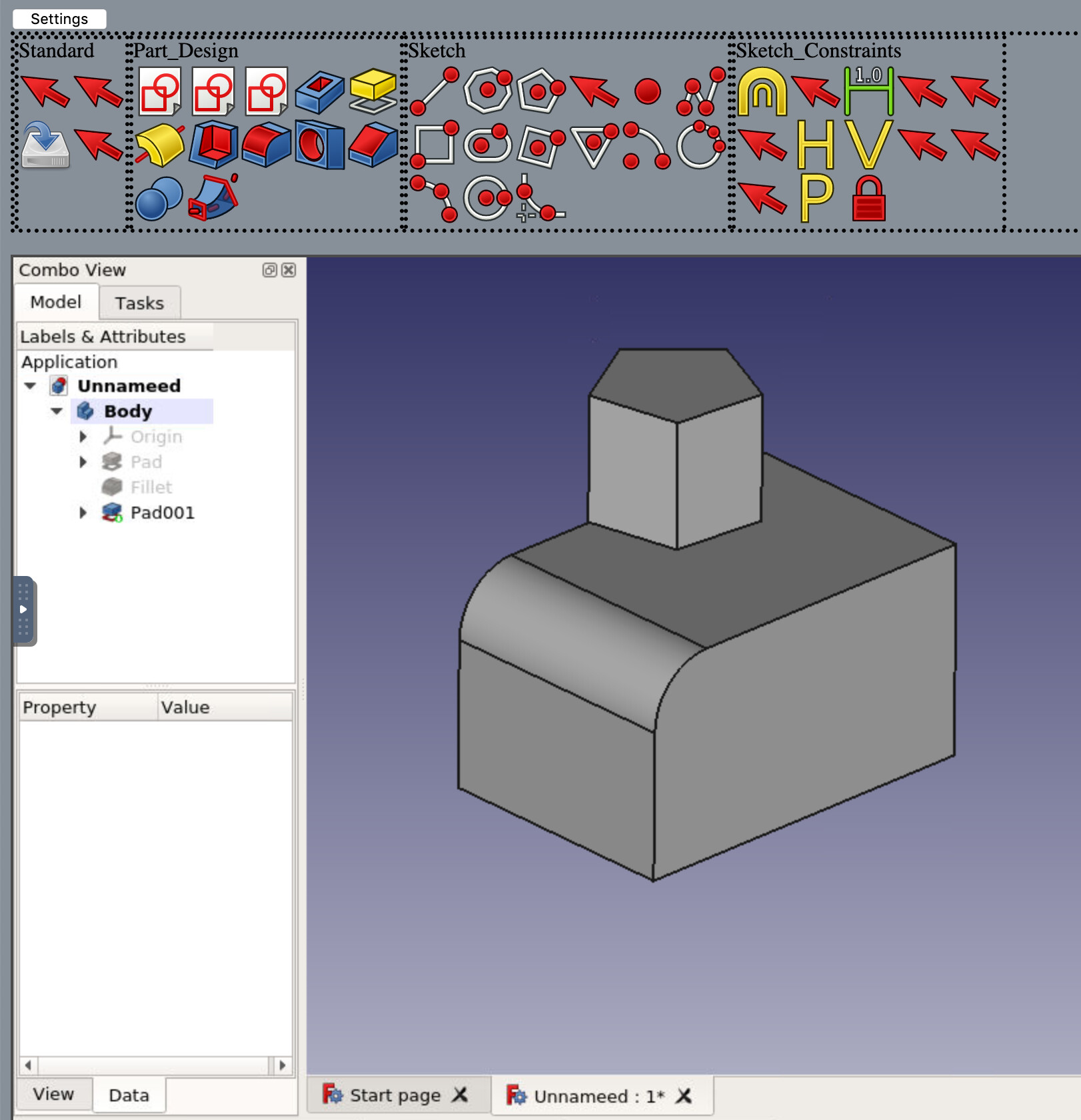
Here are some screen shots! If they look a little weird keep in mind I am running on a chromebook.
Build instructions
If you are familiar with how to work docker you can do the following commands to get a server up and running real quick.
git clone https://github.com/mmiscool/FC-Docker.git
cd FC-Docker
./build-run.sh
This will work on ubuntu 18.04 and debian9 so long as you have docker installed.
If you do not run your own docker server the same commands can be used to get a container running FreeCAD with a browser based interface on https://labs.play-with-docker.com/
That web site lets you play with docker containers for free. Just sign up and it gives you a console to play in.
Once it is done building click the port 80 link as shown in attached screen shot.
That web site will let you run a temporary docker container for 4 hours.
The first time you run a build it will take a few minuets to complete.
I updated the previous post for the URL of the package. There was a small problem with the first build I posed so if you got it before I updated you will want to rebuild it again.
Awesome!!
My dreams come true!
Really, I was expecting this as the best update that FreeCAD can ever have… run it inside the browser (ala OnShape) would make it worldwide relevant.
Well, I’m going to try it out.
PS - I’m web designer and responsible of FreeCAD stylesheets (themes) among other things so I am very interested in helping you with the look and feel of this FreeCAD web app.
Yes, it’s working through online docker container:
It would be nice to chat or communicate in order to make this happen, my available time is reduced so be patient, please.
One question: is Docker project open source? I don’t know if this would become a dead end for real FreeCAD development…
The client doesn’t receive pre-rendered images (as in the screen-scraping scenario), nor does it receive whole CAD models with precise geometry. Rather, its graphics are all in the form of triangles, rendered with WebGL (in browsers) or OpenGL (for mobile apps). Rather than using one of the third-party scenegraph libraries, we use our own custom renderers, with our own custom capabilities, and with the speed we need to display large models.
Every approach has some (dis)advantages. Streaming does not need fast client hardware but introduces a lot of latency. But, because it is a hot topis right now, some big companies are making research or reducing streaming latency. Have you seen Stadia Streaming Tech: A Deep Dive (Google I/O’19)?
Hello.
It seems the file hosting service I was using is down.
I updated the list of commands in the post you referenced. Should be working now.
Did a bunch more work on this thing. Made a little video showing how to get it set up. Please keep in mind this is about a weeks worth of hacking around. It is not some thing that is any thing close to production ready.
Just did an update that makes it so that you don’t have to click back in to the window to type. For example before when you clicked the dimension button from the tool bar you would have to click back in to the free cad dialog before being able to type. This limitation has been removed. File management has gotten a bit better.
I must say. Pretty happy with how this is turning out so far.
On the other hand some time ago I have been playing with 3D engines like babylonjs that drew directly the freecad objects in the browser without using VNC.
What the freecad server actually did was to rebuild the model into a mesh object to send to babylonjs every time it changed. It’s a lot of work on the server for large models, but it worked. But this seems better to me as it uses vnc to take control of the freecad server.
I add a wish list for the project:
That you can change the workbench from the same browser.
That each user can manage his instance privately and can share it with multiple friends if he wants.
To be able to upload models made in FreeCAD to display them in the browser.
I will continue publishing if I find some interesting features.
I will be putting this out as open source of one type or another here soon.
I use components from lots of different projects so I would need to sort out a list of those project and there licences.
Because of how I am doing the packaging I think it should be fine to acknowledge the licences for the separate entities that my custom code talks with. For the code I developed and the docker file to build the image I am thinking of using https://www.gnu.org/licenses/agpl-3.0.en.html .
That would force any one who deploys as a public cloud service to release any modifications they did to it. It will either be that or just a simple standard MIT licence. I don’t feel I am at the point of release yet either way. I have to automate the build process and dependency fetching first.
I did a bunch more work on this thing today. Really have some interesting things up and running now. Also been working on managing sessions and spin up/shutdown of these things on the fly. That way it can be deployed as a service with users and session management. This is really just a small portion of a much bigger goal.
 )… Maybe you could consider helping us out in the Packaging Forum ?