Ah the UI is done in .net… So that isn’t really an option.
This one looks interesting too:
https://github.com/martijnkoopman/Qt-Ribbon-Widget (although it is dead for 5 years.)
I btw tested macad and it doesn’t even has dimensions, so it’s UI looks clean it’s very limited in the capabilities.
Although it is very impressive work for a single person. (as far as I see it it’s developed by one dev.)
Yes, this looks interesting (and its flat color icons looks nice).
Also there is some Ribbon Bar implementation in PySide/PyQt (instead of native Qt/C++): https://github.com/haiiliin/pyqtribbon
Just a heads up, the scaling of the ribbon is a bit large for my tiny-screened laptop, even though I have the icons set to Small in Edit/Preferences.
Also, it seems like the FreeCAD/Modern Menu icon doesn’t do anything. I’m not sure if I might be missing some part of the setup, or if this is known/intentional at the moment.
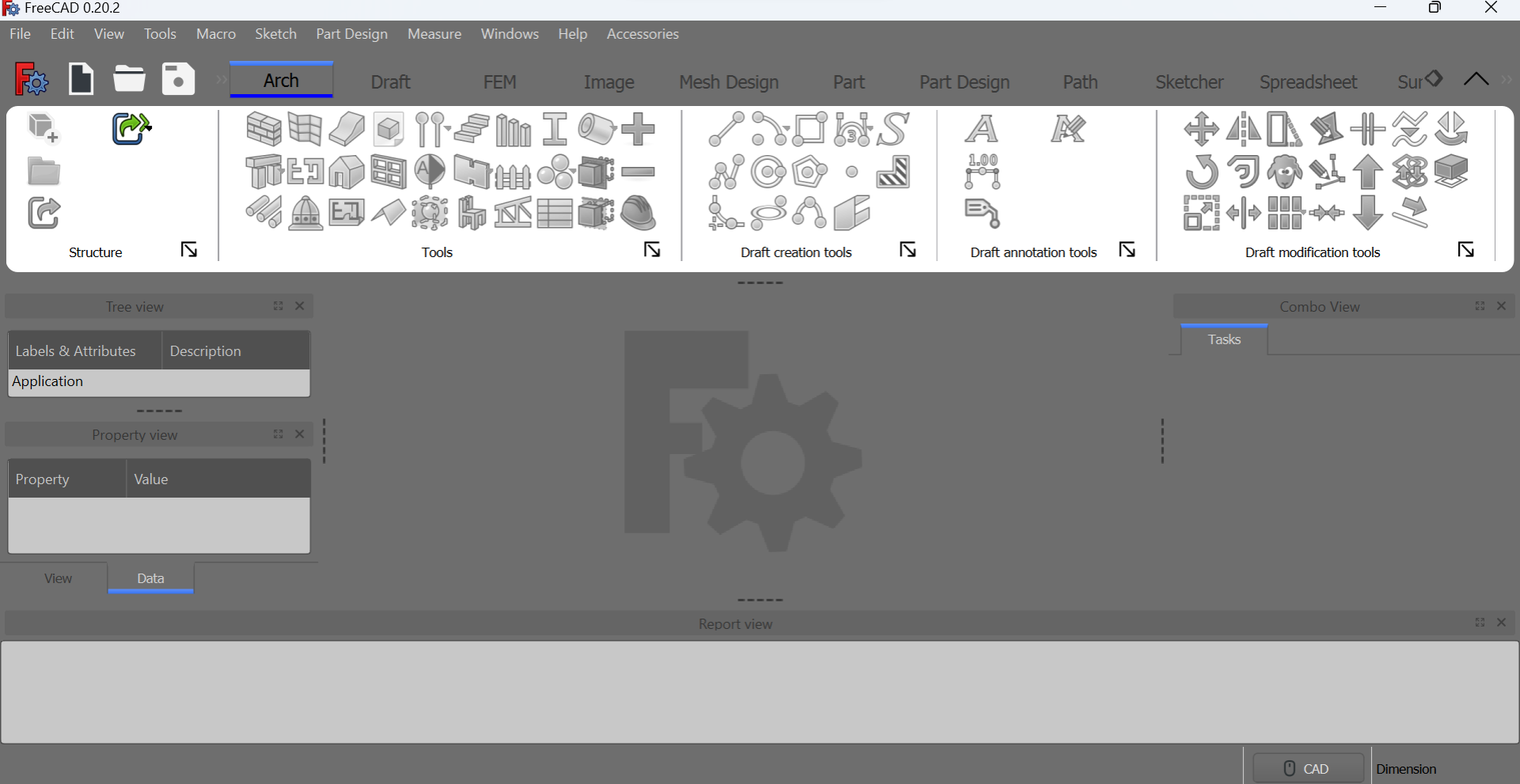
Whoops, the GitHub page does mention what’s going on with the menu/preferences. Silly me for not reading two paragraphs down 
That’s actually the library I used 
But for a real integration into FreeCAD I would prefer writing a custom solution because all existing libraries have some “minor” issues / missing features that are growing into larger problems if you want to create the UI for a large, customizable program like FreeCAD.
The icon size is one of the missing features of pyqtribbon (I have not missed anything).
You mean the FreeCAD icon on the top left corner? This has indeed no functionality although I was planning to put the menu of the menu bar at the top into it.
Best regards
geolta
But back to a technical topic: I think it is obvious that just taking the order of the normal toolbars for a ribbon is not a good idea. Currently, this issue is handled with a JSON file where the new order can be specified. I think, this isn’t the best idea, because the tools change for different versions of FreeCAD, so you would need one configuration for every version of FreeCAD. And if some developer adds / removes a tool, the order might get messed up.
The problem is though, that I have no better idea
Maybe somebody has one?!
Thanks in advance for suggestions!
While implementing the automatic switch between PartDesign and Sketcher, I ran into a problem, see this forum thread: https://forum.freecad.org/viewtopic.php?t=79768
Please answer there, if you know a solution
Hi,
haven’t made much progress in the last weeks 
I only added the workbench icons to the tabs for a better visual structure.
I’ve looked a bit into the source code – for me (without any experience in the FreeCAD core) the most viable solution seems to be to implement a custom QToolBar that displays commands as a ribbon panel and display the Workbench-Dropdown as a tab bar. I know, that there are developers with much more knowledge of FreeCAD so I highly appreciate feedback on this idea
Best regards!
Yeah, I managed to implement the automatic switching between the workbenches, like between PartDesign and Sketcher
You can download it from the GitHub Repo, enjoy: https://github.com/geolta/FreeCAD-Ribbon
https://github.com/czyt1988/SARibbon
This repository could be a good starting point
Regards, MCx
I wonder if anyone can give me a hint. I am trying to install the FreeCAD-Ribbon but
keep getting the '..“During initialization the error “No module named ‘pyqtribbon’” occurred in C:\Users\User\AppData\Roaming\FreeCAD\Mod\FreeCAD-Ribbon\InitGui.py..” error on start-up
I have pip installed pyqtribbon and pip list seems to see it
when issued from the ../Mod/FreeCAD-Ribbon and the Freecad/bin directories
so I think it is installed.
Also pkgutil.find_loader is also indicating it is there
import pkgutil
check = pkgutil.find_loader('pyqtribbon')
if check:
    print("Module is installed.")
else:
    print("Module is not installed.")
I noticed other people had had a problem, but I thought I had installed everything correctly
Many Thanks
Most obvious answer is to issue on FreeCAD Cosnole:
import sys
print(sys.path)
and see if the library location is in the path.
At least on a working FreeCAD version.
If you are speaking maybe during the WB init phase, probably the same will work as it should print some debug data somewhere, on Windows I don’t know, on Linux if you launch from a terminal you will have printouts in the terminal and also in report view.
Hope it helps.
Regards
Carlo D.
For both Windows and Linux I use this macro saved as a py file in my macro folder, then I know for certain it’s the Python version that Windows/Linux is using currently and not some other lying around on the drive (note it’s tested on 0.20.x and above):
# pipModule = "lxml"
import re
import os
import platform
import distutils.spawn
from PySide import QtCore, QtGui
from PySide.QtGui import QLineEdit
# FreeCAD.Console.PrintLog(platform.platform()+'\n')

class PipInstallModule():
    def __init__(self):

        self.dialog = None
        self.s1 = None

        # Make dialog box for the input of the module name
        self.dialog = QtGui.QDialog()
        self.dialog.resize(350,100)
        self.dialog.setWindowTitle("Pip Install/Update Module")
        la = QtGui.QVBoxLayout(self.dialog)
        t1 = QtGui.QLabel("Module Name to Install/Update")
        la.addWidget(t1)
        self.s1 = QtGui.QLineEdit()
        la.addWidget(self.s1)
        self.t2 = QtGui.QLabel("")
        la.addWidget(self.t2)
        # Add OK / Cancel buttons
        okbox = QtGui.QDialogButtonBox(self.dialog)
        okbox.setOrientation(QtCore.Qt.Horizontal)
        okbox.setStandardButtons(QtGui.QDialogButtonBox.Cancel|QtGui.QDialogButtonBox.Ok)
        la.addWidget(okbox)
        QtCore.QObject.connect(okbox, QtCore.SIGNAL("accepted()"), self.proceed)
        QtCore.QObject.connect(okbox, QtCore.SIGNAL("rejected()"), self.close)
        QtCore.QMetaObject.connectSlotsByName(self.dialog)
        self.dialog.show()
        self.dialog.exec_()

    def proceed(self):

        self.t2.setText("Attempting to download and install/update...")
        FreeCAD.Console.PrintLog("Attempting to download and install/update...\n")
        # la.addWidget(t2)
        if self.s1.text()=="":
            FreeCAD.Console.PrintError("You must enter a module name\n")
        else:
            pipModule = self.s1.text().lower()
            if platform.system() == 'Windows':
                # pip_cmd = distutils.spawn.find_executable("python.exe")
                pip_cmd = 'python'
                # pip_cmd = 'where python'
                try:
                    out = os.popen(pip_cmd + ' -m pip install --upgrade '+pipModule,'r')
                    # out = os.popen(pip_cmd + ' -m pip install git+https://github.com/tensorlayer/tensorlayerx.git','r')
                    # out = os.popen(pip_cmd, 'r')
                except:
                    FreeCAD.Console.PrintWarning("Something went wrong with the pip install/upgrade of "+pipModule+"\n")
            if sys.version_info.major >= 3 and platform.platform() == 'Linux-5.4.0-47-generic-x86_64-with-LinuxMint-19.3-tricia':
                pip_cmd = "python"+str(sys.version_info.major)
                try:
                    out = os.popen(pip_cmd + ' -m pip install --upgrade '+pipModule,'r')
                except:
                    FreeCAD.Console.PrintWarning("Something went wrong with the pip install/upgrade of "+pipModule+"\n")
            if platform.system() == 'Linux' and sys.version_info.major < 3:
                pip_cmd = "python"+str(sys.version_info.major)
                try:
                    out = os.popen(pip_cmd + ' -m pip install --upgrade '+pipModule,'r')
                except:
                    FreeCAD.Console.PrintWarning("Something went wrong with the pip install/upgrade of "+pipModule+"\n")
            if 'out' in locals():
                out_string = out.read()
                out.close()
                # print(out_string) # put back as commment when finished
                new_module_status = None
                if re.search(r'already up-to-date: '+pipModule,out_string) != None:
                    result = re.search(r'already up-to-date: '+pipModule,out_string)
                    new_module_status = result.group(0)
                if re.search(r'Successfully installed '+pipModule,out_string) != None:
                    result = re.search(r'Successfully installed '+pipModule,out_string)
                    new_module_status = result.group(0)
                if re.search(r'Successfully installed ',out_string) != None and new_module_status == None:
                    result = re.search(r'Successfully installed ',out_string)
                    new_module_status = result.group(0) + pipModule
                if re.search(r'already up-to-date: '+pipModule,out_string) != None:
                    result = re.search(r'already up-to-date: '+pipModule,out_string)
                    new_module_status = result.group(0)
                if re.search(r'Requirement already satisfied: '+pipModule,out_string) != None:
                    result = re.search(r'Requirement already satisfied: '+pipModule,out_string)
                    new_module_status = result.group(0)
                if new_module_status:
                    FreeCAD.Console.PrintMessage(new_module_status+"\n")
                else:
                    FreeCAD.Console.PrintWarning("Could not determine the error while trying pip install/upgrade of "+pipModule+", possibly does not exist.\n")
            # print('Pip macro complete')
            self.close()

    def close(self):
        self.dialog.hide()

PipInstallModule()
Problem is however where pip install the module, as example AddOn manager seems to install modules in the Mod directory.
Now I don’t remember exactly but chennes has fiddled a little when setting the install of external python modules during development of AddOn manager.
As the module will be needed by an AddOn, probably OP should follow the way chennes as used, I remember that there is a way to activate AddOn manager development flag that will help to create files needed to have AddOn inserted in FreeCAD AddOn manager list.
If not OP coulp probably set pip destination in the place AddOn manager put packages that should be already in path.
Is your script doing something similar? Sorry but on my mobile it is difficult to read code as screen is too narrow.
Regards
Carlo D.
onekk, syres,
Very many thanks for your input. I now seem to have got the ribbon working, but some background
There are a number of python versions installed with some attached to specific packages, as per FreeCAD.
I had tried to put the the pyqtribbon on the path and it was showing in the FreeCAD sys.path, and
when I ran FreeCad-Ribbon from the cmd line, but Freecad didn’t seem to be able to find the external
directory at startup. In the end I just copied the pyqtribbon files to Freecad..conda./bin/Lib/site-packages
which seemed to work, but obviously will need to be done each time a new dev version is downloaded,
so I need to find a better solution. If anyone else tries this there also seems to be a dependency on qtpy and
qtgui which also dosen’t seem to be in the base dev download.
Now investigating the configurations to see if I can generated something similar to what I had with Hakan’s
ModernUI.
Thanks you once again for the suggestions
BW
onekk It’s the most simple pip install and therefore without any specific prompting goes into site-packages or dist-packages depending on the platform used. Chennes additional folder I assume is so that FreeCAD can’t be blamed for wrecking someone’s platform setup but it’s only an additional folder for FC to search to find the library.
It depends on your installation, as example in some scenario and if you are developing an AddOn IMHO better to start with this in mind, solving things later could be problematic, as an AddOn should be installed even on AppImages or similar solution so it is not insured that python version are matching between system installation and FreeCAD.
But this is my personal opinion only, the fact that the library is not found by FreeCAD however seems to reveal a situation similar to what I’ve described.
Regards
Carlo D.
Love this.
There are 3 rows of icon. Is there a section in RibbonStructure.json to change it to 2 rows or 1 rows?
Glad to see the ribbon is getting developed beyond Modern UI.
I exclusively use FreeCAD with Modern UI. I cannot stand the old Win3.0/Win95 toolbars, though I may be in the minority in FreeCAD community. Watching videos of my favorite users constantly switching between WBs by using that pull-down menu to get to the appropriate toolbars makes me want to poke my eyes out.
ModernUI is what made FreeCAD usable for me, so looking forward to seeing it continued.
Lastly, I think LibreOffice is a good example of the flexibility to user preferences, where you can still use Win3.0 style of toolbars or use the modern ribbon style with functions grouped accordingly into tabs.
Thanks for picking up the ModernUI torch.