[Discussion] A different approach to Arch modelling (Arch Assembly?)

There are many different issues in your post, but basically:

Any IFC object can be exported as anything. It could be a simple FacetedBrep object (a solid made of flat faces), which is what we do when we’re unable to get a better way. IFC is very free-form, it supports almost all the same geometry entities as Brep/Step. But many apps rely, or work much better when objects are extrusions. Revit is always the first culprit in that regard. Certainly than 50% of the complication we have with IFC is because of Revit.

So as much as possible, we try to export things as extrusions.

Now the IFC format has another very annoying “feature”: Placements. They are complicated and some object types have very specific ways. That’s the case of extrusions for example, where the base profile must always lie in the XY plane. So we cannot just take the baseline we have in FreeCAD and apply the extrusion vector, we need to first place the base face in the XY plane, apply a transformed extrusion vector, then rotate/move everything back into position. In all Arch objects where there is a getExtrusionData method, that’s a way to try to achieve that in a way that’s compatible with IFC.

Of course we could do that in other ways, for example let objects build their geometry the easy, FreeCAD way, and have another structure somewhere else that is used only at IFC export, that would deduce extrusions from any object when needed. So the BIM objects would be free of IFC hassle and could be much, much more simple. I would have been against that in the past because it seemed not very IFC-ish, but I’m really begin to change my mind…

That’s currently what is happening at IFC import, actually. An extrusion is recreated even for FacetedBreps if it’s possible.

IFC objects can also have several representations. This is often used in walls, where there is one solid representation, the extruded solid, and one axis representation, that contains the wall baseline. I heard some apps use that to recreate the complete parametric wall with its baseline, but I never saw it really working. Also because there is no way to “bind” the axis with the base profile of the extrusion, so it’s flaky to know how to use the axis.

One thing I’m really not liking is to have several intermediary objects in each wall. If you think of a 1Gb IFC file, which is not uncommon at all, there can be hundreds of walls. It is already hard to bear by FreeCAD as it is now. If each wall is made of 2 or 3 objects, we’ll end up with hundreds of additional objects, which will clog things even more and become a serious limitation to use FreeCAD for BIM for many people. I think we need to keep things with as few document objects as possible.

Internally of course, nothing prevents from having different components, modules, derived classes, anything you see fit. But while these things are fine for PartDesign-like workflows, we really have to think “economically” with BIM.

I do not understand much of IFC at the moment, but what you are evisioning is quite appealing…
How did you learn IFC? can you suggest some guides (apart keep stalking Moult I mean)?

IFC objects can also have several representations. This is often used in walls, where there is one solid representation, the extruded solid, and one axis representation, that contains the wall baseline. I heard some apps use that to recreate the complete parametric wall with its baseline, but I never saw it really working. Also because there is no way to “bind” the axis with the base profile of the extrusion, so it’s flaky to know how to use the axis.

this is still totally obscure to me… need to understand more…

One thing I’m really not liking is to have several intermediary objects in each wall. If you think of a 1Gb IFC file, which is not uncommon at all, there can be hundreds of walls. It is already hard to bear by FreeCAD as it is now. If each wall is made of 2 or 3 objects, we’ll end up with hundreds of additional objects, which will clog things even more and become a serious limitation to use FreeCAD for BIM for many people. I think we need to keep things with as few document objects as possible.
Internally of course, nothing prevents from having different components, modules, derived classes, anything you see fit. But while these things are fine for PartDesign-like workflows, we really have to think “economically” with BIM.
Yes, I agree. If we end up with something that works good but not efficient enough in terms of performance, it would just be unuseful.
Paullee option with sketches is excellent regarding this aspect.
But what do you think would be a proper limit of objects for a wall? Current Wall segment have 2 objects (a base sketch and the wall itself)…
Perhaps also one wall object per wall segment is too much…

IFC is really a pain in the ass, because while there IS a relatively good, well-illustrated and complete documentation, that unfortunately for some reason they moved out and now I can’t find it anymore, the concepts in general are often cryptic and hard to understand.

Maybe we could do our part there, and have a thread specially for IFC format questions and explanations…

Basically to reply the representations question:

You have one main IFC class called IfcProduct to represent all the “objects” in a building, like walls, doors, columns, etc. All other types like IfcWall, IfcDoor, etc… are derived from IfcProduct.

IfcProduct has a few generic properties like name, description, ID, and representations.

The representation is a list of representation objects. Representations are classes derived form IfcRepresentation, and they can be solid geometry, 2D objects, and more. Each representation in an IfcProduct has a name. Usually, there is always at least one which is a 3D geometry and is called “body”. But you could do pretty much what you want there, for ex. add an “axis” one that is just the baseline of the wall, “footprint” that would be the base face, etc… AFAIK there is not much norm there outside the “body”.

At the beginning of the IFC file you also define contexts (IfcContext). Each representation always refers to a context. So basically you could have one context which is the 3D model, another which is a floor plan, etc. I guess you understood the idea.

The 3D geometry representation can be made of many things, like extrusions or breps. Breps are easy, but not editable (it’s just a list of faces, there is no information of how the object is constructed), while extrusions are made of a base profile and an extrusion vector or path. So they are more easily editable as the importing app can recreate a parametric object where the extrusion can be changed.

Maybe we could actually try simplifying the whole IFC import process, by having all objects always created as dumb shapes on import, which would make everything much faster (both the import and the model handling in FreeCAD), and be able to “make object editable” on demand, as a right-click option or something like that, where it would recreate the necessary baseline, extrusion direction and whatsoever.

In 90% of the cases you don’t really need to edit imported IFC objects. At most move them. So you don’t really need them all editable. That might be an interesting idea to explore… And it would allow to make a more complex wall object, that would only be used when needed, not for each and every wall

Sorry for the intrusion, but a brep object is not very near the way OCCT represent internally some objects.

I was experimenting with some BREP objects, just for fun and it seems not to hard to reproduce the things, they are a list of faces that interconnects.

The most challenging task would be create an object in FreeCAD that hold the imported Solid.

But I’ve note that many objects could be created simply passing a list of tuple (Xcoord, Ycoord, Zcoord), instead of Vector, the coordinates could be easily extracted with x = V0[0] y = V0[1] z = V0[2]

x = V0[0]
y = V0[1]
z = V0[2]

or even better with:

V0 = (10,20,30)
vx,vy,vz = V0
print("X: {0} Y: {1} z: {2}".format(vx, vy, vz))
print(vx)
print(vy)
print(vz)

a complex polygon could be created easily with:

import FreeCAD
import Part
DOC = FreeCAD.activeDocument()

def estr_comp(nome, spess):
    vertex = ((-2,0,0), (-1, 2, 0), (1, 2, 0), (1, 0, 0),
              (0, -2, 0), (-2,0,0))

    obj = Part.makePolygon(vertex)
    wire = Part.Wire(obj)
    poly_f = Part.Face(wire)

    cexsh = DOC.addObject("Part::Feature", nome)
    cexsh.Shape = poly_f.extrude(Vector(0, 0, spess))
    
    return cexsh
 
obj = estr_comp("test_extrusion", 10)

Maybe I’m misunderstanding the problem, but Vector I think uses more memory than a tuple with simple the coordinates, eventually it is possible to vector only when needing complex operations, but not for storing data even in the FCstd file, but I don’t know the internals of FreeCAD.

Hope to have not bothered you

Regards

Carlo D.

As long a you contribute to the discussion you can intrude as much as you can!
Yes. It is, and thanks for the hint about App::Vector vs (x,y,z). I did never consider this.

Anyway the discussion is more focused on the proposal for a new wall object. And it have to be parametric, so if BREP is the only output, when importing back it does not give us any parametrical information. It’s to say, it just tell us the geometry Shape, but not for example the wall height, the wall width, etc. and guessing them from the BREP shape could be really difficult sometimes :slight_smile:

We have a new toy to play with, with a lot of @realthunder magic!
I’m attaching an improvement over his old macro, that served as a basis for the wall prototype.
It’s a Part::FeaturePython object that has a ViewObject with Gui::ViewProviderOriginGroupExtensionPython.
@realthunder tweaked the DisplayMode so it is able to display its own shape and its children shape at the same time.
So just 1 object for the wall! and the childrens are displayed perfectly!!!

Try it, it’s amazing =)
shapegroup.FCMacro (3.62 KB)

After seeing the code and experimenting a lot, I’ve seen that many objects accept tuples with coordinates, but not every object and maybe some of them accept not only list but tuples, it seem not a big improvement, but in python, tuples are more “memory efficient” and with pithon3 it is easy to transform them in list.

Maybe it is interesting to test if using tuples in some operation will speed up things.

New Python have introduced more data structures, like sets() and deque that is said to be much fast than list in append and pop operations.

But I don’t know in which version and what are the drawbacks, it there are any.

I’m not an expert of Python, simply I’m using it and sometimes I’m faced with problems, so some solutions I’m integrating some solutions in my code, generally if i have to append something i use lists, but for example to store coordinates that I have to use without modifying them I’m using tuples.

I will check the code in the macro you attach and I will see if there is room for “improvements”, if it is possible to test outside a developing environment, maybe some speed improvements are possible using maybe some tuples instead of vectors, a fast way is to insert some time() print and calculations to see if a little modification in code is speeding things up.

Regards

Carlo D.

Thanks @onekk!
mind that the last code is available at : https://github.com/carlopav/FreeCAD/tree/Arch_new_wall_object
(Edit: in particular you find the wall object here https://github.com/carlopav/FreeCAD/blob/Arch_new_wall_object/src/Mod/Arch/archobjects/wall.py)
and it will change a lot today according to the new discovery provided by @realthunder.
If you are not used to GIT, you should become, it’s a really really cool thing to manage souce code :slight_smile:

The gif is a bit messy, but it works so nice :slight_smile:
Just a note: can we avoid having the Origin object? Does it slow down the document? (it contains 6 more objects, so 7 in total!)
newwall.gif
EDIT: I was imagining a window that is based on the external parametric App:Part file, but when imported it is just one object (that remeber the path to the parent parametric object). If you change some of the properties of the window, it recompute it’s shape thanks to the parent parametric object (and also the shape of the wall subtraction).

Cattura.JPG

At the moment this is not possible. However, realthunder has mentioned in other threads about assembly that he wants to submit code so that creation of the Origin object is optional, and so we can save a few DocumentObjects when not needed.

Let’s hope so, it seems so unuseful in this usecase: the wall object itself is a clear reference of the xz plane.

Last for today:

Cattura.JPG
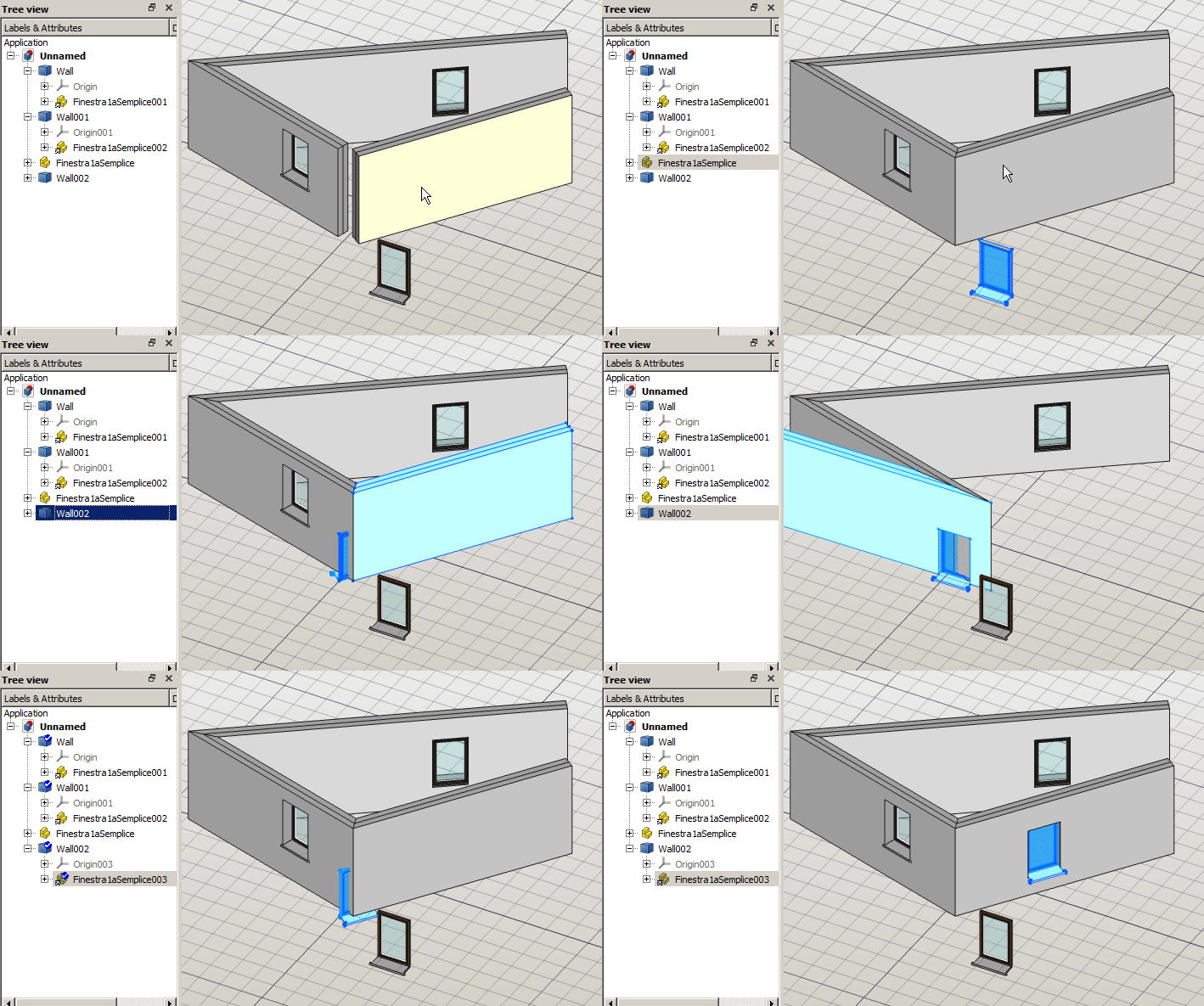
Now the Subtractions property is PropertyLinkListGlobal, and the shape placement is computed according the global placement, so the subtraction object can be placed inside a random coordinate system and will be subtracted as seen in the 3dview!

I thought you want the Origin, because in the other thread you asked about OriginGroupExtension. If there is no use for it, then you can use GeoFeatureGroupExtension (and ViewProviderGeoFeatureGroupExtension) instead. You can delete the code for creating Origin. Note that changing extension like that may break backward compatibility, meaning that older file may not be open after you make the change.

Excellent! Just perfect

Yes, sorry, please be patient with me… I asked for OriginGroupExtension cause I thought it was the way to get the children moved :slight_smile:
Cattura.JPG

Hey there, since the rough prototype of the wall is there, i was working to try to provide all the functionalities the current wall object have, but without losing the advantages of the prototype (moving childrens accordingly and segment joining). And to add them as separated objects to not overload the wall object code.
The wall prototype have a BaseGeometry property that allows the object to acquire the base shape from any other object. So using external ProfileExtrusion or Face Extrusion or whatever else is possible.
At a first look there are 2 parts of code that I do not want to include in the wall itself, but I want the user to be able to continue using:

  • the “profile extrusion” or “thin element”
  • the blocks feature

Do you have some time to help me splitting them into separated stand-alone objects, so the wall prototype will be able to embed them as BaseGeometry?

2nd magic by @realthunder in the same day:
now the prototype wall works with every chosen display mode, and keeps displaying its children! wow

Cattura.JPG

Is it possible for you to use a different Wall icon? This is just so that there is no confusion with the older wall, at least for the moment. You could add a number “2” on top of the icon, or add the Std_Part, or something that makes it stand out.

Sure! no problem. Edit: I’ll make it yellow!

tree.png
Arch_Wall_Tree_next.svg

Going back to my third post in this forum to show how stubborn I can be :stuck_out_tongue:

and yorik reply:

I made a bit of an experiment on the same concept using the same base object we used with the wall prototype:


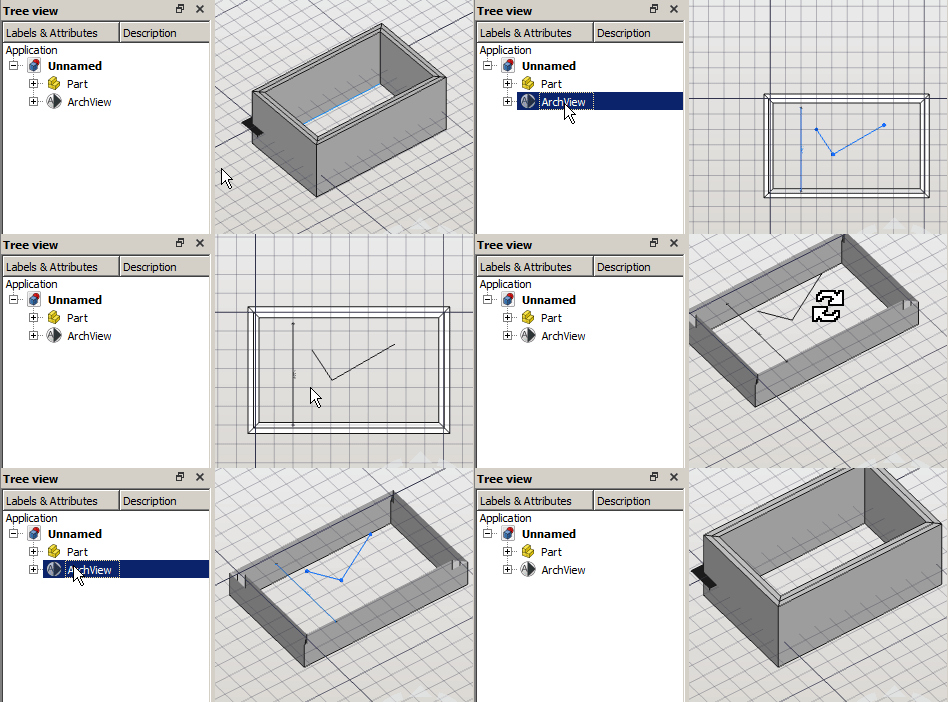
This would allow to separate the Tree into a model part and a documentation part, in my opinion improving a lot the structure readability. A user will be able to activate the view automagically:

  • aligning the 3dview,
  • activating the WorkingPlaneProxy
  • activating an embedded shape2dView producing the section cut.
  • enabling CutView property to show the effective model.
  • will we use it to filter objects by type too!?
    When the view is moved, all the contained documentation objects are moved accordingly!
    What do you think?

Edit: Little improvement! when activated the section plane shows it’s childrens, set the section plane, align the view and activate the clipping plane (for autogroup integration, I should study more the BuildingPart class).

view object.gif

Seems there is lot of fun here :slight_smile:

Can you elaborate slightly what you want to do - I have not followed every codes you are creating, with my very limited knowledge in codes / python.

For sure! Here is my goal:

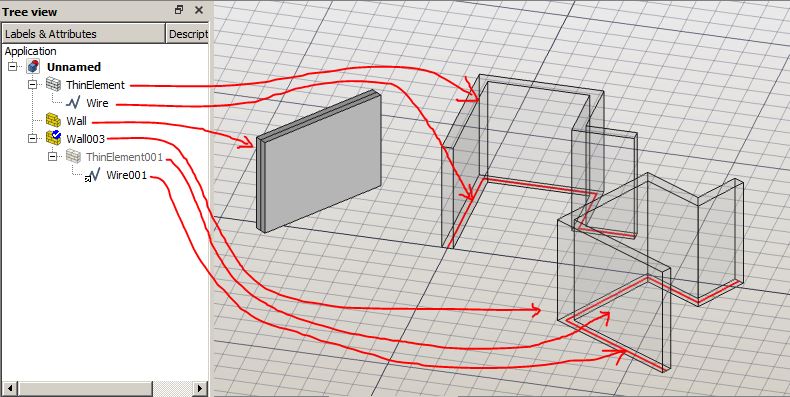
Cattura.JPG
Wall: is a simple wall without any base element.

ThinElement: is the current Arch_Wall object, based on a Draft_Wire.

Wall003: is what I want to achieve: the ThinElement object become the BaseGeometry of the new wall. It is pure geometry, and it does not know that it is a wall. Can be used here or in a million different usecases. (it works perfectly also now, but I’d like to clean up the really huge code the current wall has and obtain a really simple object that produce that peculiar ThinElement Shape)

Edit: Wire001 is a link object to Wire. This is needed because we do not want to shallow the original object, and doing so we obtain that the linked object can always be in place with the wall!

Cattura2.JPG
The boolean operation are carried out by the parent new wall object.