Hi @project4,
i like to have material, which is not completely approved, within a separate branch. New branch abetis-1 is online now. After testing and perhaps small modifications i will do my PR to master and merge.
At first i tested the original abetis-branch. It works for your testfile. I could add angleConstraints and everything is fine. But your workaround is still in.
With workaround it solves all my testcases. I think it is faster than before, also there are a lot of printouts. Not bad.
I could not check your code at moment whats the problem is by removing the workaround. Perhaps this evening. But i think it is no good idea to create rigids without valid dependencies. Every rigid, you want to process, has to have valid dependencies at this point.
Edit1
Whenever you want so solve a subsystem (not including all rigids), you have to regard all parts you want to move including the fixed you started from.
From this collection you should create the rigids and the corresponding dependencies, on a fresh initialized solversystem. Only when done this, you can first do any solverstep.
/Edit1
Workaround adds all the rigids to first stage calculation, so it will work exactly as your version.
Many printouts are remarked, I left them in the code since I think I might need them to debug later development.
All processed rigids have their dependency in place.
The question is what should be done with the dependencies to rigids that are not processed at that stage.
In my case there are 3 rigids:
bar1, bar2, bar3
and 2 dependencies:
C1: circular between bar1 and bar2, C2: circular between bar2 and bar3
First stage calculation selects bar1 and bar2.
In that case only C1 should be involved since bar3 is not in calculation and there is no logic to reference circular dependency between bar2 and bar3.
On stage2 bar3 is added to the calculation and C2 dependency as well.
So at that stage all the rigids are calculated with all the dependencies, but bar3 is not placed in the right place.
Maybe there is a bug in dependency initialization?
If all the rigids are calculated all together (the old behaviour), the solver might hide the bug by moving everything in place…
One question: i just checked the code in master. Did you deactivate both calcMoveData() and moveRigids() for parts which are not in working list ??
This would be necessary.
Those 2 functions moved to the Rigid class domain since they manipulate the rigid’s data.
Both functions are called only for the rigids that are in the workList:
            for w in workList:
                w.calcMoveData(doc, self)
                w.move(doc)
Hi all,
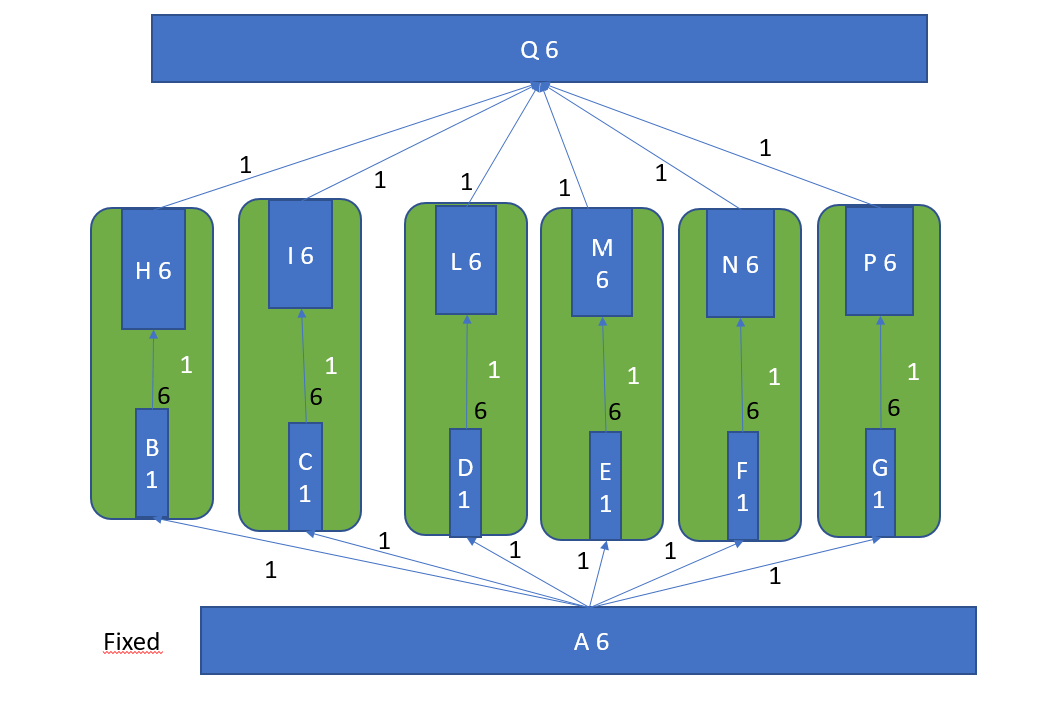
I reworked the 6dof assembly charts:
I’m thinking that spherical weigth 3 only if the coincidence is in the center of the rigid. hopefully we won’t need a so deep analisys 
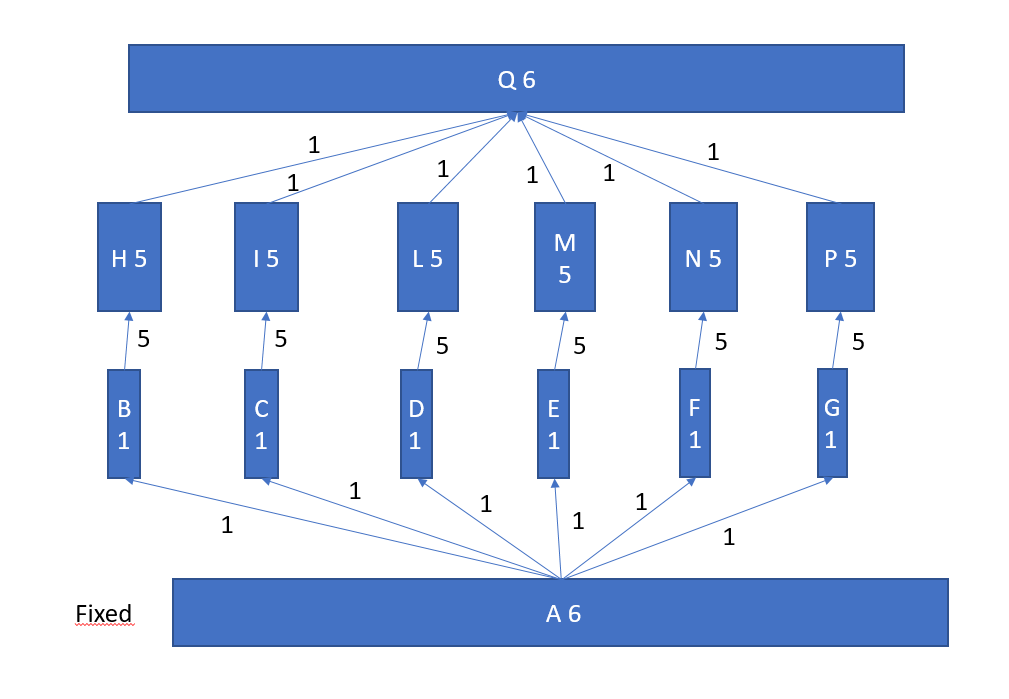
look what happens if rotation is locked, in this case we can individually solve each pair piston+cylinder, fuse them in a single rigid which has a number equal to the sum of the constraints of the fathers.
Hi Turro,
another “Houston, we have a problem..”
Solver ignores lock rotation, as i have no idea ATM how to implement it within this solver type.
Do you have an idea ?
Edit1
Last diagram with lock rotation is not quite correct in my opinion. Each cylinder connected to platform needs 2 angles to move. Weight seems not to be correct. Same for pistons..
/Edit1
bwoah… (as Raikkonen would say…)
I guess this is done by creating a line from center to circle on both deps then make them parallel.
A quick out of topic:
regarding direction on alignment, there are “none”, “aligned” and “opposite”. My suggestion is to remove “none” to force a manual choice by the user
or, if You really like it, You would rename it as “auto”.
the spherical constraint leaves free all three axes on rotation (yaw pitch and roll).
in case the center of the rigid is the same as point used in constraint, the 3 position (X, Y, Z) dof are locked.
In this case we are constraining another point so the position of center of the rigid involved is free to move and rotate along a virtual sphere centered on that point with a radius of the sphere which is the distance between the point and the rigid’s center.
point coincident is special case where
if You constrain 1 single point between two solids you lock almost anything.
if You constraint another point, the solid is able to rotate around an axis which is a line from these 2 points.
we can lock the x,y,z positions only if the rotation axis cross the center of the rigid.
if You constraint another point, the object if fully locked.
I’m trying to understand this relation matrix for every constraint, and also how put these rules in an algorythm.
Then I can save the World… 
i am studying your code and try to follow all of your new object linkages and their purpose. It isn’t as trivial as before. Will need a bit time to analyse.
Hope to find the bug. Just at moment i do not believe it did exist in version before, but everything is possible.
Let me know if you need explanations.
Do you see it happening without the workaround to add all rigids to stage1?
I kinda agree with Turro.
I’m not good with math and don’t fully understand the code around the dependencies, but I think (when possible) the constraint should store the data about direction of normal vector compared to the constrained element. The direction of the normals can be “normal” or “opposed” (or something like that), but only 2 values possible. If opposed, the stored normal vector should be negated/reversed.
BTW, it can be useful in the future:
https://forum.freecadweb.org/viewtopic.php?f=10&t=29805
I see bar 3 moving, but to wrong position. Why, i first have to understand…
Edit1
When bar2 and bar3 are been moved away, after solving result is: bar2 correct placed, bar3 wrong position.
Solve again with bar2 in correct position, bar3 find’s its correct place. Strange.
/Edit1
Edit2
The effect is very clear now.
Start from correct assembled point. (Solve twice) . Only move bar2 some distance left. Solve again. bar3 jumps to the position, where displaced bar2 has been before. Perhaps already this could be a hint for you, as i am still reading code…
/Edit2
Edit3
it seems that the rigids placement and the part placement are not correct correlated.
/Edit3
Hi,
you are number 3 who is telling this to me.
OK, we can rename it to “auto”. But it is a very useful feature. When placing constraints, previously rough adjusted the additional part, nothing is flipping around in some strange directions. If this happens, you have to rough adjust the part again for next constraint. If using “auto/none” everything keeps in expected place and saves time.
My proposal: keep adequate mode alive, just rename it to “auto”
Hi Kbwbe and Project-4
this is my proposal for reduction to subassemblies and solving process
it would make sense in case of solve failure switch to current “all together” solver.
I’m not sure rigid replacement and fuse is really necessary in the first and second steps, for sure the third step need it.
let me know how about


I remember that I got to situation where every computation put bar3 far and far away from needed point.
I never managed to place it correctly by additional computation.
Are you running all the computations from macro manager as you explained to me earlier?
I turn off the auto-resolve, so the application won’t execute the old logic by accident…
I will test it again later.
woohaaa… Will need some time to digest all that…
Few questions for now to understand what you wrote:
what do you mean by “check if any obj which has a father fixed it isn’t in the whole list of father” - can’t understand the last part of the sentence.
don’t understand what objects are selected for the first stage calculation.
All fathers are fixed - ok.
it is no father itself - you mean it’s a final leaf in the tree and there are no children for that object?
Maybe I didn’t fully understood the logic, but selecting only objects that have all fathers fixed doesn’t work. See 6DOF assembly, the cylinders are connected to base1 (fixed) and don’t have other fathers, but they can’t be calculated by their own…
I am impressed and shocked at same time !
I only started a small assembly thread here in forum and got most active coworkers on world. 
I think a scientific dissertation is nothing worth to speak about compared to that was is going on here.
Thread is not only growing by speed of light, it is growing by WARP !!!
I hope we find an apropiate way to handle all these things which we are discussing here.
I try to define the state of this project:
- we have a small assembly workbench, with most of the absolute necessary features included.
- we have a slow “altogether solver”, but it solves a lot of complicated things. User has only to wait !
- Turro convinced me, that we need priorities within solving of constraints. His first prototype was as fast as himself. Much faster than my one.
- During tests, we found that Turro’s “lightspeed” solver could not solve each possible assembly, a user could try to do. (I am such a user)
- Now we discuss splitting an assembly to subassemblies or even some other “partial systems”
Perhaps the activities yet at moment are fitting somehow together.
- project4 with his programming skills tries to make the solver more variable to meet other scenarios and solving strategies.
- Turro supplies non stop new ideas..
All in all not bad.
For me we have reached a point, where i am not able to understand all different proposals at same time.
Perhaps we have to change the way of development. We discuss the ideas here, each of you gets a own branch on A2plus repo and does
PR’s against it. So i could test each branch separately and merge the “best of” all systematics.
Any other suggestions appreciated, Guys !
Keep on contributing.
English isn’t my first language so sometimes I struggle finding the right way to explain me.
If an object has no sons so nothing depends on it and if the same obj has all fathers fixed . Solve it immediately and forget it. It won’t hurt anything.
Take the chart crankshaft, the obj A is exactly this an object which can be solved even if not fully constrained.
in The 6dofassembly in fact you can’t do nothing, only third step (pistons and cylinders pairs joined as a single rigid if lock rotation active) and the last with all remaining together.
Still on 6dof, without lock rotation You can only do the 4th step (as it should be imho). So the solver has to handle 14 objs and 18 constraints
With lock rotation on we can do something on step 3 and reduce the 4th step to 8 objs and 12 constraints.