To make it usable it would need some sort of parameter GUI replacing beso_conf.py, and some code changes (hint:
exec(open("beso_conf.py").read())
is not a good way to get settings, and beso_main.py should be a function (maybe several, if functionality can be broken up) - this way you can get input parameters from the command line, from a configuration file, or from the macro GUI thingy)
I couldn’t make it work with the first example (I can’t run any calculation and I don’t know why - missing material? but I can’t add a material either, so…); it may well be a PEBKAC situation since I have very little experience with the FEM workbench (and zero experience with FEM in general, I only ever played with a model of my MPCNC’s table)
I can try to make the code interact with the world more easily if you accept pull requests
OS: Ubuntu 16.04.6 LTS
Word size of OS: 64-bit
Word size of FreeCAD: 64-bit
Version: 0.18.1.
Build type: Release
Python version: 2.7.12
Qt version: 4.8.7
Coin version: 4.0.0a
OCC version: 7.3.0
Locale: English/UnitedStates (en_US)
Thanks for the comments.
What I want to do (hopefully within two weeks) is to make a simple GUI which would write beso_conf.py with parameters for very basic task so that user would not need to touch the code. By now, for more advanced use (or more experimental since whole implementation is quite experimental) I would leave it to a user to modify the configuration file.
if you insist on a python config file, at least do something like
from beso_conf import *
this way, you can add the beso dir to sys.path in the fcmacro file and avoid the chdir nonsense, while preserving the current behaviour (when you run it from the same directory); a better way to do it is probably to use something like an ini file (or yaml, which is in fashion these days and is almost as easy to edit)
if I find some time this week I’ll try to whip up a proof of concept and send you a pull request
Nice one! I am a bit too late for this, but this should not be too hard to be added to FreeCAD. (At least it should be possible to write a workbench which mimics your Blender addon and which reimports the STL file at the end.)
I know topology optimization is hard to compare, but I dared try it.
beso vs z88Arion vs Ansys,.. Unfortunately I had to exclude ToOptix because I work with FreeCAD .19 and python 3
I used the same mesh on all three solvers. The mesh was generated by Netgen from the FEM WB. Otherwise I tried to set all parameters s the same as good as possible
In short: beso is very slow but also gives very good results. I even find that it often gives the best results, but everyone has to decide for themselves
Here some screenshots. For a closer look, I attached the pdf file. Topologie-vergleich.zip (963 KB)
Thank you for this great comparison. It seems evident that beso is on fighting ground with Ansys.
I wonder if Z88 Arion’s comparatively simpler output is a measure of how effective it is or too simplistic a calculation.
However, the calculation times seem to show that beso could benefit from some level of optimization. I wonder if it is using all the resources (threads/cores) of the computer you used.
Beso only has the ability to optimize for stiffness, this is why I’ve used the CO solver in Arion which does very fast iterations based on stiffness. Maybe it would have been better to use TOSS. I thought it would be unfair to compare but maybe not, because beso also adds material. That’s what the SKO and TOSS solver do in Arion. The TOSS solver is also relatively slow.
And due to the limitation of Ansys academic (<32k nodes and elements) I had to use a rough mesh. Certainly Arion’s result will look different with a finer mesh.
II’ve noticed that beso often takes away material (especially at the load surface) and in the next few iterationen adds the same material again and so on. If it were possible to exclude areas (surfaces, edges, volumes), then you could save many iteration steps.
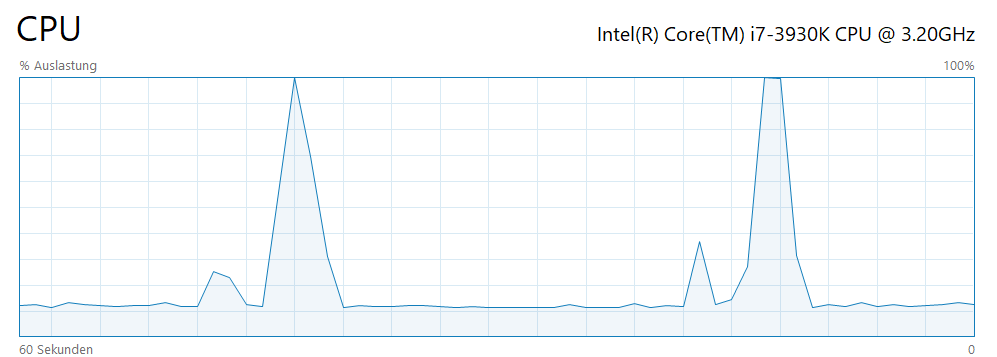
I think so, because the output says:
 Using up to 12 cpu(s) for the stress calculation.

 Using up to 12 cpu(s) for the symmetric stiffness/mass contributions.

 Factoring the system of equations using the symmetric spooles solver
 Using up to 12 cpu(s) for spooles.
It looks like Beso doesn’t use the CPU optimally. I have too little programming knowledge, but it seems that beso spend too much time for something in the background (read and write data or something else) and less for the actual calculation.
CalculiX uses all CPU threads (not whole time it is running). BESO inside does not use more threads.
Second note is that if you would run larger and larger tasks you would notice that CalculiX takes smaller and smaller portion of the optimization time. This is due to data structure which gets rapidly slower if they contain many members.
BESO is in principle simpler method (maybe to simple), you can change its “speed” by the slider in GUI, but results could change.
Another point is about multiple load cases which are not in the comparison, but in real application they are often necessary. In CalculiX you would need to add new steps to inp file for other load cases which would do almost all the work again for each load case in CalculiX, but some solvers can solve them very efficiently.
It is possible to define second material in FreeCAD for top flange and not include it to the optimization domain or define it as the non-design domain.
Thanks, I didn’t know that.
That means I need a model with at least two materials but if I try to add a different material to a surface, CalculiX shows me this error “it is not possible to have different reference shape types for material objects at the moment”.
Ok I think I have to create a compsolid of several bodies in order to assign different materials.
To change the geometry instead of defining the surfaces with just a few clicks is a bit laborious.
However, it’s great to have the possibility for topology optimization in FreeCAD.
@fandaL Have you ever thought about integrating this into the FEM WB? Please talk with the FEM guys,.. this would be awesome!
It’s amazing what is possible with open source software these days!
I will play around with BESO a while. Obviously I have nothing better to do on vacation,… especially on this rainy day
EDIT:
somehow I can no longer use my keyboard in FreeCAD after BESO is finished. The arrow keys are working but space, del or contr+c are not. To restart FreeCAD helps.
I’m not sure if it is intended workbenchworkflow but dirty way can be to define another cube, shift it to overlap original geometry a bit and than define a new material on the cube (which has nothing to do with a mesh object).
Later I will look how to make it available through Addon Manager as a macro. As regards topology optimization directly in official FEM wb, IMHO it would be worth only with big changes, maybe turning to different method or implementing ToOptix.
Hi All,
Can anyone describe how exactly should I prepare model and mesh if I ahve a regions which i don’t want to optimize ? I am trying with boolean operatons but it seems to not work.


 3,9GHz