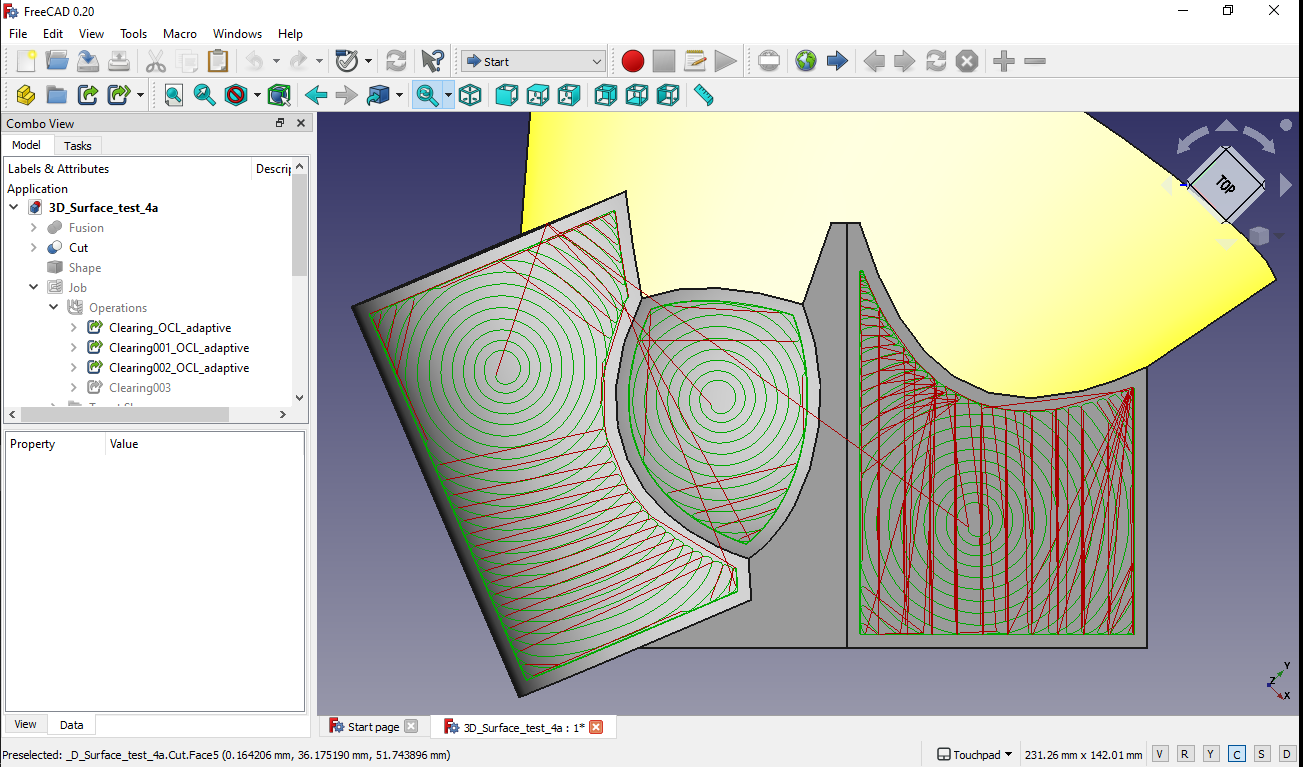
I’m not sure if this warrants a feature request, or whether maybe someone might want to write a macro for it, but here it goes:
I recently had to 3d surface some aluminium plates, around 8 mm thick. I tried multiple strategies, but most regular strategies were not ideal for aluminium, so here’s what I came up with:
I created multiple copies of the object in question, then created a sketch with dimensions of the stock on the bottom of each of these objects and padded them “upwards” to different heights, to create faces for the adaptive toolpath to follow. This way, I was able to create multiple jobs which, when combined, make up a 3d roughing job using adaptive clearing, and, since the adaptive clearing does contours rather well, with far better finish than the waterline path, which I never really had much luck with.
I must say, the adaptive clearing works absolutely brilliantly and is a joy to use.
But as you can imagine, creating these 3d surfacing jobs by hand is a bit tedious and it would be super awesome if there was a way to automate the process, especially since, in addition to roughing, If we were to use only the contouring of the adaptive clearing, it would create far cleaner waterlines than the waterline feature currently does, so could be used for the finishing step as well.
So, these are my thoughts. Maybe I’ve been missing some secret sauce somewhere and this is already something that can be done more easily, in which case it would be great if someone could point me in the right direction.
Edit: One risk of this approach that I can see is that it will not detect potential collisions due to undercuttings.
Sure, here is a screenshot of an example and a sample project attached.
Notice how the paths follow the shape of the body. Every stepdown is its own job here. (Please don’t pay too much attention to the suboptimal paths, this is quickly thrown together as an example)
Usually, the adaptive clearing function can’t deal with non-flat surfaces, so to get it to do what I want it to, I have to create these surfaces myself:
This is what a regular adaptive clearing operation with 1mm stepdown would look like:
You can’t select the chamfer, because the adaptive clearing function can’t deal with it, so it would only clear straight down. adaptive_stepdown.FCStd (636 KB)
Yes, I know this works, I’d prefer to have an adaptive tooling option, though.
The example I’ve given is rather simple, so an adaptive approach doesn’t make the most sense here, but on more complex bodies and especially with metals as material, the difference between regular and adaptive tooling is a big one, in time and tool wear.
Note: Github marked my account as spammy, probably because I used a temporary email to sign up, or because it doesn’t like my IP address, so if you’re not logged in, you just get a 404 error. Hopefully someone with access can see it and modify it? It says “only visible in staff mode”, not sure what that means.
Evening.
Extending current cut patterns to all clearing ops has been a long-desired feature. I had a PR active a while back that addressed some cut pattern fixes, for discussion only. That same branch I have advanced quite a bit to explore this application of all cut patterns to a single clearing op, including the use of OCL if the user desires. The last three images, specifically, are of the Adaptive pattern applied with OCL (current 3D Surface). Each of the last two images is using a single-pass mode. The second image has a multi-pass OCL Adaptive on the left side of the model. The first image is not using OCL, but the current 3D Pocket method of slicing and clearing the solid at each cut depth.
Yes, others are thinking of, and tinkering with the same idea.
Wow, that’s super cool, especially the 3D surface /adaptive clearing amalgamation. Is it accessible somewhere (on Github)?
I have pretty much zero programming abilities, so my only input is whining about it…
Any new information on the 3D Adaptive strategy for the Path WB?
This would be most excellent to have in FreeCAD as the common procedure for CNC machining any part in any other CAM software usually consists out of a 3D Adaptive roughing strategy followed by a 2D Contour finishing toolpath.