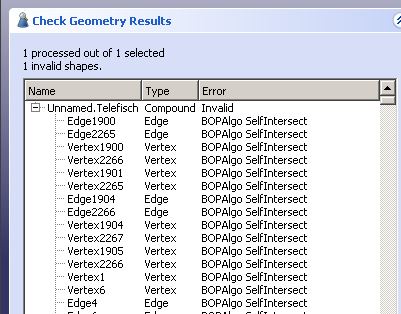
Basically I cant generate a pocket, even on the small knobs. I could generate a bit of a path with adaptive clearing on the tv screen, but it was only partial.
Cheers,
Mark
I’ve been having a look, and this was the approach I took from your file - hopefully others will have some different ideas and we can all learn something
Open the IGES model
Open Draft workbench
Select the Telefisch object & “Modification → Downgrade”
This will convert the original object into a number of discrete faces
Select each horizontal face of interest & ‘Draft to sketch’ to create a sketch from it
Note that these sketches will be positioned with their z offsets from the original object, can reposition to zero in the data pane for each sketch.
Hide or delete the original faces (I moved them to a new folder to keep the tree a bit cleaner)
Open the Part workbench and extrude each sketch as appropriate for machining
Optionally create a compound of the multiple extrusions (or else can select multiple models in the Path job).
Then I was able to use Path workbench to create an adaptive clearing. I needed to drop down to a 1mm endmill to get both the ‘knobs’ though - so maybe it’s not so practical?!
I’ve uploaded my version on Dropbox, should be able to download from here
Please note - I haven’t set any feeds and speeds set on any of the toolcontrollers in the above file..
Thanks Jon. I will go through and repeat your steps to learn it.
2mm was arbitrary. I also tried it on the IGES with a 0.25mm tool path. Why do you think it necessary to downgrade to faces? Why can’t freecad just work with the solid model in the IGES?
Thanks,
Mark
The IGES model is not imported in a usable form. I do not know if the IGES is broken or if FreeCAD is not importing correctly. In either case the imported model has hundreds of errors and is not a solid.
My initial thought process was just to get the important geometry of your design into a sketch. Am quite often importing SVG files as 2D geometry for machining, so ‘Draft to Sketch’ is something I fall back on quite a lot.
However, I just had another look at your model, and appears there’s a much easier way! Import the IGES model, open the Part workbench, and use ‘Part → Convert to solid’. The resulting solid (with no errors shown in it) can then be used directly for the adaptive path.
I’ve uploaded another file using this approach here
Another very helpful gentleman also took a look at it and returned an STEP file, which I can import, but when I open the Path workbench, there is no “Job” button. It is also not available in the Path menu. Do you have to do something to an imported STEP model before it can be used as the basis for a CAM program?
Cheers,
Mark
Afraid I can’t recreate that behaviour here. It’s greyed out before any file is opened, but enabled as soon as I create a new file, or import a .step file. (Tested with 20.1 and with a recent weekly build).
Before we try to find out, what the problem is, I very strongly recommend to do this in the 0.21 version. The internal format of the Jobs and paths has changed, and going directly to 0.21 avoids all migration issues. Furthermore there is active development including error fixing in 0.21.
If your issue persists, I recommend to reset to a plain vanilla config. Another possibility is to delete your config files or to move them in case you want to restore them. This more radical procedure assures that no other workbench interferes.
And finally I add a first go of just an outer profile with the default 5mm mill, to check if you can work on an existing job. Please note that this was made in 0.21 and will probably not work in 0.20.
Ask back if you have further questions. telefisch_cb.FCStd (382 KB)
Iges is a very old format. It dates back to the 70s and hasn’t had an update in decades. It’s also primarily a surface model. Out of curiosity, why are you using iges rather than step? I can’t think of a design tool written in the last 20 years that will export iges and not step.
Thanks for looking at that.
I just drew a different part, within Freecad, rather than an import, and when I switch to the Path bench, the Job button is there and active.
Cheers,
Mark
I am trying to post the simple tool path I created. In preferences, I have the LinuxCNC PP selected. When I hit the post process button, and name a file, I get this following error. My installation is just the generic standard V0.20 installation for M1 apple.
'_TempObject' object has no attribute 'InList'post: KineticNCBeamicon2(/Users/markwrathall/Documents/Schaublin 125 CNC/Parts/Switch bracket, )
17:23:55  Show editor = 1
17:23:55  postprocessing...
17:23:55  Running the Python command 'Path_Post' failed:
Traceback (most recent call last):
  File "/Applications/FreeCAD.app/Contents/Resources/Mod/Path/PathScripts/PathPost.py", line 437, in Activated
    (fail, rc, filename) = self.exportObjectsWith(slist, job)
  File "/Applications/FreeCAD.app/Contents/Resources/Mod/Path/PathScripts/PathPost.py", line 216, in exportObjectsWith
    gcode = processor.export(objs, filename, postArgs)
  File "/Applications/FreeCAD.app/Contents/Resources/Mod/Path/PathScripts/PathPostProcessor.py", line 105, in export
    return self.script.export(obj, filename, args)
  File "/Applications/FreeCAD.app/Contents/Resources/Mod/Path/PathScripts/post/KineticNCBeamicon2_post.py", line 227, in export
    job = PathUtils.findParentJob(obj)
  File "/Applications/FreeCAD.app/Contents/Resources/Mod/Path/PathScripts/PathUtils.py", line 405, in findParentJob
    for i in obj.InList:

'_TempObject' object has no attribute 'InList'