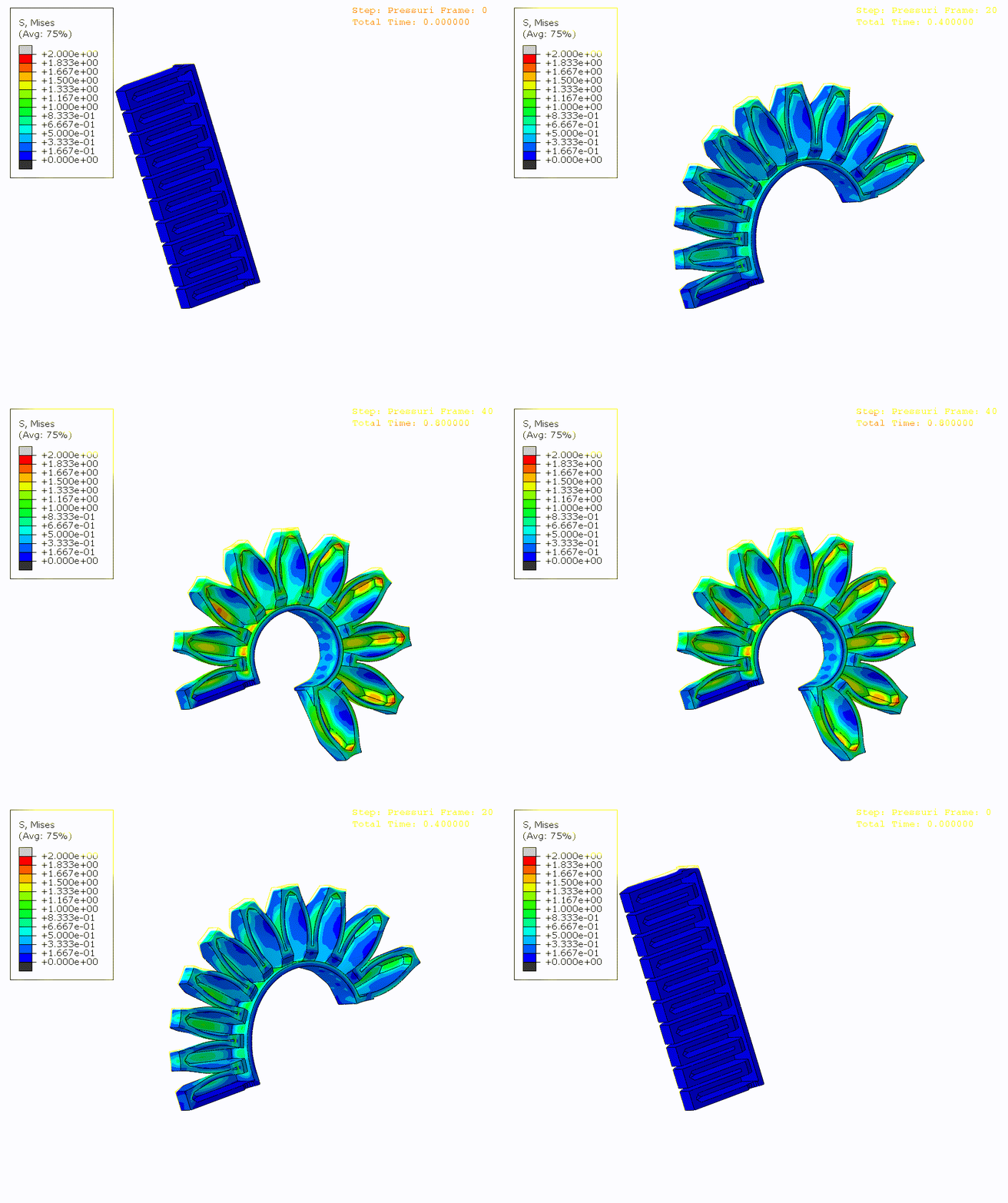
Pneumatic actuators and inflatable structures have many logical surfaces on which to apply pressure boundary conditions. Previous forum posts indicate there is not a way of naming such surfaces when exporting STEP for offline meshing with Gmsh. This leads to a tedious manual process of selecting all the primitive surfaces on which a pressure boundary condition must be applied, be it in Gmsh directly or FEM workbench. I’m curious what would be practical to develop for this purpose. I’m envisioning an algorithm that starts with bounding curves (gaskets) and one interior point/surface, then traverses all neighboring surfaces that don’t cross the bounding curves. I imagine it would be harder to implement filling a “volume” (implied by absence of structures) to find all surfaces, but that’s closer to the physical process. Regardless of how those surfaces are found, they would be placed in a “Physical Surface” in Gmsh, which is written to the mesh file and available to solvers. Here’s an example structure:
We currently use or own solver (open source, scalable, good GPU support) and are considering adding support for it in FEM workbench. Finding a way to automate this aspect of pneumatic actuator analysis would make that a higher priority for us.
Ratel/. You can read about the methods in this paper, which tests scalability on hyperelastic analysis of Schwarz Primitive lattice structures with billions of DoFs.
You mean something like shown in the following video for Ansys Discovery, where first the faces at the openings are selected (inlet and outlet) and then a “seed” face that represents the interior, then all the internal faces are automatically selected and from it the internal volume is build… ? This selection technique is actually very common in many different applications, both in modeling and for further model preparation as in this case for CFD…
Here is a modified version of that code that seems to give the expected “seed and boundary” functionality. First face one selects is the seed, all the next selected faces are the boundaries…
# first face selected is the seed, all next selected faces are the boundaries
# WARNING! always review unknow scripts before running them, if you don't understand them, don't run them!

boundFace=[]
visitFace=[]
checkFace=[]
edge2Face={}

shape = FreeCADGui.Selection.getSelection()
subElement = FreeCADGui.Selection.getSelectionEx()
slen = len(subElement[0].SubElementNames)

for j in range(slen):
	if j == 0:
		seed = subElement[0].SubObjects[j]
	else:
		boundFace.append(subElement[0].SubObjects[j].hashCode())

for f in shape[0].Shape.Faces:
	for e in f.Edges:
		if e.hashCode() in edge2Face:
			edge2Face[e.hashCode()].append(f)
		else:
			edge2Face[e.hashCode()] = [f]

checkFace.append(seed)
visitFace.append(seed.hashCode())
while len(checkFace) > 0:
	face = checkFace.pop(0)
	for e in face.Edges:
		for f in edge2Face[e.hashCode()]:
			if f.hashCode() not in visitFace:
				if f.hashCode() not in boundFace:
					visitFace.append(f.hashCode())
					checkFace.append(f)

adjacency=[]
for f in shape[0].Shape.Faces:
	if f.hashCode() in visitFace:
		adjacency.append(f)

shell=Part.Shell(adjacency)
Part.show(shell)
Exactly (though I wasn’t aware of that feature). The Creo version seems ambiguous for objects like a tube, where the surface could be on the inside or outside surface, thus a need have a seed.
Thanks for your helpful reply and for debugging the script. As you say this is quite common, should it be contributed upstream?
I have now updated my script above so that it should actually be useful. Before I did just a simple test that worked only on a special test case, now I have added the proper selection mechanism, so it can be used and tested on all shapes. First face one selects is the seed, all the next selected faces are the boundaries. It is actually still just a quick test script that should be improved further, but since I am not the best programmer, I will let that to others
About including it in the main code, I am sure this functionality can be usefully for many, as I said maybe it was actually already implemented somewhere, so it would be best that some of the main developers take this over and decide where and how it should be done.
seedselect.gif
Test file with the script…
PS: Embedded scripts can be copy/paste and run from the console or with eval(compile(FreeCAD.activeDocument().getObject(“Text_document”).Text, “”, “exec”))
And a general WARNING! Always review unknow scripts before running them, if you don’t understand them, don’t run them!
FYI:
In the cfdof-wb (openfoam) there is an option to designate unselected faces by default.
The diagonals from the tower structure cant be selected with the cursor, but you can select
the strut and tick the box, so the rest of the lattice is assigned as boundary.
But before you must select the outer walls (inlet=blue, outlet, walls) of the channel,
otherwise they are assigned too.
cfdofWB_select_default_faces.JPG
Thanks, this seems to be a bit different, but it is also good to know about it yes. Is this lattice example your project or is it somewhere available as a demo project so I could check how this works…
In the links to examples above we see a few a bit different implementations of this, one does only the selection (but other tools can then be used to make surfaces from the selection etc.); my example directly creates a surface (shell); in the ansys example a closed shell (volume) is created (interesting thing in this example is also that it seems to directly created the closed shell from several parts); some others also work on meshes,… What would be the preferred workflow for your needs?
I have also cleaned up a bit my code and tested it on a few a bit more complex models and it seems to work well…
Surface WB and Part WB tools can be used to close the holes of the extracted shell and make a closed shell (volume) or a solid out of it
shell.gif
Clipping planes can help in selecting more complex shapes with internal faces
Thanks, all. I modified the script to do selection based on a seed surface and bounding curves. E.g., in this example, select any one surface of the structure, then control-click to add each of the four curves (like the bottom left barely visible in yellow), and apply the macro (e.g., Control-Shift-1) to convert that to a selection of all the surfaces (green in this image; the bounding edges are removed from the selection). I call this ~/.local/share/FreeCAD/Macro/seed-select.FCMacro so it appears in my Macro menu.
Screenshot from 2023-04-08 10-21-18.png
from collections import defaultdict

(shape,) = FreeCADGui.Selection.getSelection()
(sel,) = FreeCADGui.Selection.getSelectionEx()

seed = sel.SubObjects[0]
boundary_edge = set(e.hashCode() for e in sel.SubObjects[1:])

edge2face = defaultdict(list)
for f in shape.Shape.Faces:
    for e in f.Edges:
        c = e.hashCode()
        if c not in boundary_edge:
            edge2face[e.hashCode()].append(f)
face_names = {(f.hashCode(), f"Face{i+1}") for i, f in enumerate(shape.Shape.Faces)}

check_face = [seed]
visit_face = {seed.hashCode()}
while check_face:
    face = check_face.pop()
    for e in face.Edges:
        for f in edge2face[e.hashCode()]:
            c = f.hashCode()
            if c not in visit_face:
                visit_face.add(c)
                check_face.append(f)

sel_names = [n for (c, n) in face_names if c in visit_face]
Gui.Selection.clearSelection()
Gui.Selection.addSelection(shape, sel_names)
I have two remaining issues:
In FEM constraint parameters, the UI has you click Add, then click faces one at a time. You can’t create the selection first and then add it, and you can’t, say, control-click an edge as part of seed-select (error popup “Only faces can be picked”). Unless I’m missing something, I think this will need a modest UI change/extension.
Real models contain multiple materials materials (be it metal and rubber or multi-material FFF printed devices), which if I understand correctly, means that seed-select needs to be extended to propagate across multiple parts in an assembly. I’m pretty new to FreeCAD scripting and the interfaces I see are all in reference to one shape so any tips for handling selection across an assembly would be welcome.
Nice, I was also thinking to add the possibility to chose edges for boundaries also to my script, I think it would work having both for boundaries…
I see the issue with the constraint parameters dialog, one way to change it could maybe be to open the dialog, make the selection before pressing the Add button and then when pressing the Add bottom the existing selection would be automatically added…
A different way to do it, that might already work for you, is to add a constrain with just one selected face and close this dialog, then modify it from the property view panel…
property.jpg
Another way that it seems to me could be useful for such cases is with the FEM MeshGroup https://wiki.freecad.org/FEM_MeshGroup But I am actually not so experienced in FEM and don’t exactly know how the current implementation of MeshGroup can be used, but it seems to me that they could be used to instead of making the selections from the constraint parameters dialogs, one would prepare the different groups and then just chose them from the constraint parameters dialog… But others users from the forum that are more experts in FEM and developers should review if this makes sense and would not conflict with some other functionality?
For propagating selection over different parts, it is actually a bit more complex topic, because it depends if we talk about parts and assemblies/subassemblies as the proper components of a product/assembly structure, for example created with one of the assembly workbenches from FC, or are we basically talking just about multiple individual geometries (solids, shells,…) placed together. For basic FEM analysis this second case is used more often and for this, Part WB → Make Compound or Boolean Union could maybe help, but again someone with more knowledge in FC FEM will have to elaborate further about this…
Yeah, just need to find where this logic is implemented.
A different way to do it, that might already work for you, is to add a constrain with just one selected face and close this dialog, then modify it from the property view panel…
Ah, this kind of works. It adds the bounding edges when I click them (but bypasses error checking so I’m not stopped by a popup) and I can go back and manually edit them out (and this is kinda scalable because they’re in the order selected). It isn’t a solution fit for users.
Another way that it seems to me could be useful for such cases is with the FEM MeshGroup
This creates lines in the Gmsh input that look like
Physical Surface("MeshGroup") = {2, 3, 4, 6};
which is similar to what happens when creating named BCs.
Interestingly, these silently don’t work together (if you add mesh groups, the constraints vanish from the gmsh input shape2mesh.geo). This is probably not intentional.
For propagating selection over different parts, it is actually a bit more complex topic, because it depends if we talk about parts and assemblies/subassemblies as the proper components of a product/assembly structure, for example created with one of the assembly workbenches from FC, or are we basically talking just about multiple individual geometries (solids, shells,…) placed together. For basic FEM analysis this second case is used more often and for this, Part WB → Make Compound or Boolean Union could maybe help, but again someone with more knowledge in FC FEM will have to elaborate further about this… >
Yeah, I don’t know what the usual workflows are, but assume many would like to use assembly workbenches instead of what appears to be a much more manual process involving compounds. I’m a complete novice with respect to these parts of FreeCAD.
EDIT: On further exploration, it appears the prevailing (only?) workflow for multi-material analysis is to use Boolean Fragments to create a single CompSolid (creates a Compound as a side-effect, which is then removed by a Compound Filter). The seed-select macro works for that setup, so I think I’m set with a work-around selection hack and I’ll work on a better approach if I can find time to contribute to the workbench.