I’m playing with nonlinear material. CalculiX has a lot of different nonlinear material models. I just would like to know your opinions what is best to integrate this in the FEM workbench.
all material values needed for the nonlinear materials analysis are material attributes and thus should be saved in the material object.
the question is where do we define which material model is used for the analysis? IMHO this should not be defined in the material object since it is and analysis attribute. Since it is an analysis attribute I would save it in the solver object!
CalculiX cracks needed ! Is it possible to define different material analysis types for different materials in an multibody analysis? Means one material uses *plastic, on material uses *hyperelasic, one material uses *deformation plasticity and one material is standard elastic and so on!
This would be difficult in the solver object. I would still save it in the solver object. Means all defined materials uses the same material model at the moment. If we would like to have different material models in one analysis for different materials I would put this in an separate small python FEM object, which defines the different material models used for the analysis
bernd,
if all you need is one more field in Material library than if should be very easy to do. It would be done in a similar way as we currently handle Young’s modulus or density.
I do not really know, but would expect that this should be possible.
I think the cleanest solution is to put one or more options into the material object of the analysis. So the material definition may support more material models and with the settings in the option one can choose, what should be used in the actual analysis. Think about a standard metal. In a typical statical analysis only the Young’s modulus and the poisson number is needed and this should be the default setting. But this metal can also be formed in a bending machine or other metal-forming machine. In order to simulate the behaviour of the same metal in that machine, additional parameters and models about plasticity are needed.
For example we could have a list of material models with the needed parameters. Which model for this material should be used, has than to be selected from this list inside of the material object. There could be an error message, if the needed parameters are not available.
The next iteration is to change the material model between different simulation steps. I would not support more than two or three different steps in this case.
Edit: About thinking of the complex nature of the material setting, it may be better to have a freely editable field for a custom material setting inside of the material object.. This will be better than editing the input-file.
Is it possible to define different material analysis types for different materials in an multibody analysis? Means one material uses *plastic, on material uses *hyperelasic, one material uses *deformation plasticity and one material is standard elastic and so on!
Material model should be separate for each material - imagine for example engine mount rubber is hyperelastic and adjacent steel is enough to model as linear elastic.
I think user should have control what are inputs to analysis: let’s say we have complicated model, first, we run linear analysis with linear elastic model of steel - if I see that it (finally) works and stress is above yield limit I will add properties for the nonlinear material and run nonlinear analysis (which takes a lot more time and can have easily problems with convergence). And if I fill nonlinear material data CalculiX will automatically run nonlinear analysis.
I got this idea but I’m not sure if it is worthy to think about:
In the material object user will see all data from material card (as now) and on the side there might be something as check buttons or whatever “active”, “not active”, and by default “automatic”. When writing inp FreeCAD will write all “active” properties and as regards “automatic” it will write data according to analysis type as it is now. In case something important is “not active” or 0 FreeCAD will inform user by error or warning. Perhaps user can see on the “automatic - active” or “automatic - not active” according to analysis type predefinition.
Thare can be a lot of material models and I would say that profesional user will take that one with which he/she is familiar and has “checked” material data.
Since I do not like to depend on CalxuliX with the linear material object I added a new object a nonlinear material. This object is linked to a linear material. In the nonlinear material the material model is choose and the values are inserted. In a later version we could read the material values from the linear material dictionary.
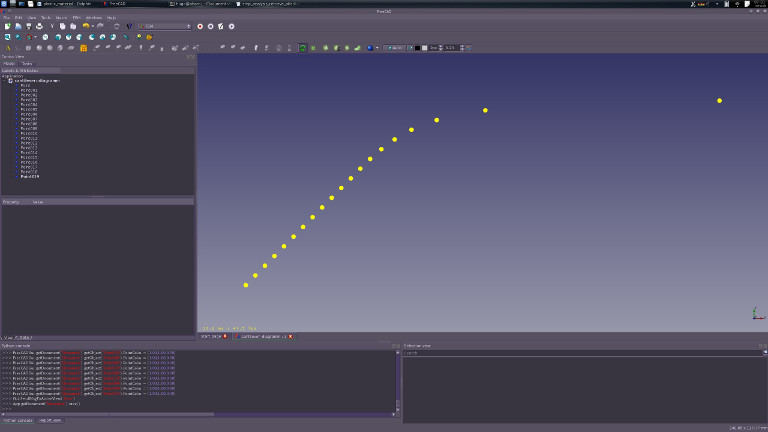
Attached an simple example and an example diagramm I made of the result objects. cantilever–plastic_without_results.fcstd (519 KB)
code to make the diagram dots
absdis = []
for o in App.ActiveDocument.Objects:
    if o.isDerivedFrom('Fem::FemResultObject'):
        print o.Name, ' --> ', o.Stats[11]
        absdis.append(o.Stats[11])

end_force = App.ActiveDocument.FemConstraintForce.Force
stepcount = len(absdis)
step_force = 1.0 * end_force / stepcount
start_force = step_force
data = []
i = 0
force = start_force
for d in absdis:
    d = (force, absdis[i])
    i += 1
    force += step_force
    data.append(d)

for d in data:
    print d[0], ' --> ', d[1]

# draw a diagramm with Draft
import Draft
for d in data:
    Draft.makePoint(d[1], d[0] * 0.00001,0)

Gui.SendMsgToActiveView("ViewFit")
It has been a bit hectic so I only got to look at this now.
Should we really a new icon for ever type of material ?
I’m afraid the desktop gets cluttered with too many icons, when they do almost the same thing.
We are considering work on temperature dependant material properties which will have to fit in the same way
I can compile the branch and run it, very useful feature
I just would like to split the linear materials from nonlinear materials. Linear materials only define material constants and linear material laws. Thus they are the same for all solvers. Non-linear materials define special material laws and retrive the material constants from linear material. The reason behind is the independence of the solver. The non-linear material depend on special material laws and thus at the implementation of them in the solver. That is why I would vote for an own object for non-linear materials. Furthermore it is clear that without a nonlinear material the analysis is truly linear in the regard of material laws.
I have been thinking about them too. From my point of view it is possible to split it between the material objects dependent on the material law behind it.
BTW: In regard of icons … We should start to think about grouping the icons, into pull down icons or only show the icons supported by the solver one is just working with.
i would suggest that every material is linear and non linear. And then set in the solver the type of solving…
as example: Linear static or non linear static.
I don’t know if a non linear solver needs an own solver button or that is is just an checkbox in the linear equivalent solver…
The problem is there is one linear material model but there are dozens of nonlinear material model and any FEM solver has its own implementation with own key values of each nonlinear material model. If we put all nonlinear stuff for every solver in the linear material object it will be a big monster. This is neither FreeCAD like nor unix like.
Have you started already? We could share opinions and discuss how to integrate it best?
@bernd
We had a vacation work student start this, but he did not get far.
Our idea was create CSV file with temperature dependent material properties in a specific format input is Young’s, CTE conductivity and density.
In the same file you see you have temperature dependent failure values yield UTS , creep rupture strength 100k 10k hours etc
On the material card we were just planning on adding a button “Temp dep file” and you select the CSV file.
On the output side we would read the same CSV file and user the user defined results to plot a selected value as a function allowable property(which is also temp dependant)
But we are still using *ELASTIC card.
We do have someone working on linearised stresses. If you use this on a static analysis you can predict failure on a component in which a certain are volume would have gone plastic very accurately with far less computations than a plastic analysis. This is also the way pressure vessel design codes asses stress for design
We should spend some time to discuss how it is best implemented. could you give more informations? May be a separate thread. My be a App::PropertyMap is a better idea as an csv file. With an csv file the values are not saved in the FreeCAD file.
Back to the nonlinear material. Should we introduce the current new nonlinear material in up to date master.
We should spend some time to discuss how it is best implemented. could you give more informations? May be a separate thread. My be a App::PropertyMap is a better idea as an csv file. With an csv file the values are not saved in the FreeCAD file.
All the temperature dependant material data we have is proprietary, thus we thought of only providing generic template for other users.
Property data can be included in output for user.
I understand how the non-linear material works now.
Suggestion when it is selected , non linear geometry should be activated by default
To the first one. We should disscuss on detail on pm. To the second poit, good idea, if nonlinear material us added, solver changes to nonlinear material autmaticly
Sorry to revive this old topic but I found it via Google search. Was this non-linear material not implemented? If Calculix allow to perform non-linear analysis it would be nice FreeCAD have the option