This is definitely the best pie I had all year!
Is it possible to make piemenu appear when I rightclick instead of pressing tab? (other than an external application)
This is definitely the best pie I had all year!
Is it possible to make piemenu appear when I rightclick instead of pressing tab? (other than an external application)
Good to hear that.
Just note that this latest addition (Accessories → Pie menu) isn’t connected yet with the front end. That is with the actual pie menu you see, when you press on the Tab key. For configuring and using that, continue to use the Preferences located in the drop down menu, from the pie menu itself.
Is it possible to make piemenu appear when I rightclick instead of pressing tab? (other than an external application)
It’s on the todo list. This is one of a few things i haven’t actually explored yet in-depth and more will be known once i do that. There are some considerations, such as on how to access other menus in FreeCAD, if for example pie menu would always show. But as said, best to wait until i actually do a few tests first.
I have nothing to ask, I just wanted to tell you that I installed PieMenu recently and it really improved my workflow ! so thanks for that 
I’m brand new to FreeCAD and I only know one hotkey, Tab. Unfortunately I don’t now know how to tab from the x to the y value. One of the early comments was changing the hotkey of PieMenu from Tab to Q. Is there a way to do this? Thank you.
Edit line 1904 in InitGui.py, I’m not sure if binding it to just Q wouldn’t generate other conflicts but you can choose the key of your liking, key combinations are also possible. Also, this could brake updating PieMenu from addon manager as I have seen it refuse to update when there are modified files in the addon I’m trying to update.
Umm. I found 29 InitGui.py files in my FreeCAD 0.18 folder. None of them seem to have that many lines. Would you be so kind as to point me in the right direction? Thank you.
Sorry I wasn’t specific, you have to edit PieMenu’s InitGui.py, it will be in the folder were external workbenchs are downloaded, on linux it will be ~/.FreeCAD/Mod/PieMenu, on windows it is something like C:/Users/username/AppData/Roaming/FreeCAD/Mod/PieMenu, if it’s not there try the one specified here it has a directory for Mac too if you use that.
Sweet! That worked. 
I changed it to CTRL+SHIFT+TAB which I will assign a button on my mouse. THANK YOU!
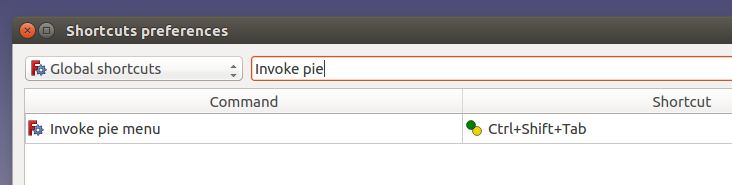
Make sure you have the latest version of PieMenu module installed. Now one can change the pie menu invoke shortcut by using ShortCuts module.
How to do it without having to install/have installed the ShortCuts module?
Look above at the answer provided by @adrianinsaval.
Hi triplus,
Two years ago you started this thread, how is Piemenu 2.0 development status?
Me and, I bet lot more users, are still eagerly waiting for it. 
Cheers
Is it possible to change the current access key (TAB) to something else? I tend to use TAB to quickly move across textboxes to edit preferences on parts/sketches (for example, creating a datum plane and settings the offsets/rotations without having to constantly click the textboxes). When PieMenu is active, I can’t do that.
@triplus hasn’t been active recently so my take would be to change line 1905 of InitGui.py in the %APPDATA%\FreeCAD\Roaming\Mod\PieMenu folder from:
actionKey.setShortcut(QtGui.QKeySequence("TAB"))
to reflect another key but make sure it doesn’t clash with another part of FreeCAD.
Hello everybody,
this is my first post on this forum starting with a question regarding the PieMenu.
As soon as I hit the TAB button the hole screen turns into opaque black. How to change this behavior?
This sounds a like a display driver issue. Does that happen in any other context when using FreeCAD ?
See Known Issues thread
That’s the only and first appearance like this in FreeCAD.
If you want the most up to date PieMenu functionality, you may want to consider using realthunder’s LinkStage3 branch. He has souped up @triplus’s PieMenu addon (which is what you see in this thread)
You can download LinkStage3 from: https://github.com/realthunder/FreeCAD_assembly3/releases
Here’s an example of realthunder’s enhancements:
https://www.youtube.com/watch?v=tq-FJH0p9aE
I installed that version. It didn’t change that behavior.
Please add your full About info for each version of FreeCAD this occurs for you. Thanks.