Morning J.
I’m loading up the model now to attempt reproduction of the behavior. I think the problem may be the same as presented in another recent topic, Bug in Path/Pocket 0.19. I’ll take a look.
If the problem is has the same root cause, I have a solution already coded, just not isolated and uploaded.
J.,
I was able to reproduce the error. Preliminary results suggest same issue as topic mentioned in previous post.
I’ll compare the causes to determine if the causes are indeed one and the same. I’m hopeful they are because I have already been working on the solution.
Hi Russ, sorry if that was a repost. reading the topic you pointed at yields the same conclusion. I don’t believe in coincidences. Thanks for looking into it you rock.
I just updated the PathPocketShape and PathAreaOp scripts in the initial post to version 1k-testing. The updates should correct the random repositioning/jumping of the Job model when using Path Pocket operation. The script now creates an additional clone per axis_angle rotation for basis of rotational pockets, then destroys the temp clone used. You will need to re-create Path_Shape operations because the “Use Rotation” property is renamed “Enable Rotation” to prepare for UI integration.
The fix for this issue is included in PR #2231. Please review and provide feedback here or as comments on the PR page.
I’m thankful for the feedback and your enjoyment. Oddly, I don’t even have a 4th-axis machine. Furthermore, the machine I have partial ownership of is over at my dad’s house. So, I just develop for the 4th-axis.
Been playing around with the pocketing and profiling ops on the square tip file attached.
Good news: no jumping around of the model anymore! that’s pretty neat. I’ve tried varied combination of parameters and it seems solved for now, until someone smarter than me complains about it
The op paths are, however, not really well placed. I’ve systematically cycled through the B axis override/reverse direction/reverse angle parameters to eliminate them as possibilities for the mismatch. Something tells me it has something to do with the clones.
I’ve had one bug so far where a clone appeared and stayed, which I assume to be one of the operations being interrupted mid script. But I couldn’t reproduce it.
EDIT: system info
OS: Windows 7
Word size of OS: 64-bit
Word size of FreeCAD: 64-bit
Version: 0.18.16093 (Git)
Build type: Release
Branch: releases/FreeCAD-0-18
Hash: 690774c0effe4fd7b8d2b5e2fb2b8c8d145e21ce
Python version: 2.7.14
Qt version: 4.8.7
Coin version: 4.0.0a
OCC version: 7.2.0
Locale: French/Switzerland (fr_CH)
I favor this build because it works well and i use it to work, but it is still allowing me to experiment with the new ops thanks to the community’s work. TipCutting.FCStd (36.8 KB)
I’m thinking this thread could be well captured in the wiki together with the facing operation, so I’ve integrated it roughly over here: https://www.freecadweb.org/wiki/Fourth_Axis
secondly - these pictures are making me dizzy - it looks like these are 5 axis operations - is that correct or am I missing something???
Afternoon, Sir.
Thanks for all the documentation you have contributed lately: OCL and 4th_axis.
The page is off to a good start. Looking through some of the other Path operations wiki pages, I think we will need to isolate and move information and instructions on a per-operation basis. For example, the Profile Faces op that is receiving 4th-axis only has three new 4th-axis settings, whereas the Pocket Shape op has many more. Nonetheless, you have a great start. I’d say leave it for now. We can move and modify as the ops develop.
Well, yo (yes and no). Yes because counting XYZAB is five; however, no because you can’t really access complex angles that require both an A and B axis movement for access to the face/feature. I’m pretty sure I’ll have to go back and raise the level of complexity on the rotation-angle analysis algorithm for 4th-axis. It is on my to-do list down the line. For that reason I still say 4th-axis. Perhaps a 4.5-axis label is the best I could give.
Thanks for all the help. Wish I could make it down to the southern hemisphere meet.
I have updated the PathAreaOp and PathPocketShape scripts on the OP of this topic. They are the same versions that I just updated for PR 2231. Remember, you also need both for the PathPocketShape op to function.
Thanks for updating the scripts, i’ve been taking them out for a spin, and it seems things are broken somewhere. Beware that I’m using python 2.7
OS: Windows 7
Word size of OS: 64-bit
Word size of FreeCAD: 64-bit
Version: 0.18.16093 (Git)
Build type: Release
Branch: releases/FreeCAD-0-18
Hash: 690774c0effe4fd7b8d2b5e2fb2b8c8d145e21ce
Python version: 2.7.14
Qt version: 4.8.7
Coin version: 4.0.0a
OCC version: 7.2.0
Locale: French/Switzerland (fr_CH)
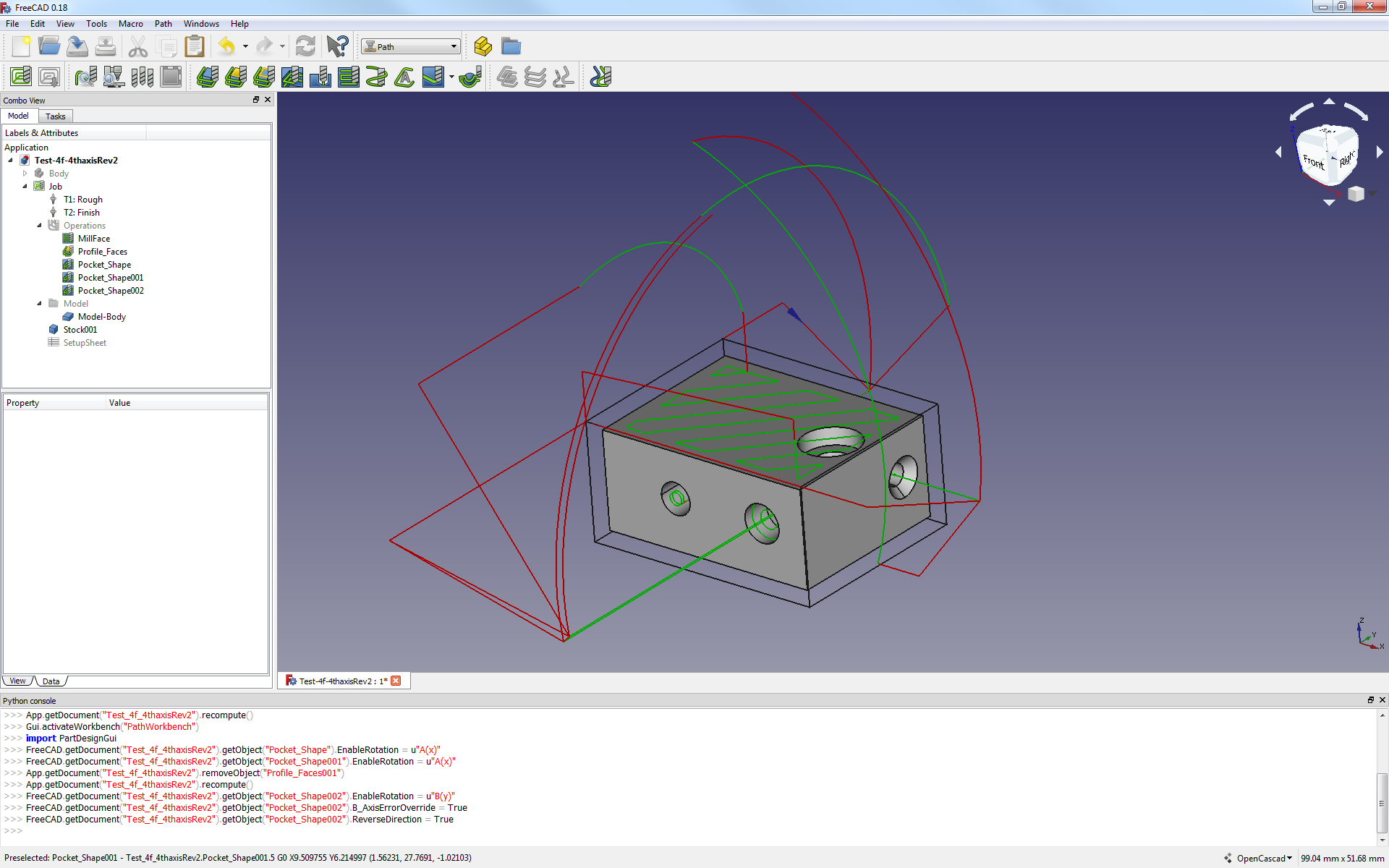
What happened? I prepared an extruded block on which I made 3 holes using the hole tool, and one cylindrical pocket using the pocket tool.
Using the job, I started gentle with face-milling, then proceeded to ask for pocketing the counter bore surface. Profiling this surface works. Pocketing it doesn’t. It also generates a funny weird face-milling type path around the body (see screenshot).
Not discouraged for a second, I proceeded to test the other holes and enabling rotations. Funnily enough, same problem occurs. I attach the file as I found it problematic.
Fiddling around with the profiling ops seems to work. Whenever the B(y) rotation axis is involved some serious Boolean gymnastic is required between B-Axis override, Attempt inverse angle, reverse direction and inverse angle…
Also, the behavior regarding profiling is unclear, most of the time, when I get the profile in the location that I want
(around the face I selected) it doesn’t perform the adequate step-down and stays at the first layer around the face
.
I think overall the promising capabilities you’ve enabled look great and feel almost right. If the behaviour can be made more intuitive, you’ve got something that will be able to be machined soon.
Thanks so much for your efforts, I’m ready for your rebuttal and counter-experiments. Test-4f-4thaxisRev.FCStd (83.4 KB)
Evening, J.
Thanks for the continued testing and feedback. I just took a look at the information you posted.
Indeed, it appears so. Good news though. It isn’t what it seems. I loaded your file in my machine with setup pasted at the end of this message. I was able to click Recompute on two of the bad paths and they corrected straight away. I did find a line of code that needed adjustment to correct another two - it had to do with depth settings.
I have not located my binary archives. I think I have your version, or one very close to unzip and test with. I don’t recall if I have the 2.7 version. Likely I have the 3.6 because I began to personally transition about that time from 2.7 to 3.6 once I was able to compile OCL for 3.6. Anyhow, I think the distant version differences probably have a role to play in the erroneous paths being generated.
The “weird face-milling” type paths usually appear when no face is entered in the Base Geometry tab. This can occur due to errors with the extensions feature included in the PocketShape tool. Otherwise, I only found Pocket_Shape002 to be set incorrectly; it was set to EnableRotation = B(y), but needed A(x).
If I recall, the B-Axis Override has been fixed permanently since 0.18.16093. B(y) rotations are rendering correctly since. For that reason, I have not made any adjustments to it within the code I have been working on. And, I have not been testing for compatibility with older versions. My apologies. If I get time, I will put a little more effort into testing and ensuring better backward compatibility with the 0.18 stable release.
This looks and sounds familiar from testing. I have made some depth and orientation analysis improvements in the code. I can offer a few suggestions also:
When working with rotation enabled operations, you may have to manually override the Start Depth or Final Depths to see if that corrects the issue.
Yes, toggling the InverseAngle property will correct the issue in some instances. If the lead in drop-down of the cutter is cutting through the model, rather than starting on the perimeter of the model and moving toward it, then the InverseAngle or the ReverseDirection probably need adjusted.
Keep in mind:
ReverseDirection should always change the path 180 degrees. No more. No less.
InverseAngle is used to correct a mistaken minus(-) sign. For example, you may notice the path points at the correct face, but is approaching from a slightly wrong direction. Say the face requires a 30 degree rotation to be normal at Z-axis. The code may offer a path at -30 degrees to the face. This is when you would try InverseAngle toggle. This would change the -30 to 30 degrees for the path.
I have improved the AttemptInverseAngle feature to be more intuitive. If set to True, it will automatically attempt the InverseAngle (if set to False) upon determining the initial rotation was not correct. Additionally, it will help when I get some documentation posted to the Wiki, rather than the scattered bits and pieces here on the forum. My goal has been to get some consistency with property names and functionality before drafting much documentation. Once we have some reliability, documentation will be easier to write.
You are quite welcome, Sir. I really appreciate your patience, investment, participation and time in the matter. I have had a lot of fun.
I will again post the most recently updated version 2g-testing scripts for your benefit, and that of the greater FC community.
Gratefully,
Russ
Of late, I have been developing using this below, but have pulled some additional recent commits in from the FC master repo:
OS: Windows 10 (10.0)
Word size of OS: 64-bit
Word size of FreeCAD: 64-bit
Version: 0.19.16886 (Git)
Build type: Release
Branch: master
Hash: ed47e962d2c821bf1792889f6d7bdf457dcf6c9e
Python version: 3.6.8
Qt version: 5.12.1
Coin version: 4.0.0a
OCC version: 7.3.0
Locale: English/United States (en_US) Test-4f-4thaxisRev_3.FCStd (66.4 KB)
Russ, thanks for a very detailed response. My next step is to fully switch to FC0.18 Py 3.6. I had only downgraded a couple of months ago because OCL wasn’t ready yet beyond 2.7 on windows. But since everyone is so damn productive I’ll catch up to speed.
I’ll rework from there. Play with the depths on profiling.
Installed the current x64 official version from Fc website - Py 3.6
Attempted rev. 2f of Pocket and Profile: same issue as before.
Copied the new rev. 2g from Russ: see screenshot. All good it seems!
Note: anyone noticed a slower performance of the computer with the newer 0.18 version? Mine is so much slower…not sure I like it, not sure where it comes from.
Afternoon All.
I have updated the Properties section of the Path_Pocket_Shape and the Path_Profile wiki pages. It will add some support to those who make use of it. The ‘Usage’ section is still lacking. Perhaps we can work together on that.
Also, I have word that the current PR 2231, with fixes for issues mentioned in this topic and others, might be close to merging into FC master.
Thanks @sliptonic and @mlampert for your consistent support.