Trying to wean myself off Windows; off & on attempts to use linux over the past 20 years or so. Currently have a dual boot win11/Mint system running but can’t seem to find FreeCAD 1.x that’s set up to ‘install’ like other software. All I was able to find was something that seemed to be the linux version of a windows .exe file, that doesn’t show up in the start menu; you have to find it with file manager and execute from there, unlike most of the common software packages I’ve installed in Mint.
Am I looking in the wrong places, or for the wrong name(s), or is that the only option?
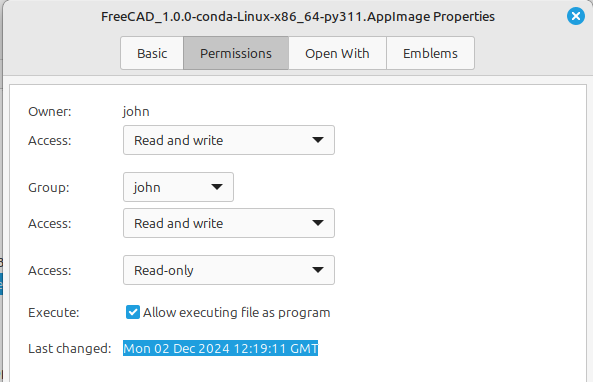
Welcome to the forum, your best step into the Linux world is to use an AppImage so using a windows machine you will need the x86_64 version FreeCAD_1.0.0-conda-Linux-x86_64-py311.AppImage from https://github.com/FreeCAD/FreeCAD/releases/tag/1.0.0 You must make the AppImage executable before it can be used so right-click the file and select Properties, click the Permissions tab and tick the checkbox Allow executing file as program
I went the same route in 2017 and have only used Windows for the odd app that isn’t available for PLCs etc.
Compiling on Linux Mint 22.1 is quite easy but unfortunately the documentation is only up-to-date to compile the bug fixed version of 1.0 not the very latest 1.1dev. If you want to go down that route in the future get back in touch and people can help out.
I should have mentioned that my Mint version is: ‘Linux Mint 22 Wilma base: Ubuntu 24.04 noble’.
Following the link detailed, and making the appimage executable does give me a program that runs, but this is where I show my linux ignorance. The appimage file now seems to be the linux equivalent of a windows .exe file, that’s run directly rather than being part of the ‘start menu’ architecture. (I realize that my terms are likely inaccurate…) This is obviously different from most of the other software I see in linux like Firefox, Thunderbird, etc that are ‘installed’ applications showing up in the start menu, similar in appearance to ‘installed’ windows applications.
The software is certainly usable ‘as is’, but I’d hoped for a more consistent user interface.
Thanks for the links and process; it did get me a functional FreeCAD installation.
Next step is to get FreeCAD (and linux, for that matter) to see my NAS drive…