How to check where negative Jacobina are

I have a question about tips and tricks around negative jacobian.
Most of the time i make the mesh finer and it resoved it self.
Now i have a imported step file. 2 sheetmetal plates (created in NX) and two other parts.
the point is i have now upper limit = 1 mm, lower limit = 10 µm and still:

Gmsh had warnings ...
Warning : Volume mesh: worst distortion = -0.77866 (avg = 0.999257, 11 elements with jac. < 0)
Warning : ------------------------------
Warning : Mesh generation error summary
Warning :     1 warning
Warning :     0 errors
Warning : Check the full log for details
Warning : ------------------------------

I have 2770104 Nodes and 1814745 Volumes

What trick do FC have to now where the neg jacobians are.
I know the existence of boundary layer and mesh region. But does that work when the lower limit == 10 µm?

You can not show the negtive jacobians of gmsh in FC. You would need to use gmsh for this.

What you can do, just run it in ccx and see what happens. Sometimes it runs anyway. Sometimes ccx complains about negative (nonpositive) jacobians too. Sometimes not. Sometimes it complains about them without gmsh complaining. If you have 11 element out of 2700000 it is quite common any of the above can happen. If you would have 2000 out of them normaly gmsh and ccx will complain.

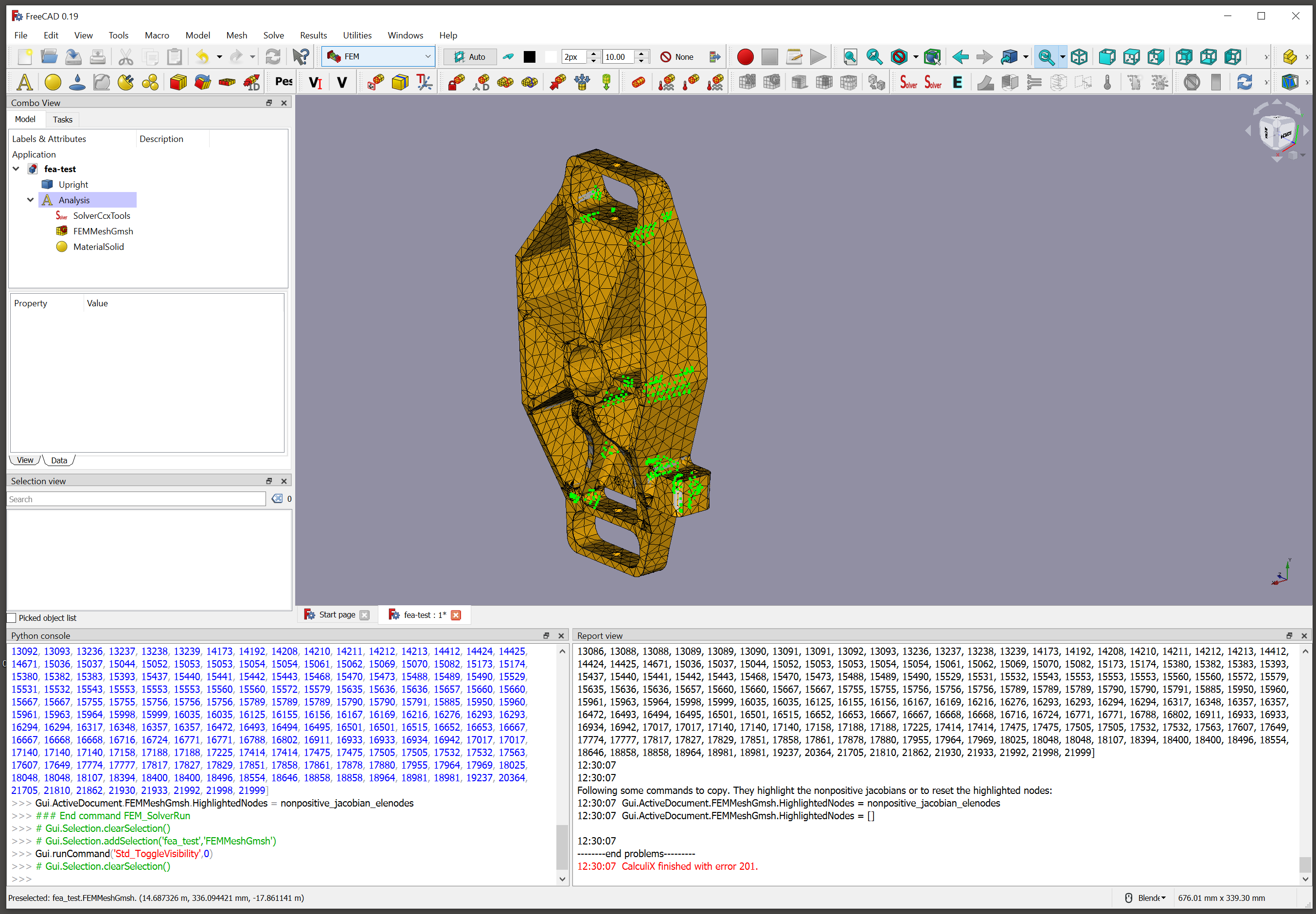
The nonpositive jacobians of ccx will show green in result mesh. Just use the run button to run the analysis not the task panel. https://forum.freecadweb.org/viewtopic.php?t=21075&start=10#p163902

BTW: In most cases it is the upper limit not the lower limit the problem.

I tried (with another model) Don’t know where the problem comes from.
When using the sover menu(write analysis >> run solver) i get the negative jacobian error but no green dots. when using the SolverRun command buttun i got first a Calculix 201 Error (by 88xxx nodes).
After that i remeshed (11xxx nodes) both methods the green dots don’t show up. as last i tested the experimental solver also no green dots…

OS: Windows 7 SP 1 (6.1)
Word size of OS: 64-bit
Word size of FreeCAD: 64-bit
Version: 0.19.21514 (Git)
Build type: Release
Branch: master
Hash: 89ddab33f692a9bd739171689f9ab0eb58d64b35
Python version: 3.6.8
Qt version: 5.12.1
Coin version: 4.0.0a
OCC version: 7.3.0
Locale: Dutch/Netherlands (nl_NL)

You need to use the standard CalculiX solver. Would you post the FreeCAD file?

Here you should see some prints in the report view and the green dots in the 3D scene.

jaut gave it another try. If the run button is used the nonpositve jacobians are green for me. You need to activate the mesh to see them!

screen.png

Do you meant this button: https://wiki.freecadweb.org/FEM_SolverRun ?

when that button i got:

CalxuliX ccx tools solver!
References: empty in MaterialSolid, MaterialSolid
References: Face in ConstraintFixed, ConstraintFixed
References: Face in ConstraintForce, ConstraintForce
Check prerequisites.
References: empty in MaterialSolid, MaterialSolid
Start writing CalculiX input file
Write ccx input file to: C:\Users\USER\AppData\Local\Temp\fcfem_vsw4x817\FEMMeshGmsh.inp
ConstraintFixed:
    Type: Fem::ConstraintFixed, Name: ConstraintFixed
  found mesh group for the IDs: ConstraintFixed_Nodes, Type: Node
Writing time CalculiX input file: 0.3 seconds 

Writing CalculiX input file completed.
Run CalculiX ...
It seams we run into NOANALYSIS problem, thus workaround for wrong exit code for *NOANALYSIS check and set ret_code to 0.
We will load the ccx frd and dat result file.
Read ccx results from frd file: C:\Users\USER\AppData\Local\Temp\fcfem_vsw4x817\FEMMeshGmsh.frd
Nodes, but no results found in frd file. It means there only is a mesh but no results in frd file. Usually this happens for: 
- analysis type 'NOANALYSIS'
- if CalculiX returned no results (happens on nonpositive jacobian determinant in at least one element)
- just no frd results where requestet in input file (neither 'node file' nor 'el file' in output section')
Read ccx results from dat file: C:\Users\USER\AppData\Local\Temp\fcfem_vsw4x817\FEMMeshGmsh.dat

When using the write inp → run calculix menu i got

0.0: Check dependencies...
0.3: Write completed.
0.0: CalculiX binary: C:/Users/USER/Downloads/FreeCAD_0.19.21514_x64_LP_12.1.6_PY3QT5-WinVS2015/bin/ccx.exe
0.0: CalculiX input file: C:\Users\USER\AppData\Local\Temp\fcfem_obbqgo88\FEMMeshGmsh.inp
0.0: Run CalculiX...
0.0: Starting CalculiX...
0.0: CalculiX is running...
0.7: CalculiX stopped.
0.7: ************************************************************ 
CalculiX Version 2.15, Copyright(C) 1998-2018 Guido Dhondt 
CalculiX comes with ABSOLUTELY NO WARRANTY. This is free 
software, and you are welcome to redistribute it under 
certain conditions, see gpl.htm 
************************************************************ 
You are using an executable made on niedz., 16 gru 2018 14:14:23 
The numbers below are estimated upper bounds 
number of: 
nodes: 11296 
elements: 10012 
one-dimensional elements: 0 
two-dimensional elements: 0 
integration points per element: 4 
degrees of freedom per node: 3 
layers per element: 1 
distributed facial loads: 0 
distributed volumetric loads: 0 
concentrated loads: 0 
single point constraints: 351 
multiple point constraints: 1 
terms in all multiple point constraints: 1 
tie constraints: 0 
dependent nodes tied by cyclic constraints: 0 
dependent nodes in pre-tension constraints: 0 
sets: 5 
terms in all sets: 39137 
materials: 1 
constants per material and temperature: 2 
temperature points per material: 1 
plastic data points per material: 0 
orientations: 0 
amplitudes: 1 
data points in all amplitudes: 1 
print requests: 1 
transformations: 0 
property cards: 0 
*WARNING: no analysis option was chosen 
STEP 1 
No analysis was selected 
Decascading the MPC's 
Determining the structure of the matrix: 
number of equations 
33537 
number of nonzero lower triangular matrix elements 
1115283 
Using up to 4 cpu(s) for the stress calculation. 
Using up to 4 cpu(s) for the symmetric stiffness/mass contributions. 
*ERROR in e_c3d: nonpositive jacobian 
determinant in element 6255 
*ERROR in e_c3d: nonpositive jacobian 
determinant in element 6286 
*ERROR in e_c3d: nonpositive jacobian 
determinant in element 6371 
*ERROR in e_c3d: nonpositive jacobian 
determinant in element 6484 
*ERROR in e_c3d: nonpositive jacobian 
determinant in element 6558 
*ERROR in e_c3d: nonpositive jacobian 
determinant in element 6702 
*ERROR in e_c3d: nonpositive jacobian 
determinant in element 9469 
*ERROR in e_c3d: nonpositive jacobian 
determinant in element 9470 
*ERROR in e_c3d: nonpositive jacobian 
determinant in element 6731 
*ERROR in e_c3d: nonpositive jacobian 
determinant in element 6750 
*ERROR in e_c3d: nonpositive jacobian 
determinant in element 9531 
*ERROR in e_c3d: nonpositive jacobian 
determinant in element 9533 
*ERROR in e_c3d: nonpositive jacobian 
determinant in element 9540 
*ERROR in e_c3d: nonpositive jacobian 
determinant in element 9587 
*ERROR in e_c3d: nonpositive jacobian 
determinant in element 9587 
*ERROR in e_c3d: nonpositive jacobian 
determinant in element 9588 
*ERROR in e_c3d: nonpositive jacobian 
determinant in element 9597 
*ERROR in e_c3d: nonpositive jacobian 
determinant in element 9600 
*ERROR in e_c3d: nonpositive jacobian 
determinant in element 9609 
*ERROR in e_c3d: nonpositive jacobian 
determinant in element 6904 
*ERROR in e_c3d: nonpositive jacobian 
determinant in element 9838 
*ERROR in e_c3d: nonpositive jacobian 
determinant in element 9842 
*ERROR in e_c3d: nonpositive jacobian 
determinant in element 9844 
*ERROR in e_c3d: nonpositive jacobian 
determinant in element 9908 
*ERROR in e_c3d: nonpositive jacobian 
determinant in element 9966 
*ERROR in e_c3d: nonpositive jacobian 
determinant in element 10012 
*ERROR in e_c3d: nonpositive jacobian 
determinant in element 7217
0.7: CalculiX execute error: 
0.7: Loading result sets...

and

Run CalculiX ...
It seams we run into NOANALYSIS problem, thus workaround for wrong exit code for *NOANALYSIS check and set ret_code to 0.
We will load the ccx frd and dat result file.
Read ccx results from frd file: C:\Users\USER\AppData\Local\Temp\fcfem_vsw4x817\FEMMeshGmsh.frd
Nodes, but no results found in frd file. It means there only is a mesh but no results in frd file. Usually this happens for: 
- analysis type 'NOANALYSIS'
- if CalculiX returned no results (happens on nonpositive jacobian determinant in at least one element)
- just no frd results where requestet in input file (neither 'node file' nor 'el file' in output section')
Read ccx results from dat file: C:\Users\USER\AppData\Local\Temp\fcfem_vsw4x817\FEMMeshGmsh.dat
References: empty in MaterialSolid, MaterialSolid
References: Face in ConstraintFixed, ConstraintFixed
References: Face in ConstraintForce, ConstraintForce
Check prerequisites.
References: empty in MaterialSolid, MaterialSolid
Start writing CalculiX input file
Write ccx input file to: C:\Users\USER\AppData\Local\Temp\fcfem_obbqgo88\FEMMeshGmsh.inp
ConstraintFixed:
    Type: Fem::ConstraintFixed, Name: ConstraintFixed
  found mesh group for the IDs: ConstraintFixed_Nodes, Type: Node
Writing time CalculiX input file: 0.3 seconds 

run CalculiX at: C:/Users/USER/Downloads/FreeCAD_0.19.21514_x64_LP_12.1.6_PY3QT5-WinVS2015/bin/ccx.exe with: C:\Users\USER\AppData\Local\Temp\fcfem_obbqgo88\FEMMeshGmsh.inp


CalculiX returned an error due to nonpositive jacobian determinant in at least one element
Use the run button on selected solver to get a better error output.
Error() 
We will load the ccx frd and dat result file.
Read ccx results from frd file: C:\Users\USER\AppData\Local\Temp\fcfem_obbqgo88\FEMMeshGmsh.frd
Nodes, but no results found in frd file. It means there only is a mesh but no results in frd file. Usually this happens for: 
- analysis type 'NOANALYSIS'
- if CalculiX returned no results (happens on nonpositive jacobian determinant in at least one element)
- just no frd results where requestet in input file (neither 'node file' nor 'el file' in output section')
Read ccx results from dat file: C:\Users\USER\AppData\Local\Temp\fcfem_obbqgo88\FEMMeshGmsh.dat

So i don’t completly understoot what button you meant

yes, exactly this button. As said before it does NOT show the nonpositive jacobians if the solver task panel is used.


Furthermore you seam to use checking solver mode.

*WARNING: no analysis option was chosen

It for sure shows the nonpositive jacobians in frequency analysis. Just add an analysis, a solver set solver to frequency, add a material and hit the run button.

  • start FreeCAD
  • load the file
  • activate the analysis
  • run analysis with run button (do NOT use the task panel)
21:08:12  CalxuliX ccx tools solver!
21:08:12  References: empty in MaterialSolid, MaterialSolid
21:08:12  Check prerequisites.
21:08:12  References: empty in MaterialSolid, MaterialSolid
21:08:12  Start writing CalculiX input file
21:08:12  Write ccx input file to: /home/hugo/Desktop/nonpositive_jacobians_ex01/SolverCcxTools/FEMMeshGmsh.inp
21:08:12  Writing time CalculiX input file: 0.07 seconds 

21:08:12  Writing CalculiX input file completed.
21:08:12  Run CalculiX ...
21:08:12  CalculiX failed with exit code 201
21:08:12  --------start of stderr-------
21:08:12  --------end of stderr---------
21:08:12  --------start of stdout-------
21:08:12  
************************************************************

CalculiX Version 2.17, Copyright(C) 1998-2020 Guido Dhondt
CalculiX comes with ABSOLUTELY NO WARRANTY. This is free
software, and you are welcome to redistribute it under
certain conditions, see gpl.htm

************************************************************

You are using an executable made on Thu Jul 23 21:43:50 CEST 2020

  The numbers below are estimated upper bounds

  number of:

   nodes:         4231
   elements:         3721
   one-dimensional elements:            0
   two-dimensional elements:            0
   integration points per element:            4
   degrees of freedom per node:            3
   layers per element:            1

   distributed facial loads:            0
   distributed volumetric loads:            0
   concentrated loads:            0
   single point constraints:            0
   multiple point constraints:            1
   terms in all multiple point constraints:            1
   tie constraints:            0
   dependent nodes tied by cyclic constraints:            0
   dependent nodes in pre-tension constraints:            0

   sets:            4
   terms in all sets:        15251

   materials:            1
   constants per material and temperature:            2
   temperature points per material:            1
   plastic data points per material:            0

   orientations:            0
   amplitudes:            0
   data points in all amplitudes:            0
   print requests:            0
   transformations:            0
   property cards:            0


 STEP            1

 Frequency analysis was selected

 Decascading the MPC's

 Determining the structure of the matrix:
 number of equations
 12693
 number of nonzero lower triangular matrix elements
 447204

 Using up to 4 cpu(s) for the stress calculation.

 Using up to 4 cpu(s) for the symmetric stiffness/mass contributions.

 *ERROR in e_c3d: nonpositive jacobian
        determinant in element        3159

 *ERROR in e_c3d: nonpositive jacobian
        determinant in element        3161

 *ERROR in e_c3d: nonpositive jacobian
        determinant in element        3192

 *ERROR in e_c3d: nonpositive jacobian
        determinant in element        3194

 *ERROR in e_c3d: nonpositive jacobian
        determinant in element        3194

 *ERROR in e_c3d: nonpositive jacobian
        determinant in element        1972

 *ERROR in e_c3d: nonpositive jacobian
        determinant in element        1972

21:08:12  
--------end of stdout---------
21:08:12  --------start problems---------
21:08:12  

CalculiX returned an error due to nonpositive jacobian elements.
21:08:12  nonpositive_jacobian_elements = [1972, 3159, 3161, 3192, 3194]
21:08:12  nonpositive_jacobian_elenodes = [335, 337, 398, 418, 428, 1253, 1262, 1264, 1279, 1289, 1302, 1310, 1400, 1406, 1408, 1444, 1445, 1446, 1447, 1448, 1450, 1746, 1746, 1747, 2164, 2167, 2183, 2184, 2185, 2348, 2348, 2351, 2351, 2363, 2367, 2368, 2369, 2369, 2370, 2600, 3605, 3684, 3938, 3938, 4055, 4056, 4110, 4111, 4161, 4161]
21:08:12  
21:08:12  
Following some commands to copy. They highlight the nonpositive jacobians or to reset the highlighted nodes:
21:08:12  Gui.ActiveDocument.FEMMeshGmsh.HighlightedNodes = nonpositive_jacobian_elenodes
21:08:12  Gui.ActiveDocument.FEMMeshGmsh.HighlightedNodes = []

21:08:12  
--------end problems---------
21:08:12  CalculiX finished with error 201.

nonpositive_jacobians_ex01.FCStd (214 KB)
Screenshot_20200921_210948.png

i check your example tomorow