This is a long-standing issue with the Path Pocket operation. It is on the list to be addressed at some point.
The simple solution for immediate use is to add a thin plate to the bottom of the object. Then the holes will have a bottom face, and the pocket operation will work correctly.
PathContour and PathMillFace have just been converted to use PathArea and merged yesterday. They seem to be working well.
I’m in the process of converting PathPocket, PathProfile, and PathProfileFromEdges. If you want to try them out and don’t mind building from source, the branch is here: https://github.com/sliptonic/FreeCAD/tree/feature/PathAreaOps2 (all usual warnings apply. Likely to be broken often )
Here’s what pocket looks like:
And face profile :
As a teaser, here’s pocket with some more interesting pocket shapes:
I’m using launchpad freecad-daily, I’ll give it a try and let you know the results.
And Congratulations for the great job you’re all doing with FreeCad.
I compiled your branch on Windows 7, and it appears to work well. I tested a very simple structure of a cube with a hole through the middle, and the pocketing operation took out the entire hole, even without a bottom face.
I also tried a stepped hole, and again the pocket operation handled it without error. The only issue is that the depth settings only allow for a single depth to be chosen. I could select the step depth, in which case the entire pocket was of that depth, or I could select the through depth, in which case the bottom of the step was ignored.
If I tried two consecutive pocket operations, one for the step and one for the through hole, the combination was correct. Perhaps not completely efficient due to some overlap of cutting paths, but definitely workable.
Took-me a while to build it from source, but I have it working now, using the lauchpad build scripts for the daily version and merged with your branch.
Let me know if you need some help testing some specific scenarios, there are other issues that core dump that I’ve not mentioned.
I have some remarks, I will list:
PathProfileEdges - works fine although there are some parameters in the GUI that I don’t know what they mean.
What is “Roll Radius”
What is “Extra Offset”
PathPocket
Only ZigZag works, I cannot select other strategy.
Seaches for all pockets cannot select one to create a path. (is there any way to select which to perform, I mean pockets with out bottom)
If I have pocket operations with different depths, it is still selecting all pockets and the path operation is only one with one depth (10 mm), one of the pockets is 5 mm .. see PathPocket-1.png
What is “Material Allowance” ?
What is “Step Over Percent” ?
Like I’ve mentioned this is not exactly your branch but the master merged with yours, still your functionality is there
Cool. thanks for testing. PathAreaOps2 is pretty broken right now. I’m actively working on it and hoping to have it back in shape this weekend.
I have some remarks, I will list:
PathProfileEdges - works fine although there are some parameters in the GUI that I don’t know what they mean.
What is “Roll Radius”
What is “Extra Offset”
Roll radius is obsolete and should be removed. I’ll make a note.
Extra Offset is an extra amount to be be applied to the offset. If you use a 5mm cutter and have compensation turned on, you’ll generate the path 2.5mm from the model. If you add 1mm of extra offset, the path will be at 3.5mm. I’ll often add a small amount of extra offset, like .1mm as I step down on a contour. Then do a second operation with only a single pass to remove that material. This ‘finishing pass’ improves the surface quality of the part since you don’t see the dwell marks of the step-down passes.
PathPocket
Only ZigZag works, I cannot select other strategy.
Seaches for all pockets cannot select one to create a path. (is there any way to select which to perform, I mean pockets with out bottom)
If I have pocket operations with different depths, it is still selecting all pockets and the path operation is only one with one depth (10 mm), one of the pockets is 5 mm .. see PathPocket-1.png
What is “Material Allowance” ?
What is “Step Over Percent” ?
PathPocket is being worked on. Lots broken at the moment. selection of subobjects is pending.
other strategies should work. I’ll take a look.
Material Allowance is equivalent to ‘extra offset’ Probably should rename one or the other. Does one name make more sense?
Step-over percent is the percent of the cutter to move over on each pass clearing a pocket. The first pass is always 100% of the cutter but after that, the cutter can proceed stepping over only part of its diameter.
Like I’ve mentioned this is not exactly your branch but the master merged with yours, still your functionality is there > >
I rebase my branch from master regularly so it should be about the same either way.
Roll radius is obsolete and should be removed. I’ll make a note.
Extra Offset is an extra amount to be be applied to the offset. If you use a 5mm cutter and have compensation turned on, you’ll generate the path 2.5mm from the model. If you add 1mm of extra offset, the path will be at 3.5mm. I’ll often add a small amount of extra offset, like .1mm as I step down on a contour. Then do a second operation with only a single pass to remove that material. This ‘finishing pass’ improves the surface quality of the part since you don’t see the dwell marks of the step-down passes.
[quote=“mario.silva.costa”]
PathPocket
Only ZigZag works, I cannot select other strategy.
Seaches for all pockets cannot select one to create a path. (is there any way to select which to perform, I mean pockets with out bottom)
If I have pocket operations with different depths, it is still selecting all pockets and the path operation is only one with one depth (10 mm), one of the pockets is 5 mm .. see PathPocket-1.png
What is “Material Allowance” ?
What is “Step Over Percent” ?
[/quote]
PathPocket is being worked on. Lots broken at the moment. selection of subobjects is pending.
other strategies should work. I’ll take a look.
Material Allowance is equivalent to ‘extra offset’ Probably should rename one or the other. Does one name make more sense?
Step-over percent is the percent of the cutter to move over on each pass clearing a pocket. The first pass is always 100% of the cutter but after that, the cutter can proceed stepping over only part of its diameter.
Well I’m a newbie in CNC world, so I don’t know much of the jargon of the area. For me the “extra offset” makes sense, but still I would need some tip with your explanation. I would add your exact explanation to the Tutorial of the Path Workbench, as it explains CNC typical usage scenario and its geometrical meaning/impact on the path.
Hi @sliptonic,
you have an incomplete merge committed, and its giving an error when installing.
File “/usr/lib/freecad/Mod/Path/PathTests/TestPathCore.py”, line 113
<<<<<<< d3838802b1665892c464bce8a340531cafcb66f2
I found and fixed this problem this morning. Then forgot to commit the fix. Sorry. Should be fixed now. Test still doesn’t complete successfully though.
just for the record, edge profile would also work, you just have to change “On” to “Left” or “Right”, depending on the direction of movement (just pick one and see if it’s where it should, otherwise pick the other one).
re. contour - for some reason it doesn’t seem to lift the tool at the end of the job, but it attempts to return to [0, 0]; luckily, the first time I got this it was 18mm spruce and a 6mm end mill, it just destroyed the part; afterwards I made a habit to simulate in camotics first (ended up replacing contour with edge profile or face profile, depending on the situation).
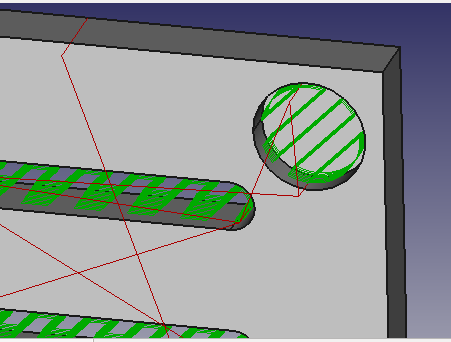
I’ve noticed something strange in the pocket operation. I have several pockets, and used the spiral strategy for the path pocket operation. All pockets seem fine, except for one, that has a strange path inside.
All of them have 4 mm width, I’m using a tool with 3 mm.
See the image below
I’m using freecad-daily version, that is built from the master branch
Let me know if you need additional information to track whats wrong.
Spiral often gives weird results. If you can share your file, please do. Or better yet, post it to the Methodist thread. Maybe we should pin that thread so it stays up top.
Which version did you use? The daily version changes, hmm, well: daily. Tomorrow no one knows where your problem came from. Please add your FreeCAD info as described in the forum help: http://forum.freecadweb.org/viewtopic.php?f=3&t=2264
 , greetings to all!

 )
)



 I found and fixed this problem this morning. Then forgot to commit the fix. Sorry. Should be fixed now. Test still doesn’t complete successfully though.

