 Hi all, it’s a bit late but it looks like FreeCAD will be applying as its own organization to Google Summer of Code this year. I’m putting together the organization application now. Please share if you have an interesting project idea, if you’re willing and able to mentor, or if you’re an interested student.
A good unified measurement tool. A VERY good measurement tool.
This would be a good idea, but keep in mind it’s a 12-22 week project. It’s very much possible to make the tool in that time, but maintaining might not be that straightforward. Any mentor working on this project should probably have enough knowledge about the codebase that if the contributor doesn’t continue beyond GSoC someone else should be able to take it up.
Of course this doesn’t apply to just the measurement tool.
Idea: Using Nim as an extension to the existing C++ code.
These days everybody is talking about replacing C++ with Rust. To me that is silly because the existing C++ code is most of the times adequate and although Rust is quite good, to me it has the look and feel of C++ 2.0
Python is used as an extension to to the C++ code. Why? Because it’s easier and faster to read and write than C++.
My idea is to use a second programming language as an extension to the C++ code: Nim. Why? Again, because it’s easier and faster to read and write than C++, but there is one big difference between Nim and Python: Nim is roughly as fast as C++ !
Now people are gonna ask: WTF is Nim? Nim has the “look and feel” of Python but is a different language. Contrary to Python is Nim completely typed, has operator and procedure overloading, objects, macros, templates, generics, threading and is multi-platform. Mostly I think that Nim is C++ without it’s quirks and you are gonna write a lot less code. Nim is “easy” but of course it is a mature professional programming language, so it also has it’s quirks but compared with C++ it is a piece of cake. The compile speed of Nim is good and it compiles to C++. Nim is being used for exactly this purpose: To extend C++. It is used inside the Game industry, for embedded and also for Web design. You can find the Nim libraries at https://nimble.directory/
The downside of Nim is that the integrated Python prompt doesn’t work and you need to write code with an editor. You can import your Python code with Nim.
What would be the goal? Implement Nim and also to implement the FreeCAD wrappers (incl. OCCT) so that people can use Nim in FreeCAD.
What are the chances of success? To be honest I think that the problems are gonna arise with the package management and the multi-platform aspects of FreeCAD but for the rest I think that the chances are pretty high. We are gonna need a new branch obviously.
I think that GSoC could be the perfect opportunity to introduce Nim to FreeCAD and once that people are start using Nim, that would be the success for me.
Unless you fully replace C++ adding another language sounds like just complicating things further… but I’ve never used nim so maybe it is so easy to use that it warrants the complexity of mixing 3 languages.
You can compare Nim a bit with Python, but stricter and in my opinion just as fun.
Probably a waste if time seing that one of the goal for future Python version are mainly speed improvements.
I have no doubt that Nim is a good language, but trusting on Python improvement you have not to rewrite a big part of FreeCAD and almost every WB already coded.
EDIT: I was intrigued on what NIm is sadly it is a compiled language, so no luck, Python in interpreted language, you are comparing apples to aoranges.
Once written a Python script could run on every flavour of FreeCAD on every OS without a bit of recompiling, with Nim, you have to recompile the script each time you run it, at this point why not write a script in C++ directly?
END EDIT
Better to reduce complexity than augment it. Following the KISS principle, it is not a case if Python is used in many scientific projects.
Regards.
Carlo D.
I already told you that Nim compiles to C++. When you look into the generated files you can see C++ files. I am sorry that you thought that Nim has an interpreter like Python. But I don’t think that I have to tell you why I don’t want to write C++, that is obvious and that is why I suggested this idea to start with.
It sounds like nim can translate itself into C++, couldn’t you then write in nim, translate to C++ and PR the generated C++ code? Is there a way of doing the opposite? Translating C++ into nim?
That would be very hard to do because C++ has so many features.
Formula editor improvement.
A mockup with the process to “catch” a length propriety of an edge with a pick tool.
For maximum flexibility, the reference can ve anything that you can extract a number to assign to an expression to make a formula.
The “another level feature” are make an: if, or, … basic programming code formulas in the formula editor.
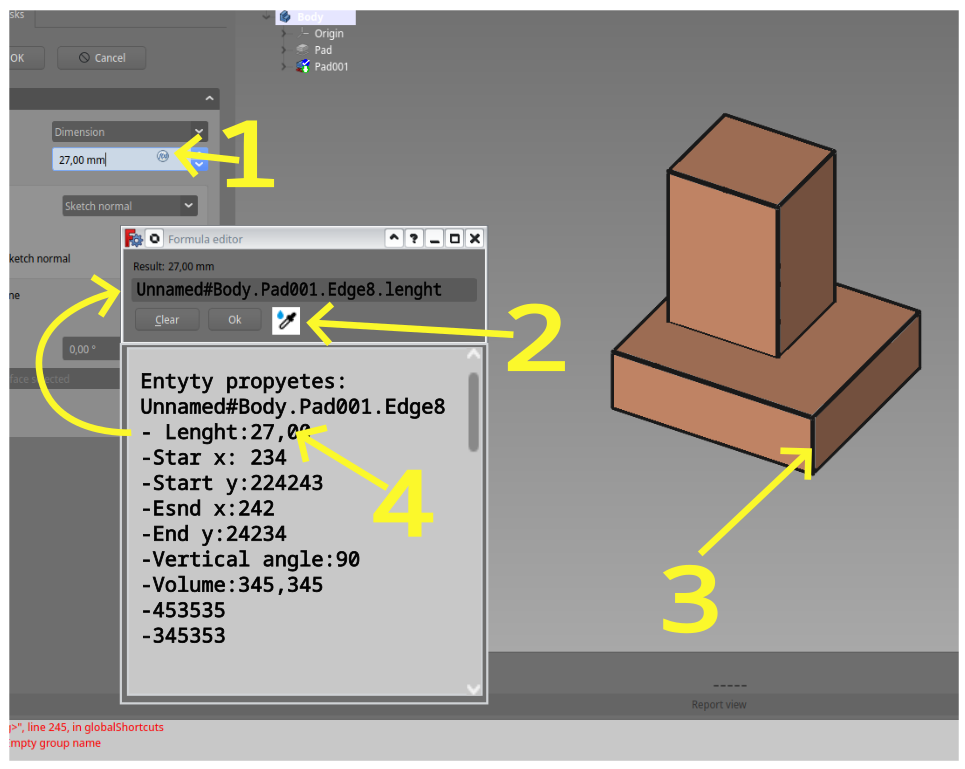
expressions using generated geometry are a terrible idea, in any case it can allow clicking a property or referencing the whole object
-
I could think of all sorts of tool enhancements. Like you have in-command shortcut options in the Draft Polyline (M-key), you could expand that to many more tools. Basically, implement a modal tool system.
-
2D drafting could be improved with better polyline segment manipulation tools (sub-element selection, sub-element move)
-
Selection in general, see: https://forum.freecad.org/viewtopic.php?t=75719
-
More intuitive and efficient parametrisation through spreadsheets, maybe. Like type: “parametername = Value”, have it auto-populate in the spreadsheet with the parametername alias. Add a header above for the auto-populated cells and a style to indicate they were not typed in manually. Allows you more freedom to work as you go.
-
Then you could add drag and drop row ordening (and if you have a formula that references B6, but you move it to C7, it will maintain links).
-
Get rid of the Spreadsheet.Parameter syntax for formula and instead allow to just type the parameter alias. Saves users a lot of typing the initial Spreadsheet letters.
-
A pop-up spreadsheet window
-
A dedicated spreadsheet for automatically assigned parameter aliases (ties back to 4, but make it a different sheet with headers/ titles per modeling operation). This helps keep your own spreadsheets clean, while you could use the other sheet in your formulas.
-
Don’t know if suitable for GSOC: try to get Paddle’s sketcher work to merge. There are plenty of patches of his that could be worked on
-
For the sketcher: work on additional functionality for spline types and constraints.
-
For draft workbench a curve to curve intersection which trims/ extends both curves to their intersection point (so it’s just one operation instead of 2). Could be mixed and matched with Chamfer and Fillet operations.
-
UI: Help bridge stylesheet styling so that every window/ button type that is nested in other Qt classes are documented and styleable. Polish the rough edges where possible.
-
bring RealThunder’s shaded display functionality over to master (nicer realistic viewports).
-
Maybe research a way to load commands on activation from not-loaded workbenches when invoked through a macro or hotkey.
-
As per: https://forum.freecad.org/viewtopic.php?t=75768 - work on persistent toolbars (prevent them from moving around).
-
Anyone familiar with Affinity/ Illustrstor/ NX: create a shapebuilder tool, which if you drag over enclosed areas of curves, merges them to leave their oultine. With alt pressed, removes the curve sections that enclose the portion one drags in from the selected shapes. And, this could also be a trimming tool when you drag over overshooting (extending) line ends so they end at the adjacent curve intersection. Nice QoL improvement. Window/ lasso select curves to operate on, the drag to operate and button/ hotkey to accept changes.
-
A parametric, node based editor (akin to Blender’s geometry nodes, but then for BREPS). This is useful for complex patterning and for the BIM workbench in general (also useable to automate tasks for those who like nodes more than scripting).
These are some initial thoughts
Yes, I also have a dozen or so ideas. But if you really think hard about ONE subject, a subject where a guy is gonna work on for about three or four months with your supervision, what would your idea then? That is the subject about what we should be talking about. Think, write it down, write the rationale, the benefits and the possible failure. What can we learn? If you can write that down then I am sure that your idea gets attention.
Edit: And of course it would be better if you can maintain that code for the rest of your life 
Ok I understand it is caused for the TNP problem, and the use of spreadsheed is recomended way.
In the example I use generated geometry, but you can pick a more stable propiety like a constraint lenght on sketch or pad lenght.
I would say this final motivation for the project scope, problem definition and proposed solution are more for the person who is working on this and what they may find interesting. My list was more of a getting started list of ideas. Here’s a conversion of the items to topics:
But, you can already see a couple topics:
1. Parameter management and useability thereof
Problem: Right now the system is somewhat rigid and takes away some flow of work, you need to manage your parameters manually, but if the software could take care of this, the user is more free to delegate thoughts to design.
Solution: see some points from my previous posts, it comes down to the software managing the parameters in an automated fashion. The user just specifies a parameter name, the software stores and recalls it when using the parameter name (alias).
Caveats: Is there a way for the user to manually adjust the automated parameter management? How is this made insightful for the user?
2. Tool ergonomics (& efficiency)
Problem: Many tools in FreeCAD exist for a single purpose. For instance, when you are drafting polylines, you can create one polyline at the time. When done, you exit the tool. But, if you want to create many polylines and manipulate them, you need to reinvoke tools or switch tools often.
Solution: Create ‘swiss army knife’ tools, which are tailored to a particular workflow. For example, the polyline command would be reactivated after closing a curve or exiting one curve. This is the idea of active tools. The advantage is that you can keep on working within a tool and that you can determine yourself whether you want to only stop drawing the current polyline or that you want to switch to another dedicated tool. The same goes for trim and extending, where you often want to make sure lines intersect. For that matter, you can create smart context sensitive tools. You could for instance add an intersection mode so curves are automatically extended/ trimmed to their intersection point before initiating a fillet or chamfer. Set the chamfer distance to 0 (with an in-command shortcut aka modal hotkey) to trim/ extend polylines to intersection points.
Caveats: which tools, what workbenches and what is the user workflow? > can ask on the forum.
3. Realistic viewport display
Problem: the current viewport display is rather barebones. We, as humans, are used to see things with shading: cast and drop shadow (not just ambient occlusion). FreeCAD doesn’t do this, so it is harder to evaluate shapes (and looks less pretty).
Solution: Implement a realistic, physics based viewport.
Caveats: RealThunder uses an external library for this. What are the opportunities of the library? And what are its weaknesses? It has to be maintainable and there are downsides to incorporating a third party library in the code.
4. Selection
Problem: FreeCAD can be a bit iffy and inconsistent in its selection procedures. But, selection is one of the most important processes of modelling, you need to tell the software which operations are performed on what. This ‘what’ is covered by selection.
Solution: Create a more consistent selection experience across the software (read: workbenches). Having dedicated modes (with hotkeys) for selection, selection filtering, etc. helps to more accurately and more efficiently tell the software where to operate on. This in turn, saves time and reduces clicks for the user, which makes the software more efficient.
Caveats: How are each of the selection modes accessed? Are there conflicts with current hotkeys/ navigation preferences?
Make yourself familiar with Draft Polyline, it’s all there.
Okay, yes, the continue option. It didn’t work by using the hotkey (it exits the polyline for me). Sorta skimmed over it because of that.
E2: Appears my user.cfg got corrupted.
E: But, the Draft Fillet command, only accepts lines according to the documentation. And splitting polylines to then go to their properties to set a radius is not the most user friendly to say the least (it does not support varying fillet radii either, nor filleting non-coincident lines). So that’s not already there. What is available, requires way too many clicks and can be improved, that’s what I’m saying. Not to mention the lack of a live preview when performing a fillet, where you could click the lines to fillet, move the mouse and thereby change its radius (like Blender’s bevel command if you are familiar with that).
Keep in mind the groundrules outlined in the opening post.
Looking for ideas that YOU are willing and able to mentor.
Are you ready to handle all these items?
Gene
The way I read it is that you could also send in interesting ideas for a project. I unfortunately won’t be able to participate myself, but was trying to help raise some ideas to kick-start the discussion for future prospects. The opening post’s sentence is open to multiple interpretations.