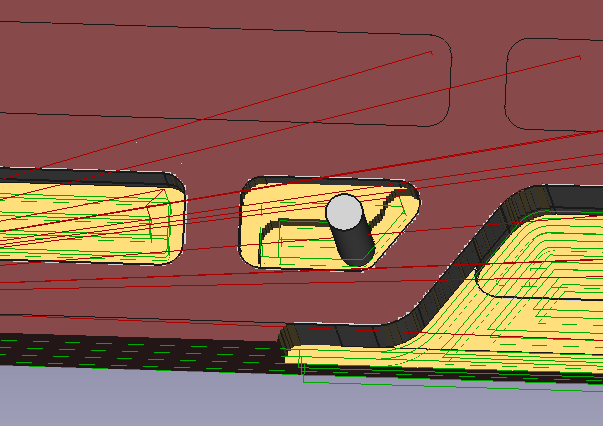
Hi there, I am quite new to CAM/CAD designs, started couple of days ago, so I might have stupid questions, however I did not find a way to get arround that, so I might need a help with that. Thank you in advance!
I had succesfully design this solid with pockets and generated the toolpath. I think it will work just fine, however I am a little bit confused with what is just a simulation and how the tool will move on the cnc in real world. And I have two questions:
-
The thing is that I have pockets with the same depth. Is there a way how to make a operation of two pockets with the same depth in single operation (two on the odge) and then combine them with another two pockets (two smaller next to them) while moving the tool from lower left pocket (1 - 8cm wide), then to move to next (2 - 4 cm wide but with another depth), then trird with another depth etc while not to return the spindle to the starting point 0,0? I found that best strategy is to create an operation of every single pocket separately in order to stay efficient, but I am wondering if there is some quicker solution..
-
If I have created the pockets separately in good order - from lower left to lower right and then upper right to upper left, can I somehow enable the boolean “mintravel” of all operations “in the group”, so it will clear one pocket and move to another while not coming back to start point 0,0?
-
On the picture 2 I can see that the step is executed just by moving Z axes by the set distance, is there I way how to set that it will move slowely while cutting the wood? This is happening in every step down in all operations. I think that if the endmill will make a step down on some angle, it will be better for life of that endmill and result in better surface.
and lastly 4) Is there some way to make finish passes of maybe 0,5 mm inside the pockets and outside actual workpiece?
I found a video from creater of CAM module on this forum https://www.youtube.com/watch?time_continue=1&v=k1ezXIaOw60&feature=emb_logo&ab_channel=sliptonic, but I think that this is not the solution whoch I want. I think I understand the start point but my starting point of the actual job is right, so I don’t need to change that manually.
In the video there is mentioned MinTravel boolean, so I am wondering If I can fuse that somehow.
And there is another topic which I have found: https://forum.freecadweb.org/viewtopic.php?t=29652
Sliptonic is mentioning: “With gcode, a move is always relative to the previous position. Since the first move in a job is relative to wherever the cutter is currently positioned and Path doesn’t know that, it uses the part placement in order to render the first red rapids. This does NOT mean the cutter will first go to that position and then go to the actual start point.” - That confused me even more. Does it mean that only way how I can check how the actual spindle is moving is from inspecting rendered G-code? 
Thank you for advice! 
g-code.txt (27.4 KB)