No. Can you check the advanced and grouped boxes in Cmake and then expand the Boost group?

What is Boost_LIBRARY_DIR set to?
Ok so seems like it did not find the boost directory for some reason. I tried to manually set it but it did not find the libraries
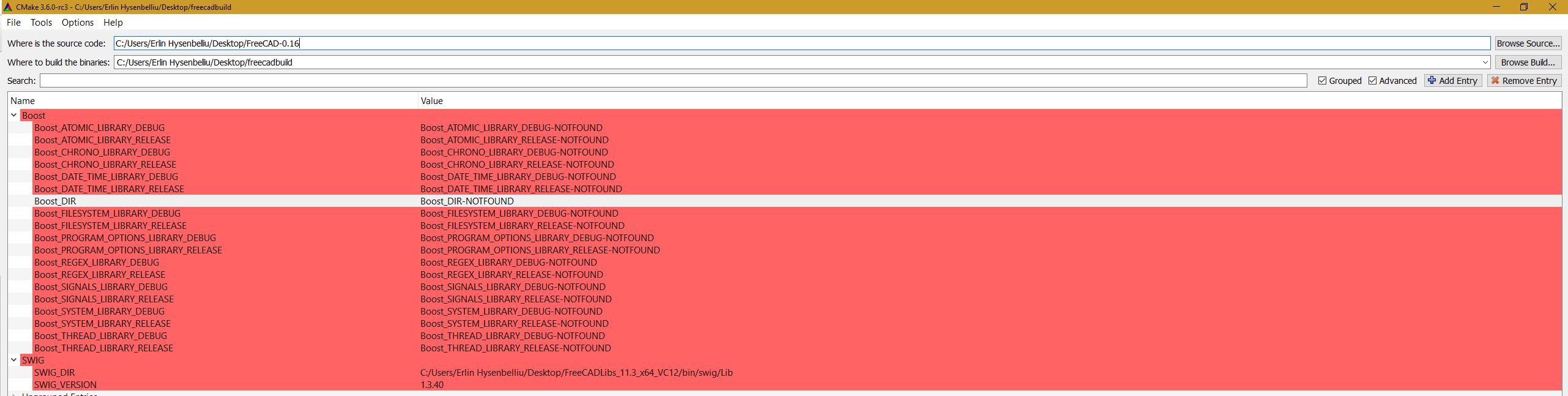
Boost Atomic is not required by FreeCAD nor is it included in the Libpack
It looks very similar to this Cmake bug
http://forum.freecadweb.org/viewtopic.php?f=10&t=15339
Maybe try a different version of Cmake. I know 3.2.2 works and I know 3.5.0 doesn’t.
with version 3.2.2 it does find the Boost_INCLUDE_DIR but it fails to find anything else. The libraries are in there and when I try to manually set the location for them in CMAKE it still does not work. Is there any other way I can set it manually?
I don’t know what the problem could be. Can you upload your CmakeCache.txt file (It’s in the build directory)
Then try File > Delete Cache and the Configure again.
Re-configuring doesn’t help.
Here is the CmakeCache
CMakeCache.txt (23.4 KB)
CMAKE_LINKER:FILEPATH=C:/Program Files (x86)/Microsoft Visual Studio 14.0/VC/bin/x86_amd64/link.exe
This is Visual Studio 2015. The libpack is built with VS2013 which is VC12.
I use this one https://www.visualstudio.com/en-us/news/vs2013-community-vs.aspx
To use VC 14 you would need to build all the libraries yourself or find pre-compiled binaries compiled with VC 14.
The guide said that I can use 2013 or newer that is why I didn’t think it would be a problem. I will give it a try. hopefully it works.
Thank you again 
I got it working and I also compiled it successfully! Thank you for your help! However it did compile with an "_d " in the name of each file and it seems to try to find each dependency with such an underscore as well for example “Python27_d.dll”. I can rename the files for now but how do I avoid that in the future?
Nevermind, I had compiled a debug version 
I have one last question. Currently the DXF IMPORT/EXPORT needs to be set manually. http://www.freecadweb.org/wiki/index.php?title=FreeCAD_and_DXF_Import
How do I include that in my package without the user having to set up anything them-self?
You can place the required files anywhere in FreeCAD pythonpath
import os, sys
print (sys.path)
are the available locations. There is a relatively new and I think undocumented system wide macros location.
If you create a directory Macro in the FreeCAD directory at the same level as bin I think it should work. The path will be the last one if you use the above command.
There is also a new C++ coded importer built in. In Edit >Preferences > Import/Export > DXF and uncheck Use legacy python importer. I don’t think there’s a way to change the default without editing the code.
With 3a25e05 the builtin C++ one is now the default. That was about time I think
So the python dxf libs are not mandatory anymore. But they still are required if a person wants to export 3D objects directly to DXF, without placing them on a Drawing sheet first.
Thank you all for your suggestions. My main intention was to export DXF. I did resolve that
I’m not sure I agree. It does not seem as complete as the old python library.
For example the C++ importer does not seem to support BSplines. In this topic for example, I can import a DXF containing BSplines and they get converted to Draft BezCurves with the python importer. The C++ importer fails to import anything. Although I tested on 0.16.6703.
Edit: I tested again the C++ importer on 0.17.7797. Same result as with 0.16.6703.