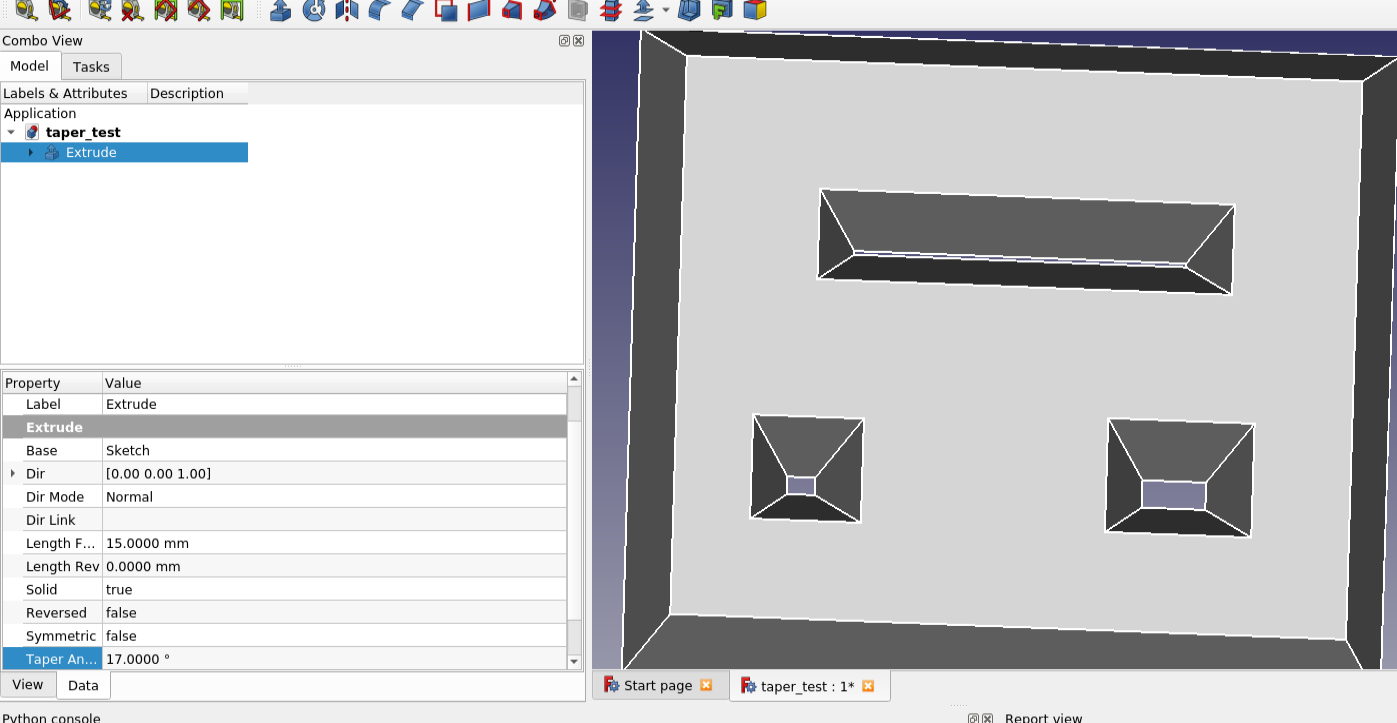
[finished] project: Making Part Extrude taking care of inner structure

Understandable but what I meant is, can’t we use Draft’s method (that apparently gives better results) instead of the loft approach?

the OCC kernel has problems to shrink small wires - the smaller e.g. the diameter of an inner circle, the more likely it crashes, no matter how small you make the negative offset (negative angle).

does FreeCAD crash too? Does this warrant a bug submission to OCCT? Does the crash happen using the draft method or the loft method? (or both?)

Therefore I am once more convinced that taking care of inner wires should be the second step for PD Pad/Pocket.

And I on the other hand am more weary about integrating this wonky feature now that we have even less indication that it will get better, if it will be that limited IMO it’s better to let Draft deal with this and wait for the TN algorithm so it’s actually usable. edit: never mind this last sentence, thinking a little longer maybe counting on the TN algo is not a good idea considering how awfully stalled the merge is, planning shouldn’t be done based on fairy tales.

Exactly. Draft is using an OCC class called BRepOffsetAPI_DraftAngle.

There are some other interesting OCC classes referenced in the Draft code:

  • LocOpe_DPrism can create a stand-alone draft prism (a drafted pad). The sketch can only have a single wire, though


  • BRepFeat_MakeDPrism requires a support for the operation but will probably support multiple wires in the sketch

I am doing some experiments with LocOpe_DPrism now. We shall see if it will create BSplines or planar faces.

As I wrote this acts on a face: https://dev.opencascade.org/doc/refman/html/class_b_rep_offset_a_p_i___draft_angle.html
→ toponaming alert

This could be a candidate.

However, can someone please explain me on an example the issue with the B-spline. I still haven’t understand it.

Line 519, setting the first argument to false means you get shells instead of solids in this intermediate step, but the final shape is still a solid. This is probably why sewing was failing.

             for (auto& wires : extrusionSections) {
-                BRepOffsetAPI_ThruSections mkTS(params.solid ? Standard_True : Standard_False, /*ruled=*/Standard_True, Precision::Confusion());
+               // BRepOffsetAPI_ThruSections mkTS(params.solid ? Standard_True : Standard_False, /*ruled=*/Standard_True, Precision::Confusion());
+                BRepOffsetAPI_ThruSections mkTS(Standard_False, /*ruled=*/Standard_True, Precision::Confusion());

I’d prefer to use FaceMaker Bullseye because it can manage nested inner wires, such as a bullseye. See line 301.

I could identify the problem to this:

  • on making the offset wire, the resulting wire ends up at an arbitrary location. This only occurs for inner wires, outer wires keep their positions.
  • when all offset wires would keep the position, the sewer succeeds. I could manage to make this work in the PD workbench, and there the trick is to make the offset of a wire and then move it to the desired direction. First moving, the offsetting fails.
  • for the Part WB, no matter what I try, just making an offset of an inner wires moves the result to a strange location. Also other face this issue: https://dev.opencascade.org/content/brepoffsetapimakeoffset-wire-and-face-odd-occt-740

Fine with me. But also this needs all offset wired at the same plane, the inner and the outer ones.

I don’t think you are right here. PartDesign_Draft is TNP sensitive because it relies on FreeCAD’s face numbering. The OCC function does not use face numbers, as long as we can identify what faces should be drafted inside the feature code, everything will be fine with respect to TNP.

Actually topological naming is a good example. Imagine that you create a pad with taper=0. You create a sketch on its side face and continue modeling. Then you change taper angle of the pad. You will then get a failed model.

Addendum:
I will try to make a proposal for how we can use BRepOffsetAPI_DraftAngle to add the draft to the pad before it is fused/cut from the baseshape. It will not rely on topological naming. Any face that is perpendicular to the pad direction will be drafted, inner and outer wires does not matter. And I expect FreeCAD face numbering will remain constant with taper angle 0 or other.

Exactely.
https://forum.freecadweb.org/viewtopic.php?f=8&t=63211


Addendum:
And I expect FreeCAD face numbering will remain constant with taper angle 0 or other.

+1
And with constant linear and planar elements as well I hope.
+1000

Here you are, it’s the augmented example from my post above:

I can use point-on-object on the upper external reference (Draft), but not the lower (Loft):
SnipScreenshot-8c9e1e.png

But Bsplines are not scalable, as they a are defined by a math formula that may use “control points” “poles?”, “knots?”, that are difficult to “transpose”.

EDIT:
Interesting reading could be:

https://www.cl.cam.ac.uk/teaching/2000/AGraphHCI/SMEG/node4.html

At least for the concluding consideration:

If there are no pressing reasons for doing otherwise, your B-spline should be defined as follows:

k=4 (cubic);
no multiple control points;
uniform (for a closed curve) or open uniform (for an open curve) knot vector.

END EDIT

EDIT2
Some more research, if I have guessed weel you could transform you bspline, apllying the tansformation to the control points.
According to this text.

http://home.iitk.ac.in/~jrkumar/download/ME761A/Lecture%205%20Curves%20New.pdf

The entire B-spline curve can be affinely transformed by transforming the control points and redrawing the curve from the transformed points.

END EDIT2

EDIT3

I’have noted the absence of @Chris_G in this disccussion.

Sorry for poking :smiley:

Maybe he could help.

END EDIT3

I have had some problems with B-Splines, and usually you could use this approach:

  • discretize the B-Spline segment
  • transform the points to the new shape
  • use the “transformed points” to obtain a new B-Spline in the final objects

Usually as you are making a transformation, you have to create a new in this case a new face.

In case of taper you could also join two corresponding b-splines if they have “same number of edges” with a ruled surface, but this is only a guess as I have not used it in real code, usually I approximate them to BiArcs and operate on them.

Hoping having guessed the problem right.

Regards

Carlo D.

Some experimenting:

"""spline_surface.py

   This code was written as an sample code 
   for "FreeCAD Scripting Guide" 
     
   Author: Carlo Dormeletti
   Copyright: 2022
   Licence: CC BY-NC-ND 4.0 IT 
"""

import os
from math import pi, sin, cos

import FreeCAD
from FreeCAD import Placement, Rotation, Vector
import Part


DOC_NAME = "spline_surface"

def activate_doc():
    """activate document"""
    FreeCAD.setActiveDocument(DOC_NAME)
    FreeCAD.ActiveDocument = FreeCAD.getDocument(DOC_NAME)
    FreeCADGui.ActiveDocument = FreeCADGui.getDocument(DOC_NAME)
    print("{0} activated".format(DOC_NAME))


def setview():
    """Rearrange View"""
    DOC.recompute()
    VIEW.viewAxometric()
    VIEW.setAxisCross(True)
    VIEW.fitAll()


def deleteObject(obj):
    if hasattr(obj, "InList") and len(obj.InList) > 0:
        for o in obj.InList:
            deleteObject(o)
            try:
                DOC.removeObject(o.Name)
            except RuntimeError as rte:
                errorMsg = str(rte)
                if errorMsg != "This object is currently not part of a document":
                    FreeCAD.Console.PrintError(errorMsg)
                    return False
    return True


def clear_DOC():
    """
    Clear the active DOCument deleting all the objects
    """
    while DOC.Objects:
        obj = DOC.Objects[0]
        name = obj.Name

        if not hasattr(DOC, name):
            continue

        if not deleteObject(obj):
            FreeCAD.Console.PrintError("Exiting on error")
            os.sys.exit()

        DOC.removeObject(obj.Name)

        DOC.recompute()


if FreeCAD.ActiveDocument is None:
    FreeCAD.newDocument(DOC_NAME)
    print("Document: {0} Created".format(DOC_NAME))

# test if there is an active document with a "proper" name
if FreeCAD.ActiveDocument.Name == DOC_NAME:
    print("DOC_NAME exist")
else:
    print("DOC_NAME is not active")
    # test if there is a document with a "proper" name
    try:
        FreeCAD.getDocument(DOC_NAME)
    except NameError:
        print("No Document: {0}".format(DOC_NAME))
        FreeCAD.newDocument(DOC_NAME)
        print("Document Created".format(DOC_NAME))

DOC = FreeCAD.getDocument(DOC_NAME)
GUI = FreeCADGui.getDocument(DOC_NAME)
VIEW = GUI.ActiveView    

activate_doc()

clear_DOC()

ROT0 = Rotation(0,0,0)

### CODE START HERE ###

# from /Mod/Draft/draftfunctions/scale.py
# implemented by Dion Moult during 0.19 dev cycle

points = [
    Vector(0.0, 0.0, 0.0),
    Vector(0.0, 0.0, 100.0),
    Vector(100.0, 100.0, 200.0),
    Vector(100.0, 300.0, 200.0),
    Vector(0.0, 400.0, 100.0),
    Vector(0.0, 400.0, 0.0)
    ]

spline = Part.BSplineCurve()
spline.interpolate(points)

DOC.recompute()

sp_curv1 = Part.Wire(spline.toShape())

# Part.show(sp_curv1, "Spline")

scale = Vector(0.5, 0.5, 0.5)
center = Vector(0, 0, 0)

poles = spline.getPoles()

npoles = []

for index, point in enumerate(poles):
    npoint = point.sub(center).scale(scale.x, scale.y, scale.z).add(center)
    npoles.append(npoint)

spline2 = Part.BSplineCurve()
spline2.interpolate(npoles)

sp_curv2 = Part.Wire(spline2.toShape())
sp_curv2.Placement = Placement(Vector(1500, 0, 0), ROT0)

DOC.recompute()

# Part.show(sp_curv2, "Spline2")

surf = Part.makeRuledSurface(sp_curv1, sp_curv2)

Part.show(surf, "surface")


setview()

After having inspected some Draft code, I derived the scaling for points, using a center, (for simplicity i put it at the origin) it uses only vector methods, so I think is robust enough, hope it helps.
spline_scaled.png
Regards

Carlo D.

agreed, as long as the faces are determined when recomputing and not by user selection there shouldn’t be any issue

Addendum:
I will try to make a proposal for how we can use BRepOffsetAPI_DraftAngle to add the draft to the pad before it is fused/cut from the baseshape. It will not rely on topological naming. Any face that is perpendicular to the pad direction will be drafted, inner and outer wires does not matter. And I expect FreeCAD face numbering will remain constant with taper angle 0 or other.

keep in mind that we now have custom directions for pads an pockets so it’s not sufficient to check if they are perpendicular, or are tapered pads only allowed for the normal direction?

There is no doubt that B-splines are helpful or even needed. But that doesn’t mean that they should be used whenever possible. The argument here is rather, that it is preferable to use the simplemost geometry. And I think we can at least agree on this one: planes are simpler than B-spline surfaces.
If things can be done with a Plane, they can from a mathematical point of view be done with a B-spline surface as well. But they shouldn’t. There is more computing power needed for calculations, and, as my example above shows, in using them on a computer with finite precision there are practical differences too.

With this change (setting solid to false on line 533) it works well for me on OCCT 7.5.2:
Snip macro screenshot-41575d.png
Negative taper angles also work as long as the taper is not too much to cause an inner wire to intersect the outer wire.

I am not seeing the issue with inner wires moving to a new location when offsetting. Is there a way to reproduce the issue in python? I have 7.5.3 in Windows, but 7.5.2 in the Ubuntu VM where I compile. How about using Part 2d offset in the Gui on the same profile? Does the 2d offset there also produce the same issue? If not, then in that code there might be a solution.

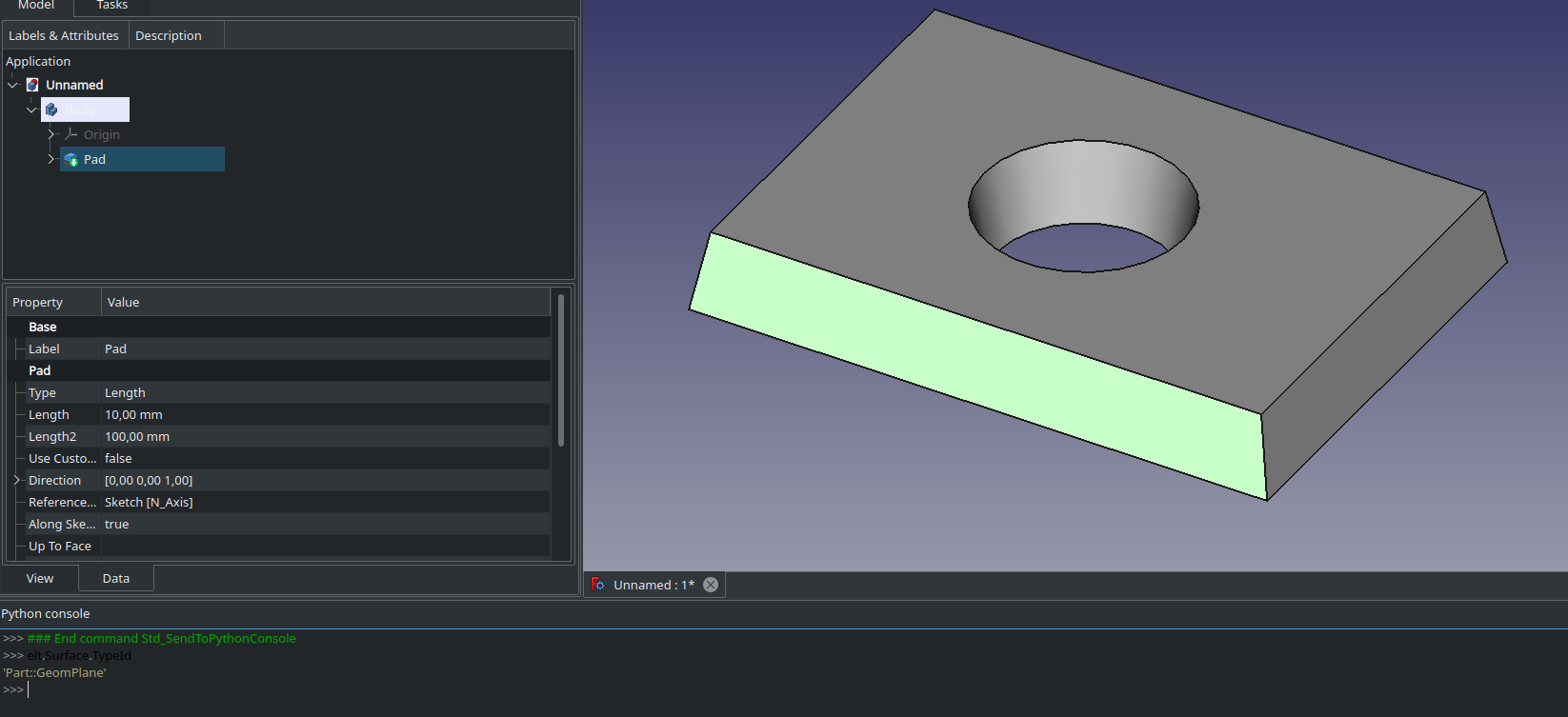
The tapered faces are bspline surfaces, but the untapered faces are plane faces. An easy way to check for this is select the face, press Ctrl+Shift+P, and enter in the python console:

elt.Surface.TypeId

I will try to make a proposal for how we can use BRepOffsetAPI_DraftAngle to add the draft to the pad before it is fused/cut from the baseshape

Now I tried it. It was straight-forward to implement a proof of concept.

I simply inserted this code at the end of the pad execute, just before the fuse or the cut.

double angle = 10.0*3.14/180.0;    // hardcoded 10 degrees just for proof of concept
gp_Pln neutralPlane;  // TODO: we need to define the plane from the support face. For now we hardcode XY plane

BRepOffsetAPI_DraftAngle mkDraft;

mkDraft.Init(prism);          // prism is the shape that normal pad has made.

TopExp_Explorer xp;

for (xp.Init(prism, TopAbs_FACE); xp.More(); xp.Next())
{
    TopoDS_Face face = TopoDS::Face(xp.Current());

    // get the face normal
    double umin, umax, vmin, vmax;
    BRepTools::UVBounds(face,umin, umax, vmin, vmax);
    Handle(Geom_Surface) aSurface = BRep_Tool::Surface(face);
    GeomLProp_SLProps props(aSurface, umin, vmin, 1, 0.01);
    gp_Dir normal = props.Normal();


    if (std::fabs(normal*dir) > 1e-10)
        continue;

    mkDraft.Add(face, dir, angle, neutralPlane);
}

mkDraft.Build();
prism = mkDraft.Shape();

Screenshot_20220111_224511.png
It works as expected. Inner and outer wires are supported automatically. The straight faces are planar and the circle genrated a cone shape. No BSpline.


keep in mind that we now have custom directions for pads an pockets so it’s not sufficient to check if they are perpendicular, or are tapered pads only allowed for the normal direction?

Yes, indeed. It does not seem to work for arbitrary direction.

Appendix:
Something else that does not work is to extrude splines. How ironic :smiley:

:smiley: :smiley: :smiley:

It does not seem to work for arbitrary direction.

From my point of view that is well acceptable.

From my point of view we could conclude that the Draft based method is best when it works since it generates simpler geometries that can be used for sketching on and so on. But there are limitations: sketches with spline wires cannot be padded. And arbitrary direction only works if there are only straight lines in the sketch (no arcs).

One approach could be to try the Draft method first and then fall back on the Loft method. I think that would give the best of both worlds.

Indeed. And it it is quite natural that B-spline curves create B-spline surfaces.
B-splines currently don’t work with taper in Part workbench nor do they work with PartDesign Draft; and I guess it would be very hard to calculate them.

Is this because the faces are not identified as needing to be drafted or is there another issue at play?

No the code understands that the face should be drafted. But the OCC class (BRepOffsetAPI_DraftAngle) does not know how to work on the surface type that you get when you extrude a circle at an angle. Again, a reason to prefer the simple surface types: Plane, Cylinder, Cone. Advantage is that it is clear if the operation worked or not. So we can implement a fallback method based on the more general loft.

Works for me. Another advantage of having cones and cylinders as faces is there is a macro that can flatten such faces.

If it is known which types of edges do not work, then it might be possible to check for them before attempting one of the methods rather than trying one and seeing if it fails.