OS: Ubuntu 18.04.3 LTS
Word size of OS: 64-bit
Word size of FreeCAD: 64-bit
Version: 0.18.3.
Build type: Release
Python version: 3.6.8
Qt version: 5.9.5
Coin version: 4.0.0a
OCC version: 7.3.0
Locale: German/Germany (de_DE)
I surrounded my problem but I dont understand it.
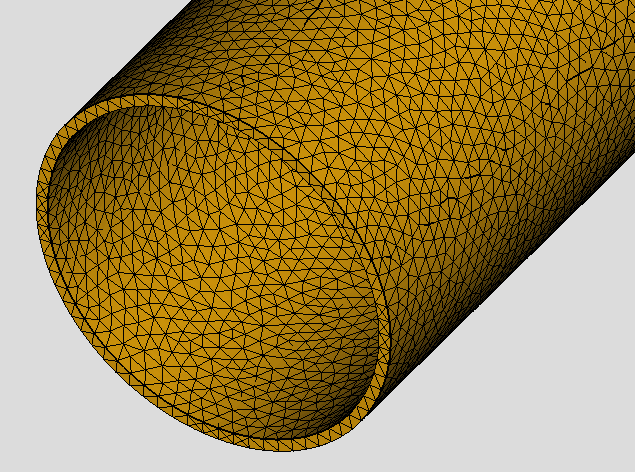
I made a tube from a sketch with two circles radius 53,55mm and 57,15mm. Then a Pad with length 744,98mm.
I switch Workspace to FEM mark the tube and click the Gmsh Icon and execute Gmesh.
Now I dont see a finished mesh and get the following output:
0.0: We are going to start …
0.0: Start Gmsh …
0.5: Gmsh had warnings … 0.5: double free or corruption (fasttop)
0.5: Gmsh done!
I cancel Gmsh and change the length of the Pad to 300mm and repeat Gmsh execution.
Now I see a generated mesh and get an other output:
0.0: We are going to start …
0.0: Start Gmsh …
0.4: Gmsh had warnings …
0.4: [35mWarning : Surface mesh: worst distortion = -1.26646 (avg = 0.944898, 16 elements with jac.
0.4: Gmsh done!
So my problem is, that the size of the tube makes 2 different warnings but I dont find deeper Information whats wrong.
It would be greate if you can help me to find a solution.
I just repoduced the problem to make a screenshot. With the beginning length of 744,98mm the Gmsh execution took 0 seconds without error or warning and produced a Mesh with 0 Nodes, 0 Edges … an empty Mesh i guess.
After that I changed the length to 300 and it behaves like in the previous description.
Accordingly to rule “garbage in, garbage out!” this inputs gives much better results
We are going to start Gmsh FEM mesh run!
  Part to mesh: Name --> Cut,  Label --> Cut, ShapeType --> Compound
  CharacteristicLengthMax: 5.0
  CharacteristicLengthMin: 0.0
  ElementOrder: 2
  ElementDimension: 3
  C:\Users\aio\AppData\Local\Temp\Cut_Geometry.brep
  C:\Users\aio\AppData\Local\Temp\Cut_Mesh_TmpGmsh.unv
  C:\Users\aio\AppData\Local\Temp\shape2mesh.geo
  C:/Program Files/FEMbinpack/bin/gmsh_4.4.1.exe
  No Group meshing for analysis.
Start: ViewProviderFEMMeshBuilder::createMesh() =================================
    0.010000: Start build up 290312 face helper
    0.105000: Start eliminate internal faces GRID
      Size:F:5.000000,  X:5  ,Y:5  ,Z:31
      VoxelSize: Max:756 ,Average:374
    0.231000: Start build up node map
    0.289000: Start set point vector
    0.299000: Start count triangle size
    NumTriangles:189256
    0.301000: Start build up triangle vector
    0.601000: Start build up edge vector
    NumEdges:283884
    0.627000: Finish =========================================================
  The Part should have a pretty new FEM mesh!
Warning : Unknown element type for UNV export (MSH type 15) - output file might be invalid
Warning : Unknown element type for UNV export (MSH type 15) - output file might be invalid
Warning : Unknown element type for UNV export (MSH type 15) - output file might be invalid
Warning : Unknown element type for UNV export (MSH type 15) - output file might be invalid

========================== Dump contents of mesh ==========================

1) Total number of nodes:      	143549
2) Total number of edges:      	578
3) Total number of faces:      	47314
4) Total number of polygons:   	0
5) Total number of volumes:    	72578
6) Total number of polyhedrons:	0

7) Total number of linear edges:	0
8) Total number of linear faces:	0
9) Total number of linear volumes:	0

10) Total number of quadratic edges:	578
11) Total number of quadratic faces:	47314
11.1) Number of quadratic triangles:  	47314
11.2) Number of quadratic quadrangles:	0
12) Total number of quadratic volumes:	72578
12.1) Number of quadratic hexahedrons: 	0
12.2) Number of quadratic tetrahedrons:	72578
12.3) Number of quadratic prisms:      	0
12.4) Number of quadratic pyramids:    	0

===========================================================================