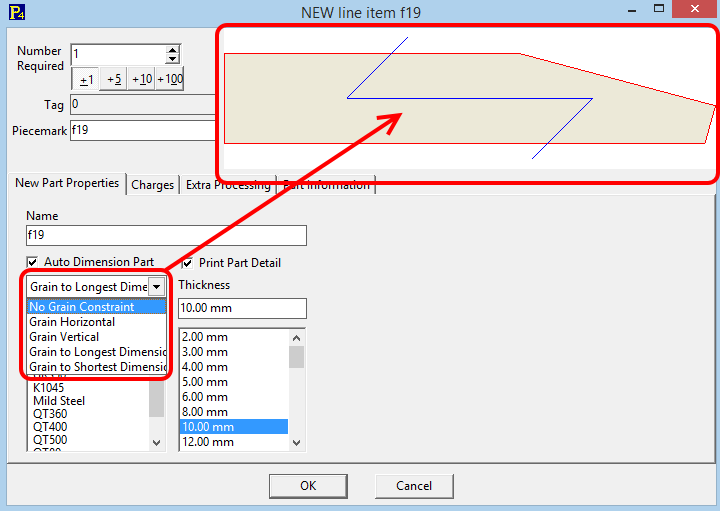
Hi. I do work in the furniture industry and for me it is very important to be able to define a “Grain Direction” property for every part created in FreeCAD. Please take a look at the bellow example and consider the posibility to add this kind of functionality into FreeCAD.
This feature it is very important for the corect rotation on the nesting softwares for real fabrication of the components.
FreeCAD could have woodworking workbench and more specific properties for Pad and Cube objects.
For sure any woodworking macros would be easier to implement then, I agree.
What about adding this to Arch Panel? Any object can be converted to an arch panel, so it would be easy to use across FreeCAD…
The way we could do it:
Arch Panels gain a new “Grain Direction” (or maybe “Fiber Direction?”) property which is a PropertyVector.
They also gain a “Grain Size” or “Fiber Size” view property. If this property is non-zero, a “Z” mark is drawn on both largest faces of the panel, according to the grain direction
I don’t know Arch Panel and I am not sure if this will be easy to manage for woodworking users. In many furniture design tools there are possibility to add texture for wood piece. From woodworking user perspective this would be nice to have ability to add texture for object face and also to have ability to select grain direction (from simple select list and see it at 3D model as live preview the direction). The grain direction could be simple watermark of grain direction example added at the top of texture, color or just raw face object. This might be hard to implement at FreeCAD. I saw there is some kind of <class ‘App.Material’> but don’t see usage of it.
From my personal perspective I don’t need changes at FreeCAD. I can live with current FreeCAD functionality. I don’t need grain direction because I mostly cut chipboards and use something like that getDimensions/Docs at master · dprojects/getDimensions · GitHub
But the question is what is the FreeCAD goal? If this should be tool for any purpose? or if this should have woodworking friendly approach as well? I think this is the key point of that.
EDIT:
I mean this existing FreeCAD functionality:
Maybe this could be improved somehow? I play with it little bit and I was able to add custom property for wood material named “grain direction” but I wasn’t able to use the wood material onto Pad or Cube face or at whole object. Also I scanned little bit the content of the Wood Material object created and haven’t seen anything like connection to applied to Base Object (something like transformations use Profile, Origin, BaseFeature).
Is wood grain a “by object” indication, just to know how to cut the board, or is it “by face” information? (ie, something you would use for ex to glue decorative laminate finish on panels)
This is correct. For laminated chipboards the Grain Direction is usually veneer applied at the surface by manufacturer. You can also apply the veneer tape at the edge surface but in practice it is not important how the grain direction at the edge is because the tape usually has default grain direction along the tape. For the raw wood the grain direction at edge face is mostly not important, as well. So, you have only 2 surface with grain direction in fact.
However, in my opinion it is better to think about Grain Direction as “by face object property”. This could be better to manage in case of edgeband. Currently I use option “Set color…” at object face to recognize the applied edgeband: Edgeband - detailed by selection.
The Arch workbench has something like MultiMaterial, you can add layers there. One layer could be watermark with grain direction. Maybe this could be added to face “Set color…”? possibility to apply MultiMaterial on face? with 90 degree rotation option? also there could be XML base object face reference?
I just released “grain direction marker” feature. I think this might be good step into this direction.
Each object has Grain attribute with array of strings. For now the h string represents horizontal, the v - vertical and x - no grain.
The array length is the same as number of faces, so you can mark any face like this.
Let me know what do you think.