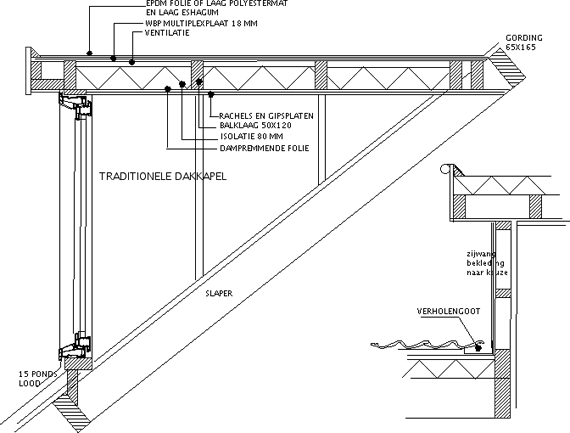
What would be the best way to detail some of my windows (currently ‘Arch Windows’ ) using the ‘real’ aluminium profiles in the full model of my house? I like to create detailed drawings for some relevant sections and end up with something like this:
I found some dxf files that I converted to freecad (see attached file) and was trying to make a full 3D window using the PartDesign_AdditivePipe feature but so far this only results in very complex models and I guess I am probably completely on the wrong track. I figured that this probably was not possible using Arch Windows and hoped I could create something with Part design (possibly parametric) that I could fit in some existing openings. I looked through several example projects but could not find any good example, however I did some some nice screenshots where people did this. Any ideas on what the best way forward is? Reynaers_C77_cleaned.FCStd (352 KB)
Hi Paulee, thanks again for your swift reply - I now remember reading Yorik his post few months ago but did not find it back (and I was not that familiar yet with Freecad back then so I did not really understand it all). Will have to spend some time this to make sure I fully understand all concepts, but this info definitely points me in the right direction!
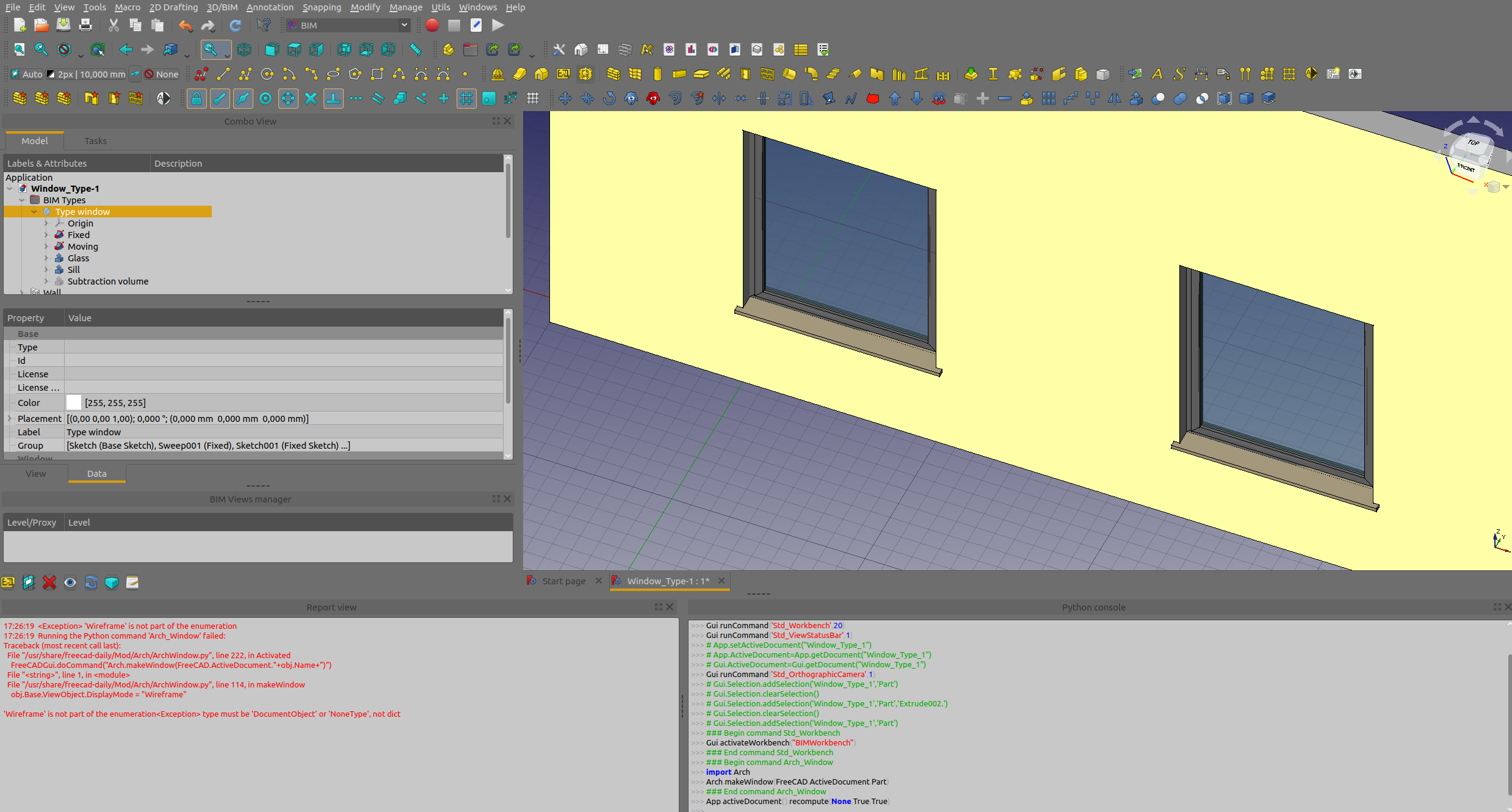
followed the description in the Arch window page and used Yorik his model as guidance, but I am stuck in the last step; creating a window from this part. It seems like I am doing something wrong with the subvolume, but can’t figure out what it is..
17:26:19  <Exception> 'Wireframe' is not part of the enumeration
17:26:19  Running the Python command 'Arch_Window' failed:
Traceback (most recent call last):
  File "/usr/share/freecad-daily/Mod/Arch/ArchWindow.py", line 222, in Activated
    FreeCADGui.doCommand("Arch.makeWindow(FreeCAD.ActiveDocument."+obj.Name+")")
  File "<string>", line 1, in <module>
  File "/usr/share/freecad-daily/Mod/Arch/ArchWindow.py", line 114, in makeWindow
    obj.Base.ViewObject.DisplayMode = "Wireframe"

'Wireframe' is not part of the enumeration<Exception> type must be 'DocumentObject' or 'NoneType', not dict
17:27:40  <Exception> type must be 'DocumentObject' or 'NoneType', not dict
17:27:40  <string>(1)<class 'TypeError'>: type must be 'DocumentObject' or 'NoneType', not dict
17:27:42  <Exception> type must be 'DocumentObject' or 'NoneType', not dict
17:27:47  <Exception> type must be 'DocumentObject' or 'NoneType', not dict
17:27:47  <string>(1)<class 'TypeError'>: type must be 'DocumentObject' or 'NoneType', not dict
Screenshots from my and the example model (which is also attached):
I am running Freecad Daily with latest version of the BIM addon
OS: Ubuntu 20.04.1 LTS (ubuntu:GNOME/ubuntu)
Word size of OS: 64-bit
Word size of FreeCAD: 64-bit
Version: 0.19.
Build type: Release
Branch: unknown
Hash: 43aef8616d6f1fa9017829e2320edc5f725ad790
Python version: 3.8.5
Qt version: 5.12.8
Coin version: 4.0.0
OCC version: 7.3.0
Locale: English/United States (en_US)
This work around works fine - this is really a powerful way to configure windows! There is so much info in the wiki pages, even after reading it 3x I still find useful hints and tricks. I managed to create windows, put them into walls, I can easily move them around and even create some nice techdraw pages, see attached example. Just struggling with the last steps;
making the multi-material work. I compared my models with the example one, where everything works just fine but without any luck so far
finding a way to use a single base window and scale it to fit the different scales for different windows in the building reynaers_simplified rev 0.3.FCStd (108 KB)
@Paullee, tried again yesterday evening by renaming a ‘standard’ window which works fine. Then I tried renaming some of my components with similar names like the standard window (Glass Panel, Frame etc.). Probably some very stupid detail that I miss somewhere.. will try again with a new custom window from scratch since I compared about everything between my and Yorik his model. Is there an easy to export all (hidden) properties and features of an object (possibly using python) so I can easily text compare to spot differences?
@Roy_043, fully agree.. that is indeed what I intended to say, adjusting height and width independently since you do not want to A) keep width/height ratio and B) scale the profile, only the window size.
Did do a new attempt, this time taking the example model, just replacing the sketches with my profiles and re-creating the sweep. Strangely enough the materialization worked, but for only one profile. Changing the aluminum color was nicely propagated to the windows. But after saving the file to upload it here and re-opening again, it does not work anymore (only for the Sil it works, but I did not touch/destroy that part..)
The only clue I have seen occurring multiple times that indicates something is wrong is this:
Part::FeaturePython / Window: Links go out of the allowed scope
Some day it feels like I really start to master some parts of freecad, other days all this struggling make me realize there is so much more to discover ExampleModelwithmyprofile.FCStd (73.4 KB)
Create a multi-material
Create one entry in the multi-material for each component of your App Part. For example, one “Frame”, one “Glass panel” as we used above. Make sure to use the exact same name.
Attribute that multi-material to each of the windows derived from the same type
You can use any other kind of workflow than the one described above, the important points to remember are:
The type object must be one object, no matter the type (App Part, PartDesign Body, Part Compound, or even another Arch Window)
The type object must have a “Subvolume” property (linked to the window’s Subvolume property) for openings in host objects to work
The type object must have a “Group” property with different children with same names as multi-material items for multi-materials to work "
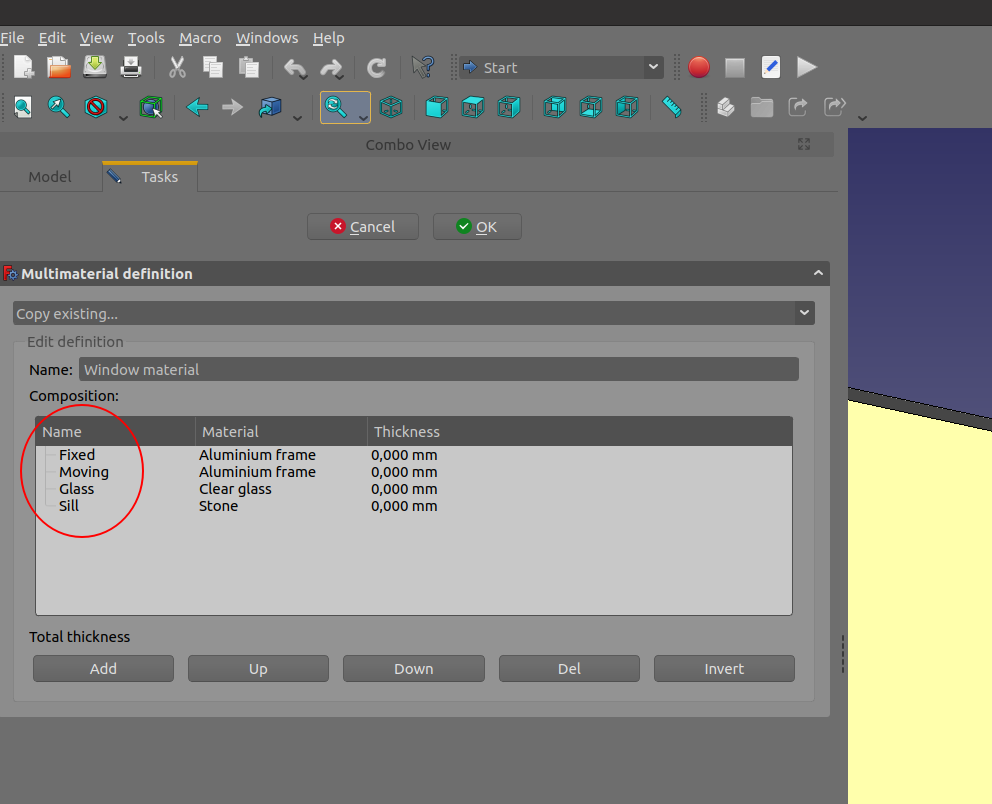
jep, I read this section several times to figure out what I missed, and always assumed the ‘group’ property referred to this:
and that it should match the material names used in here:
But maybe I am completely wrong. Is there a way to export all (hidden) properties to a text file of an object?
Just realized that in the previous attempt (based on the wiki file) I forgot to connect the right object to the ‘subvolume’ definition of the type, but that did not change the results..




 that part..)