Crash in 0.22 when importing ifc

when I export this file

tn1319.FCStd
as ifc in 0.22 (with this error message)


No stream support: No module named 'lark'

0.22 crashes when importing the file. can anyone confirm this?

OS: Ubuntu 22.04.3 LTS (XFCE/xubuntu)
Word size of FreeCAD: 64-bit
Version: 0.22.0dev.35639 (Git) AppImage
Build type: Release
Branch: main
Hash: f315314569aee5334fd0e69a49aab33684a802ba
Python 3.10.13, Qt 5.15.8, Coin 4.0.2, Vtk 9.2.6, OCC 7.6.3
Locale: German/Germany (de_DE)

The error message comes from the experimental NativeIFC WB. I see it whenever I delete an object. Deletion is also quit sluggish because of this.

So try removing that WB and try again. If this does not help then please post the IFC file (instead of the FCStd) and a screenshot of your IFC import preferences.

how can I delete it. I don’t remember installing it.

With the Addon Manager. Or you can remove it from your Mod folder. To find where that is located enter this in the Python console:

FreeCAD.getUserAppDataDir()

Thanks for the info. there is nothing there. revit 2024 does not crash when opened, but it is incomplete. Here is the ifc

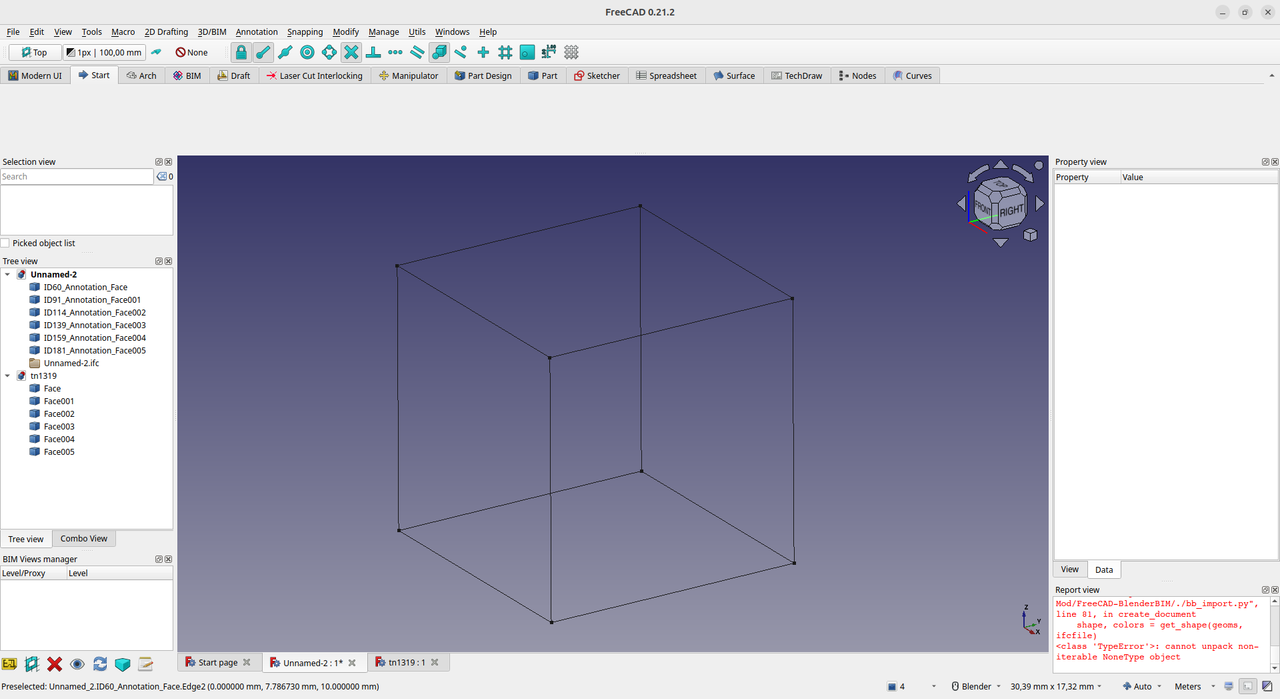
I see this…

pMB

No crash here and I see the same.

OS: Windows 8 build 9600
Word size of FreeCAD: 64-bit
Version: 0.22.0dev.35594 (Git)
Build type: Release
Branch: main
Hash: 49e7bba9c7390b11e6cc9acebd10cc1568ec8869
Python 3.10.13, Qt 5.15.8, Coin 4.0.2, Vtk 9.2.6, OCC 7.6.3
Locale: Dutch/Netherlands (nl_NL)
Installed mods:

The NoneType error I can see in the Windows screenshot I’m assuming here is from the IfcOpenShell library which I’m again guessing was compiled C++ code? If so, that would explain why Linux hard crashes but the clue for me is the bit about shape and colours, one area in FreeCAD that’s changed recently is the Material Wb which has some colour related code in it. All the tests I can see have been done with recent 0.22dev builds, thomas-neemann have you tested it with a 0.21.x build or an older 0.22dev AppImage?

yes in 0.21.2 it works fine

thanks for testing

I don’t get an error. Note the path of the addon in the image: FreeCAD-BlenderBIM. I don’t have that addon. If you have NativeIFC installed you are offered 2 options when importing the IFC.

If you mean me: I used a fresh installation with basic settings (out of the box).

It’s all down to the very specific version of IfcOpenShell, see https://devtalk.freecad.org/t/integration-of-blenderbim-features-freecad-archbim-native-ifc/64271/153 the developers added a new dependency of lark.

Thanks for the tip, but I’m not a programmer. I suspect it’s being worked on

Thomas can you check if it is not this issue?:
https://devtalk.freecad.org/t/solved-my-weekly-freecad-in-the-virtual-box-crashes-when-generating-windows/74593/1

it runs not in a virtualbox.

i have tested this

“After the restart, and before opening a document, open the preferences, go to Display > 3D View and press OK without making any changes.”

same problem

Indeed ifcopenshell at some point started needing the lark python module. However AFAIK the package that you download from the ifcopenshell website should contain all these dependencies… Where did you get ifcopenshell from?

hello yorik

thank you for your cooperation. I don’t remember installing it, but it seems to be in use

oh you are on linux… Then it should just be a matter of apt-get install python3-lark (or any other way to install packages on your distro, just look for “lark” or “python-lark” or “python3-lark” or something like that)
Thanks, I’ll try it and report back