However, if I try to import with standard settings, I get this error output for each outer wall (made up by a concrete layer and insulation):
    adding 2 object(s) to Wand-003
Width & OverrideWidth & base.getWidths() should not be all 0 or None or [] empty list
Fehler: Ungültiges Basisobjekt
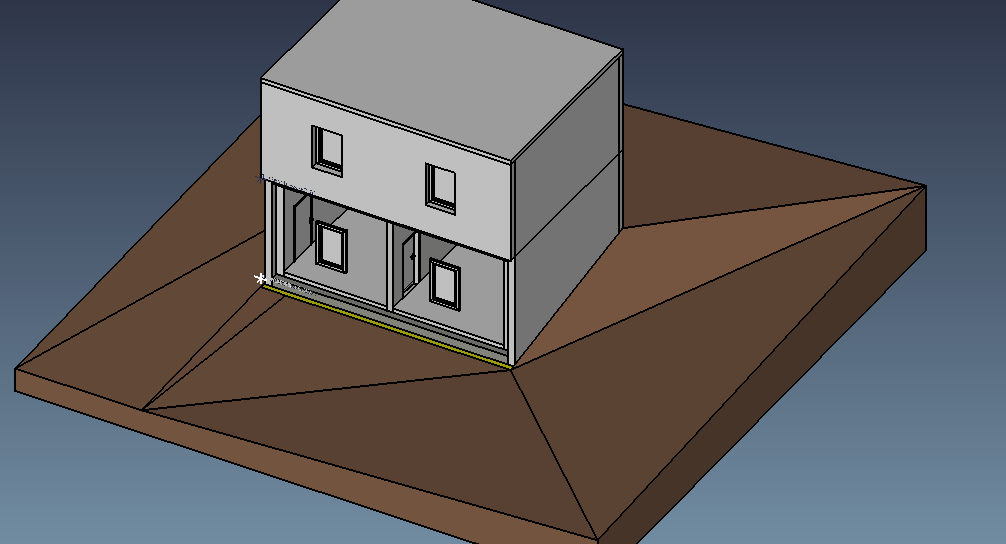
3D-view is missing these walls and the room objects are also displaced. See the attached file.
If I set IFC import setting to “Import as non-parametric arch objects” (translated from German), I can import the model successfully, but of course this comes with its own downsides. Eg I don’t get any room objects at all.
At the moment I’m not yet sure, whether the file contains some illegal content or FreeCADs IFC importer is the problem. I guess I have multiple questions:
Are there any known limitations of IFC support in FreeCAD, that I should be aware of. (Better to ask than run off in the wrong direction.)
Can anybody recommend a tool useful for inspecting IFC files, to easier see what’s going on. Maybe also for automatically or manually validating them.
Does anybody know what’s going on and can point me in the right direction.
BTW, my ultimate goal is to write a tool (ideally FreeCAD module), that can extract surface information from a model and calculate building properties like power necessary for conditioning, surface temperatures on a hot/cold day etc. For this I will likely need access to lot’s of less common object properties from the IFC file. Is the whole information from the IFC file available in the FreeCAD DOM, or only a subset that maps to concepts that FreeCAD understands natively? Any thoughts on my project are appreciated.
OS: Debian GNU/Linux bullseye/sid
Word size of OS: 64-bit
Word size of FreeCAD: 64-bit
Version: 0.19.21088 (Git)
Build type: Unknown
Branch: master
Hash: f0e246f86d4add646e1b041022d54b690cb4065e
Python version: 3.8.3
Qt version: 5.12.5
Coin version: 4.0.0
OCC version: 7.4.0
Locale: German/Austria (de_AT)
That’s a regression introduced likely with @paullee’s extensions. Arch Walls SHOULD work even with Width & OverrideWidth & base.getWidths() not be all 0 or None or empty list. I’ll have a look at it EDIT no, that error message shouldn’t be printed ( 146a175370) but it doesn’t modify the wall functionality. I’ll have a look at your file…
Okay there was indeed a regression there, the wall object was not working anymore when made of aggregates of other objects, this is now fixed in 6945e37635.
Strange, it looks like all the walls from this model were made this way… I had never seen such an IFC file before. This is from ArchiCAD right? We get too few ArchiCAD files to test around here, please submit more if you find other issues!
Thanks for the quick fix! The wall objects work now, though the messages during importing persist. Also the space objects are still placed incorrectly.
Strange, it looks like all the walls from this model were made this way… I had never seen such an IFC file before. This is from ArchiCAD right? We get too few ArchiCAD files to test around here, please submit more if you find other issues!
Yes, it is from ArchiCAD, but also exported with very special settings to cater for the planned physics calculations. I’ll happily submit more files as I run into issues. Though some of them I might not be allowed to share publicly.
Never versions of Allplan do save multilayer walls the same way as well as Vectorworks. I have seen only one ArchiCAD file which does it before. Seams to be the future to save the multilayer walls this way. I like it because it is easy to extract building shell geometry. Very important for the structural engineers.
I have another test and it seems whether it is 0.18 or 0.19_pre, ‘return none’ resulted in ‘Error: Invalid base object’. May have another look and test how this should be tackled if Wall is supposed to work if Width is 0, e.g. so Addition should works …
BTW, there is some recent discussion about multi-material and wishlist. Problem is before that multi-width was introduced, I found it did not work with basewire > 1 and reported in the thread. So problem may be more nested to untangled Anyway, will have a look and would like to solve that when there is a gap.
        length  = obj.Length.Value

        # TODO currently layers were not supported when len(basewires) > 0	##( or 1 ? )
        width = 0
Yes the wall tool is becoming increasingly a big messy thing but @carlopav is designing a really interesting new one… And I’m more and more wanting to separate all the IFC-generation stuff from Arch objects too, which would also simplify things a lot
the bad is that in this way we lose the possibility to update Ifc Attributes when IfcType changes. So i did set IfcType property as read-only, and I was going to experiment another function (that could be activated from the taskpanel for example) that change the type and update the attributes. It’s a bit more coumbersome than just changing it, but that could work. It could simply be:
I don’t really understand your explanation above and what it tries to achieve
Anyway, I already thought about non-Arch objects too, we could do something like BlenderBIM does, like if the object label contains “IfcWall” we export it as an IfcWall… But really the gist of the system is to be able to set all other IFC-related things like attributes, properties, materials… Just exporting an object as a wall is not very interesting. Wrapping a lightweight Arch Component around, that provides support for all these things still seems like a good solution to me.
About separating IFC generation from the FreeCAD object: I thought of a module that would build 1) the Ifc object, and 2) any number of representations. You could give that module any FreeCAD object and it would just decide what to do and build it. Basically:
detect all IFC attributes, properties, materials to apply, create when needed
detect straight extrusions, either by object type (Part extrusions, walls, structure…) or by analyzing the geometry
detect sweeped extrusions and rebars
detect booleans, subtractions or additions
detect assemblies
if none of the above, create an advanced brep if the object has curved surfaces and ifcopenshell supports it
I thought of a module that would build 1) the Ifc object, and 2) any number of representations.
Is that basically a kind of exporter or does it create a new FCStd file that suits IFC before exporting it with current exporter? If it is an exporter, can we borrow BlenderBim exporter and build a new FC parser?
Anyway, I already thought about non-Arch objects too, we could do something like BlenderBIM does, like if the object label contains “IfcWall” we export it as an IfcWall…
Yes, but we could also have a bunch of functions that actually add real IFC properties to every FC object… this is what I was trying to explain from the experiment i was pointing.
Imagine you take a Part::Box and run IFCfize(Box001). And IFC properties are just added to the Part::Box.
Anyway this is then a matter of what you’ve written above, because when exporting we have to decide what to do with those properties (as for “IFC” label) from outside the object (we can not rely in an getExtrusionData() internal to the object)…
I am probably missing a lot, because i just started to play with Ifc few days ago…
You could do that, but, as explained IIRC to Regis some days ago, if you attached a Material to a Box, even if you can add a new “Material” property to it, that wouldn’t change the color of the box. For that, you would have either to change all of existing FreeCAD objects (I don’t wish that to you ), or have a complex observer mechanism that watches for property changes of all FreeCAD objects and do some stuff when needed, but you would slow all of FreeCAD down just for that.
Of course we still can (and currently do) look at properties when exporting. So if a Box has an IfcAttributes properties, that will be used at IFC export. But there is no feedback to that inside FreeCAD itself, so it seems less interesting to me.
About reusing BlenderBIM’s IFC export, we already do that. The common part between our two projects is the same, it’s IfcOpenShell. The rest that BlenderBIM adds is mostly Blender-specific.
That’s what I meant. Of course is less interesting, unless you consider that you are saving objects (think economically)…
It’s not about losing the current workflow, but to be able to apply ifc attributes also to other objects.
Also visual feedback could not be so important to some power users… (At the moment it’s just a matter of changing color, is it?)
In every case is not something really important, I was just curious to try if it worked, and it works.


 Anyway, will have a look and would like to solve that when there is a gap.

 but
but  )
)
 ), or have a complex observer mechanism that watches for property changes of all FreeCAD objects and do some stuff when needed, but you would slow all of FreeCAD down just for that.