BIM/Arch development news articles from Yorik's blog

Cross-posting from https://yorik.uncreated.net/blog/2023-016-freecad-weekly9

  • NativeIFC: Default project structure: When you create a new project from scratch using the BIM Project tool, you will now see a dialog asking if you also wish to create a default project structure (Site, Building and Storey) under it. Note that this is not strictly mandatory by the IFC specs, you can very well have a flat file where all objects are simply related to a (mandatory) IfcProject. However, this site → building → storey structure is considered by many BIM applications as a standard. Your choice! :wink: commit
  • NativeIFC: Better attributes handling: I reenabled the display of non-link attributes (those that don’t link to other IFC entities) by default when importing a file, as it seems to me they cannot change the geommetry or affect other objects so they should be safe for now, but this needs to be explored further. The “Description” property contents will also now show in the “Descriptipn” column of the FreeCAD tree view. commit
  • NativeIFC: Support for IfcSpaces: Spaces are now handled, displayed in the tre view when importing the project structure or expanding the children of an object. You can also add objects to an IfcSpace. The shape of IfcSpaces is shown in wireframe mode in the 3D view when the shape is loaded. In coin mode, you don’t see anything in the 3D view (for now… better ideas are welcome). commit
  • NativeIFC: Loading of orphan objects: An IFC file might contain objects that are not related to an IFC project. This is not standard, but it is still used around and might even actually be a useful thing, for example in Work-In-Progress files where it was not clear to the author what would become of a certain object. In the import dialog, there is now an option to import these “orphan” objects. They will be placed into a special group under the project object. This feature is not complete yet, because we still need to permit people to add their own objects to that group. commit - issue
  • NativeIFC: First steps towards geometry edition: This is probably the most exciting feature of the lot: The ability to edit IFC objects. This is still an experiment to see if this is a valid path to follow, but it’s proving really interesting so far. Basically, objects gained a new “expand geometry properties” right-click menu option. When that option is clicked, a new “Geometry” property group is created, and a few properties are added to it tha allow to edit the geometry. So far, you can edit the extrusion depth and direction of extruded objects, and length and width of their profile, if that profile is a rectangle. This works really well for Arch walls and structures (rectangular beams and columns). I’ll add more types on the way. There is more to iron out too, such as updating the object history. And later on, of course, we should integrate all this in an edit mode and implement tools to edit these values graphically. But I think this is a pretty interesting start. commit

I see, thanks !

Time to download the latest AppImage + update NativeIFC :smiley:

Updates of this week: https://yorik.uncreated.net/blog/2023-017-freecad-weekly10

  • NativeIFC: Fixed placements: Placements were still not translating right between FreeCAD and IfcOpenshell, mainly because they use different types of matrixes at different points, and I got fooled into trying to find a problem that was not there. It turns out that you can simply give IfcOpenShell a FreeCAD matrix, without any transformation needed. So i can stop reading this complicated explanation luckily :slight_smile: commit
  • NativeIFC: Edition of extrusions of polylines: Last week I started implementing a system to be able to edit the geometry of objects. I worked further on this and implemented properties for theeextrusion of polylines. I think this system can work well, and it has many advantages: It simplifies the tree representation a lot (no more additional object to represent base geometry), and splits the difficulty in two: one half is to translate the inner geometry into properties, and the next one will be implement UI edition tools. Which will be much easier because all they will have to do is represent the values of these properties on screen. commit
  • NativeIFC: Removed group extension: Extensions are a powerful system in FreeCAD where an object can inherit a whole bunch of functionality of another object all at once. For example, the Group extension allows any object to behave like a group (with support for drag and drop and everything). The IFC objects used up to now the group extension. However, there are several problems with this, namely when hiding/showing individual objects. Since we already reimplement most of the group functionality anyway, for example drag & dropping, because we need to do additional tasks there, there was no more advantage to use the extension, and it has now be removed. There is still one problem that I thought was coming from the extension but it is not: when an object has no shape but has a group property, a coin representation is built automatically from its children. This is annoying when we want an object to specifically have noerepresentation at all, such as an IfcBuildingStorey. I hav added a workaround, which is to give these objects a “dummy” shape (a 1mmx1mm cube) so they don’t create aedefault representation anymore, but that’s something we probably need to change at FreeCAD level. commit
  • FreeCAD: Researched Appimage packaging: Since the next 0.21 release has been announced, we decided to try to use the opportunity to documwnt better all the steps needed to produce a FreeCAD release, so it can be petter streamlined next times, and more people can learn and take part in it. The packages that the FreeCAD team produced are the major part of that process. At the moment, they are automatically produced from the Conda build platform. However, we should also be able to produce these packages locally, without the platform. I’m researching the Linux part now, how we can do that manually.
  • FreeCAD: Google Summer of Code: This year, FreeCAD is participating on its own to the Google Summer of Code program, which funds students to work on specific opwn-souroe projects. The selected students have been announced, and surprise, we will have no less than four students working on FreeCAD this year! Discover the projects here

Updates of this week from https://yorik.uncreated.net/blog/2023-018-freecad-weekly11

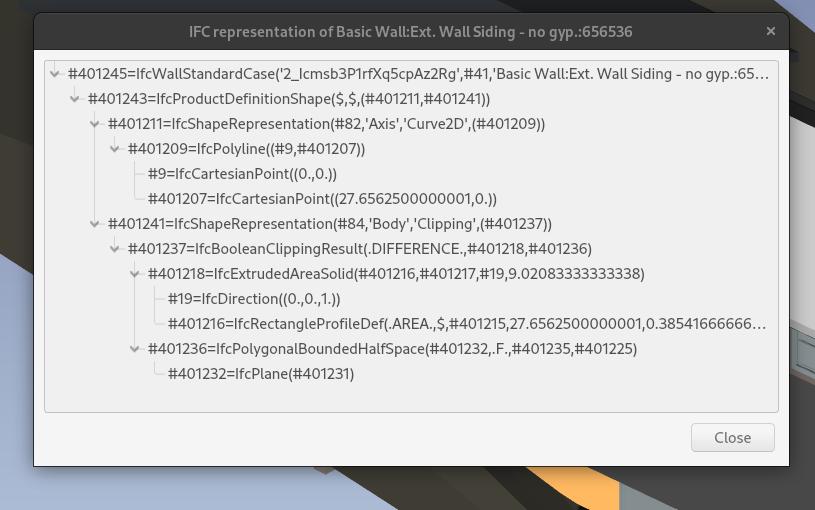
  • NativeIFC: Show geometry tree: Importer IFC objects now have a new “Show geometry tree” context menu option. This option pops up a dialog window that shows the geometry decomposition of that object. This has no direct utility when you are modelling, but can be very useful for debugging, and also to learn the internals of how IFC objects are constructed. You can also of course use this from Python. commit


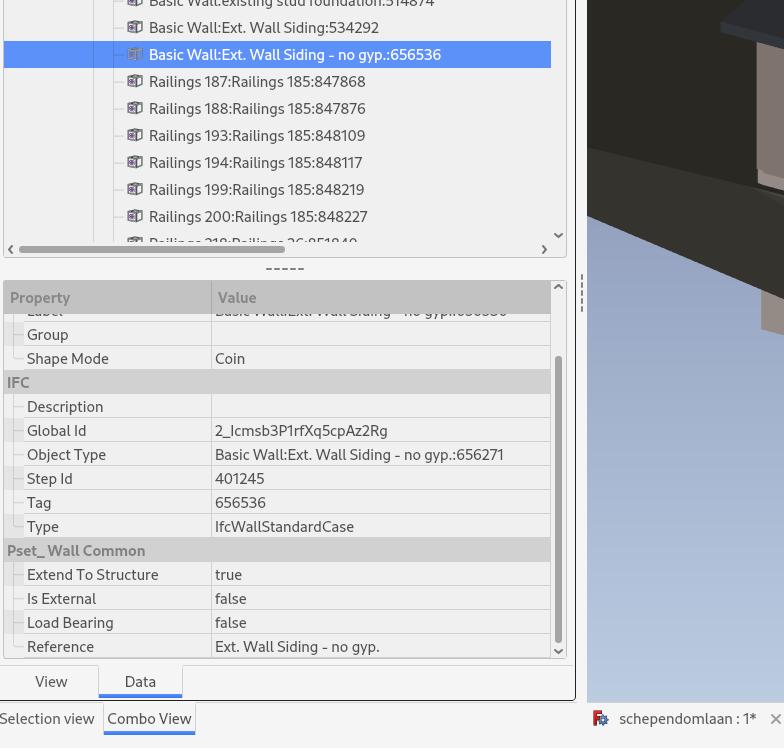
  • NativeIFC: Expose IFC property sets: You can now right-click any IFC object, and choose the new “Expand IFC property sets” option. Alternatively, you can also mark the “load property sets” option on the import dialog. When choosing that option, property sets attached to an IFC object appear in the properties panel of the object. At the moment, you can change the value of a property, which will correctly change the IFC file. However, the owner history of that object is not changed, I’m not sure it needs to, and you still cannot add new properties or new property sets. I’m not too sure how to handle this yet, as we might want to allow adding or even bulk-adding default psets like Pset_WallCommon automatically. I guess we’ll go step by step and first allow to add new properties :wink: commit


Great, work as advertised :smiley:
Screenshot from 2023-05-16 01-33-16.png

Updates of this week from https://yorik.uncreated.net/blog/2023-019-freecad-weekly12

  • FreeCAD: release 0.21: As you might have seen in the mass media on social networks, we are preparing a new release of FreeCAD, which will be labeled 0.21. Hopefully, that’s the last one before the big 1.0. We wanted this one to be 1.0 already, but it’s better to do this the right way and given things the time they need than trying to stick to a predefined plan. After this 0.21 release, we will start merging toponaming code that can affect FreeCAD performance too, so it also makes sense to have a stable version now. The release date will depend on many factors, but we estimate it should be ready in about one month from now. announcement - help us!
  • NativeIFC: support for doors and windows: You can now create windows and doors from scratch in FreeCAD and add them to a NativeIFC project. The workflow is the same as other NativeIFC-ready objects, you create a window or a door using usual BIM or Arch tools, then you drag and drop it onto a wall. Simple as that! An opening will be generated automatically and the necessary relationships added to the IFC document. If you use other tools than Arch/BIM to model your window, make sure it has a “Subvolume” property pointing to a shape object that defines the opening volume otherwise no opening will be created in the host object. commit
  • NativeIFC: editing openings: When expanding individual IFC objects, windows and doors are shown embedded into their parent object (typically a wall). When expanding the children of that wall, both the opening element (which creates the “subtraction” in the wall) and the window or door that fits ito it get revealed. So we now have a possibility to edit the opening too, by moving it together with the window, or changing its extrusion parameters if it is extruded. commit
  • FreeCAD: Misc fixes: I also did a couple more BIM-related fixes in FreeCAD:
  • Arch: removed ‘object’ from command tooltips

reads -

“Use the Project tool from the BIM workbench. When the NativeIFC add-on is installed, the Project tool detects it (its toolbar icon will have the purple IFC logo displayed on top, so you can check if this is enabled), and produce a NativeIFC-ready project object.”

I see there are IFC Site, Building, and Floor objects. What is the difference with the one without NativeIFC ?

No separate button to create these IFC Site, Building, and Floor objects?

Thanks.
Screenshot from 2023-05-26 14-55-11.png

You just need to drag and drop one of these new objects into an IFC project (or into a member of an IFC project).

Of course later on we could do that automatically, the same way as PartDesign, have an IFC project marked as “active”, and automatically add the new objects to it. But this needs more thinking, because for ex. if you add a wall to an active IFC project, we need to make sure it goes under a storey and not directly under the project

I see now :slight_smile:

E.g. once the Arch Site is dropped into the IFC Project, it is transformed into an IFC Site object.

It seems most Arch Site attributes are removed then (and I like its icon) - so supposedly it does not works like the Arch Site anymore right?

Hmm normally all properties that are currently exported to IFC are supported (under the hood, when dropping an object under a NativeIFC project, it performs an Arch IFC export of that object). What attributes are removed?

Indeed it does not work like an Arch site. That is because once an object is a NativeIFC, it takes it shape fully from the IFC project, which becomes the Single Source of Truth. So specific Arch behaviours are not available any more. But I’m still looking at it, there might be a way to “combine” both…

The attributes it removed are those related to Arch Site Object for it to function, like Terrain, so understood they are removed as the IfcSite object does not behaviour like an Arch Site object anymore.

Another observation, before the FC Arch Object and Ifc Objects behaviour can combined :slight_smile: -

  1. When I drop and Arch Object (e.g. Site), the Ifc Project ‘swallow’ the original object to turn it into an Ifc Object.
  2. Alternatively, I make a Clone of the former, and drag and drop the latter into the Ifc Tree and it preserves the ‘original’ Arch Object
  3. Good to add option the drag and drop preserve the original objects?

Thanks

Hmm that’s a very good idea. At least while this is not fully working like it should, this can be very useful

Update 13 from https://yorik.uncreated.net/blog/2023-020-freecad-weekly13

NativeIFC: hidden project groups

There is a lot of information that needs to be loaded from an IFC file, that is not geometry, for example materials, types, layers, etc… that should be organised inside the IFC project, that should be visible and manageable by the user, at times, but that should also not otherwise pollute your project tree.

All this data is loaded only when you request it (when marking the appropriate checkboxes on the import dialog or by right-clicking an object in the tree) and placed into those hidden groups. You can show them by right-clicking the project and choosing “show hidden items”. There is also a preference option under Edit → Preferences → I/O → NativeIFC to have these groups shown by default.

commit

There is, together with this point above, a whole lot of new functionality in NativeIFC that is, at the moment, loosely gathered under the right-click context menu of objects. This is obviously not ideal, and is highly temporary. Simply, putting these things there at the moment is easy programming-wise as all the “UI” stuff is self-contained and in one place.

Obviously, we will need to better think to the UI later on. Ideally, I’d like all these tools to simply vanish, and the needed functionality to be expanded automatically and transparently while you work. I’ll start experimenting with that soon.

NativeIFC: Editing the geometry tree

By right-clicking any object, you could already select “show geometry tree” and pop up a dialog window showing the geometry composition of that object. Since geometry can be constructed in a lot of different ways in IFC, this is useful info. Now, that dialog shows a side panel that allows you to select geometric components and modify some of their properties.

This is a work in progress, one step further in exploring possibly smart ways to edit IFC geometry without creating a ton of FreeCAD objects and keeping large models responsive, and might change more in the future. But it’s amazing to see how revealing properties like these allows in terms of geometry editing.

And of course, once the “problem” is expressed in properties, the whole UI question next, that is, how to edit these properties graphically, gets much easier to solve. I think we are on a good path there.

commit

NativeIFC: Materials support

Another important item on our list is now done: materials. You can now load all the materials from an IFC file at once, or right-click any object and load its materials. Materials are then stored into one of the hidden groups I described above, and linked to a “Material” property of the object. Within the BIM workbench, you can also create and manage materials the standard way, with the materials manager, and attribute those materials with the same material manager, as if it were a classic, non-NativeIFC material. Under the hood, when attributing a non-NativeIFC to a NativeIFC object, the material gets converted to NativeIFC.

So the basic system is now working, you can view, create and manipulate materials. There are more refinements needed, such as supporting material properties, and probably a better UI workflow, but I guess we need to test a bit how things work now to know better.

commit

NativeIFC: Changed Type property to Class

The current Type property is confusing. Soon we will implement types (families) support. So better change now than later. So from now on, the object type (IfcWall, IfcWindow, etc) is called class.

commit

NativeIFC: Regrouping

You can now drag an IFC element and drop it onto a building or storey, everything gets handled and reorganized smartly. It was actually already possible, but I just checked different scenarios to make sure it works

commit

####NativeIFC: Active containers

This is not fully working yet because it needs changes in FreeCAD, but you can now right-click a building structure object, like a building or storey, and make it active. When an object is active, it is highlighted in the tree, and when you create a new object it will automatically be added to it.

Right now you can already mark an object as active, and when the PR is merged, all new BIM objects will automatically be added to it.

commit - PR

FreeCAD: Export of structure axis

IFC objects can have different representations. For example, a wall can have a 3D shape and a 2D shape that is used in plan view (not sed/implemented yet in FreeCAD/NativeIFC, but we’ll get there). Another representation type that is very useful, is an axis representation, which is a simple line that describe the object. So far, only the walls used it, but it’s also commonly used for stucrtural elements like bams and columns. Now this is also supported in FreeCAD.

PR

NativeIFC: API use + auto changes of IFC file

I reworked a couple of less polished parts of the NativeIFC code, and now each and every action that touches the IFC document (excepting creating new IFC representations, which still use the Arch IFC export code), use the IfcOpenShell API. Besides the increased stability and reliance on IfcOpenShell, it also has the side effect that we always know when the internal IFC file has changed. So we now have a much more reliable way to know that, and we can think of automatic operations such as writing the changes on the fly, or later on plugging to other management systems like Git.

commit

Looks great !

yorik would consider to use the IFC Representation dialog box table on the right to edit the properties?

Have some small tasks for the community to contribute? :slight_smile:
Screenshot from 2023-06-10 08-28-53.png
Screenshot from 2023-06-10 08-42-32.png
Screenshot from 2023-06-10 08-48-55.png

Updates from https://yorik.uncreated.net/blog/2023-021-freecad-weekly14

NativeIFC: Layers

This has taken surprisingly more time than I thought, because everything was there already, I thought this would be easy! But in fact it added a whole new layer of complexity to NativeIFC, and made me realize some design options I chose earlier had become too bulky and a large refactoring was needed. More on this below. Anyway, we now have layers support in NativeIFC! Basically:

  • When opening or importing an IFC file using the NativeIFC importer, in the import dialog, we now have the option to import layers. This will create a hidden group inside the IFC project. You can reveal it by right-clicking the project → show hidden items, or turning on the “show hidden groups” setting in NativeIFC preferences.
  • These layers are the same layers used by Draft and Arch workbenches. Only, they live inside the IFC project.
  • The layers manager of the BIM workbench has been extended so it shows which layer is an IFC layer (part of an IFC project) and which not. From that layers manager you can create new layers, and, by selecting an IFC project, you add these new layers to that IFC project.
  • To add an object to a layer, just drag and drop it on that layer from the tree view.

This all is still a bit rough, of course. But I decided to stop implementing this further for now, because of the increasing complexity. I thought bet to solve that first, then we’ll get back to layers. Read on!

commit

NativeIFC: Groups

The NativeIFC add-on now has support for groups. This works basically the same way as in the rest of FreeCAD: You can add groups inside your IFC project, and add objects to these groups. To add a group, right-click any IFC object in the tree, and choose “Create group”. To add an object to a group, just drag and drop it into it.

There is one catch, though: Groups work the same way as other FreeCAD groups: They behave like other FreeCAD objects. You can add groups inside other objects or structures, but if you add an object to a group, that object cannot be part of another group or structure. This kinds of forces a strict “tree-like” structure.

In IFC, however, groups are a much looser structure. You still keep a strict structure using building containers like storeys or buildings, but any object can be attached to any group, and groups don’t need to live inside a structure.

We could do it that way too, but then our IFC groups would not look like FreeCAD groups anymore, they would become a separate, loose structure on the side and not interfere with the building structure.

I like the former one, because I’ve got used to work that way in FreeCAD and use groups a lot to organize things, for example inside a storey. But I understand this is not the way most people use groups within IFC. So this is a point that still needs some debate I think.

What’s your opinion? Do you use IFC groups? How? I’d be interested to know.

commit

NativeIFC: material properties

Property sets attached to materials are now properly handled by the NativeIFC module.

commit

NativeIFC: code refactor

I seem to have gone (maybe too?) fast and stacked a lot of things in ifc_tools module. This has been working fine up to now, but I begin to meet some bottlenecks. Mainly, the overall complexity begins to pose different problems:

  • The overall performance is becoming hard to control. It is hard to see where the slowdowns and bottlenecks are.
  • Each new feature supported by the NativeIFC brings a new layer of complexity, that must be applied on several parts of the code, which is slowly getting out of control. We need a better plan to handle these complexity increases.
  • There is more and more “stuff” outside the IFC project structure itself: materials, layers, groups… And there will be much more in the future. We need to think of a better system to properly and beautifully handle these.

So I’ve started working on a big code refactor, separating code into easier-to-handle structures, and also designing a better structure to accommodate future expansion. Right now there is not much to see yet, the main piece committed is the separation of all shape-generation code into a separate ifc_generator module. So the situation is mow much clearer: FreeCAD objects use this module whenever they need their shape to be calculated or updated, and that’s it, nowhere else in the NativeIFC module is a shape recalculation initiated. So when measuring file load performance that’s now the only place to look at.

I’ve also added a quick-and-dirty performance test that gives the performance data at the end of the README. I’ll try to maintain these performance numbers updated and more under control form now on.

commit

FreeCAD: 0.21 preparations

The forthcoming 0.21 release of FreeCAD is coming, we are coming to the end of what we call the “feature freeze” time, where we all concentrate on bug fixing. Most of the work is done, and outside a few leftovers we’re close to ready for the release. Another important aspect we’ve been looking into is to better streamline and document the process of building the “official” release packages for the different platforms (Windows, MacOS and Linux).

Currently, weekly builds are all handled using the conda platform. Release builds too, for MacOS and Linux. Conda is a really interesting open-source, cross-platform system that gathers the capabilities of a build system and a package manager.

On Windows, though, the FreeCAD executable must be packaged into an installer, so there is an extra step, which is currently done manually, outside the conda platform.

We’re trying to better document all this process, so others can help working on these packages, and also make the official FreeCAD installer packages more seamlessly installable.

Another issue we have is that main commercial platforms, basically Windows and MacOS, are increasingly trying to restrict the ability for users to install applications not coming from their own stores. More than often, users are nagged by “warning! You are trying to install an unsafe application!” dialogs when trying to install FreeCAD.

While we’re also trying to bring FreeCAD on these stores, it is a pretty complex process which takes big amounts of time and money. So while we’re still not there we are also trying to make the current FreeCAD packages a bit more recognized as safe by these platforms, by having them digitally signed. This is another complex problem that also takes a lot of research, as these platforms put a lot of conditions.

Is all this really bettering the security of these platforms? I have my doubts there, it seems much more like a commercial move to force application developers to use the stores, which generates big revenues (they take about 30% of the developer earnings, without having to do much). Anyway, we’re decided to try to get FreeCAD there, as long as it does not harm the open and free nature of FreeCAD and does not cost us a fortune.

FPA issues

it looks as if windows11 will soon only be available as cloud streaming. I suspect that most freecad users will then switch to liunx. I wouldn’t put much more effort and money into the windwos version

Of course. You see that we’re not running to have FreeCAD in the Apple/Windows stores… Nevertheless, I understand having FreeCAD better served on those platforms would be much easier for many users. So what we can do to help them, we definitely want to do. Provided it does not eat all our time and money of course :wink:

I get the idea that most FreeCAD users use Windows. But I may be wrong. Switching OS is not always an option.

I assume so too

I have not used Windows at home for a long time (more than 10 or 15 years?), just at workplace where the computers are managed by company :laughing: