just doing some simple exercises, and not getting any satisfactory results. I’m trying to do a very simple cylinder-in-flow benchmark; 500mmx400mmx10mm volume with a 10mm radius cylinder:
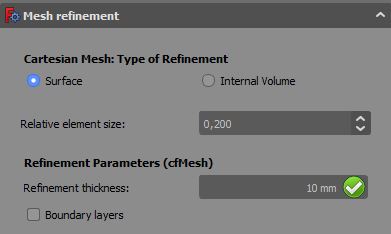
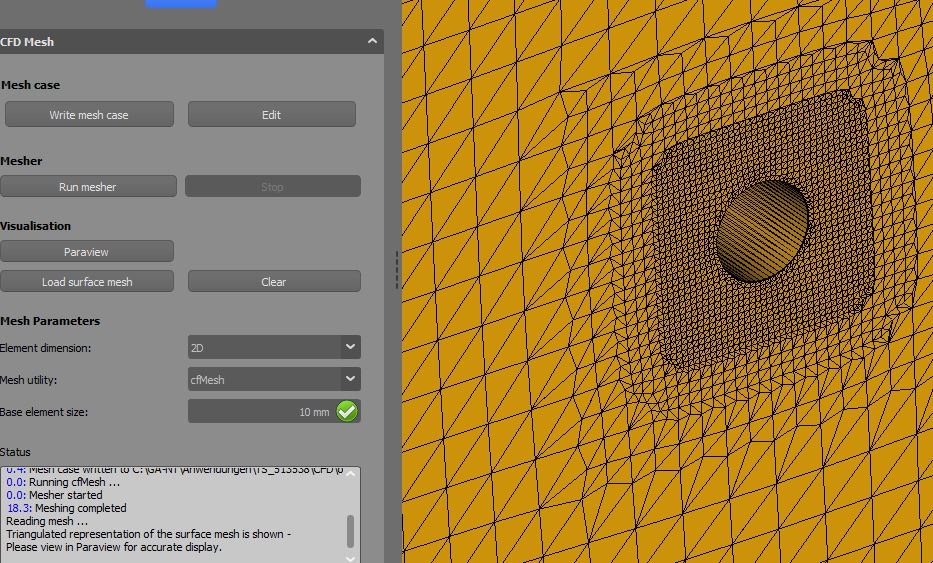
meshing 2d cfmesh, base element size 10mm, with a mesh refinement of 0.1 relative on the cylinder surface. It’s turning the cad into a truncated mesh:
Any ideas what I’m doing wrong? (attaching the freecad file)
Many thanks for any pointers - it’s probably something really basic…
Looks like you need to decrease the base element size to prevent cells being lost. 4mm works for me. Alternatively making the geometry thicker in the z direction should allow you to use a coarser mesh without the cells disappearing.
Hi,
I use 1/3 of the part thickness as max element size for 2D-mesh (cfmesh only).
As oliver said: increase the part thickness or reduce max element size.
Done with
OS: Windows 10 (10.0)
Word size of OS: 64-bit
Word size of FreeCAD: 64-bit
Version: 0.19.19697 (Git)
Build type: Release
Branch: master
Hash: 8832356802011bf5d70e9d6f0efa89c47bc70a91
Python version: 3.6.8
Qt version: 5.12.1
Coin version: 4.0.0a
OCC version: 7.3.0
Locale: German/Germany (de_DE)
not having much luck now - reinstalled everything (freecad 0.18.3 from standard Ubuntu rep, OpenFoam7 from https://openfoam.org/download/7-ubuntu/, cfdof directly from addon manager, then cfmesh and hisa from there). Still not getting expected behaviour;
becomes
Any more thoughts?
Just updated cfdof-wb, used “tester”-file from Kailee71, works with
OS: Windows 10 (10.0)
Word size of OS: 64-bit
Word size of FreeCAD: 64-bit
Version: 0.19.19697 (Git)
Build type: Release
Branch: master
Hash: 8832356802011bf5d70e9d6f0efa89c47bc70a91
Python version: 3.6.8
Qt version: 5.12.1
Coin version: 4.0.0a
OCC version: 7.3.0
Locale: German/Germany (de_DE)
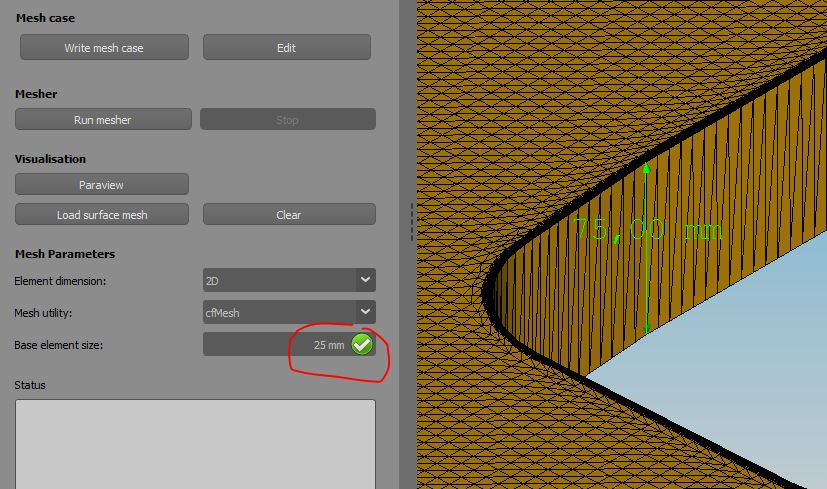
I’m just continue to write in here, because my current issue fits the topic. In the attached picture you see my current mesh. This issue kills my mesh quality and what reality bugs me is that everything work fine until yesterday. The Cut geometry (other picture) looks fine too me. I just updated CfdOf (with FreeCAD 0.21.1) and I’m using Cfmesh with this meshDict file:
Thanks for the answer and sorry i didn’t do it right away!
I’m using
OS: Windows 11 build 22631
Word size of FreeCAD: 64-bit
Version: 0.21.1.33668 +26 (Git)
Build type: Release
Branch: (HEAD detached at 0.21.1)
Hash: f6708547a9bb3f71a4aaade12109f511a72c207c
Python 3.8.10, Qt 5.15.2, Coin 4.0.1, Vtk 8.2.0, OCC 7.6.3
Locale: English/United States (en_US)
Installed mods:
  * CfdOF 1.24.5
  * Plot 2022.4.17
Unfortunatly my file is still too large, i hope it works with this link: https://file.io/D6auMHMe2Puf
I’m using cfmesh and the base element size is 30 mm, the volume refinement is level 2, the rings and most of the plates in the middle level 3 and three faces close to the rings level 5. These settings worked for me fine for a similar geometry.
Thanks for any suggestions!




 Will try as soon as I get home from work tonight.