@looo what is blocking this from becoming a preference to enable for power-users in FreeCAD ?
this is quite unstable. I encounter problems from time to time. With anaconda I thought to have a stable alternative but recently encountered problems with nvidia nouveau driver (linux kernel update…) Right now this is working for me with the anaconda jupyter builds. But conda-forge is moving forward to make builds qt5 compatible. So right now there is an issue with libicu…, which has impact on many dependencies of freecad (vtk, qt). Hopefuly this will stabilize with time…
Any upstream tickets worth following ? If so, let’s post them to this thread so we can track them?
Can this projects be a candidate to be added as a FC-add-on marked experimental?
Any upstream tickets worth following ? If so, let’s post them to this thread so we can track them?
I think conda isn’t that related to the jupyter-stuff. But jupyter recomends conda to install the jupyter-project. There is a conda-thread here in the forum.
http://forum.freecadweb.org/viewtopic.php?t=15197
Can this projects be a candidate to be added as a FC-add-on marked experimental?
Hmm actual this are only 5 lines of code… Everyone with a compatible jupyter freecad combination can try this. But as I have said, dependencies are the difficult part.
But:
Although dependencies are quite difficult, I think jupyter is a really great way to interact with freecad. Writing a little graphical interface could be as easy as adding a little decorator:
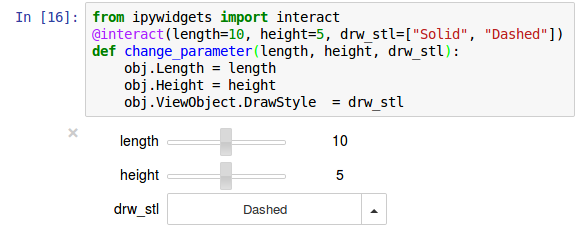
You mentioned libicu? What bug(s) are you referring to?
Also what other non conda dependencies are we talking about here?
Could you wireframe what a jupyter->freeCAD GUI would look like?
You mentioned libicu? What bug(s) are you referring to?
Also what other non conda dependencies are we talking about here?
No bug. Only a little dependency problem. Moving forward one library will brake others which do not depend on a fixed version number…
Jupyter depends on on many libraries. I think the chance that there is something not combatible is high.
I don’t know if jupyter is available with the std packagemanager. But all this should also be possible with ipython-notebooks and these are available on ubuntu.
Could you wireframe what a jupyter->freeCAD GUI would look like?
Imagine you have a cad-model in freecad and you want to run a simulation on that model. Now this simulation produces much data which you want to show in some nice custom graphs. Jupyter can be used as a tool to visualize this data (plots, graphics, tables..). Also its nice to document all the stuff with some markdown.
Freecad objects could be represented in jupyter as 2d and 3d visualisations using jupyters rich representation.
I like the gui like it is. There is no need for having jupyter inside freecad, allthough this is easily possible.
for me this is again broken. There were quite some updates on both sides (jupyter and FreeCAD), so it’s quite difficult to find the problem.
The problem is that the Main-Window of FreeCAD doesn’t show up.
calling FreeCADGui.exec_loop() shows the main window, but there is no possibility to interact via jupyter-qtconsole, jupyter-notebook.
Just want to mention that this problem is not related to freecad. With ipykernel4.5.2 this is still working. https://github.com/ipython/ipykernel/issues/240
An example of the utility for this feature:
FC integration with QGIS libs or PyQGIS interface for geodetic calculations?
QGIS has a plugin that does ipython integration

Dev repo: https://github.com/elpaso/qgis-ipythonconsole
I just tried to run freecad with qt5 from the jupyter-lab but this gives a full black screen after creating a new document in freecad. (no error-message…) This is the code I am using to start freecad from jupyter-lab:
import sys, os
os.environ["QT_API"] = "pyside"
%gui qt5
sys.path.append("DIR_which_contains_FreeCADGui")
import FreeCADGui
FreeCADGui.showMainWindow()
FreeCADGui.exec_loop()
Relevant: 2869 duh, thought this was a single post for some reason. I hope this functionality will finally work in Qt5
The problem still exists. It is possible to show a quarter-widget and a soqt-widget (qt5.6) in jupyter, but FreeCAD seems to have problems showing the scene when launched from jupyter-lab/jupyter-notebook. While pivy still uses a deprecated QtOGLWidget, FreeCAD has switched to the newer QtOpenGLWidget. Maybe this is the reason for the black screen… Any ideas what is wrong here?
no idea if this traceback gives any insights or if it is related at all…
Program received signal SIGSEGV, Segmentation fault.
#0  /lib/x86_64-linux-gnu/libc.so.6(+0x354b0) [0x7fb0548744b0]
#1  /home/lo/conda/envs/freecad/bin/../lib/libpython3.6m.so.1.0(PyErr_Restore+0x31) [0x7fb0558be4c1]
#2  /home/lo/conda/envs/freecad/bin/../lib/libpython3.6m.so.1.0(PyDict_GetItem+0xd0) [0x7fb0557fb5b0]
#3  /home/lo/conda/envs/freecad/lib/python3.6/site-packages/PySide2/QtCore.cpython-36m-x86_64-linux-gnu.so(+0x174153) [0x7fb00d5d6153]
#4  0x7fb02df1447e in Shiboken::BindingManager::getOverride(void const*, char const*) from /home/lo/conda/envs/freecad/lib/./libshiboken2.cpython-36m-x86_64-linux-gnu.so.5.6+0x5e
#5  /home/lo/conda/envs/freecad/lib/python3.6/site-packages/PySide2/QtWidgets.cpython-36m-x86_64-linux-gnu.so(+0x426c8f) [0x7fafff998c8f]
#6  0x7fb02e3c7d5b in QObject::~QObject() from /home/lo/conda/envs/freecad/lib/./libQt5Core.so.5+0x35b
#7  /home/lo/conda/envs/freecad/lib/./libQt5Gui.so.5(+0xd532a) [0x7fb02e71932a]
#8  /lib/x86_64-linux-gnu/libc.so.6(+0x39ff8) [0x7fb054878ff8]
#9  /lib/x86_64-linux-gnu/libc.so.6(+0x3a045) [0x7fb054879045]
#10  /lib/x86_64-linux-gnu/libc.so.6(__libc_start_main+0xf7) [0x7fb05485f837]
#11  /home/lo/conda/envs/freecad/bin/python() [0x400c7d]
finally I found a workaround to make this work again with qt5/py3 in conda env. The idea is coming from this log information:
QOpenGLShaderProgram: could not create shader program
which gave some conda related results:
https://github.com/ContinuumIO/anaconda-issues/issues/9199
So some drivers are not loaded correctly. I haven’t understood the reason in the discussion there, but installing and importing pyopengl somehow solves the problem. So the commands to start FreeCAD from a jupyter-notebook or jupyter-lab now look like this:
%gui qt5
import sys, os
from OpenGL import GL
sys.path.append(os.path.join(os.environ["CONDA_PREFIX"], "lib"))
import FreeCADGui
FreeCADGui.showMainWindow()
edit: FreeCADGui.exec_loop() must be removed and %gui qt5 must be added to make the interaction between jupyter-lab and FreeCAD-gui possible. The snippet is updated. But I don’t think this will work on windows the same way 
Tested also on windows. Importing opengl is not necessary. But the path to the FreeCAD-libraries is a bit different + setting the “QT_API” variable.
import sys, os
os.environ["QT_API"] = "pyside"
%gui qt5
sys.path.append(os.path.join(os.environ["CONDA_PREFIX"], "Library", "bin"))
import FreeCADGui
FreeCADGui.showMainWindow()