Let’s do it!!!
I’d like to help too!
Starting here: https://github.com/yorikvanhavre/FreeCAD-BlenderBIM
Thanks and tested 
- Seems working, see screencapture
- Seems no option to use the ‘old’ style IFC import ?

Simply awesome!
Great, THX for setting It up!
I Guess we are considering IFC semantic/geometry distintinction when implementing IFC FC related objects, right?
Do we have a Plan for entities support? Do we start with Product and Product Type support?
What about geometry and multiple representation contexts?
Sorry to throw so much meat on the fire, but i think that if we split the tasks there is a lot of people that can help
I’d recommend following what the BlenderBIM Add-on, which allows the user to filter which elements they want to load (with native IFC, it is no longer necessary to load everything, since you can lazy load), but by default it’ll load all IfcSpatialElements, IfcElements, IfcElementTypes (plus IfcDoorStyle, IfcWindowStyle) minus IfcFeatureElements as a minimum. If there is a representation, the Body context is loaded, if not, it is simply inserted as an empty object with a placement. The user can then switch contexts on the fly later on.
IfcAnnotation can be lazy loaded selectively based on the drawing or group. IfcPort is also lazy loaded for systems. Structural elements are lazy loaded later based on selecting an analytical model. For these reasons, I’d advise not loading all IfcProducts, but instead go down to IfcElements.
I’ll be watching the commits and providing code review and suggestions as the code trickles in
Tested latest commits with geometry import
- schependomlaan.ifc of 47Mb imports (not sure if multi-core is enabled on my i3) in 01:39
- nothing shows up to “Select the BlenderBIM importer (bb_import)”, just have *.ifc in the ‘File of type’ in dialog box.
- saved FC file is about 13Mb (can’t upload, too big still)


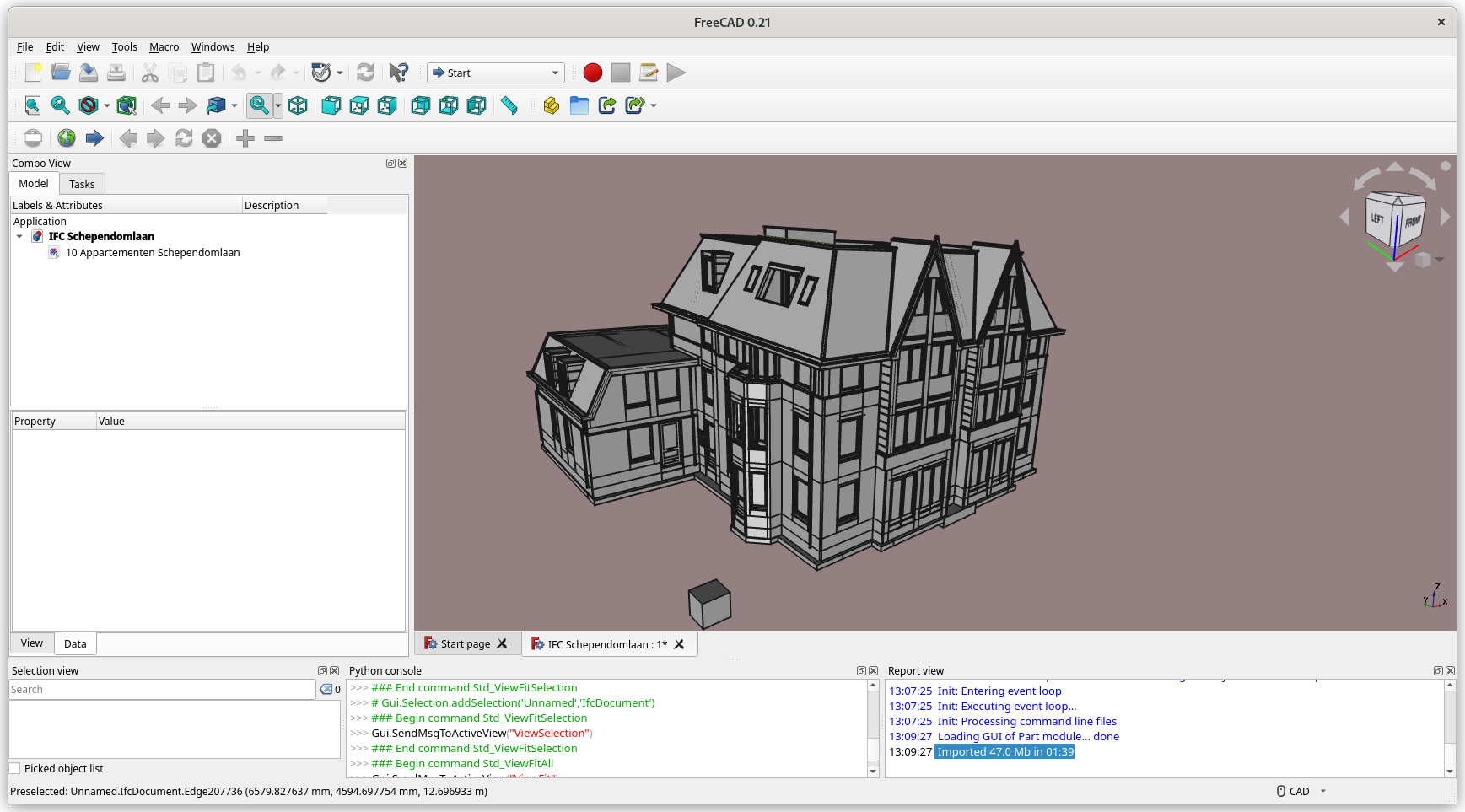
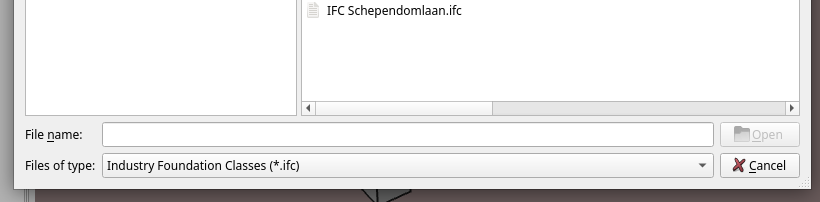
First test! Thanks!!
Yes that’s normal. After you select an IFC file and press OK, you should see a pop up window asking you which importer to use.
On mine (ryzen9) it takes 23 seconds. There are 16 cores… Try this in python to know? import multicore; multicore.cpu_count()
Yes that will quickly be a problem… I have several ideas to try, maybe this should behave like the Arch Reference object, where you can choose either to save the shape, or not, or only the coin representation? I also want to try and see if there is any load time difference if we only load mesh data (no shape).
No pop up dialog shows up - I am with AppImage on Fedora (details below)
Import multicore - no module, probably need to ‘install’ ?
>>> import multicore
Traceback (most recent call last):
  File "<input>", line 1, in <module>
  File "/home/paullee/Downloads/FreeCAD_weekly-builds-30345-2022-09-11-conda-Linux-x86_64-py310/squashfs-root/usr/lib/python3.10/site-packages/shiboken2/files.dir/shibokensupport/feature.py", line 139, in _import
    return original_import(name, *args, **kwargs)
ModuleNotFoundError: No module named 'multicore'
In fact, the original ifc file is about 4x Mb, now FC file is only about 13Mb, seems good enough 
OS: Fedora Linux 36 (Workstation Edition) (GNOME/gnome)
Word size of FreeCAD: 64-bit
Version: 0.21.30345 (Git)
Build type: Release
Branch: master
Hash: f42a47aa0fd8c4f34ef63c185d9f29b9b6e84737
Python 3.10.6, Qt 5.15.4, Coin 4.0.0, Vtk 9.1.0, OCC 7.6.3
Locale: English/United States (en_US)
Installed mods:
  * dodo
  * DynamicData 2.46.0
  * ArchTextures
  * Another link to SketchArchLite
  * BOLTSFC.backup1666323893.5041647
  * BOLTSFC
  * FreeCAD-BlenderBIM.backup1666328110.015535
  * FreeCAD-BlenderBIM
Strange, I thought multicore was part of standard python install… Do you have it when running in a console outside FreeCAD?
So probably it is Fedora which does not package with it 
[paullee@fedora ~]$ python
Python 3.10.7 (main, Sep  7 2022, 00:00:00) [GCC 12.2.1 20220819 (Red Hat 12.2.1-1)] on linux
Type "help", "copyright", "credits" or "license" for more information.
>>> import multicore
Traceback (most recent call last):
  File "<stdin>", line 1, in <module>
ModuleNotFoundError: No module named 'multicore'
>>>
EDIT -
Googling Fedora + multicore almost return nothing, only below works -
>>> import multiprocessing
>>>
I’d like to test NativeIFC by installing via the splendid Addon_manager, but in the instruction on GitHub there is no branch name to insert in the preferences of the custom repos, I have an error.
OS: Ubuntu 20.04.5 LTS (KDE/plasma)
Word size of FreeCAD: 64-bit
Version: 0.21.
Build type: Release
Branch: unknown
Hash: 9282fffa072d345e82bba983293bc9541bd9eea3
Python 3.8.10, Qt 5.12.8, Coin 4.0.0, Vtk 7.1.1, OCC 7.5.2
Locale: Italian/Italy (it_IT)
Installed mods:
  * FreeCAD-BlenderBIM.bak
  * FreeCAD-BlenderBIM
  * BIM 2021.12.0

Please add About info
Updated, sorry.
(I was thinking that in this case wasn’t important my configuration/version)
Double clicking on the URL opens a dialog that allows me to specify the branch name:

OS: Ubuntu Core 20 (KDE/plasma)
Word size of FreeCAD: 64-bit
Version: 0.21.30711 (Git) Snap 375
Build type: Release
Branch: master
Hash: 916891c3fc1855b210e826825c235d8c96b78456
Python 3.8.10, Qt 5.15.5, Coin 4.0.0, Vtk 7.1.1, OCC 7.6.3
Locale: English/United States (en_US)
Thanks!
So that page on GitHub I think sould be updated inserting “main” as a branch name.
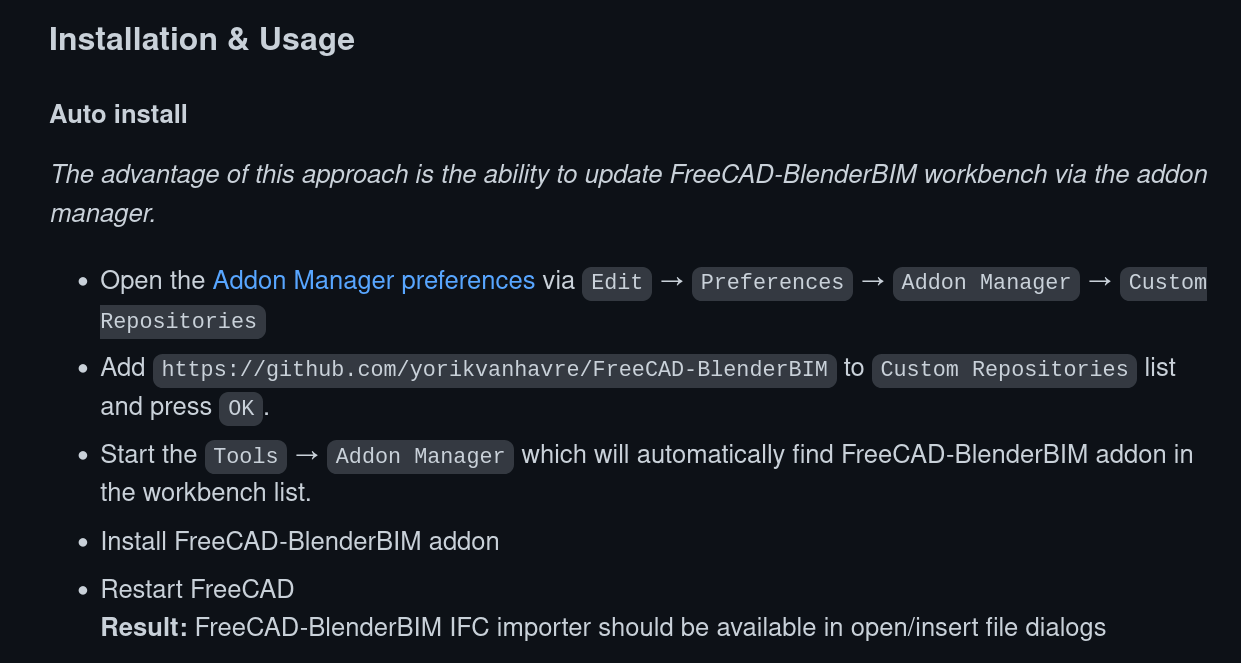
Good point. Will do that now.
Edit: added in https://github.com/yorikvanhavre/FreeCAD-BlenderBIM/commit/0f7dc217805fc56af7840ebda78dab414f0b1cef
It’s failing on automatic installing IfcOpenShell
I tried to install it manually, but IfcOpenShell it’s not present in the official repos of Ubuntu (20.04 is a LTS release).
I have to do it via Python commands?
[edit]
Ok I’ve seen here:
https://github.com/IfcOpenShell/IfcOpenShell
and
https://wiki.freecadweb.org/IfcOpenShell
OS: Ubuntu 20.04.5 LTS (KDE/plasma)
Word size of FreeCAD: 64-bit
Version: 0.21.
Build type: Release
Branch: unknown
Hash: 9282fffa072d345e82bba983293bc9541bd9eea3
Python 3.8.10, Qt 5.12.8, Coin 4.0.0, Vtk 7.1.1, OCC 7.5.2
Locale: Italian/Italy (it_IT)
Installed mods:
  * FreeCAD-BlenderBIM 2022.10.20
  * BIM 2021.12.0

Mentioned this in an open ticket https://github.com/yorikvanhavre/FreeCAD-BlenderBIM/issues/3