[IFC Export] Problems with IFC (structural view) export

Hi @balrobs @bernd et al, so I took a look at the file and one thing that needed correction was the “zAxis” property of the curve members. I see that @bernd in his commit has taken care of that, so great to see!! Just to provide the context that this axis must never be parallel to the axis of the curve and should be used to define the orientation of the profile.

Materials, profiles are also missing as well as various connections, some are there but some members have no connection at all. I did some manual modifications and used the “Bonded” scripts that I have created for cases where the connections/supports are not properly defined. This script results in a “bonded” model, let’s say applicable to a concrete structure, where there are no double nodes nor internal releases, etc. and it allows to specify a specific z coordinate to create a group of all nodes lying on this horizontal plane, so that one can easily define the support conditions of the base.

With these scripts I did a simple gravity analysis that I show here together with the geometry and mesh created in Salome_Meca. Looks good! :slight_smile:
test_FreeCAD_1.png
Test_FreeCAD_2.png
PS: @balrobs you say you are not an “instructed developer” but really who is? :laughing: don’t worry and keep going!

Hi @Jesusbill,

thank you so much for testing my IFC file!
Considering that my code is at a very early stage and still full of weak points I’m strongly impressed how far you could get with actually generated IFC files from FreeCAD.
Now the points I need to work on in the future are much clearer:

  • correct the “zAxis” of the curve members (probably this error prevented the correct view of my files in some viewers :confused: )
  • investigate why connection are missing for some members
  • add material properties to surface members
  • add material and profile properties to curve members (my plan is to do this for I and rectangular sections)

In regard to structure supports and internal realeases I will have to investigate further … ATM I don’t see any way to do this in FreeCAD. IMO It will be easier to accomplish this with further processing by an external tool … we will see :question:

BTW, can you provide me your corrected file please? This could help me :smiley:

I found the reason why connections between structural curved members with coincident nodes where missing :unamused:
screenshot.jpg
Now I will tackle down the problems for connections between surface members with coincident edges. When I’m done I will submitt a pull request.

Now also connections between structural surface members with coincident edges should work :smiley:
screenshot.jpg
Here is my pull request: https://github.com/FreeCAD/FreeCAD/pull/4853

Edit: And here my IFC file:
test_structure_with_stairs_SurfaceMember.ifc (25.8 KB)

Two things I have in mind for years but never started to get my hands on.

  • add more structural properties to Arch objects to be able to input loads and connections
  • a connection between FreeCAD Arch and FreeCAD FEM

ATM the user would have been to do all this manually. It is possible to input some connections and loads too, but this is very cumbersome for a building analysis model. The idea would be to put in these informations not in FEM but in Arch and than have some connection between Arch and FEM which would generate all the FEM objects automatically.

Furthermore the FEM solver Calculix is limited for beam analysis which is very very important in structural analysis fields.

cheers bernd

I got a first answer …

… Please check if the program is listed in the buildingSMART International Standards Implementation Database.
BIMcollab ZOOM should support files made in any of the programs in this list.


To my surprise either FreeCAD and IfcOpenShell are on the list :smiley:. Hopefully this wil convince them …


screen.png

Before assuming it is a problem with zoom, we should check it first. The BlenderBIM add-on can help isolate issues. Jesusbill would you like to investigate? There were a number of issues already mentioned, perhaps those should be fixed first? Sorry I haven’t had time to investigate myself.

Thanks @Bernd for the info!

I will continue to work on the already mentioned issues but it would certainly help if also @Jesusbill could have a deeper look at my latest sample IFC file in order to exclude serious errors contained therein.

Here is the result when loading it into the lastest BIMcollab ZOOM version! Everything I write to the file so far is there except the StructuralSurfaceMembers :question:
screenshot.JPG
Cheers

@balrobs looks good, I have downloaded the latest version of your model and will investigate as @Moult suggests for any inconsistencies, other than what I wrote the other day.
Regarding my modifications for the analyses I showed, I only changed the IfcStructuralCurveMember entities manually changing the last attribute (zAxis) to be #6 (global X) instead of #7 (global Z). Then I used the ifc2ca script to obtain the json file and in there I made some more modifications to assign materials and profiles missing. So, that is why I did not upload anything. But since I will investigate your latest file in BlenderBIM, I will add materials and profiles in there so that hopefully I will have a more complete IFC file I can share here.

Thanks @Jesusbill for supporting my journey :smiley: Your help is very precious to me!
In the meantime I also managed to write FreeCAD-materials with their structural properties and their structural members relations to IFC.
But I have to make some more tests and maybe reconsider my way of doing it, because at the end I realized that FreeCAD already writes out materials for the architectural model. Since in FreeCAD it’s possible to export a hybrid model (both architecture and structure) I have to be careful not to create any duplicates with the materials.
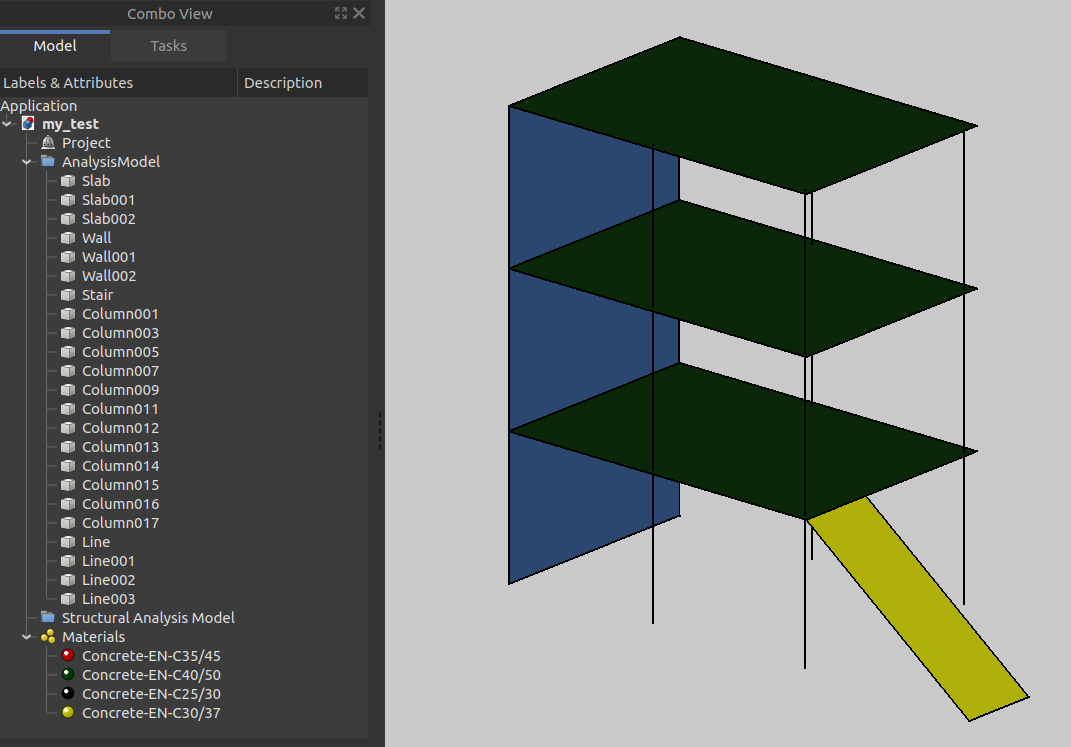
This is my usual FreeCad model with different materials and its (for now) created IFC file (only structure):
Screenshot.png
Cheers
test_structure_with_stairs_SurfaceMember.ifc (27.3 KB)

Hi @balrobs I have attached a modified version based on your latest upload.

The materials assigned look good for Surface Members but for Curve Members assigning a Material is not the way to do it. I think this is one of the first things to “digest” when dealing with IFC. We, as civil engineers, are used to think as if materials and profiles/sections are two separate things, but here it is not. So, you need to define a MaterialProfileSet, which contains at least one MaterialProfile, which in turn has Material and Profile. I know, a bit confusing, and there’s more, like the IfcMaterialProfileSetUsage. In any case, I have made this modification in BlenderBIM, defined a Rectangular 0.3x0.3 profile and a MaterialProfileSet that is assigned to all Curve Members. I also added some of the connections missing (not all but just to show), like for example the PointConnection at the top of the ground-floor column, which has to be connected with the bottom of the first-floor column as well as with the plate (so I added two RelConnectsStructuralMembers for this case). Another one is the line between two walls and the slab where the connection to slab was missing. Also, you will need connections at the base like supports, I forgot to do those I can do it for the next update.

Regarding the issue with BIMcollab ZOOM I am not sure what is the problem, looks weird that you can see the curve members but not the surface members, perhaps I would have expected the opposite.
I see though that the representation sub-context is ‘Analysis’ and ‘Axis’
#27=IFCGEOMETRICREPRESENTATIONSUBCONTEXT(‘Analysis’,‘Axis’,,,,,#24,$,.GRAPH_VIEW.,$);
while the correct would probably be ‘Reference’ and ‘Model’ like
#27=IFCGEOMETRICREPRESENTATIONSUBCONTEXT(‘Reference’,‘Model’,,,,,#24,$,.GRAPH_VIEW.,$);
Is that right @Moult ?
But in any case I do not think this is the reason for not showing in BIMcollab ZOOM. In BlenderBIM there is no problem visualizing everything.
Cheers

Edit: Forgot to mention that all changes in the IFC file are at the end, #599 removed and #604 - #622 added (#604 - #608 related to MaterialpProfile), if you have a diff tool for txt or sth could be useful.
test_FreeCAD.ifc (28.9 KB)

Thanks @Jesusbill for your detailed description :slight_smile:

I’m aware of this and I was thinking to tackle the problem only after I have solved it for surfaces. Thank you for confirming me it’s working for surfaces.

I will try to improve connection generation further but I think it will remain difficult for me to handle certain cases (i.e. column nodes that don’t have a corresponding slab node ).

Here I will make this change and then try to import the file in BIMcollab ZOOM. Let’s see what happens :smiling_imp:
Cheers

Hi @Bernd,
out of curiosity I imported my generated IFC file back into FreeCAD using the option “import_struct_IFC_objects=non_parametric_Arch_objects”.
The result looks amazing (material colors were corrected by me. I’m not writing them to IFC so obviously they could not be imported :smiley: )
Screenshot.png
BTW I noticed some minor issues:

  • surfaces thickness are all zero in the IFC attributes shown in the property panel
  • all structural properties of the imported materials are empty

Cheers

Sounds good, keep in mind that you should also replace all ‘Analysis’ with ‘Reference’ in IFCTOPOLOGYREPRESENTATION statements for members and connections, like for example #36 should be
#36=IFCTOPOLOGYREPRESENTATION(#27,‘Reference’,‘Edge’,(#35));

I made the mentioned changes but the result in BIMcollab ZOOM is still the same. Considering that BIMcollab ZOOM is the only viewer I tested not showing the StructuralSurfaces, for now I will assume that it’s a ZOOM-problem and not make any changes to my code in this regard.
Thanks @Jesusbill for your support :slight_smile:

PS: This is my changed file:
test_structure_with_stairs_SurfaceMember_01.ifc (27.3 KB)

AFAIK The architectural modell (KoordiantionView) and the structural modell (StructuralAnalysisView) are not connected at all, ATM.

Thus in theory you could even use different materials for both. Which could makes sense. In our architectural modells all building site concrete is just one material, but in our structural model we do use different concrete materials due to different Young’s-Modulus. Thus any object does have two materials, the material and the structural analysis material.

Neverless … Since this connection would be cool to have it has been disscoused already. AFAIK on OSArch forum. @Mould @Jesusbill Does one of you guys is able to find the topic on osarch? I failed …

When I coded the import Arch workbench did not even have materials :mrgreen: Since I have not touched it since than material import ist not supported AFAIR. Futhermore I did not implement any properties import like thickness etc AFAIR. Just the geometric representation is imported. Since the FEM mesh has geometric representation too it is imported as well if it exists in the structural ifc.

This is a very good understanding of construction rather than just modelling a 3D representation of a building structure :smiley:

This should be understood by all architectural student IMHO.

So even if my approach at first sight looked strange to me because of a material duplication when exporting the FreeCAD model to a hybrid IFC maybe it could make sense to go this way.
So every material related to a structural object in FreeCAD will result in two same named IFCMATERIALS, one related to a structural element and the other to an architectural element. AFAIK the IFCMATERIAL for the architectural element holds only color informations for the moment while the IFCMATERIAL generated for the structural element could stores all mechanical properties!
screencast.gif
Let’s here what @Jesusbill and @Moult think about it!

Sorry for the late reply. Yes, Reference is more correct than Analysis.

IFC materials do not distinguish between architectural and structural. All IFC materials can store properties (e.g. youngs modulus) regardless of which discipline uses it. The same Ifc Material may be shared between disciplines (in an ideal, integrated world).

The relationship between the architectural model (i.e. body shapes) and structural model (i.e. stick model with analysis) is given by IfcRelAssignsToProduct.There are some discussions here: https://community.osarch.org/discussion/9/integration-of-code-aster-in-an-ifc-driven-workflow-for-structural-analysis/p1