Command-Line Preferences Manipulation
Brief summary of Project
The project aims to create a Command-line utility tool to manage and manipulate FreeCAD
preferences from outside the FreeCAD application. This tool is intended to be used for installing
and configuring the FreeCAD all through the scripts.
Project Description (Detailed)
Introduction
The FreeCAD Preference Manipulation CLI Tool will be designed to streamline the customization
of your CAD software directly from the command line interface, eliminating the need for complex
graphical interfaces. It will facilitate the management of FreeCAD’s preferences, enabling users to
perform various tasks such as modifying existing configurations, accessing preferences stored in
files, and removing unnecessary settings. Whether users are adjusting preferences for personal use
or system-wide configurations affecting all FreeCAD users, this tool will offer comprehensive
control. Users will be able to swiftly create tailored preferences and make precise adjustments
without the inconvenience of additional windows, enhancing workflow efficiency.
In scripts for installing FreeCAD, the FreeCAD Preference Manipulation CLI Tool will play a
crucial role in automating the setup process and configuring FreeCAD installations according to
specific preferences.
The tool will be developed in Python programming language which FreeCAD supports so that it
can be easy incorporated in the current system. Python can easily interface and parse the
configuration files (i.e. .cfg files) which uses XML version 1.0 for storing preferences and can
manipulate it.
Information and current state
At present the FreeCAD’s python library has a preference manipulation function that can be used
for managing the preferences but it cannot directly be used in a terminal of used in scripts to
automate installations.
Functional Requirements
Configuration file interface
To interface with FreeCAD’s configuration files, which are typically in XML format, using Python,
we can utilize the built-in XML parsing library called xml.dom. This library allows us to parse
XML files, navigate through the XML tree structure, and manipulate XML elements and attributes.
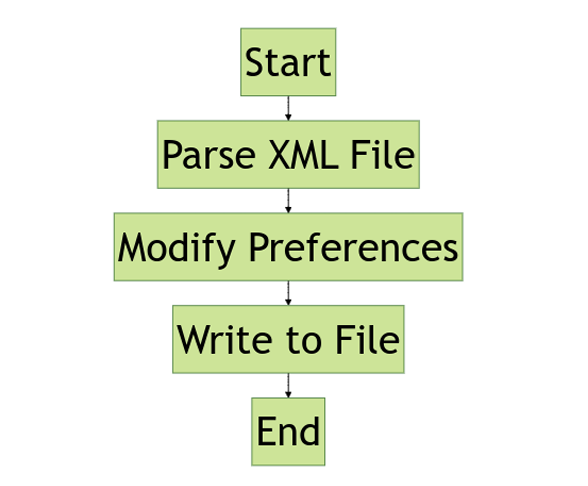
To interface with XML configuration files in Python using the xml.dom module, we can follow
these steps:
• Parse the XML File: Use the xml.dom.minidom module to parse the XML file and create a
DOM (Document Object Model) tree.
• Navigate the DOM Tree: Traverse the DOM tree to locate and manipulate the desired
elements and attributes.
• Modify Preferences: Update the values of specific elements or attributes to reflect the
desired preferences.
• Write Changes to File: Serialize the modified DOM tree back to an XML file.
Command Line Tool
The FreeCAD Preference Manipulation CLI Tool is made to make changing FreeCAD settings
easier by using commands you type into the computer. It’s like having a helper that can quickly
adjust how FreeCAD works without needing to click around in the program. This tool is all about
saving time and keeping things the same across different projects or places where you use
FreeCAD.
Basically, it lets you tell FreeCAD what you want it to do without having to manually change
settings every time. You can create simple instructions, called scripts, that tell FreeCAD what
settings to change. This makes it handy for making FreeCAD work just the way you like it, no
matter what you’re working on or where you’re working from.
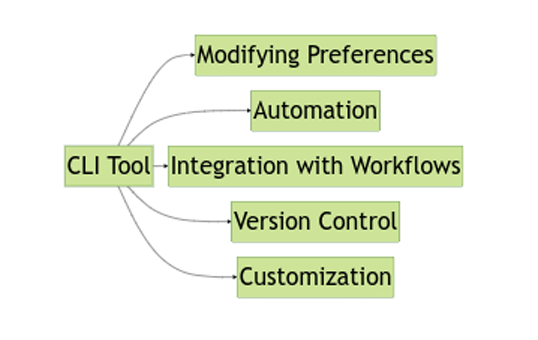
Using it, one can perform various operations to manage FreeCAD settings efficiently. These
operations include:
• Modifying Preferences: You can change FreeCAD settings such as default file paths,
interface preferences, unit configurations, macro settings, and more.
• Automation: By scripting preference modifications, you can automate repetitive tasks and
ensure consistency across projects. This helps save time and minimizes the risk of errors.
• Integration with Workflows: You can integrate preference adjustments into larger
automation workflows or shell scripts, allowing seamless management of FreeCAD
configurations alongside other processes.
• Version Control: Scripting preference changes enables version control of configuration
adjustments, making it easier to track changes and reproduce configurations across different
setups.
• Customization: Users can tailor FreeCAD settings to specific use cases or workflows by
scripting modifications according to their needs, enhancing productivity and usability.
Scriptablity
In the future, the FreeCAD Preference Manipulation CLI Tool will offer easy-to-use scriptability,
making it simple to automate preference adjustments directly from the command line. This tool will
streamline configuration management by allowing users to create scripts that modify FreeCAD
preferences, saving time and ensuring consistency across projects and environments. By defining
preference modifications in scripts, users will be able to smoothly integrate FreeCAD configuration
changes into larger automation workflows or shell scripts, boosting efficiency and minimizing the
risk of mistakes. Additionally, scriptability will support version control of configuration changes
alongside project code, making it easier to reproduce configurations and deploy them across
different setups.
In practice, users will write shell scripts or batch files that utilize the CLI tool to modify FreeCAD
preferences based on specific requirements. These scripts will be able to include conditionals, loops,
or function calls to handle various scenarios and configurations. Executing these scripts from the
command line or integrating them into automation workflows will enable effortless management of
FreeCAD configurations, ensuring that preferences are tailored to specific use cases or workflows.
Thorough testing and validation of scripts will ensure correct modification of preferences and
validate resulting FreeCAD configurations, providing users with a dependable and effective method
for configuring FreeCAD according to their needs.
Example:
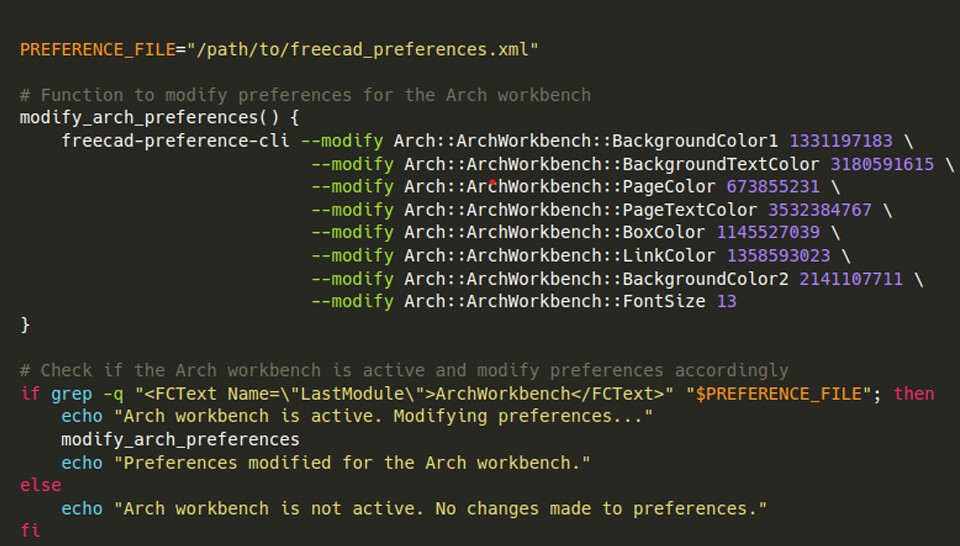
A real scenario using the FreeCAD Preference Manipulation CLI Tool based on the provided user
configuration could be automating the adjustment of certain preferences for specific workbenches.
Let’s say you want to ensure that certain preferences are set to specific values whenever the Arch
workbench is activated.
Interface
The FreeCAD Preference Manipulation CLI Tool is a command-line utility designed to interact with
FreeCAD’s preferences, allowing users to manage parameters either at the user or system level. This
manual provides detailed instructions on how to use the tool to perform various operations such as
retrieving parameter values, modifying parameters, creating new parameters, and deleting
parameters.
General Syntax:

Options:
• --scope or -s: Select the scope for parameter manipulation. Options are “user” or “system”.
Default is “user”.
• --modify or -m: Modify the value of a parameter.
• --create or -c: Create a new parameter.
• --delete or -d: Delete an existing parameter.
• -y: proceed without conformation
Python Module
Notes:
• If no scope is specified, the tool will default to the user scope.
• For modifying or creating parameters, if the parameter name already exists, its value will be
overwritten with the new value provided.
• When deleting a parameter, the tool will prompt for confirmation before proceeding with the
deletion.

Tools and Technology
• Python
• git + GitHub
• Argparse
• xml.dom (python library)
• pytest
