Ok =) you were fast 
When I select a part in an assembly (in the 3D view, not in the tree) and hit the “del” key of my keyboard, Freecad crash.
Actually, I cannot import more than 3 components in a new assembly. I get the error “hasher mismatch”. I have no constraint, nothing except 3 parts.
Do you know that issues?
I didn’t know. I’ll check later. My new topo naming is messing up with my Link. Well, because both of them are doing some ‘unnatural’ stuff in private.
So, after some investigation, here are my observations.
Supposing, you have 3 types of parts p1 p2 p3
you can drag and drop as many p1 as you want and drop them into the part folder. Then you can drag and drop a p2, but only one. You cannot more add a p3. (you get the error “hashing mismatch”).
how to solve it : Supposing, you already have dragged and dropped a p2 in the part folder, you’re blocked. So from here drag and drop them right into “assembly” and it’s ok.
My doubts : maybe is it just for me, as I didn’t have this issue previously (and I’m pretty sure I dropped them inside the part folder.
I tried with this release and the previous one and I had the same behaviour
Hashing mismatch error is cause by the external link, which brings a shape from another document with a different hasher than the linking document. This will be fixed in the next release.
New version released, mostly for fixing bugs caused by the topological naming.
Thanks for all the effort, made a small donation to show how happy i am to finally see something that might actually become a “proper” assembly module for FreeCAD, something i have been waiting for and tightly followed since 2012 
Now i almost feel bad that i have not donated to the rest of the developers that work on FreeCAD. well, maybe in the future..
That is very generous of you. I am happy, too, for you appreciation. I want to say thank you, to you and all the others who have shown their support, and to all who have contributed to FreeCAD. I said this when I made my first contribution, and I’ll say it again. I truly believe that FreeCAD can be The CAD of everything.
A big thank you from me too, I also dropped a small donation (and aswell already did to some other developers where I knew how to do that).
I absolutely appreciate you fantastic work, and really am looking forward to it.
The main missing aspects in FreeCAD for me currently are an Assembly module working for complex assemblies (Assembly2 really is limited here) and a good (means intuitiv and easy to use directly in FreeCAD) implementation of a render workbench.
Big thank you from my side as well 
I have one question is it possible in near future to repair measurement tool ?
It is one tool I really but really miss in assembly 3.
Or maybe I am doing something wrong ?
It works OK when I am not in assembly container, but when I am inside it it shows some random measurements not related to what I try measure.
Sure, I’ll fix it soon.
New version released with Part measurement fix. Is this the what you are using? Because there are actually more than one measuring tools in FC. I have also add a toolbar button to refresh existing measurement to sync with current objects.

very nice improvement!
It would be possible to add also an Arc/Circle radius measurement?
https://forum.freecadweb.org/viewtopic.php?t=9561#p77529
That is a missed measure in Part measurement tools.
Yes this is what I am exactly using, now it works perfectly big thank you.
I have sent you litle donation as well 
I have run your latest appimage from today to see the sketcher functionality (maybe wrong thread, I do not know if there is any other thread for this, a moderator may move it if so).

I have just done a rectangle, export two sides as single objects and pad it. Then I create another rectangle perpedicular to one of the exported sides. I wanted to make a sweep of the second rectangle along one of the exports.
When accepting the sweep, a “CopyExport” is created, even if the Export belongs to the same body.
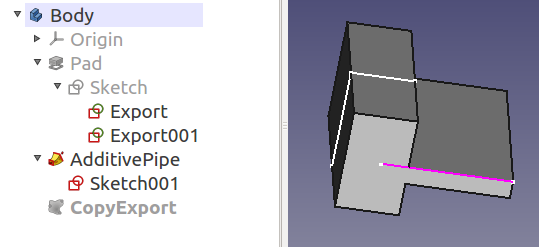
I think the export functionality is a great idea.
That’s strange. Did you see any message box asking whether you want to create a clone? I can’t seem to reproduce it.

I have just tried again. I can not reproduce it either. I do not thing it was related to your branch.
I did get the dialog asking whether to create an independent copy, cross-link… This generally happens when you are using an object outside your body. But that was the only body, it was just a trial.
Anyway, it is really a beautiful feature. I filleted one corner of the original rectangle, and exported the contiguous “line-arc-line” as a single object. Then I sweeped a perpedicular profile along the export. The result is very nice with very little effort:
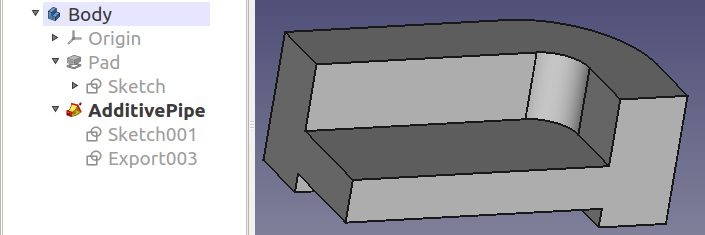
Just in case you didn’t see the video yet:
https://forum.freecadweb.org/viewtopic.php?f=10&t=1523&start=10#p12299
https://forum.freecadweb.org/viewtopic.php?f=10&t=1523&start=30#p51945
I don’t know about this thread, but I do know this solver. In fact, I read about its code (maybe not the latest version) in the freezed Assembly workbench, before I start coding for Assembly3. It seems the solver is not fully functional yet, and its code looks complex, so I chose SolveSpace in the end.
I mentioned the video for fun.
P.S. From historical point of view. I don’t remember precisely but i think the situation with 2D solver for Sketcher was similar. Use the SolveSpace (predecessor). But after the FreeCAD 2D solver was coded from scratch (FreeGCS). Therefore i am guessing with your work you kinda brought back the initial idea. As SolveSpace can now be used for 2D in FreeCAD too. If current FreeGCS will ever get extended to support 3D constraints i don’t know. I could imagine a few years of work involved to get it on SolveSpace level.